From Quote to Signed Contract: Salesforce CPQ
From Quote to Signed Contract: Salesforce CPQ
From Quote to Signed Contract: Salesforce CPQ
From Quote to Signed Contract: Salesforce CPQ
salesforce cpq contract integration

If you run contracts on Salesforce, you have probably hit a confusing question: where does your quote actually come from? A salesforce cpq contract integration should answer that clearly, not add to the muddle. This post walks through the two paths from a CPQ-generated quote to a signed agreement, so you can figure out which one fits your setup.
Many teams cannot say with certainty whether their quote document is built by a CPQ tool or pulled from native Salesforce objects. That uncertainty is not a failure. It is a common starting point, and clearing it up is the first step toward a workflow that holds together.
Key takeaways
Start by identifying where your quote document actually comes from. A CPQ tool that outputs a finished file and a Salesforce record holding field data lead to two different contract workflows.
Concord supports both routes, so you do not have to re-architect your quoting process before adopting a CLM.
Your CPQ vendor choice does not lock in your contract process. Concord picks up once the document exists, so a CPQ migration leaves approval, signature, and storage untouched.
Field data syncs in both directions until the moment of signature, then the terms lock. Your CRM ends up holding the final agreed numbers instead of stale opportunity data.
What is a Salesforce CPQ contract integration?
A Salesforce CPQ contract integration connects the quote your sales team builds to the contract they send for signature. It either generates the document from mapped Salesforce fields or accepts a document your CPQ already produced, then carries that document through approval, e-signature, and organized storage.
Why quote origin is the real question
Where your quote document comes from decides the shape of your entire contract workflow, so answer that before you evaluate any tool.
Contract leaders often describe a situation where the team does not know what it does not know. Someone generates a quote, it becomes a contract somehow, and the mechanics in between stay fuzzy.
The confusion matters because how the document gets created shapes the whole workflow. If a CPQ tool produces the quote, your contract process needs to accept that finished document and carry it forward. If Salesforce field data is the raw material, you need a template that pulls those fields in and assembles the document itself.
Before you evaluate any tool, it helps to answer a short list of questions:
Does a finished PDF or document appear when a rep completes a quote? That points to a CPQ-generated document.
Are reps filling in fields on a Salesforce record with no document produced yet? That points to a native-object path.
Does an admin maintain a master template somewhere, or does the document come from a separate quoting product?
You do not need a perfect answer before moving forward. You just need to know which path describes your day-to-day reality.
Two paths, one destination
Concord supports both routes, which removes the biggest decision blocker for teams that are still sorting out their own process.
The first path is a template that lives in Concord and pulls field data from Salesforce. Products, quantities, license terms, and other values populate the contract automatically through mapped fields. This is the right fit when your quote data sits on Salesforce objects and you want the document generated fresh.
The second path takes a document your CPQ already produced and pushes it into Concord for review, negotiation, and signature. Here, the CPQ does the document creation, and Concord picks up once that file exists. Both paths end in the same place: approval, e-signature, and organized storage.
Because both routes are available, you do not have to re-architect your quoting process to adopt a CLM. You can start with whichever matches your current setup and adjust later.
Criterion | Path A: Concord template pulls Salesforce fields | Path B: CPQ document pushed into Concord |
|---|---|---|
Who builds the document | Concord, from a template you upload | Your CPQ tool |
Where the data comes from | Mapped Salesforce fields on the account, opportunity, product and owner objects | The quote output your CPQ already produced |
Best fit when | Reps fill in fields on a Salesforce record and no document exists yet | A finished PDF or document appears when a rep completes a quote |
What you maintain | A template in Concord with field placeholders inserted | Your existing CPQ setup, unchanged |
Where it ends up | Approval, e-signature, organized storage | Approval, e-signature, organized storage |

Transcript: Here I’ve got a Salesforce-enabled template. The way that this integration works is you’ll actually upload your template into Concord. Once it’s in the system, you can then insert your different fields that are coming across from Salesforce. If you are a Salesforce user, you’ll have all your different fields here, and we integrate with the account object, the opportunity, the product, and the owner. So any of those fields and those objects in Salesforce you can pull in. You’ll input them into the document to set up your template. And then you’ll be ready to kick that off from Salesforce.
Why the CPQ vendor choice does not block you
Buyers often worry that picking a CLM will lock them into a specific CPQ tool, or that a future CPQ migration will break their contract process. The logic here is simpler than it sounds.
The CPQ’s job is to produce a document. Concord’s job starts once that document exists. Because the CPQ-generated file gets pushed into Concord regardless of which tool created it, the downstream steps land in the same workflow.
That means a change in CPQ vendor does not disrupt approval, signature, or storage. Your contract process stays stable even if your quoting tool shifts underneath it.
Simplicity beats brittle complexity
A template you can update in minutes stays current; one that needs a developer will quietly go stale.
A recurring pattern in legacy setups: a master template gets integrated with Salesforce, then goes un-updated for years because changing it is so hard. Admins describe wrestling with boxes of clauses and coding requirements just to add one bespoke template.
Complexity like this creates silos. Legal and contracts teams stop asking IT for help, IT stops reaching out to legal, and the tangled system persists unchanged. Meanwhile, contracts staff end up sorting and preparing agreements by hand from a manual inbox.
The counterweight is maintainability. Templates that are straightforward to build and update, plus an implementation that reps typically describe as one to two weeks, keep the system from calcifying. When updating a template is as easy as dropping in a document, it actually gets updated.
To pull requests out of that manual inbox, Concord’s contract intake requests capture agreements through structured forms and route them automatically. Instead of triaging email by hand, your team receives requests with the fields already filled in.
Meet reps where they already work
Sales adoption fails when reps are pushed into unfamiliar apps. Many describe strong resistance to web tools they find complicated, and they prefer to stay inside Salesforce where their deal data lives.
A clean, button-driven generate-document experience inside Salesforce respects that preference. The rep clicks a button, the document pre-fills from mapped fields, and approval and signature flows kick off automatically. The rep never leaves their system of record, yet the contract still flows into a proper CLM.
Transcript: I have an opportunity inside of Salesforce. If I want to create a new document with Concord using that opportunity, I simply click on New Document with Concord, which will take me into this document creation screen. This is where all my available templates or documents will be. I’ll be able to come in here and it’ll already have the email address of who I’m going to be sharing that with. It’s pulling that from the opportunity. And then I just click Review Before Sharing. That’s going to create the document inside of Concord, and it’s going to create a record of that inside of Concord as well. So I’ve now got that document and filled out these specific fields, and that’s now tied to that specific opportunity inside of Salesforce.
Concord’s workflow automation drives this behind the scenes. Approval routes triggered by contract conditions and data support the region-based and group-based flows teams want built in. One stakeholder confirmed that distributor agreements worldwide ran through Concord on a self-served workflow with region-based approvals already in place.
Distributor agreements worldwide ran through Concord on a self-served workflow, with region-based approvals already in place.
Want to see the generate-document button inside your own Salesforce org? Book a walkthrough and we will map it to your objects, templates, and approval routes.
Bidirectional sync closes the loop
Quote-to-contract is not just outbound. The value comes from data moving both ways.
In Salesforce workflows, fields sync in two directions. You pull products, quantities, and license terms from Salesforce into the contract, negotiate the terms, then push the final agreed values back into Salesforce. This sync runs up until the document is signed, after which the terms lock.
The result is a CRM with an accurate final record rather than stale opportunity data that no longer matches the signed agreement. Teams describe wanting exactly this: negotiate freely, then return the settled numbers to the system of record.
One current limitation is worth noting. Custom properties do not currently map back to Salesforce, so plan your field mapping around standard fields for the return sync.
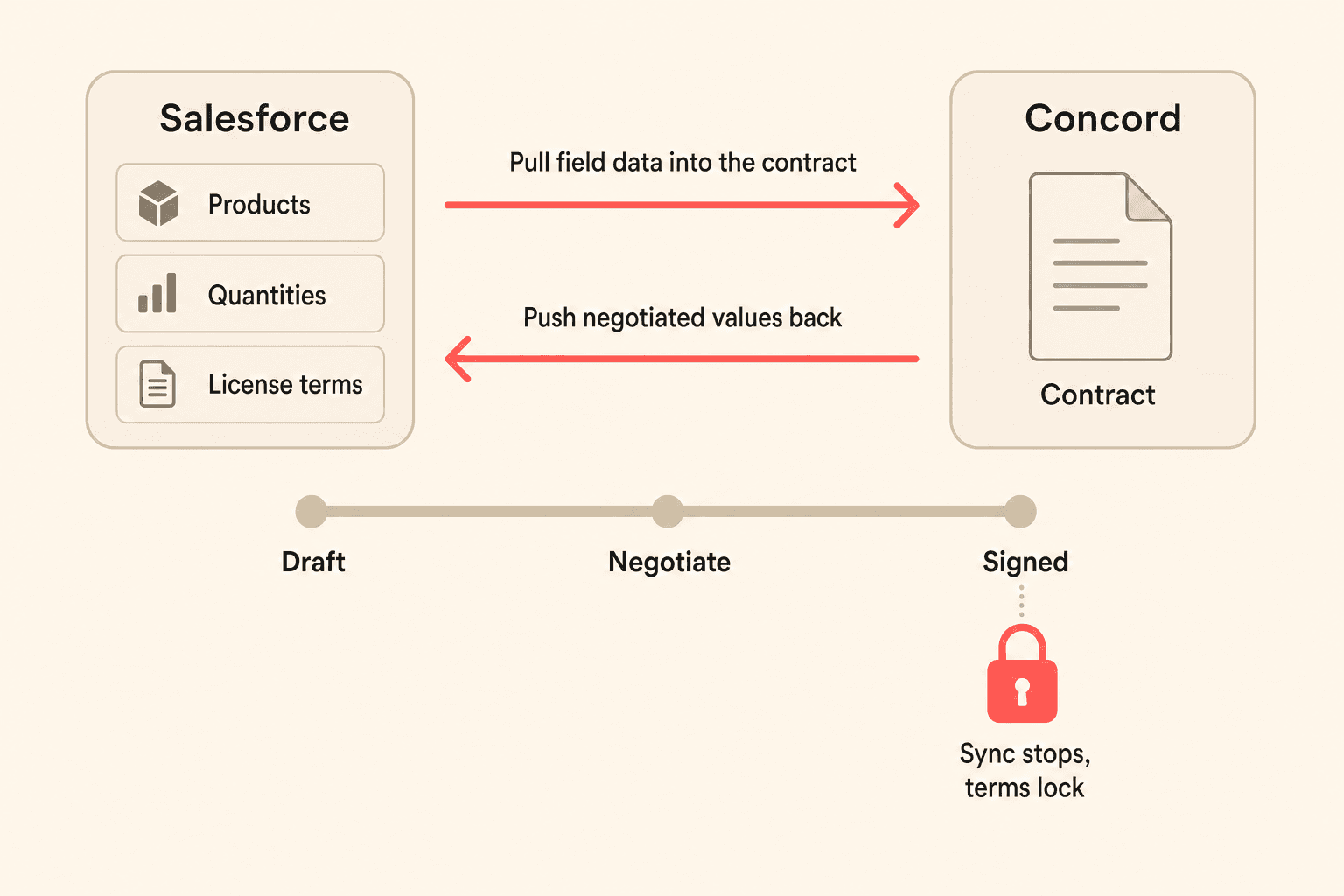
Transcript: Once you’ve generated this, you would go through the normal negotiation, discussion, and signature process through Concord. And then it can also update the status and even save a copy into Salesforce if you wanted to. This is also a bi-directional sync. So any field that you fill out here, let’s say that I were to fill in this phone number, anytime I do that in Concord it’ll push that information into Salesforce all the way up until the document is signed. So it is a bi-directional sync with all the data fields.
Fields, signatures, and the rest of the lifecycle
Once your fields are mapped, the same data carries the contract through drafting, negotiation, signature, and renewal tracking.
Mapped data relies on fillable, assignable field types: text boxes, dropdowns, checkboxes, and signature fields that connect to your CRM data. These populate contracts from Salesforce and keep the document consistent with the deal.
Once a contract is drafted, built-in redlining and version history handle negotiation, and built-in e-signature plus a DocuSign option handle execution. AI extraction reads lifecycle details from the agreement so key dates and terms are captured without manual entry. You can even sync contract deadlines into external calendars through feed URLs, so renewals do not slip.
Get clarity on your quote-to-contract path
If you are unsure where your quote originates or how to connect it to a signed agreement, that is exactly the conversation worth having. Talk to the Concord team about mapping your Salesforce and CPQ setup to a workflow your reps will actually use.
If you run contracts on Salesforce, you have probably hit a confusing question: where does your quote actually come from? A salesforce cpq contract integration should answer that clearly, not add to the muddle. This post walks through the two paths from a CPQ-generated quote to a signed agreement, so you can figure out which one fits your setup.
Many teams cannot say with certainty whether their quote document is built by a CPQ tool or pulled from native Salesforce objects. That uncertainty is not a failure. It is a common starting point, and clearing it up is the first step toward a workflow that holds together.
Key takeaways
Start by identifying where your quote document actually comes from. A CPQ tool that outputs a finished file and a Salesforce record holding field data lead to two different contract workflows.
Concord supports both routes, so you do not have to re-architect your quoting process before adopting a CLM.
Your CPQ vendor choice does not lock in your contract process. Concord picks up once the document exists, so a CPQ migration leaves approval, signature, and storage untouched.
Field data syncs in both directions until the moment of signature, then the terms lock. Your CRM ends up holding the final agreed numbers instead of stale opportunity data.
What is a Salesforce CPQ contract integration?
A Salesforce CPQ contract integration connects the quote your sales team builds to the contract they send for signature. It either generates the document from mapped Salesforce fields or accepts a document your CPQ already produced, then carries that document through approval, e-signature, and organized storage.
Why quote origin is the real question
Where your quote document comes from decides the shape of your entire contract workflow, so answer that before you evaluate any tool.
Contract leaders often describe a situation where the team does not know what it does not know. Someone generates a quote, it becomes a contract somehow, and the mechanics in between stay fuzzy.
The confusion matters because how the document gets created shapes the whole workflow. If a CPQ tool produces the quote, your contract process needs to accept that finished document and carry it forward. If Salesforce field data is the raw material, you need a template that pulls those fields in and assembles the document itself.
Before you evaluate any tool, it helps to answer a short list of questions:
Does a finished PDF or document appear when a rep completes a quote? That points to a CPQ-generated document.
Are reps filling in fields on a Salesforce record with no document produced yet? That points to a native-object path.
Does an admin maintain a master template somewhere, or does the document come from a separate quoting product?
You do not need a perfect answer before moving forward. You just need to know which path describes your day-to-day reality.
Two paths, one destination
Concord supports both routes, which removes the biggest decision blocker for teams that are still sorting out their own process.
The first path is a template that lives in Concord and pulls field data from Salesforce. Products, quantities, license terms, and other values populate the contract automatically through mapped fields. This is the right fit when your quote data sits on Salesforce objects and you want the document generated fresh.
The second path takes a document your CPQ already produced and pushes it into Concord for review, negotiation, and signature. Here, the CPQ does the document creation, and Concord picks up once that file exists. Both paths end in the same place: approval, e-signature, and organized storage.
Because both routes are available, you do not have to re-architect your quoting process to adopt a CLM. You can start with whichever matches your current setup and adjust later.
Criterion | Path A: Concord template pulls Salesforce fields | Path B: CPQ document pushed into Concord |
|---|---|---|
Who builds the document | Concord, from a template you upload | Your CPQ tool |
Where the data comes from | Mapped Salesforce fields on the account, opportunity, product and owner objects | The quote output your CPQ already produced |
Best fit when | Reps fill in fields on a Salesforce record and no document exists yet | A finished PDF or document appears when a rep completes a quote |
What you maintain | A template in Concord with field placeholders inserted | Your existing CPQ setup, unchanged |
Where it ends up | Approval, e-signature, organized storage | Approval, e-signature, organized storage |
Transcript: Here I’ve got a Salesforce-enabled template. The way that this integration works is you’ll actually upload your template into Concord. Once it’s in the system, you can then insert your different fields that are coming across from Salesforce. If you are a Salesforce user, you’ll have all your different fields here, and we integrate with the account object, the opportunity, the product, and the owner. So any of those fields and those objects in Salesforce you can pull in. You’ll input them into the document to set up your template. And then you’ll be ready to kick that off from Salesforce.
Why the CPQ vendor choice does not block you
Buyers often worry that picking a CLM will lock them into a specific CPQ tool, or that a future CPQ migration will break their contract process. The logic here is simpler than it sounds.
The CPQ’s job is to produce a document. Concord’s job starts once that document exists. Because the CPQ-generated file gets pushed into Concord regardless of which tool created it, the downstream steps land in the same workflow.
That means a change in CPQ vendor does not disrupt approval, signature, or storage. Your contract process stays stable even if your quoting tool shifts underneath it.
Simplicity beats brittle complexity
A template you can update in minutes stays current; one that needs a developer will quietly go stale.
A recurring pattern in legacy setups: a master template gets integrated with Salesforce, then goes un-updated for years because changing it is so hard. Admins describe wrestling with boxes of clauses and coding requirements just to add one bespoke template.
Complexity like this creates silos. Legal and contracts teams stop asking IT for help, IT stops reaching out to legal, and the tangled system persists unchanged. Meanwhile, contracts staff end up sorting and preparing agreements by hand from a manual inbox.
The counterweight is maintainability. Templates that are straightforward to build and update, plus an implementation that reps typically describe as one to two weeks, keep the system from calcifying. When updating a template is as easy as dropping in a document, it actually gets updated.
To pull requests out of that manual inbox, Concord’s contract intake requests capture agreements through structured forms and route them automatically. Instead of triaging email by hand, your team receives requests with the fields already filled in.
Meet reps where they already work
Sales adoption fails when reps are pushed into unfamiliar apps. Many describe strong resistance to web tools they find complicated, and they prefer to stay inside Salesforce where their deal data lives.
A clean, button-driven generate-document experience inside Salesforce respects that preference. The rep clicks a button, the document pre-fills from mapped fields, and approval and signature flows kick off automatically. The rep never leaves their system of record, yet the contract still flows into a proper CLM.
Transcript: I have an opportunity inside of Salesforce. If I want to create a new document with Concord using that opportunity, I simply click on New Document with Concord, which will take me into this document creation screen. This is where all my available templates or documents will be. I’ll be able to come in here and it’ll already have the email address of who I’m going to be sharing that with. It’s pulling that from the opportunity. And then I just click Review Before Sharing. That’s going to create the document inside of Concord, and it’s going to create a record of that inside of Concord as well. So I’ve now got that document and filled out these specific fields, and that’s now tied to that specific opportunity inside of Salesforce.
Concord’s workflow automation drives this behind the scenes. Approval routes triggered by contract conditions and data support the region-based and group-based flows teams want built in. One stakeholder confirmed that distributor agreements worldwide ran through Concord on a self-served workflow with region-based approvals already in place.
Distributor agreements worldwide ran through Concord on a self-served workflow, with region-based approvals already in place.
Want to see the generate-document button inside your own Salesforce org? Book a walkthrough and we will map it to your objects, templates, and approval routes.
Bidirectional sync closes the loop
Quote-to-contract is not just outbound. The value comes from data moving both ways.
In Salesforce workflows, fields sync in two directions. You pull products, quantities, and license terms from Salesforce into the contract, negotiate the terms, then push the final agreed values back into Salesforce. This sync runs up until the document is signed, after which the terms lock.
The result is a CRM with an accurate final record rather than stale opportunity data that no longer matches the signed agreement. Teams describe wanting exactly this: negotiate freely, then return the settled numbers to the system of record.
One current limitation is worth noting. Custom properties do not currently map back to Salesforce, so plan your field mapping around standard fields for the return sync.
Transcript: Once you’ve generated this, you would go through the normal negotiation, discussion, and signature process through Concord. And then it can also update the status and even save a copy into Salesforce if you wanted to. This is also a bi-directional sync. So any field that you fill out here, let’s say that I were to fill in this phone number, anytime I do that in Concord it’ll push that information into Salesforce all the way up until the document is signed. So it is a bi-directional sync with all the data fields.
Fields, signatures, and the rest of the lifecycle
Once your fields are mapped, the same data carries the contract through drafting, negotiation, signature, and renewal tracking.
Mapped data relies on fillable, assignable field types: text boxes, dropdowns, checkboxes, and signature fields that connect to your CRM data. These populate contracts from Salesforce and keep the document consistent with the deal.
Once a contract is drafted, built-in redlining and version history handle negotiation, and built-in e-signature plus a DocuSign option handle execution. AI extraction reads lifecycle details from the agreement so key dates and terms are captured without manual entry. You can even sync contract deadlines into external calendars through feed URLs, so renewals do not slip.
Get clarity on your quote-to-contract path
If you are unsure where your quote originates or how to connect it to a signed agreement, that is exactly the conversation worth having. Talk to the Concord team about mapping your Salesforce and CPQ setup to a workflow your reps will actually use.
Need to know
Frequently Asked Questions

Take the "management" out
of contract management.
Customer Support
Legal
Compare
Resources
Customer Support
Company
Legal
Compare
Resources
Customer Support
Company
Legal
Compare
© 2025 Concord. All rights reserved.