Contract OCR Software: Unlock Your Legacy Archive
Contract OCR Software: Unlock Your Legacy Archive
Contract OCR Software: Unlock Your Legacy Archive
Contract OCR Software: Unlock Your Legacy Archive
contract ocr software

You have decades of contracts sitting in a folder somewhere. Faded scans, faxed agreements, paper that predates your current systems. You know the value is in there. You just cannot find any of it.
That gap between having a contract and being able to use it is exactly what contract OCR software closes. When you run a scanned document through optical character recognition, you convert a picture of text into text a computer can read, search, and analyze. This post explains how that works, why OCR quality is the question that actually matters, and how a large legacy archive becomes searchable faster than most teams expect.
Key takeaways
A scanned contract is an image, and search software reads no text from it until OCR creates a machine-readable text layer.
Concord runs OCR automatically on every upload, so scans, PDFs, and Word files join one searchable repository without a manual step.
OCR quality tracks legibility. If a person can read the paper, the engine can generally convert it, so test your worst documents first.
The same text layer powers full-text search, AI data extraction, and co-pilot answers, and it works retroactively on historical contracts.
What is contract OCR software?
Contract OCR software uses optical character recognition to convert scanned or image-based contracts into machine-readable text. That text layer makes every document fully searchable and gives AI something to read, so parties, dates, renewal terms, and values can be extracted from a static archive of scans.
Why legacy contracts are invisible without OCR
A scanned contract is an image. To a search system, an image of text contains no text at all. It is a picture, the same way a photo of a page is a picture.
That single fact explains a frustrating experience. You can store thousands of scanned PDFs, know a specific agreement is among them, and still be unable to find it, query it, or run any analysis against it. The contract exists. Its content does not, at least not in any form software can read.
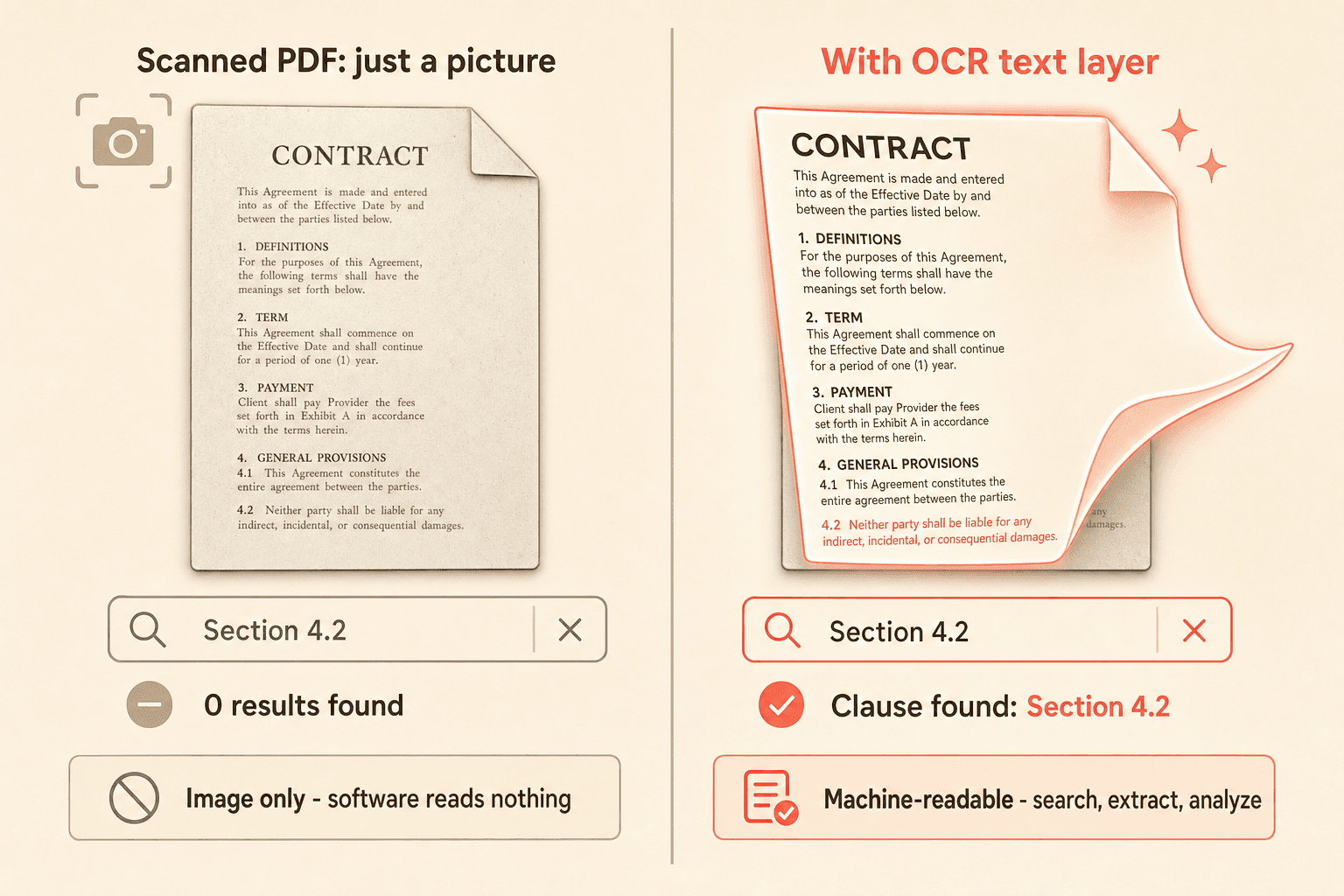
OCR fixes the root problem. It reads the image and produces a machine-readable text layer underneath the document. That text layer is the precondition for everything else: full-text search, automatic data extraction, and AI analysis. The value in your legacy contracts was never missing. It was locked behind an image format.
What contract OCR software actually does
With Concord, OCR runs automatically on every document you upload. There is no separate step to trigger, no queue to manage, and no manual conversion. When a scanned PDF lands in your workspace, the system extracts its text on the back end using a proven OCR engine.
That extraction covers the full body of the contract, not just the filename or a few metadata fields. Once the text layer exists, the document joins your searchable contract repository alongside everything else you store.
The same process applies across formats. Native PDFs, Word files, and HTML documents all get indexed, so a mixed archive of old scans and newer digital files becomes one consistent, queryable body of contracts.
The real question: will it read my worst documents?
Most teams do not ask whether a tool has OCR. They ask whether the OCR is good enough for their worst documents: the faded ones, the skewed scans, the decades-old paper, the handwritten notes in the margins, the pages that arrived by fax and were never high quality to begin with.
That is the honest concern, and it deserves an honest answer. OCR quality tracks legibility. As a practical rule, if a person can read the text on the paper, the OCR engine can generally pick it up too.
“If a person can read the text on the paper, the OCR engine can generally pick it up too.”
Handwritten content and low-quality faxes sit closer to the edge. Some handwriting is clean enough to read reliably; some is not. The same goes for a fax that degraded through multiple generations of copying.
For genuinely borderline documents, the right move is simple. Test the OCR on your actual files before you commit to a full migration. Running a sample of your worst-case scans through the system tells you far more than any general promise, and it removes the guesswork from the decision.
Clip transcript: “As soon as we bring that document, that PDF in the system, we’re going to run it through that OCR. We’re going to make a text copy of the agreement. And that OCR copy is what we’re going to use to power the data extraction and all the different searches in the system. You can even upload a scanned image and that’s going to do the same thing. People always ask me, hey, how accurate is your OCR? The good news is it’s not our OCR. We actually use Google’s OCR on the back end. It’s the best one that we found. We’ve been using it for many years now, and honestly we just really haven’t had any issues with it. As long as you can read the text on the paper, it should do a pretty good job of picking that up and converting it.”
Have a folder of worst-case scans? Request a demo and run them through Concord’s OCR before you commit to a migration.
OCR is a foundation, not a feature
The reason OCR matters so much is that everything downstream depends on it. The same text layer that makes a document searchable is what AI extraction reads from, and what the co-pilot draws on to answer your questions.

Once OCR creates that layer, AI-powered data extraction can pull key details automatically: parties, agreement category, document type, effective dates, renewal and termination terms, and financial values. This works retroactively across historical contracts, so a legacy archive gets the same structured treatment as a brand-new agreement.
The compounding effect cuts both ways. A weak text layer means missed searches, failed extraction, and incomplete AI answers. A strong one turns a pile of unreadable images into an aggregated knowledge base you can query. OCR is the multiplier that decides which outcome you get.
From searchable to intelligently searchable
Making a document searchable is only half the payoff. The half you care about is discovery.
Buyers evaluating tools often draw a line between two kinds of search. Literal search means you type an exact clause and hope it matches. Smarter search means you describe what you are looking for and get the most relevant contracts back, even across hundreds of documents.
| Literal search | Intelligent search |
|---|---|---|
How you query | Type the exact clause wording and hope it matches | Describe what you need in plain language |
What it searches | Keywords only | Contract content, metadata, and terms |
On a legacy archive | Misses anything worded differently | Surfaces the historical agreements that answer the question |
Effort | Browse folder by folder to verify | Ask once and review ranked results |
Concord’s search runs across contract content, metadata, and terms, so you can find a specific clause or agreement without browsing folder by folder. For a legacy archive, that changes the story. You are not just able to open old contracts. You can ask a question and have the AI-powered search surface the historical agreements that answer it.
Moving a large archive is easier than you fear
Most large archives move in days, not months, because OCR and AI extraction do the heavy work automatically on upload.
Migration anxiety is real, and it is usually larger than the migration itself. Teams sitting on extensive repositories, often in SharePoint or a legacy system, frequently cannot even estimate their own contract volume across clients, vendors, and categories. The unknown makes the task feel enormous.
Two things shrink it. First, OCR and AI extraction run automatically on upload, so the manual work most teams dread, retyping or hand-tagging documents, mostly disappears. Second, bulk upload can preserve your existing folder structure, so you are not rebuilding your organization from scratch.
Clip transcript: “When we first start with a new customer, the first thing we’re going to do is help them bulk upload their existing documents into the system. Even if you’re a customer who’s been with Concord for a long time, you may have contracts sitting somewhere. Maybe they’re in some filing cabinets, maybe you have them in a certain database, or somewhere you just never uploaded them into Concord. If you would like to bulk upload everything in the system, it’s actually really easy to do this, especially now with the AI features. You can go ahead and just turn those documents into a zip folder and you’ll bulk upload them into the system.”
In practice, bulk ingestion of a large archive happens in a short window rather than over months. If you are planning a move, our guidance on bulk contract migration walks through how to bring a full repository across while keeping it organized.
A note on reliability
OCR and extraction reliability matter after you buy, not just during evaluation. Standard-form legacy PDFs, for example, can occasionally be handled differently than expected depending on how they were originally produced.
The practical safeguard remains the same before and after migration: test on your real documents. Confirming that your specific contract types read and extract correctly on a sample set gives you a clear picture before you scale up, and it flags edge cases early rather than deep in a project.
Turn your archive into an asset
Your legacy contracts are not lost. They are locked behind an image format, and contract OCR software is the key that opens it. Once the text layer exists, search, extraction, and AI analysis follow, turning a disorganized pile of scans into a repository you can actually query.
See how Concord makes your legacy contracts searchable. Request a demo and test it on your own documents.
You have decades of contracts sitting in a folder somewhere. Faded scans, faxed agreements, paper that predates your current systems. You know the value is in there. You just cannot find any of it.
That gap between having a contract and being able to use it is exactly what contract OCR software closes. When you run a scanned document through optical character recognition, you convert a picture of text into text a computer can read, search, and analyze. This post explains how that works, why OCR quality is the question that actually matters, and how a large legacy archive becomes searchable faster than most teams expect.
Key takeaways
A scanned contract is an image, and search software reads no text from it until OCR creates a machine-readable text layer.
Concord runs OCR automatically on every upload, so scans, PDFs, and Word files join one searchable repository without a manual step.
OCR quality tracks legibility. If a person can read the paper, the engine can generally convert it, so test your worst documents first.
The same text layer powers full-text search, AI data extraction, and co-pilot answers, and it works retroactively on historical contracts.
What is contract OCR software?
Contract OCR software uses optical character recognition to convert scanned or image-based contracts into machine-readable text. That text layer makes every document fully searchable and gives AI something to read, so parties, dates, renewal terms, and values can be extracted from a static archive of scans.
Why legacy contracts are invisible without OCR
A scanned contract is an image. To a search system, an image of text contains no text at all. It is a picture, the same way a photo of a page is a picture.
That single fact explains a frustrating experience. You can store thousands of scanned PDFs, know a specific agreement is among them, and still be unable to find it, query it, or run any analysis against it. The contract exists. Its content does not, at least not in any form software can read.
OCR fixes the root problem. It reads the image and produces a machine-readable text layer underneath the document. That text layer is the precondition for everything else: full-text search, automatic data extraction, and AI analysis. The value in your legacy contracts was never missing. It was locked behind an image format.
What contract OCR software actually does
With Concord, OCR runs automatically on every document you upload. There is no separate step to trigger, no queue to manage, and no manual conversion. When a scanned PDF lands in your workspace, the system extracts its text on the back end using a proven OCR engine.
That extraction covers the full body of the contract, not just the filename or a few metadata fields. Once the text layer exists, the document joins your searchable contract repository alongside everything else you store.
The same process applies across formats. Native PDFs, Word files, and HTML documents all get indexed, so a mixed archive of old scans and newer digital files becomes one consistent, queryable body of contracts.
The real question: will it read my worst documents?
Most teams do not ask whether a tool has OCR. They ask whether the OCR is good enough for their worst documents: the faded ones, the skewed scans, the decades-old paper, the handwritten notes in the margins, the pages that arrived by fax and were never high quality to begin with.
That is the honest concern, and it deserves an honest answer. OCR quality tracks legibility. As a practical rule, if a person can read the text on the paper, the OCR engine can generally pick it up too.
“If a person can read the text on the paper, the OCR engine can generally pick it up too.”
Handwritten content and low-quality faxes sit closer to the edge. Some handwriting is clean enough to read reliably; some is not. The same goes for a fax that degraded through multiple generations of copying.
For genuinely borderline documents, the right move is simple. Test the OCR on your actual files before you commit to a full migration. Running a sample of your worst-case scans through the system tells you far more than any general promise, and it removes the guesswork from the decision.
Clip transcript: “As soon as we bring that document, that PDF in the system, we’re going to run it through that OCR. We’re going to make a text copy of the agreement. And that OCR copy is what we’re going to use to power the data extraction and all the different searches in the system. You can even upload a scanned image and that’s going to do the same thing. People always ask me, hey, how accurate is your OCR? The good news is it’s not our OCR. We actually use Google’s OCR on the back end. It’s the best one that we found. We’ve been using it for many years now, and honestly we just really haven’t had any issues with it. As long as you can read the text on the paper, it should do a pretty good job of picking that up and converting it.”
Have a folder of worst-case scans? Request a demo and run them through Concord’s OCR before you commit to a migration.
OCR is a foundation, not a feature
The reason OCR matters so much is that everything downstream depends on it. The same text layer that makes a document searchable is what AI extraction reads from, and what the co-pilot draws on to answer your questions.
Once OCR creates that layer, AI-powered data extraction can pull key details automatically: parties, agreement category, document type, effective dates, renewal and termination terms, and financial values. This works retroactively across historical contracts, so a legacy archive gets the same structured treatment as a brand-new agreement.
The compounding effect cuts both ways. A weak text layer means missed searches, failed extraction, and incomplete AI answers. A strong one turns a pile of unreadable images into an aggregated knowledge base you can query. OCR is the multiplier that decides which outcome you get.
From searchable to intelligently searchable
Making a document searchable is only half the payoff. The half you care about is discovery.
Buyers evaluating tools often draw a line between two kinds of search. Literal search means you type an exact clause and hope it matches. Smarter search means you describe what you are looking for and get the most relevant contracts back, even across hundreds of documents.
| Literal search | Intelligent search |
|---|---|---|
How you query | Type the exact clause wording and hope it matches | Describe what you need in plain language |
What it searches | Keywords only | Contract content, metadata, and terms |
On a legacy archive | Misses anything worded differently | Surfaces the historical agreements that answer the question |
Effort | Browse folder by folder to verify | Ask once and review ranked results |
Concord’s search runs across contract content, metadata, and terms, so you can find a specific clause or agreement without browsing folder by folder. For a legacy archive, that changes the story. You are not just able to open old contracts. You can ask a question and have the AI-powered search surface the historical agreements that answer it.
Moving a large archive is easier than you fear
Most large archives move in days, not months, because OCR and AI extraction do the heavy work automatically on upload.
Migration anxiety is real, and it is usually larger than the migration itself. Teams sitting on extensive repositories, often in SharePoint or a legacy system, frequently cannot even estimate their own contract volume across clients, vendors, and categories. The unknown makes the task feel enormous.
Two things shrink it. First, OCR and AI extraction run automatically on upload, so the manual work most teams dread, retyping or hand-tagging documents, mostly disappears. Second, bulk upload can preserve your existing folder structure, so you are not rebuilding your organization from scratch.
Clip transcript: “When we first start with a new customer, the first thing we’re going to do is help them bulk upload their existing documents into the system. Even if you’re a customer who’s been with Concord for a long time, you may have contracts sitting somewhere. Maybe they’re in some filing cabinets, maybe you have them in a certain database, or somewhere you just never uploaded them into Concord. If you would like to bulk upload everything in the system, it’s actually really easy to do this, especially now with the AI features. You can go ahead and just turn those documents into a zip folder and you’ll bulk upload them into the system.”
In practice, bulk ingestion of a large archive happens in a short window rather than over months. If you are planning a move, our guidance on bulk contract migration walks through how to bring a full repository across while keeping it organized.
A note on reliability
OCR and extraction reliability matter after you buy, not just during evaluation. Standard-form legacy PDFs, for example, can occasionally be handled differently than expected depending on how they were originally produced.
The practical safeguard remains the same before and after migration: test on your real documents. Confirming that your specific contract types read and extract correctly on a sample set gives you a clear picture before you scale up, and it flags edge cases early rather than deep in a project.
Turn your archive into an asset
Your legacy contracts are not lost. They are locked behind an image format, and contract OCR software is the key that opens it. Once the text layer exists, search, extraction, and AI analysis follow, turning a disorganized pile of scans into a repository you can actually query.
See how Concord makes your legacy contracts searchable. Request a demo and test it on your own documents.
Need to know
Frequently Asked Questions

Take the "management" out
of contract management.
Customer Support
Legal
Compare
Resources
Customer Support
Company
Legal
Compare
Resources
Customer Support
Company
Legal
Compare
© 2025 Concord. All rights reserved.