Contract Management for Agencies: Tame MSA and SOW Sprawl
Contract Management for Agencies: Tame MSA and SOW Sprawl
Contract Management for Agencies: Tame MSA and SOW Sprawl
Contract Management for Agencies: Tame MSA and SOW Sprawl
contract management for agencies, agency contract management software, MSA and SOW management, change order management for agencies, client contract management, SOW tracking, agency retainer contract renewals

A new SOW gets signed on Tuesday. A change order shows up in an account director’s inbox on Thursday. The client’s MSA, the document that governs both, sits three folders deep in a shared drive nobody has cleaned up in a year.
For most shops without a dedicated legal team, this is what contract management for agencies looks like. The cost builds slowly: scope creep that never gets billed, retainers that renew at old rates, and delivery teams working from terms that changed months ago.
A better folder system won’t fix it. You need a different way to structure your client contracts.
Key takeaways
Agency contract sprawl is a structure problem, not a filing problem. Better folders won’t show how an MSA, its SOWs, and its change orders relate.
Treat each client as an agreement family: one MSA, the SOWs beneath it, and the change orders that modify each SOW.
Tag every document by client and parent agreement with the same core fields, so reports can surface gaps like an active SOW with no signed MSA.
Track renewal and notice dates on a calendar and share negotiated exceptions with delivery, so retainers don’t renew at old rates and scope doesn’t slip.
What is contract management for agencies?
Contract management for agencies is the practice of storing, structuring, and tracking every client MSA, SOW, change order, and NDA as one connected agreement family. It gives account, finance, and delivery teams a shared view of what is active, what is missing, and what each client was promised, often with dedicated contract management software.
Why agencies feel contract sprawl more than most
Your client model is layered by design. Each client starts with one MSA. Every project, phase, or retainer period adds a new SOW, and every shift in scope adds a change order.
Ten clients can easily mean dozens of live documents, and many of them modify each other. Four traits make this harder for agencies than for a typical company:
Many clients at once. Each relationship carries its own paper trail, negotiated terms, and renewal cycle.
Stacked documents. SOWs and change orders pile up under each master agreement, and folders can’t show how they relate.
Scope changes by email. A client asks for more, someone agrees in a reply thread, and the work begins.
No in-house legal ops. Contract work falls to operations leads, finance managers, and account directors who already have full-time jobs.
Five symptoms of SOW sprawl
Most agencies don’t notice sprawl until something breaks. These symptoms usually show up first.
1. You open file after file to find the active SOW. Active, terminated, and archived versions sit side by side with near-identical names. Client-services teams commonly describe this search as wasted effort that repeats with every lookup.
2. You can’t say which clients have a signed MSA. Clients sometimes start receiving new services before the matching SOW or addendum is signed. When that happens, nobody can say with confidence which terms govern the work.
3. Negotiated exceptions never reach delivery. Special terms agreed during the sale typically reach the account team by email, if they arrive at all. The exception list often lives in a stale spreadsheet or in one person’s memory.
4. Renewal dates slip. Teams wearing multiple hats often admit that notice windows pass unnoticed. Some describe evergreen clauses that auto-renewed five-figure commitments before anyone could act.
5. Your contract count is a guess. Duplicate copies make it hard to say how many active client agreements you have. When contract knowledge sits with one administrator, the risk grows once that person leaves.
MSA and SOW management: think in agreement families
The questions agencies need answered are relational. What is the active SOW under this client’s MSA? Which change orders apply to it? Does this client have a signed MSA at all?
Files in folders can’t answer those questions. Agreement families can.
An agreement family groups every document tied to one client relationship:
The MSA sets the legal and commercial baseline: payment terms, IP ownership, liability, confidentiality.
SOWs sit beneath the MSA and define each project or retainer period.
Change orders sit beneath the SOW they modify and record every approved scope, timeline, or budget change.
Supporting documents such as NDAs and addendums attach to the same family.
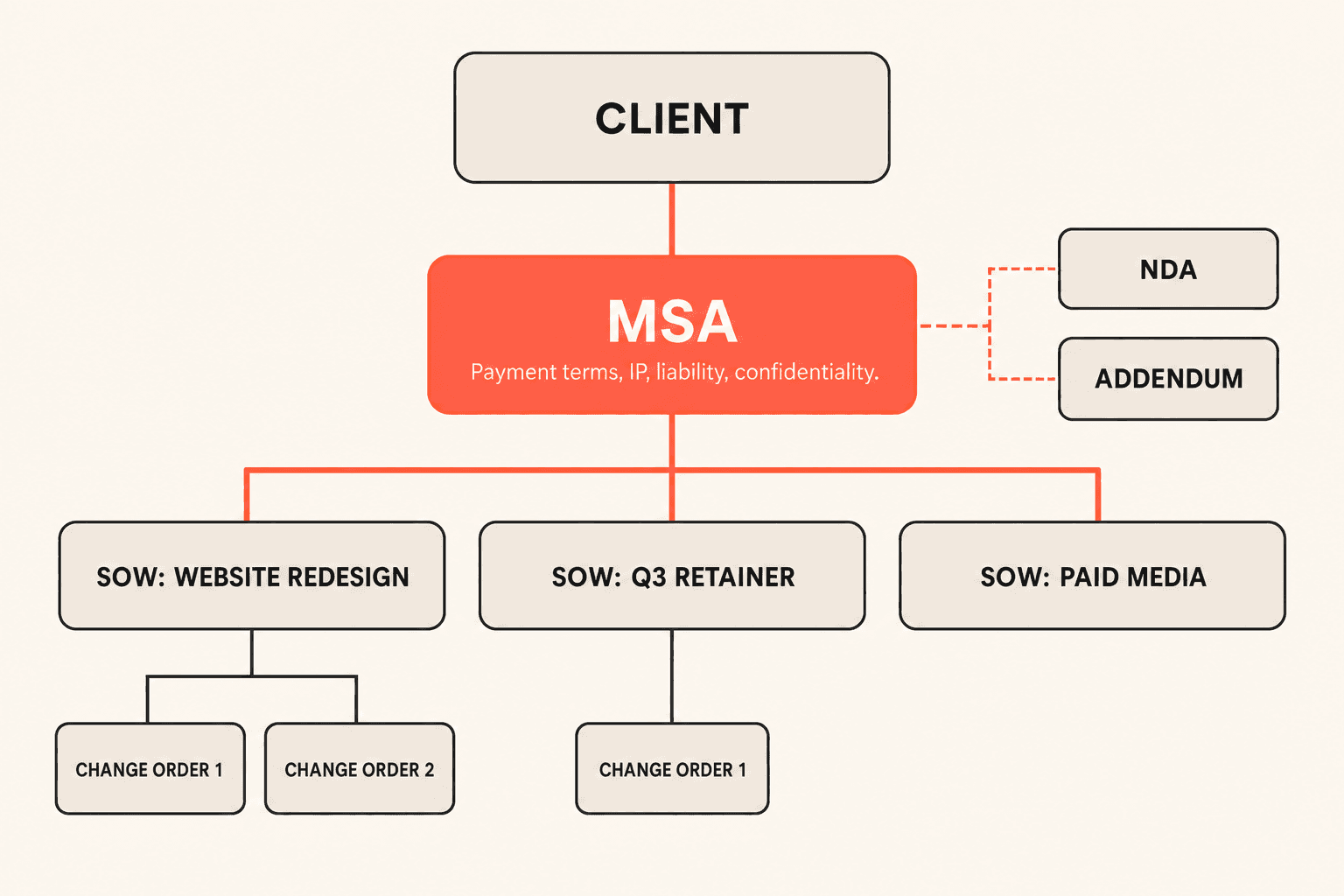
The practical move is to tag every document with its client and its parent agreement. Add consistent custom fields for agreement type, status, effective date, and end date. Once every document carries the same fields, you can build reports to find gaps, such as clients with an active SOW but no signed MSA on file.
Question | Folder filing | Agreement families |
|---|---|---|
Which SOW is active? | Open file after file with near-identical names | Filter the client’s family by status |
Does this client have a signed MSA? | Nobody can say with confidence | Run a report on clients missing a signed MSA |
Which change orders apply? | Buried in email threads | Stored beneath the SOW they modify |
When does the retainer renew? | Remembered, or missed | Tracked in list and calendar views |
Change order management for agencies: put scope in writing
A change order that lives only in an email thread causes two problems. Finance can’t bill for it, and delivery can’t confirm it was approved.
The same logic applies to negotiated exceptions. If the account team never sees a client’s custom payment terms or revision limits, the agency either over-delivers for free or under-delivers against its promises.
Keep change orders and exception terms in the same system and the same agreement family as the MSA. Then your account team can check what was promised before committing work, and finance can see what should be invoiced.
A practical framework for agency contracts
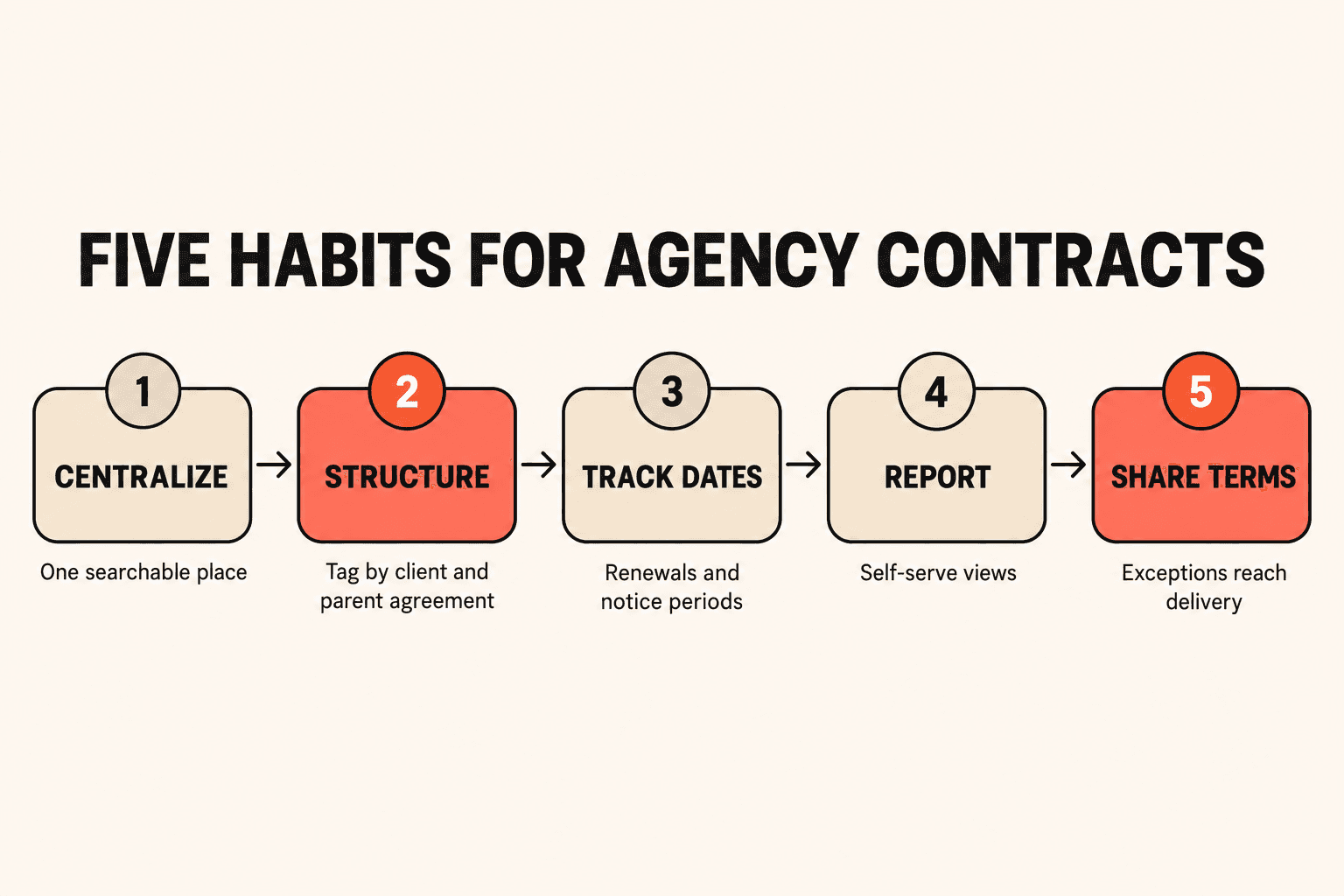
You don’t need a legal department to get this under control. You need five habits.
Centralize. Move every MSA, SOW, change order, and NDA into one searchable place. Remove duplicates as you go.
Structure. Tag each document by client and parent agreement, and fill in the same core fields every time.
Track dates. Record renewal, expiration, and notice dates for client retainers and vendor agreements, including freelancers, tools, and subcontractors. Review them on a calendar, not from memory.
Report. Give account and finance teams self-serve views of what is expiring, what is pending signature, and what was recently signed.
Share terms with delivery. Make negotiated exceptions and approved change orders visible to the people doing the work.
A note on dates: auto-renewal clauses, evergreen terms, and notice periods vary by contract. This article offers general guidance, not legal advice, so confirm clause language, notice requirements, and enforceability questions with your own legal counsel.
See your client agreement families in Concord. Book a demo to see MSAs, SOWs, and change orders organized by client, with renewal dates in view.
Run client contracts the way you run client accounts
Many agencies already manage client relationships, pipeline, and account health carefully in a CRM like HubSpot. Meanwhile, the contracts that define what they owe each client sit in disconnected folders.
That mismatch is the core gap. Organize contracts by client the same way your CRM organizes accounts. Each client should have clean contract data, including status, value, and key dates, that your account and finance teams can report on.
How Concord supports each step
Concord gives agencies the structure described above without a dedicated legal ops team.
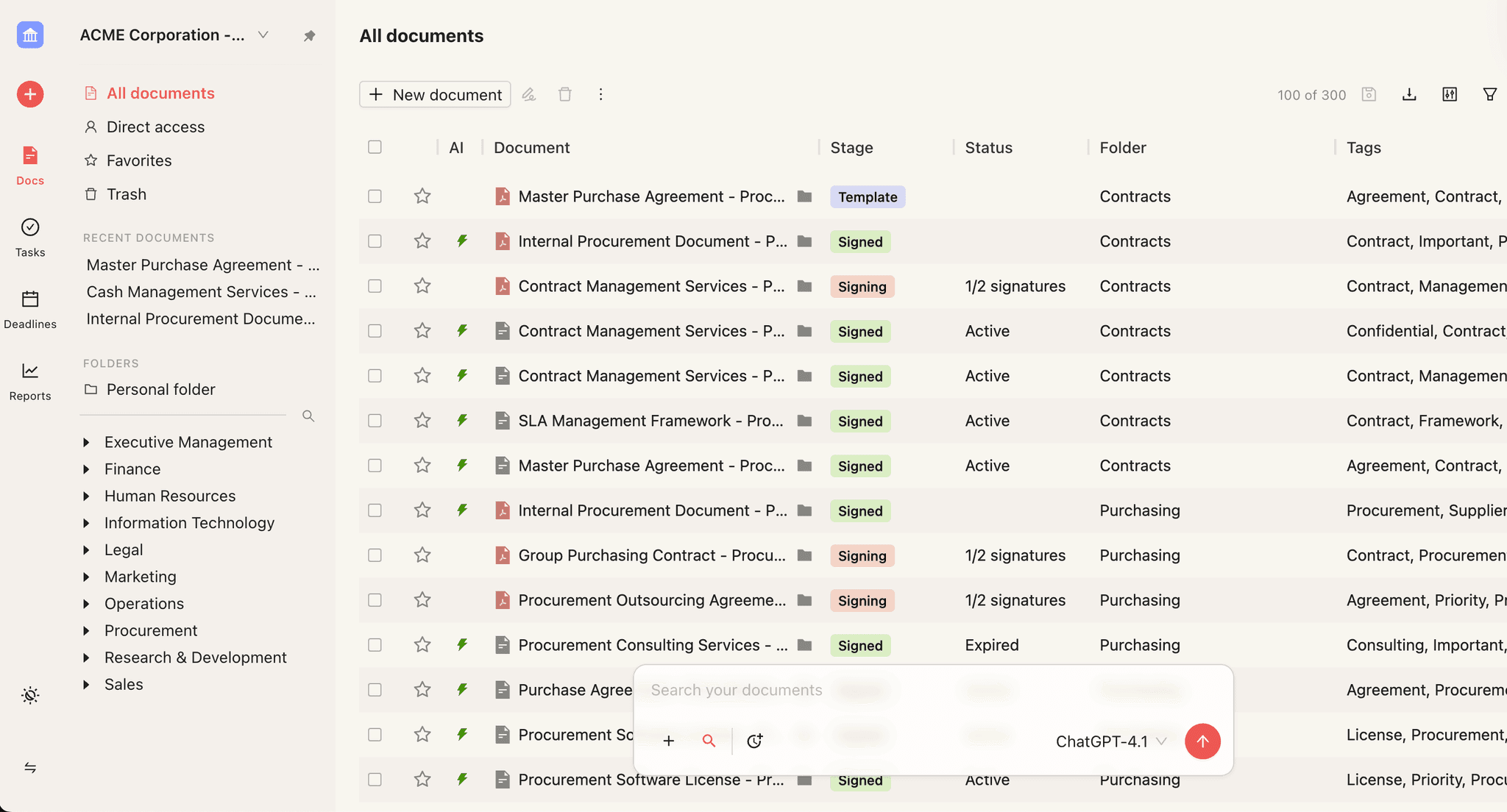
One home for every client contract. The Document Management Workspace provides a single searchable contract repository for every MSA, SOW, and change order, with folder structures and role-based access.
Faster cleanup. Bulk actions let you bulk-import and tag existing contracts, then move or archive them in groups. AI-powered data extraction can extract key terms and dates automatically, so you don’t have to reread every SOW by hand.
Lifecycle control. The Agreement Management System covers agreements from creation through signing and archival, with access control and approval management. Each client’s agreement family stays organized in one place instead of across inboxes.
Date visibility. Contract Deadline Management supports tracking renewal and notice dates in list and calendar views with filters. Retainer windows and vendor auto-renewals surface early enough to act on.
Self-serve answers. The Contract Reporting System lets you build, save, and manage custom contract reports, such as expiring contracts, pending signatures, or documents signed in the last 30 days. Combine reports with your custom fields to find clients missing a signed agreement.
Consistent language. Contract Clauses Management helps you standardize MSA and SOW language with pre-defined and custom clause libraries, which makes deviations from standard terms easier to spot.
Less manual work. Workflow Agent Management lets you configure AI-powered agents to automate repetitive contract steps, such as processing incoming documents.
Clean separation. Multi-Tenant Workspace Management lets you run separate contract workspaces within one Concord instance, with full data isolation. That helps agencies with multiple brands, offices, or sensitive client work. For everyday organization by client, tagging within a single workspace is usually enough.
Getting started without a big project
Start with the repository, because every other step depends on clean data. A phased approach keeps the work manageable for a small team:
Bulk-import your contracts and tag them by client and agreement type.
Extract key terms, rates, and dates from each document.
Set up deadline views for renewals, expirations, and notice periods.
Build a handful of standard reports your account and finance teams will use weekly.
Automate repetitive steps with workflow agents once the base is clean.
Begin with your largest or most active clients. A few well-organized agreement families will show your team the value quickly.
Bring order to your client contracts
Your MSAs, SOWs, and change orders define what you owe every client. Keep them together, keep the dates visible, and give your team the answers without the folder hunt. Book a Concord demo to see how your agency can manage client contracts the way it manages client accounts.
A new SOW gets signed on Tuesday. A change order shows up in an account director’s inbox on Thursday. The client’s MSA, the document that governs both, sits three folders deep in a shared drive nobody has cleaned up in a year.
For most shops without a dedicated legal team, this is what contract management for agencies looks like. The cost builds slowly: scope creep that never gets billed, retainers that renew at old rates, and delivery teams working from terms that changed months ago.
A better folder system won’t fix it. You need a different way to structure your client contracts.
Key takeaways
Agency contract sprawl is a structure problem, not a filing problem. Better folders won’t show how an MSA, its SOWs, and its change orders relate.
Treat each client as an agreement family: one MSA, the SOWs beneath it, and the change orders that modify each SOW.
Tag every document by client and parent agreement with the same core fields, so reports can surface gaps like an active SOW with no signed MSA.
Track renewal and notice dates on a calendar and share negotiated exceptions with delivery, so retainers don’t renew at old rates and scope doesn’t slip.
What is contract management for agencies?
Contract management for agencies is the practice of storing, structuring, and tracking every client MSA, SOW, change order, and NDA as one connected agreement family. It gives account, finance, and delivery teams a shared view of what is active, what is missing, and what each client was promised, often with dedicated contract management software.
Why agencies feel contract sprawl more than most
Your client model is layered by design. Each client starts with one MSA. Every project, phase, or retainer period adds a new SOW, and every shift in scope adds a change order.
Ten clients can easily mean dozens of live documents, and many of them modify each other. Four traits make this harder for agencies than for a typical company:
Many clients at once. Each relationship carries its own paper trail, negotiated terms, and renewal cycle.
Stacked documents. SOWs and change orders pile up under each master agreement, and folders can’t show how they relate.
Scope changes by email. A client asks for more, someone agrees in a reply thread, and the work begins.
No in-house legal ops. Contract work falls to operations leads, finance managers, and account directors who already have full-time jobs.
Five symptoms of SOW sprawl
Most agencies don’t notice sprawl until something breaks. These symptoms usually show up first.
1. You open file after file to find the active SOW. Active, terminated, and archived versions sit side by side with near-identical names. Client-services teams commonly describe this search as wasted effort that repeats with every lookup.
2. You can’t say which clients have a signed MSA. Clients sometimes start receiving new services before the matching SOW or addendum is signed. When that happens, nobody can say with confidence which terms govern the work.
3. Negotiated exceptions never reach delivery. Special terms agreed during the sale typically reach the account team by email, if they arrive at all. The exception list often lives in a stale spreadsheet or in one person’s memory.
4. Renewal dates slip. Teams wearing multiple hats often admit that notice windows pass unnoticed. Some describe evergreen clauses that auto-renewed five-figure commitments before anyone could act.
5. Your contract count is a guess. Duplicate copies make it hard to say how many active client agreements you have. When contract knowledge sits with one administrator, the risk grows once that person leaves.
MSA and SOW management: think in agreement families
The questions agencies need answered are relational. What is the active SOW under this client’s MSA? Which change orders apply to it? Does this client have a signed MSA at all?
Files in folders can’t answer those questions. Agreement families can.
An agreement family groups every document tied to one client relationship:
The MSA sets the legal and commercial baseline: payment terms, IP ownership, liability, confidentiality.
SOWs sit beneath the MSA and define each project or retainer period.
Change orders sit beneath the SOW they modify and record every approved scope, timeline, or budget change.
Supporting documents such as NDAs and addendums attach to the same family.
The practical move is to tag every document with its client and its parent agreement. Add consistent custom fields for agreement type, status, effective date, and end date. Once every document carries the same fields, you can build reports to find gaps, such as clients with an active SOW but no signed MSA on file.
Question | Folder filing | Agreement families |
|---|---|---|
Which SOW is active? | Open file after file with near-identical names | Filter the client’s family by status |
Does this client have a signed MSA? | Nobody can say with confidence | Run a report on clients missing a signed MSA |
Which change orders apply? | Buried in email threads | Stored beneath the SOW they modify |
When does the retainer renew? | Remembered, or missed | Tracked in list and calendar views |
Change order management for agencies: put scope in writing
A change order that lives only in an email thread causes two problems. Finance can’t bill for it, and delivery can’t confirm it was approved.
The same logic applies to negotiated exceptions. If the account team never sees a client’s custom payment terms or revision limits, the agency either over-delivers for free or under-delivers against its promises.
Keep change orders and exception terms in the same system and the same agreement family as the MSA. Then your account team can check what was promised before committing work, and finance can see what should be invoiced.
A practical framework for agency contracts
You don’t need a legal department to get this under control. You need five habits.
Centralize. Move every MSA, SOW, change order, and NDA into one searchable place. Remove duplicates as you go.
Structure. Tag each document by client and parent agreement, and fill in the same core fields every time.
Track dates. Record renewal, expiration, and notice dates for client retainers and vendor agreements, including freelancers, tools, and subcontractors. Review them on a calendar, not from memory.
Report. Give account and finance teams self-serve views of what is expiring, what is pending signature, and what was recently signed.
Share terms with delivery. Make negotiated exceptions and approved change orders visible to the people doing the work.
A note on dates: auto-renewal clauses, evergreen terms, and notice periods vary by contract. This article offers general guidance, not legal advice, so confirm clause language, notice requirements, and enforceability questions with your own legal counsel.
See your client agreement families in Concord. Book a demo to see MSAs, SOWs, and change orders organized by client, with renewal dates in view.
Run client contracts the way you run client accounts
Many agencies already manage client relationships, pipeline, and account health carefully in a CRM like HubSpot. Meanwhile, the contracts that define what they owe each client sit in disconnected folders.
That mismatch is the core gap. Organize contracts by client the same way your CRM organizes accounts. Each client should have clean contract data, including status, value, and key dates, that your account and finance teams can report on.
How Concord supports each step
Concord gives agencies the structure described above without a dedicated legal ops team.
One home for every client contract. The Document Management Workspace provides a single searchable contract repository for every MSA, SOW, and change order, with folder structures and role-based access.
Faster cleanup. Bulk actions let you bulk-import and tag existing contracts, then move or archive them in groups. AI-powered data extraction can extract key terms and dates automatically, so you don’t have to reread every SOW by hand.
Lifecycle control. The Agreement Management System covers agreements from creation through signing and archival, with access control and approval management. Each client’s agreement family stays organized in one place instead of across inboxes.
Date visibility. Contract Deadline Management supports tracking renewal and notice dates in list and calendar views with filters. Retainer windows and vendor auto-renewals surface early enough to act on.
Self-serve answers. The Contract Reporting System lets you build, save, and manage custom contract reports, such as expiring contracts, pending signatures, or documents signed in the last 30 days. Combine reports with your custom fields to find clients missing a signed agreement.
Consistent language. Contract Clauses Management helps you standardize MSA and SOW language with pre-defined and custom clause libraries, which makes deviations from standard terms easier to spot.
Less manual work. Workflow Agent Management lets you configure AI-powered agents to automate repetitive contract steps, such as processing incoming documents.
Clean separation. Multi-Tenant Workspace Management lets you run separate contract workspaces within one Concord instance, with full data isolation. That helps agencies with multiple brands, offices, or sensitive client work. For everyday organization by client, tagging within a single workspace is usually enough.
Getting started without a big project
Start with the repository, because every other step depends on clean data. A phased approach keeps the work manageable for a small team:
Bulk-import your contracts and tag them by client and agreement type.
Extract key terms, rates, and dates from each document.
Set up deadline views for renewals, expirations, and notice periods.
Build a handful of standard reports your account and finance teams will use weekly.
Automate repetitive steps with workflow agents once the base is clean.
Begin with your largest or most active clients. A few well-organized agreement families will show your team the value quickly.
Bring order to your client contracts
Your MSAs, SOWs, and change orders define what you owe every client. Keep them together, keep the dates visible, and give your team the answers without the folder hunt. Book a Concord demo to see how your agency can manage client contracts the way it manages client accounts.
Need to know
Frequently Asked Questions

Take the "management" out
of contract management.
Customer Support
Legal
Compare
Resources
Customer Support
Company
Legal
Compare
Resources
Customer Support
Company
Legal
Compare
© 2025 Concord. All rights reserved.