Contract Renewal Playbook: Avoiding Bad Auto-Renewals
Contract Renewal Playbook: Avoiding Bad Auto-Renewals
Contract Renewal Playbook: Avoiding Bad Auto-Renewals
Contract Renewal Playbook: Avoiding Bad Auto-Renewals

An auto-renewal is a decision you make by not deciding. That single idea sits at the center of good auto renewal contract management: the clause itself is rarely the problem, but the absence of a system that surfaces the choice before the window closes almost always is.
This playbook is not about knowing when deadlines happen. It is about what you do with the lead time you have, so you renew, renegotiate, or exit on your own terms rather than by default.
Key takeaways
An auto-renewal is a decision you make by not deciding. The fix is a system that surfaces the choice before the notice window closes.
Most missed renewals fail at data entry. If renewal and notice dates never leave the PDF, no reminder can fire.
Renewing and terminating need different alerts: loud reviews for contracts worth renegotiating, silent notices for ones you expect to keep.
Route each deadline to named owners on their own calendars. A digest everyone receives is a deadline no one owns.
Lead time is negotiating power. Open renewal talks two to three months out to reshape price, scope, or payment terms.
What is auto-renewal contract management?
Auto-renewal contract management is the practice of tracking every contract’s renewal date and notice window in structured fields, alerting named owners with enough lead time to act, and deciding on purpose whether to renew, renegotiate, or exit before the contract extends itself by default.
Why auto-renewals hurt teams (the decision-by-default problem)
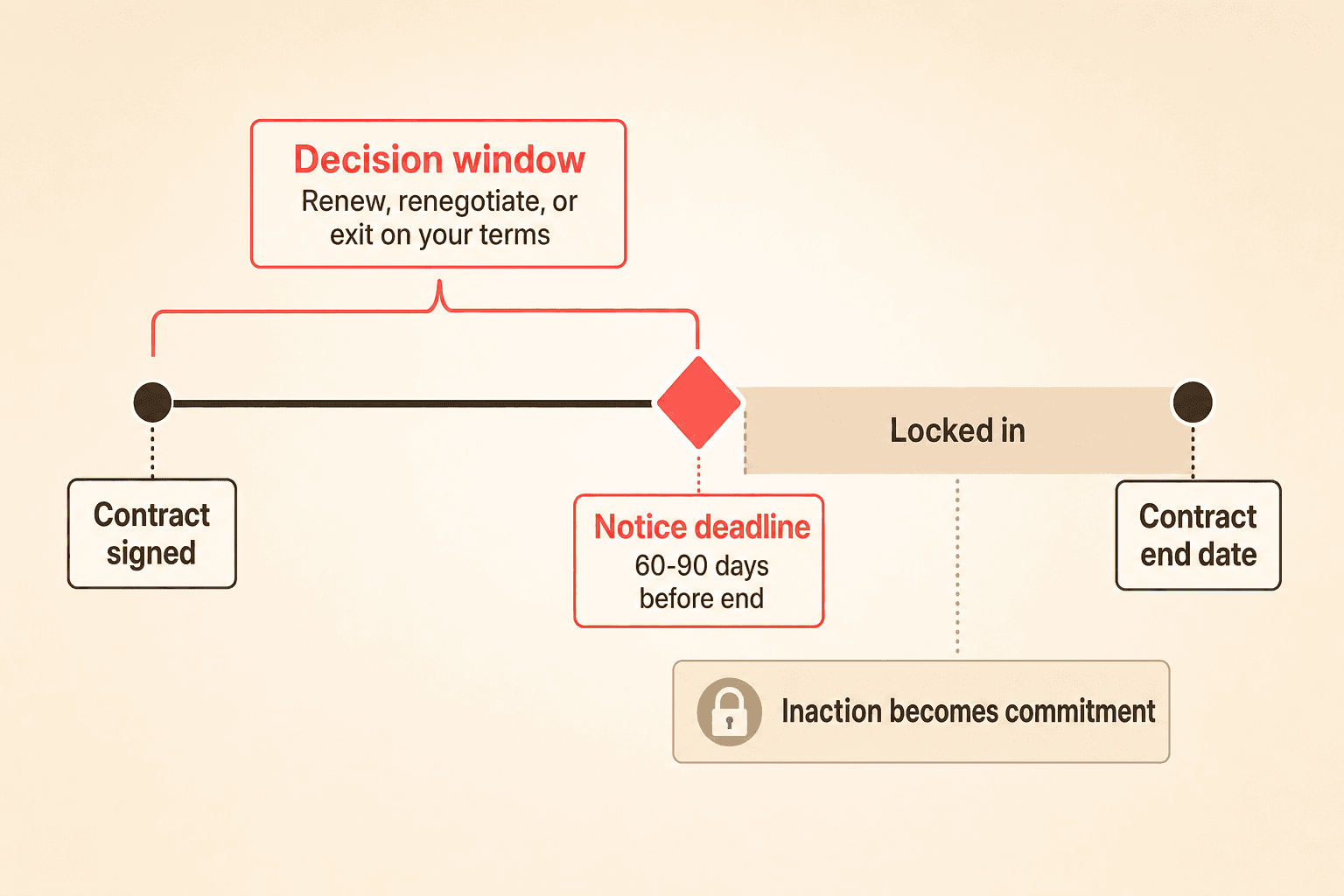
Every auto-renewal clause quietly converts inaction into commitment. When the notice window passes while your team is still deciding, the contract renews and you lose the chance to weigh in.
Finance leaders commonly describe the same failure: the team was still evaluating whether to keep a contract, the cutoff passed, and they got locked in. The gap is rarely a missing reminder. It is that the renewal date never moved from a PDF into a structured place where a deadline could fire.
The real cost is not the renewal itself. It is the lost chance to negotiate. Getting locked in means paying for something you might not need, and it means forfeiting the one moment you held negotiating power.
Step 1: Extract and structure every renewal and notice-period date
A renewal system fails at the data-entry step, not the alert step. If the effective date, duration, and early-termination notice never make it into a structured field, the whole reminder chain never triggers.
Teams tracking renewals through ad hoc CRM date fields or shared drive folders describe the process as manual and fragile. The deadline only fires correctly if a person remembered to type the right date in the right place.
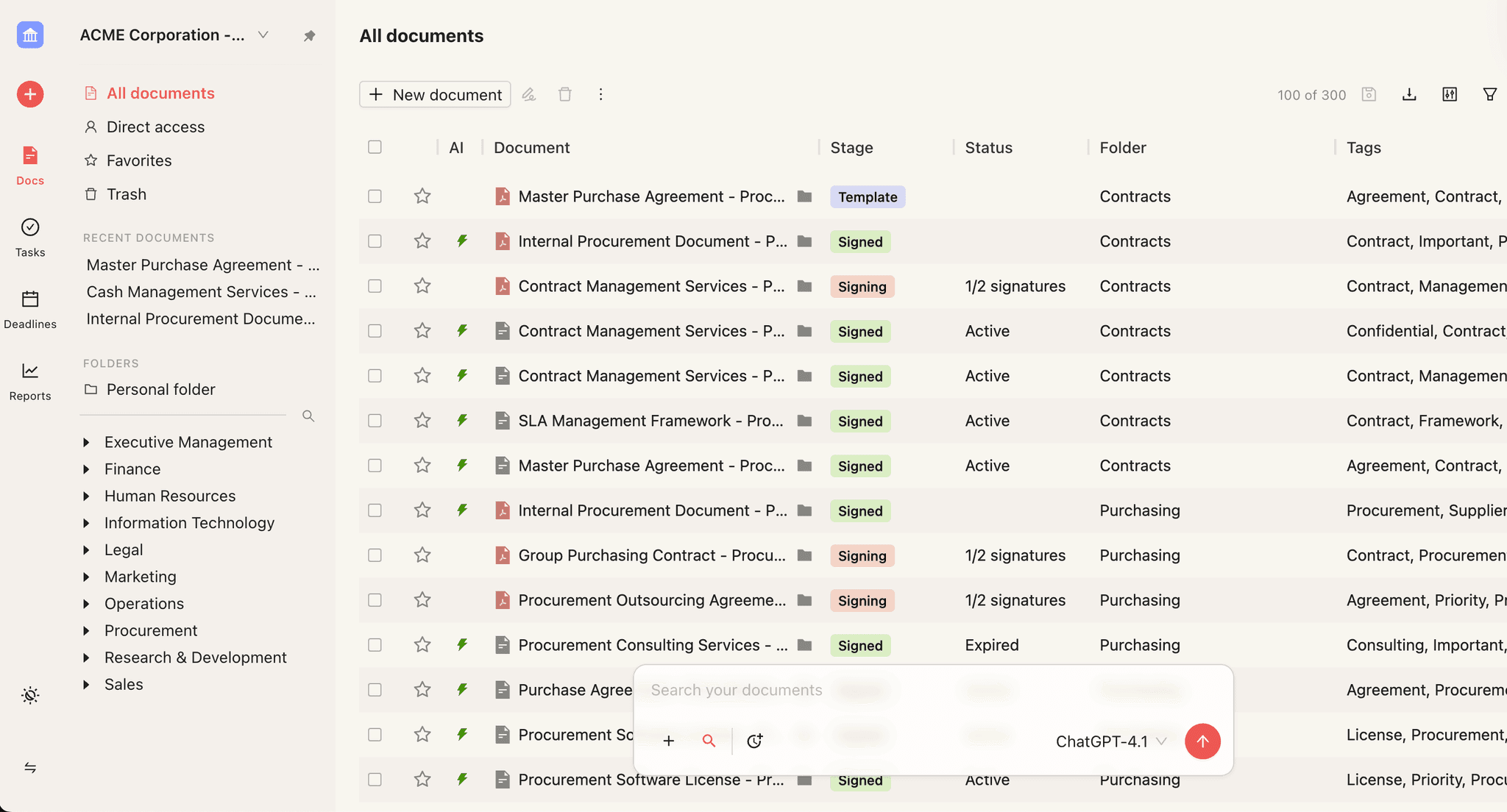
Concord’s AI data extraction reads uploaded contracts and pulls out signature date, effective date, duration, renewal information, and early-termination notice automatically. That closes the gap that causes most missed cutoffs. Once those dates live in structured fields, everything downstream becomes possible.
Clip transcript (AI extraction of lifecycle fields): “So these are all things that the AI should pick up for you based on what’s written in the contract. But if you need to come in here and make adjustments, you can. Any of these data fields, even after the AI extracts, you can come in and override them anytime you want to. So that’s our renewal information. We have signature, effective duration, renewal, and then last of all, early termination or termination notice deadline. A lot of contracts will say you’ve got to give a 60 days notice before the contract ends. And so you’re going to need to keep track of that here in the system as well. That is a field the AI will look for.”
If you want the mechanics of tracking after extraction, our renewal alert tracking guide is the companion to this playbook.
Step 2: Separate “renewing” alerts from “terminating” alerts
Renewing and terminating are not the same alert, and treating them identically breaks the workflow. Many contracts are supposed to auto-renew, and firing a termination warning on them creates alarm fatigue.
Legal ops leaders frequently describe a sophisticated version of this pain. A large share of their contracts auto-renew and are expected to, so a blaring “terminating” alarm pushes them to poke a customer who might otherwise renew quietly.
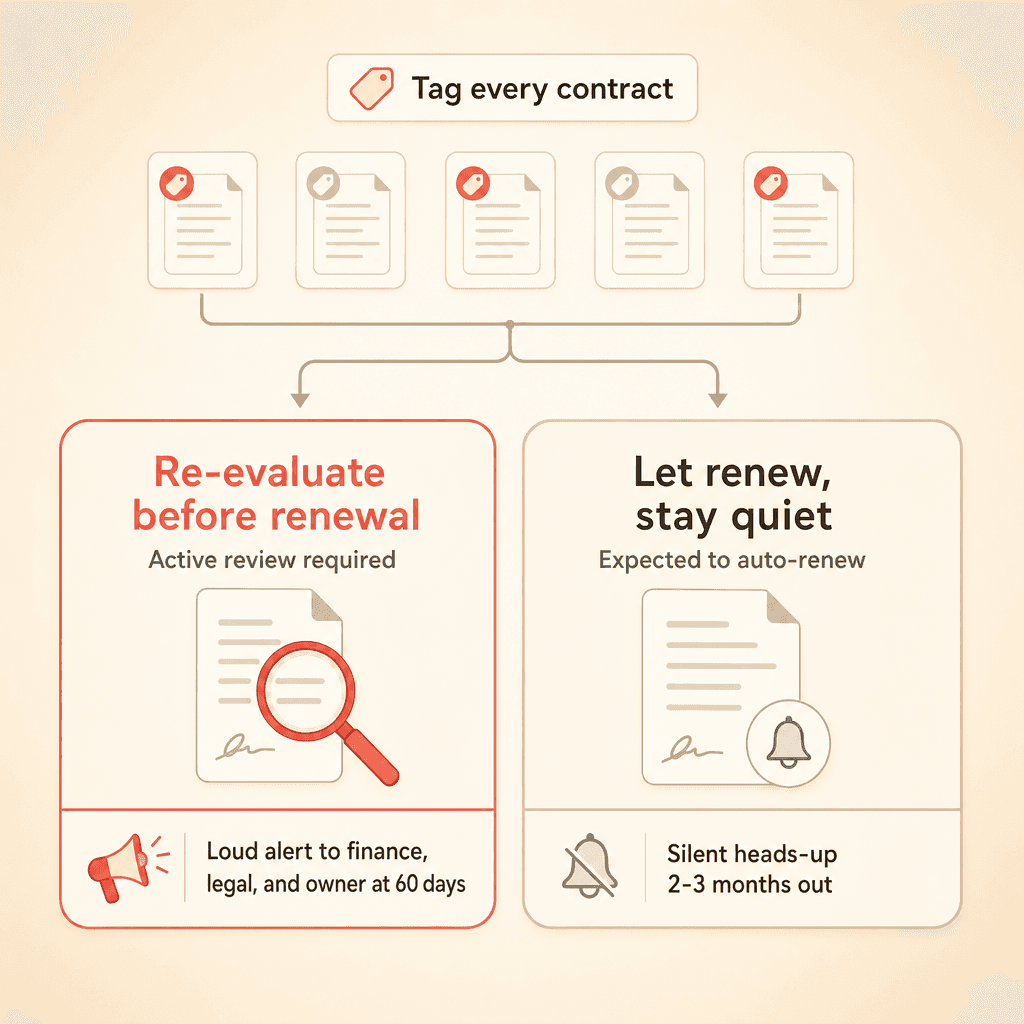
What they actually want is a quiet heads-up, two to three months out, that a contract is up for auto-renewal. That gives room to decide whether to renegotiate cost or scope without disturbing a relationship that would otherwise carry on.
Alert type | What it signals | Timing | Who gets it |
|---|---|---|---|
Termination alert | The contract ends unless you act to preserve it | As the end date nears | Contract owner |
Auto-renewal alert | The contract continues unless you step in | Quiet heads-up two to three months out | Finance, legal, and the contract owner |
Build your playbook around two buckets:
Contracts you want to actively re-evaluate before they renew.
Contracts you are happy to let renew but still want a silent early notice on.
Tag which is which so the right kind of reminder reaches the right people. For more on how deadline milestones are organized, see our contract deadline management guide.
Clip transcript (the weekly deadline email): “First of all, we have that weekly email that goes out from the system. Every Monday, you’re going to get an email that shows you all the upcoming deadlines in one place. It will break it down by type of deadline. So we have termination notice deadlines. We have renewal dates. This is when your contracts are renewing, or this is when you need to give termination notices for these contracts because they have those termination notices required. You can click on this link, and that’ll take you into the actual report in Concord.”
Step 3: Route deadlines to the right owners (not everyone)
Blanket weekly digests decay into ignored noise. When every renewal lands in a shared inbox that everyone assumes someone else is watching, no one is watching.
Buyers commonly note that frequent, redundant renewal emails get filed away and eventually missed entirely. A calendar view synced to their own Outlook or Google Calendar proves far more reliable for catching what is coming.
Concord’s deadline calendar syncs renewals, expirations, and key-term milestones into personal calendars, so deadlines surface where people already work. Pair that with routing a specific auto-renewal deadline, say 60 days prior, to finance, legal, and the contract owner rather than a digest everyone tunes out.
The point is accountability. A deadline with no named owner is a deadline no one owns.
See your own renewals and termination notices land on your calendar. Book a 15-minute Concord demo.
Step 4: Build in enough lead time to negotiate, not react
Notice-window length is a strategy lever, not a legal footnote. Short windows force adversarial, rushed decisions.
Teams describe how being handed a large price increase a couple of months before renewal, with a 24-hour window to accept, feels coercive and damages the relationship. A snap yes or no leaves no room for internal review, redlines, or a counter.
The observed better practice is longer windows, well beyond a typical 60-day notice period. More lead time gives both sides room to negotiate calmly and lock in a renewal on purpose rather than by ambush.
Treat the notice window as a term you design. When you draft or renegotiate, ask for enough runway that you are never cornered into a same-day accept or reject.
Clip transcript (setting the reminder lead time): “The way that we determine when they get sent out is actually a setting here in the tool. At the very top, you have the receive weekly deadline reminders by email. And then you have how far out you want them to start. This says include deadlines that are set to occur within the next 120 days. A lot of our customers will do 90 days before or 60 days before. But if you want a lot of time, you can set it out as far as you would like. So within 90 days of that thing happening, whether it’s a termination notice or the contract ending, it’ll start showing up on that weekly email.”
Step 5: Use the renewal window as negotiating power
Early visibility is negotiating power. The purpose of a deadline reminder is not only to avoid getting stuck. It is to force your hand to start the conversation while you still hold power.
Teams that open renewal talks early can win a lower rate, added service, or a better payment cadence, such as moving from annual to quarterly or month-to-month. Teams that wait get handed terms and a countdown clock.
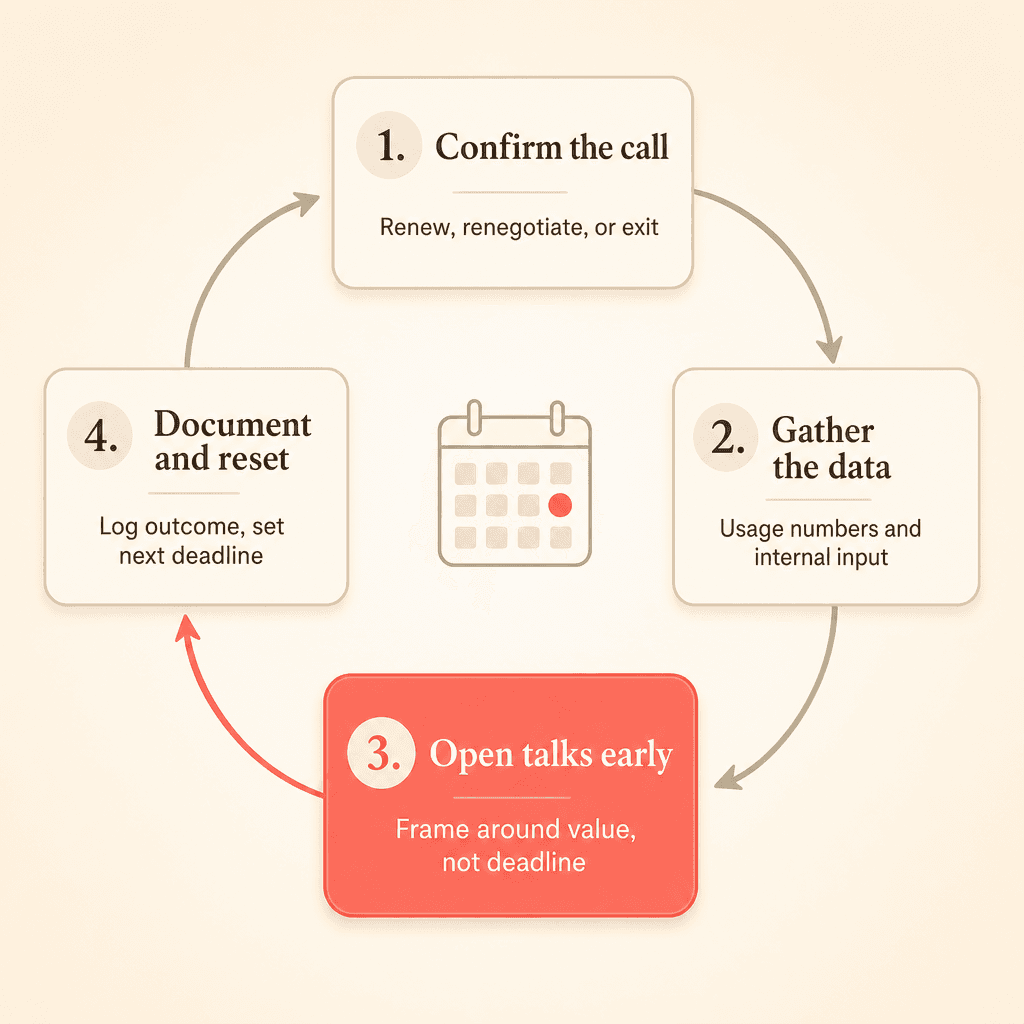
Here is the sequence to run once a renewal enters your window:
Confirm whether you want to renew, renegotiate, or exit.
Gather usage data and internal input while there is still time.
Open the conversation early, framed around value rather than a deadline.
Document the outcome and reset the next deadline immediately.
For deeper tactics on the negotiation itself, our contract negotiation guide covers how to structure the ask.
Turning the playbook into a repeatable system
A one-time cleanup does not hold. Renewals fire on their own schedule, so your system has to run without depending on anyone remembering a date.
Concord’s deadline event synchronization keeps renewal deadlines, termination dates, and notice-period milestones updated automatically as terms change. Deadline event monitoring watches approaching dates and triggers actions as they near, so milestones do not slip.
For teams billing customers, Stripe payment automation updates billing details and subscription quantities when contract terms change, keeping renewals and invoicing aligned. That removes one more manual step where a missed update can undo a carefully negotiated renewal.
The repeatable version looks like this: extract dates automatically, tag each contract as re-evaluate or let-ride, route deadlines to named owners on their own calendars, and design notice windows long enough to negotiate. Do that consistently and every auto-renewal becomes an active choice.
Ready to turn every auto-renewal into a decision you make on purpose? See how Concord manages contract deadlines and renewals.
An auto-renewal is a decision you make by not deciding. That single idea sits at the center of good auto renewal contract management: the clause itself is rarely the problem, but the absence of a system that surfaces the choice before the window closes almost always is.
This playbook is not about knowing when deadlines happen. It is about what you do with the lead time you have, so you renew, renegotiate, or exit on your own terms rather than by default.
Key takeaways
An auto-renewal is a decision you make by not deciding. The fix is a system that surfaces the choice before the notice window closes.
Most missed renewals fail at data entry. If renewal and notice dates never leave the PDF, no reminder can fire.
Renewing and terminating need different alerts: loud reviews for contracts worth renegotiating, silent notices for ones you expect to keep.
Route each deadline to named owners on their own calendars. A digest everyone receives is a deadline no one owns.
Lead time is negotiating power. Open renewal talks two to three months out to reshape price, scope, or payment terms.
What is auto-renewal contract management?
Auto-renewal contract management is the practice of tracking every contract’s renewal date and notice window in structured fields, alerting named owners with enough lead time to act, and deciding on purpose whether to renew, renegotiate, or exit before the contract extends itself by default.
Why auto-renewals hurt teams (the decision-by-default problem)
Every auto-renewal clause quietly converts inaction into commitment. When the notice window passes while your team is still deciding, the contract renews and you lose the chance to weigh in.
Finance leaders commonly describe the same failure: the team was still evaluating whether to keep a contract, the cutoff passed, and they got locked in. The gap is rarely a missing reminder. It is that the renewal date never moved from a PDF into a structured place where a deadline could fire.
The real cost is not the renewal itself. It is the lost chance to negotiate. Getting locked in means paying for something you might not need, and it means forfeiting the one moment you held negotiating power.
Step 1: Extract and structure every renewal and notice-period date
A renewal system fails at the data-entry step, not the alert step. If the effective date, duration, and early-termination notice never make it into a structured field, the whole reminder chain never triggers.
Teams tracking renewals through ad hoc CRM date fields or shared drive folders describe the process as manual and fragile. The deadline only fires correctly if a person remembered to type the right date in the right place.
Concord’s AI data extraction reads uploaded contracts and pulls out signature date, effective date, duration, renewal information, and early-termination notice automatically. That closes the gap that causes most missed cutoffs. Once those dates live in structured fields, everything downstream becomes possible.
Clip transcript (AI extraction of lifecycle fields): “So these are all things that the AI should pick up for you based on what’s written in the contract. But if you need to come in here and make adjustments, you can. Any of these data fields, even after the AI extracts, you can come in and override them anytime you want to. So that’s our renewal information. We have signature, effective duration, renewal, and then last of all, early termination or termination notice deadline. A lot of contracts will say you’ve got to give a 60 days notice before the contract ends. And so you’re going to need to keep track of that here in the system as well. That is a field the AI will look for.”
If you want the mechanics of tracking after extraction, our renewal alert tracking guide is the companion to this playbook.
Step 2: Separate “renewing” alerts from “terminating” alerts
Renewing and terminating are not the same alert, and treating them identically breaks the workflow. Many contracts are supposed to auto-renew, and firing a termination warning on them creates alarm fatigue.
Legal ops leaders frequently describe a sophisticated version of this pain. A large share of their contracts auto-renew and are expected to, so a blaring “terminating” alarm pushes them to poke a customer who might otherwise renew quietly.
What they actually want is a quiet heads-up, two to three months out, that a contract is up for auto-renewal. That gives room to decide whether to renegotiate cost or scope without disturbing a relationship that would otherwise carry on.
Alert type | What it signals | Timing | Who gets it |
|---|---|---|---|
Termination alert | The contract ends unless you act to preserve it | As the end date nears | Contract owner |
Auto-renewal alert | The contract continues unless you step in | Quiet heads-up two to three months out | Finance, legal, and the contract owner |
Build your playbook around two buckets:
Contracts you want to actively re-evaluate before they renew.
Contracts you are happy to let renew but still want a silent early notice on.
Tag which is which so the right kind of reminder reaches the right people. For more on how deadline milestones are organized, see our contract deadline management guide.
Clip transcript (the weekly deadline email): “First of all, we have that weekly email that goes out from the system. Every Monday, you’re going to get an email that shows you all the upcoming deadlines in one place. It will break it down by type of deadline. So we have termination notice deadlines. We have renewal dates. This is when your contracts are renewing, or this is when you need to give termination notices for these contracts because they have those termination notices required. You can click on this link, and that’ll take you into the actual report in Concord.”
Step 3: Route deadlines to the right owners (not everyone)
Blanket weekly digests decay into ignored noise. When every renewal lands in a shared inbox that everyone assumes someone else is watching, no one is watching.
Buyers commonly note that frequent, redundant renewal emails get filed away and eventually missed entirely. A calendar view synced to their own Outlook or Google Calendar proves far more reliable for catching what is coming.
Concord’s deadline calendar syncs renewals, expirations, and key-term milestones into personal calendars, so deadlines surface where people already work. Pair that with routing a specific auto-renewal deadline, say 60 days prior, to finance, legal, and the contract owner rather than a digest everyone tunes out.
The point is accountability. A deadline with no named owner is a deadline no one owns.
See your own renewals and termination notices land on your calendar. Book a 15-minute Concord demo.
Step 4: Build in enough lead time to negotiate, not react
Notice-window length is a strategy lever, not a legal footnote. Short windows force adversarial, rushed decisions.
Teams describe how being handed a large price increase a couple of months before renewal, with a 24-hour window to accept, feels coercive and damages the relationship. A snap yes or no leaves no room for internal review, redlines, or a counter.
The observed better practice is longer windows, well beyond a typical 60-day notice period. More lead time gives both sides room to negotiate calmly and lock in a renewal on purpose rather than by ambush.
Treat the notice window as a term you design. When you draft or renegotiate, ask for enough runway that you are never cornered into a same-day accept or reject.
Clip transcript (setting the reminder lead time): “The way that we determine when they get sent out is actually a setting here in the tool. At the very top, you have the receive weekly deadline reminders by email. And then you have how far out you want them to start. This says include deadlines that are set to occur within the next 120 days. A lot of our customers will do 90 days before or 60 days before. But if you want a lot of time, you can set it out as far as you would like. So within 90 days of that thing happening, whether it’s a termination notice or the contract ending, it’ll start showing up on that weekly email.”
Step 5: Use the renewal window as negotiating power
Early visibility is negotiating power. The purpose of a deadline reminder is not only to avoid getting stuck. It is to force your hand to start the conversation while you still hold power.
Teams that open renewal talks early can win a lower rate, added service, or a better payment cadence, such as moving from annual to quarterly or month-to-month. Teams that wait get handed terms and a countdown clock.
Here is the sequence to run once a renewal enters your window:
Confirm whether you want to renew, renegotiate, or exit.
Gather usage data and internal input while there is still time.
Open the conversation early, framed around value rather than a deadline.
Document the outcome and reset the next deadline immediately.
For deeper tactics on the negotiation itself, our contract negotiation guide covers how to structure the ask.
Turning the playbook into a repeatable system
A one-time cleanup does not hold. Renewals fire on their own schedule, so your system has to run without depending on anyone remembering a date.
Concord’s deadline event synchronization keeps renewal deadlines, termination dates, and notice-period milestones updated automatically as terms change. Deadline event monitoring watches approaching dates and triggers actions as they near, so milestones do not slip.
For teams billing customers, Stripe payment automation updates billing details and subscription quantities when contract terms change, keeping renewals and invoicing aligned. That removes one more manual step where a missed update can undo a carefully negotiated renewal.
The repeatable version looks like this: extract dates automatically, tag each contract as re-evaluate or let-ride, route deadlines to named owners on their own calendars, and design notice windows long enough to negotiate. Do that consistently and every auto-renewal becomes an active choice.
Ready to turn every auto-renewal into a decision you make on purpose? See how Concord manages contract deadlines and renewals.
Need to know
Frequently Asked Questions

Take the "management" out
of contract management.
Customer Support
Legal
Compare
Resources
Customer Support
Company
Legal
Compare
Resources
Customer Support
Company
Legal
Compare
© 2025 Concord. All rights reserved.