CLM migration guide: switch from an overbuilt platform without the pain
CLM migration guide: switch from an overbuilt platform without the pain
CLM migration guide: switch from an overbuilt platform without the pain
CLM migration guide: switch from an overbuilt platform without the pain
contract management

Your contract lifecycle management platform cost a fortune to implement, took months to configure, and today your team uses maybe 10 percent of what it offers. The rest sits untouched, a monument to good intentions and mismatched expectations. If this sounds familiar, you are not alone, and this CLM migration guide will walk you through leaving that overbuilt tool behind in as little as two weeks.
Why overbuilt CLMs become shelfware
Enterprise CLM platforms are not bad products. They are mismatched products. When a five-person legal team buys a platform designed for a 50-person legal department, most features go untouched, setup drags on for months, and the tool becomes a glorified (and expensive) document repository.
Legal ops leaders frequently describe paying for platforms where they use roughly 10 percent of available functionality. The unused 90 percent creates cost drag and cognitive overhead without delivering proportional value.
Making matters worse, the person who championed the original purchase has often left the organization. Remaining users inherit a system they did not choose, do not fully understand, and cannot configure without outside help. This compounding adoption problem makes the overbuilt tool feel even more wasteful with each passing quarter.
The real cost of staying put
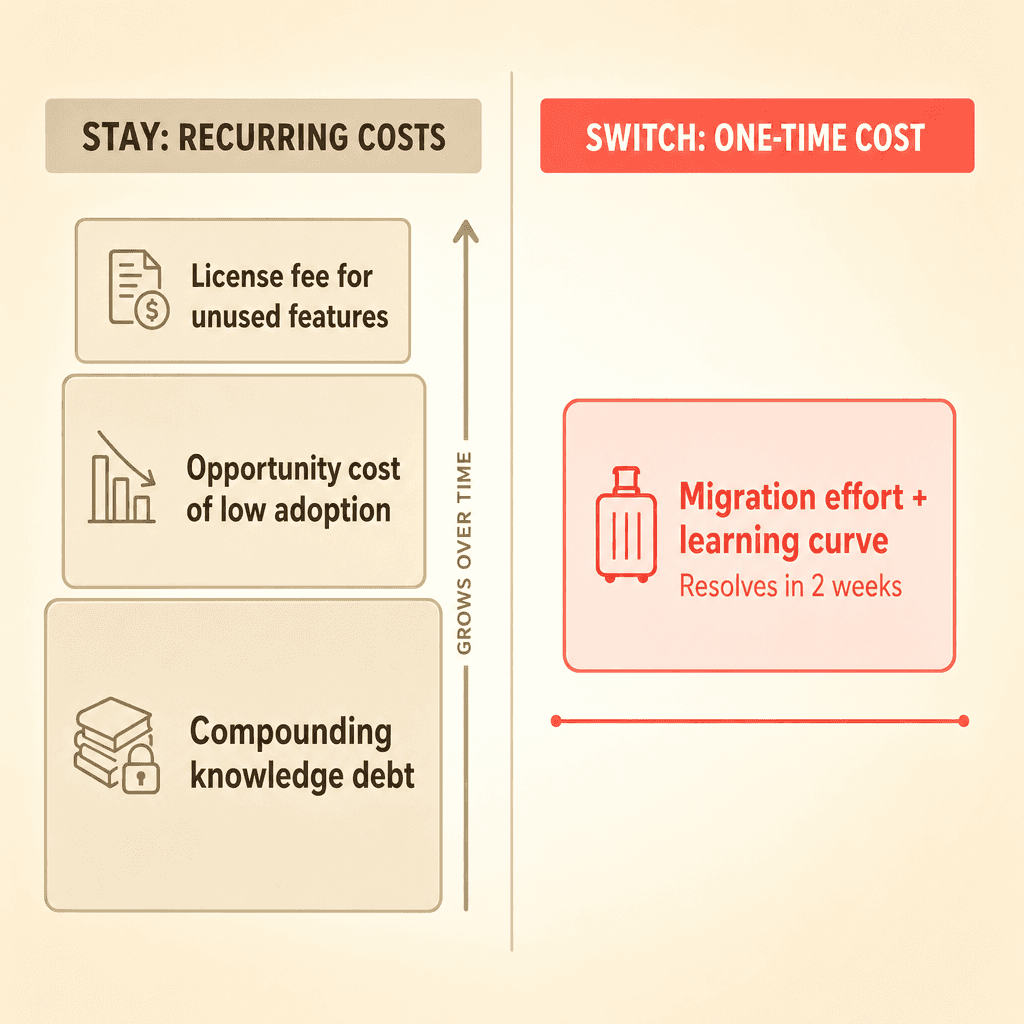
Teams that stay on an overbuilt CLM pay three ongoing costs. First, the license fee for capabilities nobody uses. Second, the opportunity cost of not having a system the team will actually adopt. Third, the compounding adoption debt as institutional knowledge about the tool walks out the door with departing employees.
Switching has a one-time cost in effort and learning curve. Staying has a recurring cost that grows every year. When you frame it that way, migration starts to look less like a risk and more like an overdue correction.
Why migration anxiety is overblown
Prospects consistently ask about implementation timelines and "what could go wrong." That anxiety is understandable. You invested months getting the current system live, and the thought of repeating that process is exhausting.
Here is the reality: a right-sized CLM can be implemented in one to two weeks, not three to six months. Implementation speed is a direct proxy for product complexity. A platform that goes live in days signals a fundamentally different design philosophy: configurable without being over-engineered, powerful enough for full lifecycle management without requiring dedicated system administrators.
The perceived risk of switching comes from two fears: data loss and workflow disruption. Both are addressable with the right tooling, which brings you to the playbook itself.
Your CLM migration playbook in three phases
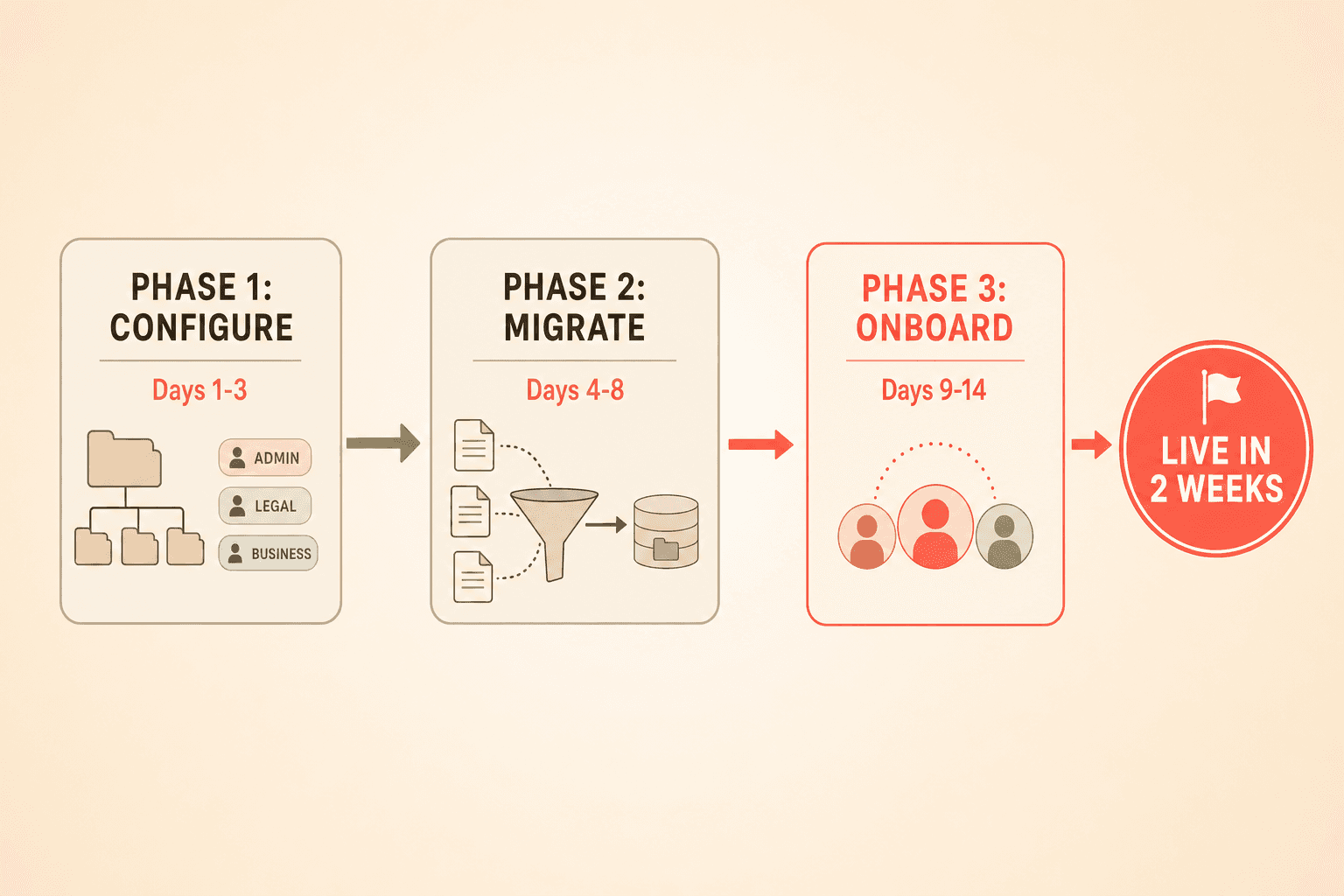
Phase one: configure your new environment (days one to three)
Before you move a single contract, set up the destination platform. This means defining your folder structure, creating user roles, and building your clause library.
Concord's contract clauses management feature lets you rebuild your playbook standards immediately. You can import pre-defined clause libraries and create custom clauses so your team has familiar language ready from day one. Role-based access control and organization switching through session management handle permissions for multi-entity or multi-department repositories.
The goal of this phase is a clean, configured environment ready to receive your contracts.
Phase two: migrate your contracts (days four to eight)
This is where most of the anxiety lives, and where reality diverges most from expectation. Your contracts are probably scattered across SharePoint, Google Drive, email inboxes, HubSpot, and a partially adopted legacy CLM. Any honest migration playbook must account for multiple sources of truth, not just a clean system-to-system handoff.
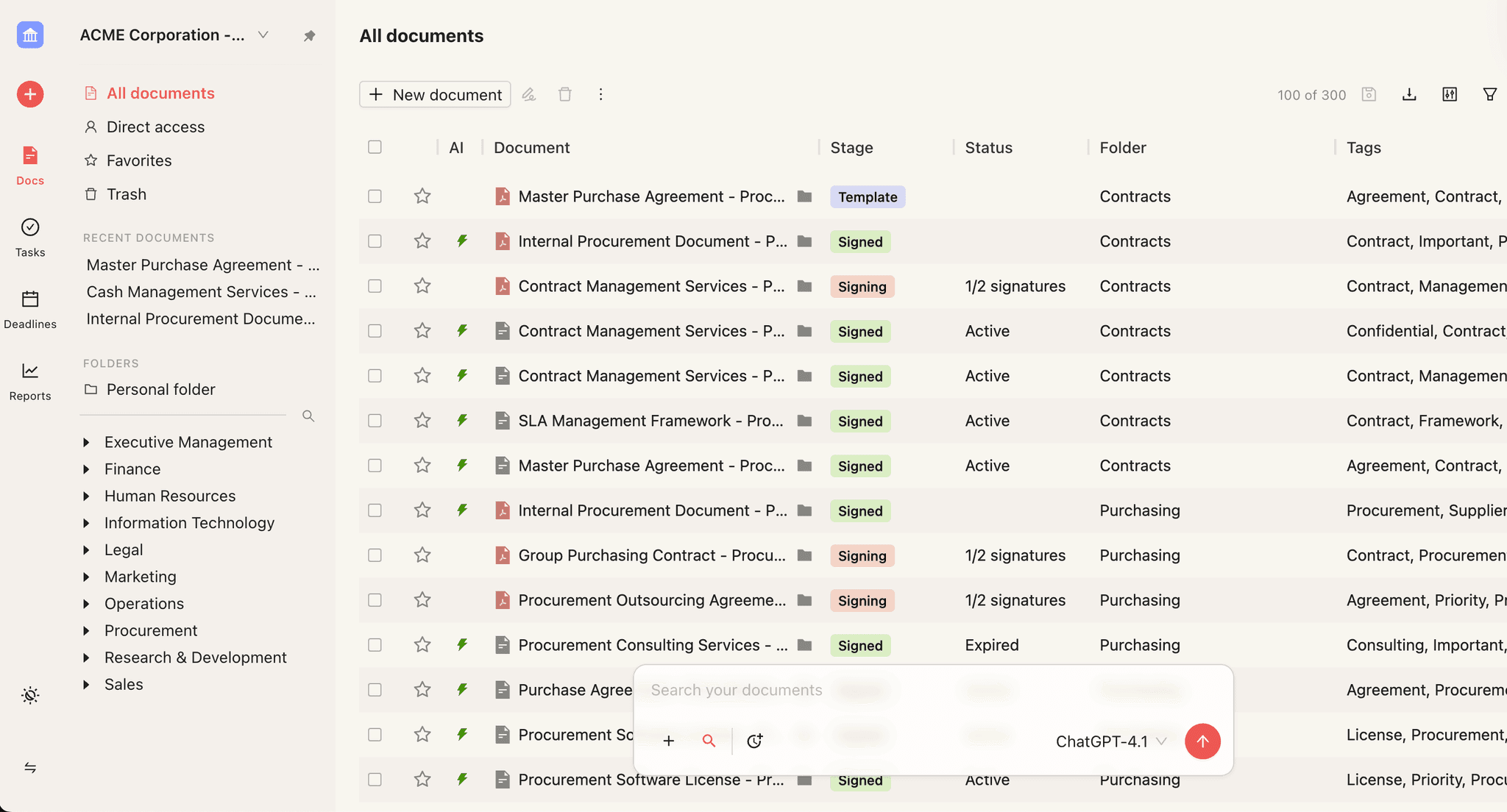
What about metadata? This is the biggest tactical fear about moving contract repositories. Nobody wants to re-key dates, party names, financials, and renewal terms by hand. Bulk upload combined with OCR and AI data extraction automatically populates those metadata fields. Scanned PDFs become searchable, extractable documents. The manual data-entry bottleneck simply disappears.
Phase three: onboard your users (days nine to fourteen)
Decision-makers frequently express reluctance about making their teams learn yet another system. If the new tool requires comparable ramp-up time, the switch is not worth it.
This is where right-sizing pays its biggest dividend. A platform built for small-to-midsize legal teams does not require weeks of training. Concord's user management feature lets admins invite team members and manage access with minimal friction. The interface is designed to feel intuitive from the first login, not after a certification course.
Plan two to three short training sessions focused on daily workflows: creating contracts, sending for signature, tracking deadlines. Skip the theoretical deep-tour of every feature. Your team will learn the rest organically because the tool is simple enough to explore without a manual.
Common pitfalls to avoid
Pitfall one: waiting for perfect internal alignment before starting. Migration problems typically come from delays caused by internal indecision. Pick a project lead, set a two-week target, and move.
Pitfall two: trying to replicate your old system exactly. Your old CLM had dozens of custom fields and workflows you never used. Do not rebuild them. Migrate what your team actually needs, not what someone configured three years ago.
Pitfall three: migrating everything at once. Start with active contracts and upcoming renewals. Archive older documents in a second pass. Batching reduces pressure and lets you validate the process before scaling it.
What to look for in a right-sized CLM
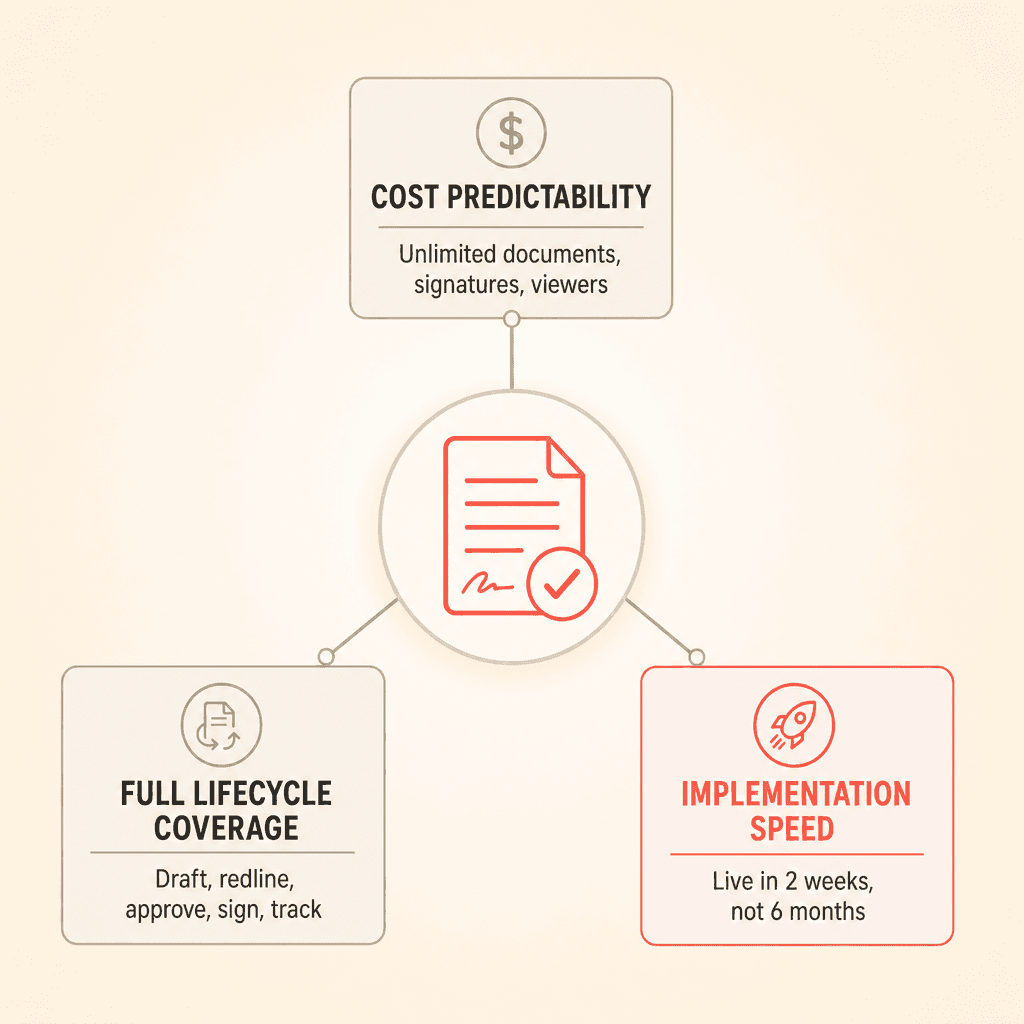
Cost predictability matters as much as total cost. Teams switching from enterprise CLMs value knowing that pricing will not creep upward with document volume or user count. Look for unlimited documents, unlimited signatures, and unlimited free viewers. These remove the variables that made your previous tool's cost structure unpredictable.
Full lifecycle coverage is non-negotiable. Right-sizing does not mean downgrading. You still need drafting, redlining, approval workflows, e-signatures, and obligation tracking. The difference is that every feature should be usable without a dedicated administrator.
Implementation speed tells you everything about long-term complexity. If a vendor cannot get you live in two weeks, that complexity will follow you through every onboarding, every workflow change, and every process update for as long as you use the tool.
Your contract lifecycle management platform cost a fortune to implement, took months to configure, and today your team uses maybe 10 percent of what it offers. The rest sits untouched, a monument to good intentions and mismatched expectations. If this sounds familiar, you are not alone, and this CLM migration guide will walk you through leaving that overbuilt tool behind in as little as two weeks.
Why overbuilt CLMs become shelfware
Enterprise CLM platforms are not bad products. They are mismatched products. When a five-person legal team buys a platform designed for a 50-person legal department, most features go untouched, setup drags on for months, and the tool becomes a glorified (and expensive) document repository.
Legal ops leaders frequently describe paying for platforms where they use roughly 10 percent of available functionality. The unused 90 percent creates cost drag and cognitive overhead without delivering proportional value.
Making matters worse, the person who championed the original purchase has often left the organization. Remaining users inherit a system they did not choose, do not fully understand, and cannot configure without outside help. This compounding adoption problem makes the overbuilt tool feel even more wasteful with each passing quarter.
The real cost of staying put
Teams that stay on an overbuilt CLM pay three ongoing costs. First, the license fee for capabilities nobody uses. Second, the opportunity cost of not having a system the team will actually adopt. Third, the compounding adoption debt as institutional knowledge about the tool walks out the door with departing employees.
Switching has a one-time cost in effort and learning curve. Staying has a recurring cost that grows every year. When you frame it that way, migration starts to look less like a risk and more like an overdue correction.
Why migration anxiety is overblown
Prospects consistently ask about implementation timelines and "what could go wrong." That anxiety is understandable. You invested months getting the current system live, and the thought of repeating that process is exhausting.
Here is the reality: a right-sized CLM can be implemented in one to two weeks, not three to six months. Implementation speed is a direct proxy for product complexity. A platform that goes live in days signals a fundamentally different design philosophy: configurable without being over-engineered, powerful enough for full lifecycle management without requiring dedicated system administrators.
The perceived risk of switching comes from two fears: data loss and workflow disruption. Both are addressable with the right tooling, which brings you to the playbook itself.
Your CLM migration playbook in three phases
Phase one: configure your new environment (days one to three)
Before you move a single contract, set up the destination platform. This means defining your folder structure, creating user roles, and building your clause library.
Concord's contract clauses management feature lets you rebuild your playbook standards immediately. You can import pre-defined clause libraries and create custom clauses so your team has familiar language ready from day one. Role-based access control and organization switching through session management handle permissions for multi-entity or multi-department repositories.
The goal of this phase is a clean, configured environment ready to receive your contracts.
Phase two: migrate your contracts (days four to eight)
This is where most of the anxiety lives, and where reality diverges most from expectation. Your contracts are probably scattered across SharePoint, Google Drive, email inboxes, HubSpot, and a partially adopted legacy CLM. Any honest migration playbook must account for multiple sources of truth, not just a clean system-to-system handoff.
What about metadata? This is the biggest tactical fear about moving contract repositories. Nobody wants to re-key dates, party names, financials, and renewal terms by hand. Bulk upload combined with OCR and AI data extraction automatically populates those metadata fields. Scanned PDFs become searchable, extractable documents. The manual data-entry bottleneck simply disappears.
Phase three: onboard your users (days nine to fourteen)
Decision-makers frequently express reluctance about making their teams learn yet another system. If the new tool requires comparable ramp-up time, the switch is not worth it.
This is where right-sizing pays its biggest dividend. A platform built for small-to-midsize legal teams does not require weeks of training. Concord's user management feature lets admins invite team members and manage access with minimal friction. The interface is designed to feel intuitive from the first login, not after a certification course.
Plan two to three short training sessions focused on daily workflows: creating contracts, sending for signature, tracking deadlines. Skip the theoretical deep-tour of every feature. Your team will learn the rest organically because the tool is simple enough to explore without a manual.
Common pitfalls to avoid
Pitfall one: waiting for perfect internal alignment before starting. Migration problems typically come from delays caused by internal indecision. Pick a project lead, set a two-week target, and move.
Pitfall two: trying to replicate your old system exactly. Your old CLM had dozens of custom fields and workflows you never used. Do not rebuild them. Migrate what your team actually needs, not what someone configured three years ago.
Pitfall three: migrating everything at once. Start with active contracts and upcoming renewals. Archive older documents in a second pass. Batching reduces pressure and lets you validate the process before scaling it.
What to look for in a right-sized CLM
Cost predictability matters as much as total cost. Teams switching from enterprise CLMs value knowing that pricing will not creep upward with document volume or user count. Look for unlimited documents, unlimited signatures, and unlimited free viewers. These remove the variables that made your previous tool's cost structure unpredictable.
Full lifecycle coverage is non-negotiable. Right-sizing does not mean downgrading. You still need drafting, redlining, approval workflows, e-signatures, and obligation tracking. The difference is that every feature should be usable without a dedicated administrator.
Implementation speed tells you everything about long-term complexity. If a vendor cannot get you live in two weeks, that complexity will follow you through every onboarding, every workflow change, and every process update for as long as you use the tool.
Need to know
Frequently Asked Questions

Take the "management" out
of contract management.
Customer Support
Legal
Compare
Resources
Customer Support
Company
Legal
Compare
Resources
Customer Support
Company
Legal
Compare
© 2025 Concord. All rights reserved.