Contract Negotiation Search by Party, Status, and Amount
Contract Negotiation Search by Party, Status, and Amount
Contract Negotiation Search by Party, Status, and Amount
Contract Negotiation Search by Party, Status, and Amount
contract negotiation search, contract pipeline management, filter contracts by vendor, negotiation status tracking, contract value reporting, search contracts by counterparty, agreement stage filter, contract repository search

Every week, the same questions come up in legal and procurement teams. Which negotiations with this vendor are stuck in legal review? Which high-value agreements are close to signature?
If your contracts live in a shared drive or a basic repository, each question becomes a manual hunt through folders and file names. Concord’s advanced contract negotiation search changes that math. You can filter your entire portfolio by party, workflow stage, and financial value, then export the result for anyone who needs it.
This walkthrough shows you exactly how, step by step.
Key takeaways
Concord extracts party names, agreement value, and lifecycle dates so filters stay useful without manual tagging.
Party, stage, and value filters can be stacked to isolate the exact agreements behind a renewal, budget review, audit, or escalation.
Stage filters turn pipeline reviews from memory-based status checks into a visible list of agreements by draft, negotiation, signing, or completed stage.
The filtered result can be exported to CSV or Excel for finance, procurement, audit, or other stakeholders.
Why contract negotiation search beats folder digging
Most contract storage is write-only. Documents go in, and getting useful answers back out requires either a good memory or opening files one at a time. A filterable repository works differently, and good contract repository management starts with being able to ask questions of your data.
Concord pairs a fast full-text search engine built with structured filters, so you can search the way you think. Type a plain-language question like “show me all contracts expiring this year” and you get a filtered result set, not a list of file names. Business users who would never build a structured query can still self-serve answers.
The filters work because Concord’s AI does the data entry. Party names, Total Agreement Value, and lifecycle dates get pulled from each document automatically, so you skip the manual tagging that makes other systems unreliable. Learn more about agreement intelligence and AI-assisted contract data extraction.
Filter contracts by party and vendor
Open the Agreements or Documents view and open the filter panel. Select one or more parties from the Party Library. Multi-select works, and each selected party appears as a readable label so you can confirm your filter at a glance.
Party filtering is the organizational backbone for counterparty work. Pull every agreement with a vendor before a renewal call. Measure your total exposure to a single entity across subsidiaries.
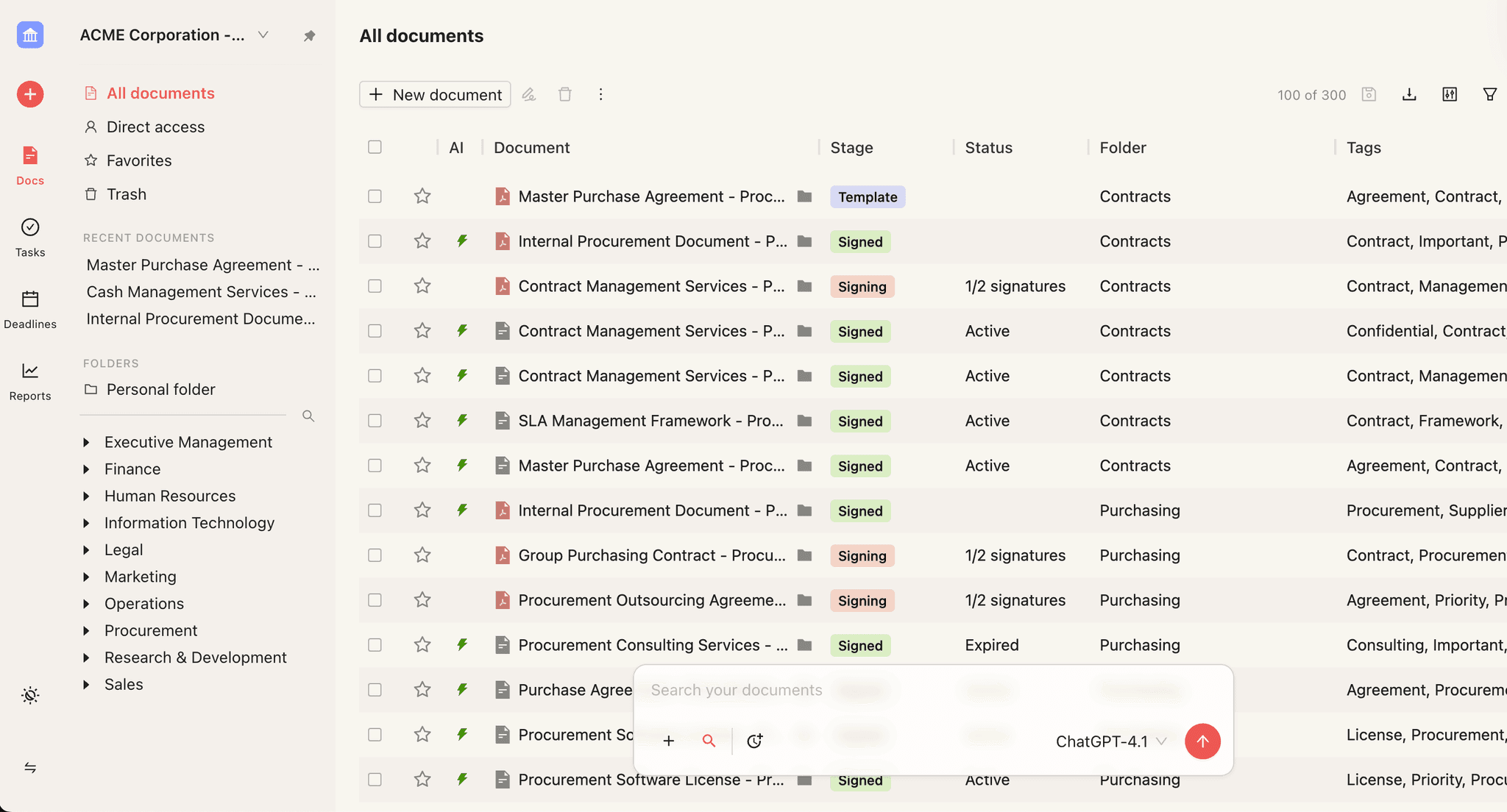
The same view supports heavier lifts, like assembling a complete counterparty list for diligence or vendor consolidation. The Party Library, which Concord’s AI populates as documents arrive, becomes your working vendor and customer master list. Parties also appear directly in document tables, so you can scan counterparties without opening files.
If renewals drive most of your counterparty questions, see how contract deadlines support renewal tracking, alerts, and reports.
Track negotiation status across your pipeline
Stage filters separate agreements by draft, negotiation, signing, or completed stage, so you can see where work is concentrated.
Next, layer on a stage filter. Agreement Stage Filtering covers draft, negotiation, signing, and completed, and Document Stage Filtering gives you the same control at the document level. The two work side by side.
Status filtering is where pipeline reviews change character. Filter to agreements in negotiation, sort by age, and the bottlenecks identify themselves: a redline sitting in an inbox, an approval chain that stalled, or a signature request nobody noticed.
Legal ops leaders frequently describe weekly reviews that ran on memory and follow-up emails before status filters. Multi-department reviews, where a contract moves from legal to finance to executive sign-off, are the scenario they mention most. A stage filter turns “let me check on that” into “here is what is blocked and why.”
For the bigger picture on stage-based workflows, see how contract management software connects each step of the lifecycle.
Report on contract value with amount filters
Amount filters turn the financial terms already inside your agreements into an immediate exposure or spend view.
Now add a value threshold. The Total Agreement Value filter lets you set a minimum, a maximum, or both, so a question like “everything over $100,000” takes seconds instead of a spreadsheet project.
Value filtering is the bridge between legal and finance. Legal thinks in obligations and risk, while finance thinks in dollar exposure and budget categories. When a CFO asks about committed spend with a vendor category, or an auditor asks for every agreement above a materiality threshold, the answer should be a filter.
Teams consistently describe value thresholds as one of the most-used filters during budget reviews and audit prep. The dollar data already exists inside your contracts, and automatic extraction simply makes it searchable.
Combine all three filters for the real answer
Each filter on its own answers one kind of question. A party filter gives you a vendor list, a stage filter gives you a pipeline snapshot, and a value filter gives you a financial report.
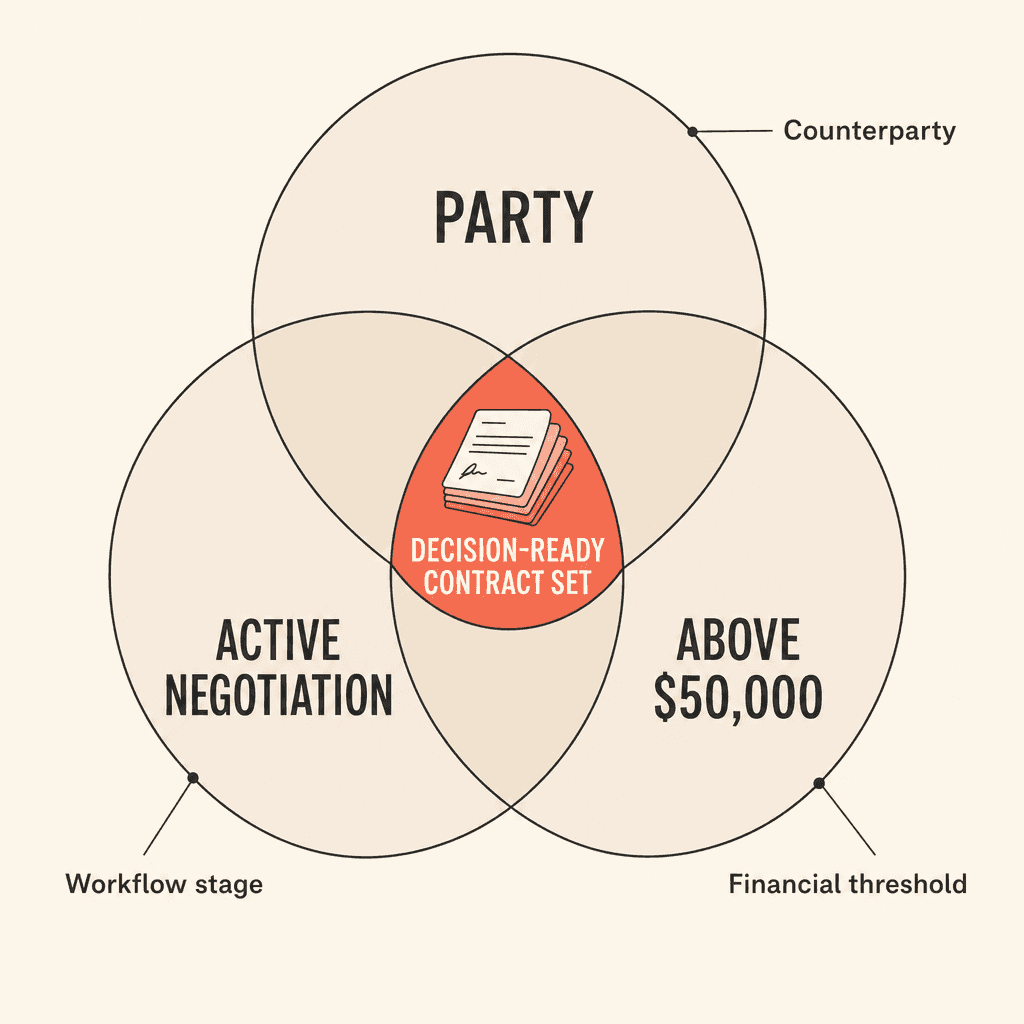
The real payoff shows up when you stack them. “Show me every agreement with this vendor, in active negotiation, above $50,000” is one filtered view. It is also exactly the working set you need for a renewal decision, a budget conversation, or an escalation.
Each added dimension removes noise. You stop scanning long lists and start looking at the precise subset that matters for the decision in front of you.
Filter | Question answered | Typical use |
|---|---|---|
Party | Which agreements involve this counterparty? | Renewal prep and vendor consolidation |
Stage | Where is each agreement in the workflow? | Pipeline reviews and bottleneck detection |
Value | Which agreements cross a financial threshold? | Budget reviews and audit preparation |
Combined | Which specific agreements need attention now? | Escalations, renewals, and exposure reporting |
See how Concord narrows a live contract portfolio to the agreements that need attention. Book a demo to explore the filters with your own workflow.
Export and share the filtered result
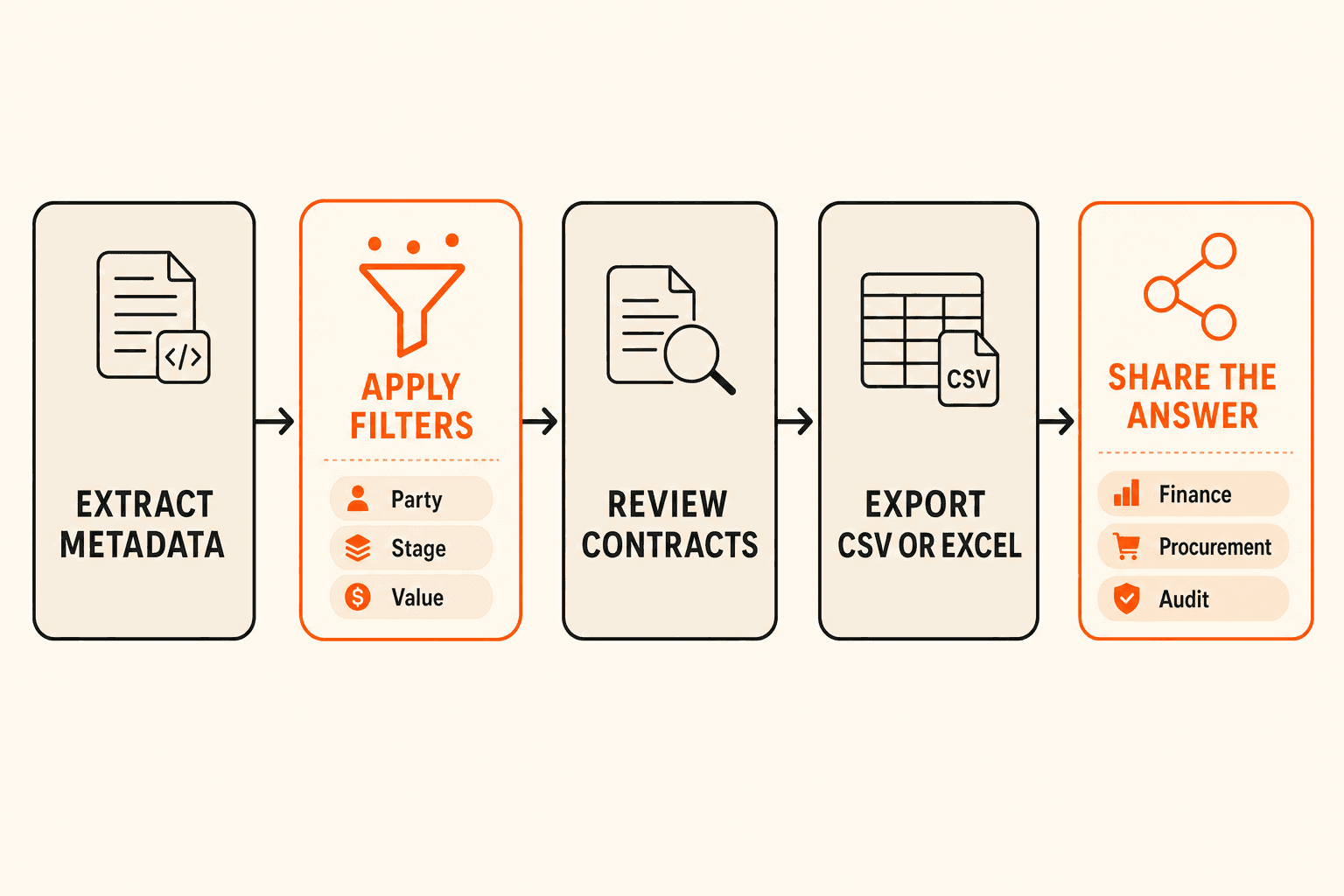
Once your filters return the right set, Agreement Export sends the list to Excel or CSV. The same view you used for analysis becomes the file you send to your CFO, your auditor, or your procurement lead.
This closes the loop from find to share. Weekly pipeline reports, audit support schedules, and vendor exposure summaries all come from the same motion: filter, review, export.
Three tips for cleaner filter results
1. Consolidate duplicate parties once. AI extraction occasionally creates near-duplicate entries from punctuation differences in source documents, like “Acme, Inc.” versus “Acme Inc.” Merge them in the Party Library during setup, and your party filters stay accurate from then on.
2. Know how folders and subfolders behave. A filter applied inside a parent folder covers only the documents stored directly in that folder, not files in subfolders. If you keep a deeply nested structure, use tags as a cross-folder filter layer.
3. Let AI keep the metadata current. Because extraction is automatic, filters stay useful as new contracts arrive. You avoid the “garbage in, garbage out” problem that comes with manual metadata entry in other systems.
Ready to turn your contract repository into a live pipeline? Book a demo and see Concord’s contract negotiation search in action.
Every week, the same questions come up in legal and procurement teams. Which negotiations with this vendor are stuck in legal review? Which high-value agreements are close to signature?
If your contracts live in a shared drive or a basic repository, each question becomes a manual hunt through folders and file names. Concord’s advanced contract negotiation search changes that math. You can filter your entire portfolio by party, workflow stage, and financial value, then export the result for anyone who needs it.
This walkthrough shows you exactly how, step by step.
Key takeaways
Concord extracts party names, agreement value, and lifecycle dates so filters stay useful without manual tagging.
Party, stage, and value filters can be stacked to isolate the exact agreements behind a renewal, budget review, audit, or escalation.
Stage filters turn pipeline reviews from memory-based status checks into a visible list of agreements by draft, negotiation, signing, or completed stage.
The filtered result can be exported to CSV or Excel for finance, procurement, audit, or other stakeholders.
Why contract negotiation search beats folder digging
Most contract storage is write-only. Documents go in, and getting useful answers back out requires either a good memory or opening files one at a time. A filterable repository works differently, and good contract repository management starts with being able to ask questions of your data.
Concord pairs a fast full-text search engine built with structured filters, so you can search the way you think. Type a plain-language question like “show me all contracts expiring this year” and you get a filtered result set, not a list of file names. Business users who would never build a structured query can still self-serve answers.
The filters work because Concord’s AI does the data entry. Party names, Total Agreement Value, and lifecycle dates get pulled from each document automatically, so you skip the manual tagging that makes other systems unreliable. Learn more about agreement intelligence and AI-assisted contract data extraction.
Filter contracts by party and vendor
Open the Agreements or Documents view and open the filter panel. Select one or more parties from the Party Library. Multi-select works, and each selected party appears as a readable label so you can confirm your filter at a glance.
Party filtering is the organizational backbone for counterparty work. Pull every agreement with a vendor before a renewal call. Measure your total exposure to a single entity across subsidiaries.
The same view supports heavier lifts, like assembling a complete counterparty list for diligence or vendor consolidation. The Party Library, which Concord’s AI populates as documents arrive, becomes your working vendor and customer master list. Parties also appear directly in document tables, so you can scan counterparties without opening files.
If renewals drive most of your counterparty questions, see how contract deadlines support renewal tracking, alerts, and reports.
Track negotiation status across your pipeline
Stage filters separate agreements by draft, negotiation, signing, or completed stage, so you can see where work is concentrated.
Next, layer on a stage filter. Agreement Stage Filtering covers draft, negotiation, signing, and completed, and Document Stage Filtering gives you the same control at the document level. The two work side by side.
Status filtering is where pipeline reviews change character. Filter to agreements in negotiation, sort by age, and the bottlenecks identify themselves: a redline sitting in an inbox, an approval chain that stalled, or a signature request nobody noticed.
Legal ops leaders frequently describe weekly reviews that ran on memory and follow-up emails before status filters. Multi-department reviews, where a contract moves from legal to finance to executive sign-off, are the scenario they mention most. A stage filter turns “let me check on that” into “here is what is blocked and why.”
For the bigger picture on stage-based workflows, see how contract management software connects each step of the lifecycle.
Report on contract value with amount filters
Amount filters turn the financial terms already inside your agreements into an immediate exposure or spend view.
Now add a value threshold. The Total Agreement Value filter lets you set a minimum, a maximum, or both, so a question like “everything over $100,000” takes seconds instead of a spreadsheet project.
Value filtering is the bridge between legal and finance. Legal thinks in obligations and risk, while finance thinks in dollar exposure and budget categories. When a CFO asks about committed spend with a vendor category, or an auditor asks for every agreement above a materiality threshold, the answer should be a filter.
Teams consistently describe value thresholds as one of the most-used filters during budget reviews and audit prep. The dollar data already exists inside your contracts, and automatic extraction simply makes it searchable.
Combine all three filters for the real answer
Each filter on its own answers one kind of question. A party filter gives you a vendor list, a stage filter gives you a pipeline snapshot, and a value filter gives you a financial report.
The real payoff shows up when you stack them. “Show me every agreement with this vendor, in active negotiation, above $50,000” is one filtered view. It is also exactly the working set you need for a renewal decision, a budget conversation, or an escalation.
Each added dimension removes noise. You stop scanning long lists and start looking at the precise subset that matters for the decision in front of you.
Filter | Question answered | Typical use |
|---|---|---|
Party | Which agreements involve this counterparty? | Renewal prep and vendor consolidation |
Stage | Where is each agreement in the workflow? | Pipeline reviews and bottleneck detection |
Value | Which agreements cross a financial threshold? | Budget reviews and audit preparation |
Combined | Which specific agreements need attention now? | Escalations, renewals, and exposure reporting |
See how Concord narrows a live contract portfolio to the agreements that need attention. Book a demo to explore the filters with your own workflow.
Export and share the filtered result
Once your filters return the right set, Agreement Export sends the list to Excel or CSV. The same view you used for analysis becomes the file you send to your CFO, your auditor, or your procurement lead.
This closes the loop from find to share. Weekly pipeline reports, audit support schedules, and vendor exposure summaries all come from the same motion: filter, review, export.
Three tips for cleaner filter results
1. Consolidate duplicate parties once. AI extraction occasionally creates near-duplicate entries from punctuation differences in source documents, like “Acme, Inc.” versus “Acme Inc.” Merge them in the Party Library during setup, and your party filters stay accurate from then on.
2. Know how folders and subfolders behave. A filter applied inside a parent folder covers only the documents stored directly in that folder, not files in subfolders. If you keep a deeply nested structure, use tags as a cross-folder filter layer.
3. Let AI keep the metadata current. Because extraction is automatic, filters stay useful as new contracts arrive. You avoid the “garbage in, garbage out” problem that comes with manual metadata entry in other systems.
Ready to turn your contract repository into a live pipeline? Book a demo and see Concord’s contract negotiation search in action.
Need to know
Frequently Asked Questions

Take the "management" out
of contract management.
Customer Support
Legal
Compare
Resources
Customer Support
Company
Legal
Compare
Resources
Customer Support
Company
Legal
Compare
© 2025 Concord. All rights reserved.