Departmental Contract Management Without Silos
Departmental Contract Management Without Silos
Departmental Contract Management Without Silos
Departmental Contract Management Without Silos
departmental contract management, contract workspaces, access control, multi-entity contract management, contract repository

When your company spans several departments, entities, or subsidiaries, contract access turns into a tug of war. Lock files down and people route around the system. Open files up and sensitive agreements appear where they should not.
Departmental contract management ends that tug of war. Give each department its own workspace with real boundaries while every contract stays in one searchable repository. This post explains why the usual setups fail, what a workspace model looks like, and how to structure yours.
Key takeaways
Departmental workspaces protect sensitive contracts without splitting the repository into disconnected systems.
Folder-only structures break down when one agreement belongs to several departments or entities.
Groups and role-based permissions make access easier to maintain as responsibilities and headcount change.
Logical separation preserves company-wide reporting for authorized leaders while each user sees only their permitted scope.
What is departmental contract management?
Departmental contract management organizes agreements in distinct workspaces for departments, entities, or subsidiaries within one platform. Each workspace applies its own access rules, folders, groups, and workflows, while authorized administrators retain search and reporting across the complete contract repository.
The false binary of contract access
Most organizations pick one of two setups, and both backfire.
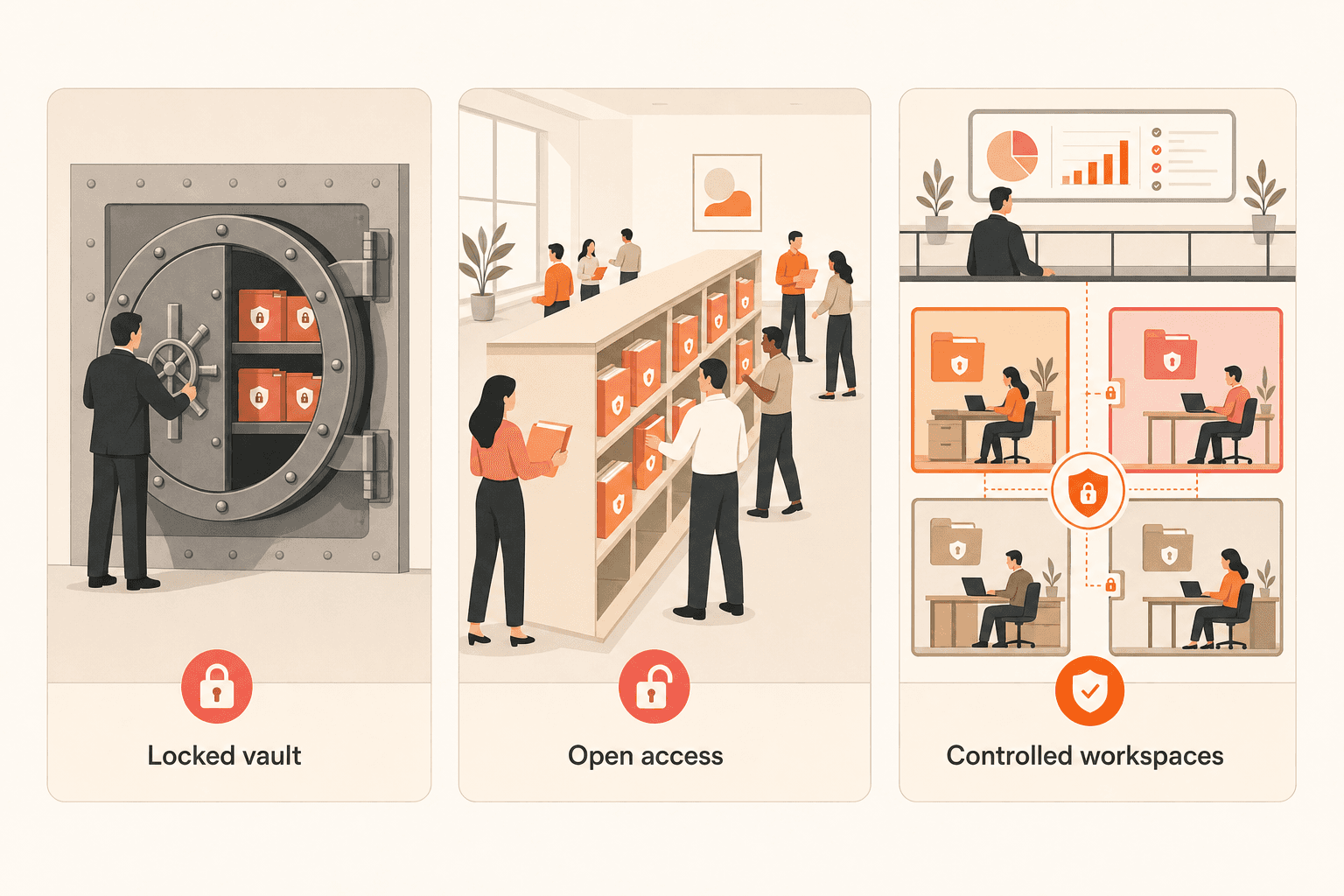
The vault approach puts contracts behind a small group of gatekeepers. Every request becomes a ticket, and the contracting team spends its day searching and forwarding files. Departments respond by keeping their own copies, which recreates the silo the central system was meant to remove.
The open-plan approach hands everyone access to everything. That works until a sensitive HR agreement shows up in the wrong search results. It also fails when one subsidiary’s pricing terms reach a team operating under a different entity.
The choice feels forced because many tools treat access as an all-or-nothing setting. The real question is whether your system can draw boundaries that match how your organization actually works.
Model | Access effect | Reporting effect |
|---|---|---|
Locked vault | Gatekeepers handle every request | Central view, slow access |
Open access | Everyone sees everything | Shared view, weak privacy |
Controlled workspaces | Teams see their permitted scope | Authorized portfolio view |
Why folder hierarchies break down
Folders carry an assumption that fails in multi-department companies: every document belongs in exactly one place. Real contracts rarely cooperate.
A master services agreement might be drafted by legal, owned by procurement, referenced by finance, and relevant to two subsidiaries. A folder tree forces you to pick one home for that file. Shortcuts, copies, and ad hoc sharing follow, and each workaround weakens your permission model.
What teams need is a workspace layer above folders, one that defines who operates in which context, combined with granular controls at the folder and document level. Strong folder management still matters, but it works best inside a structure that can express overlapping responsibilities.
The silo tax in multi-entity reporting
Separate environments protect access, but logical workspaces inside one platform preserve both boundaries and portfolio reporting.
Full separation into distinct environments gives you clean boundaries and quietly destroys portfolio visibility. Leadership loses the ability to answer basic questions: How many active vendor agreements do you have? Which contracts renew next quarter across every department? What is total contract spend?
Teams in this position describe a forced trade-off between organizational clarity and cross-organizational answers. Contracts scattered across shared drives, personal drives, legacy tools, and email make the problem worse because no unified search exists at all.
An alternative exists: draw boundaries inside a single platform. Separate data logically and keep it physically unified. Access controls determine what each person sees, while reporting spans the full dataset. For groups juggling subsidiaries, this model removes the trade-off instead of relabeling it.
Why access design now shapes buying decisions
Across platform evaluations, departmental access segregation appears as a core requirement next to search, e-signature, and renewal tracking. It is not a post-purchase detail. It determines whether a platform makes the shortlist.
Procurement, finance, HR, and operations teams all need contract access, and each group brings different permission requirements. A platform that cannot model that complexity gets eliminated early. Buyers should test both permission depth and contract management security before committing to a platform.
What strong departmental contract management looks like
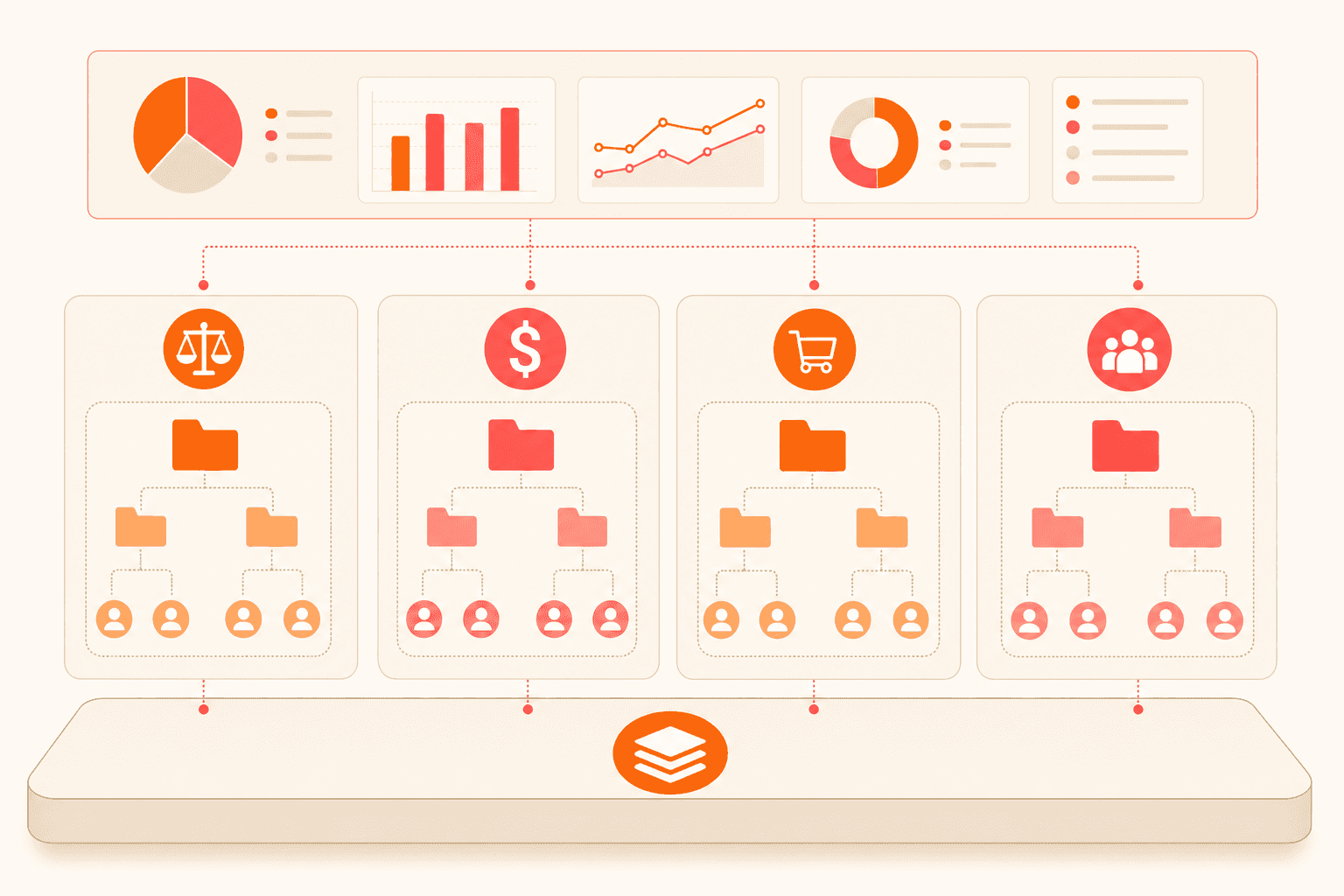
Strong departmental contract management combines isolated workspaces, granular permissions, scoped workflows, and shared reporting in one platform.
Look for these building blocks:
Separate workspaces on a single instance. Each department, business unit, or subsidiary operates in its own workspace with complete data isolation while your organization still runs one platform.
Boundaries enforced at the data level. Users in one department cannot open contracts in another unless you grant access.
One unified document workspace. Each user sees what permissions allow, and the underlying repository stays unified.
Folder-level controls. Hierarchical folders let you share contracts with specific teams or individuals inside workspace boundaries.
Groups instead of one-off permissions. Administrators map groups to departments or roles, which keeps role-based access manageable as headcount changes.
Workflows scoped to the right unit. Approval routing and review chains respect departmental boundaries.
Automatic routing to the right workspace. Tenant identification sends users to their correct context through external system integration.
Workspaces for outside parties. External tenant management creates isolated workspaces for outside organizations when needed.
Concord gives document permissions through folders. Teams can separate documents so only selected users have access, determine which users receive deadline notifications, build main folders and subfolders, add teams to those folders, and limit access to groups such as finance or executives.
See how Concord can model your departmental access rules while preserving shared search and reporting. Request a demo.
How to structure without overthinking it
A recurring question is whether to organize by department, entity, client, jurisdiction, or a combination. Teams worry about both extremes. Too broad turns the repository into clutter. Too granular makes the structure itself unmanageable.
Start by mapping workspaces to your reporting lines, then use folders for departments or categories within each workspace. Tags can handle cross-cutting labels such as region or contract type. Keep the structure shallow and let search handle the rest.
Watch the tagging burden. When labels depend on manual entry, quality drifts and filters become unreliable. A dependable contract repository favors structural organization that does not depend on every person making the right labeling choice every time.
Get boundaries without walls
You no longer have to choose between locking contracts away and giving everyone access to everything. Workspaces let you control exactly who sees what by department, entity, or role, while one repository keeps every agreement searchable. See how Concord workspaces fit your organization.
When your company spans several departments, entities, or subsidiaries, contract access turns into a tug of war. Lock files down and people route around the system. Open files up and sensitive agreements appear where they should not.
Departmental contract management ends that tug of war. Give each department its own workspace with real boundaries while every contract stays in one searchable repository. This post explains why the usual setups fail, what a workspace model looks like, and how to structure yours.
Key takeaways
Departmental workspaces protect sensitive contracts without splitting the repository into disconnected systems.
Folder-only structures break down when one agreement belongs to several departments or entities.
Groups and role-based permissions make access easier to maintain as responsibilities and headcount change.
Logical separation preserves company-wide reporting for authorized leaders while each user sees only their permitted scope.
What is departmental contract management?
Departmental contract management organizes agreements in distinct workspaces for departments, entities, or subsidiaries within one platform. Each workspace applies its own access rules, folders, groups, and workflows, while authorized administrators retain search and reporting across the complete contract repository.
The false binary of contract access
Most organizations pick one of two setups, and both backfire.
The vault approach puts contracts behind a small group of gatekeepers. Every request becomes a ticket, and the contracting team spends its day searching and forwarding files. Departments respond by keeping their own copies, which recreates the silo the central system was meant to remove.
The open-plan approach hands everyone access to everything. That works until a sensitive HR agreement shows up in the wrong search results. It also fails when one subsidiary’s pricing terms reach a team operating under a different entity.
The choice feels forced because many tools treat access as an all-or-nothing setting. The real question is whether your system can draw boundaries that match how your organization actually works.
Model | Access effect | Reporting effect |
|---|---|---|
Locked vault | Gatekeepers handle every request | Central view, slow access |
Open access | Everyone sees everything | Shared view, weak privacy |
Controlled workspaces | Teams see their permitted scope | Authorized portfolio view |
Why folder hierarchies break down
Folders carry an assumption that fails in multi-department companies: every document belongs in exactly one place. Real contracts rarely cooperate.
A master services agreement might be drafted by legal, owned by procurement, referenced by finance, and relevant to two subsidiaries. A folder tree forces you to pick one home for that file. Shortcuts, copies, and ad hoc sharing follow, and each workaround weakens your permission model.
What teams need is a workspace layer above folders, one that defines who operates in which context, combined with granular controls at the folder and document level. Strong folder management still matters, but it works best inside a structure that can express overlapping responsibilities.
The silo tax in multi-entity reporting
Separate environments protect access, but logical workspaces inside one platform preserve both boundaries and portfolio reporting.
Full separation into distinct environments gives you clean boundaries and quietly destroys portfolio visibility. Leadership loses the ability to answer basic questions: How many active vendor agreements do you have? Which contracts renew next quarter across every department? What is total contract spend?
Teams in this position describe a forced trade-off between organizational clarity and cross-organizational answers. Contracts scattered across shared drives, personal drives, legacy tools, and email make the problem worse because no unified search exists at all.
An alternative exists: draw boundaries inside a single platform. Separate data logically and keep it physically unified. Access controls determine what each person sees, while reporting spans the full dataset. For groups juggling subsidiaries, this model removes the trade-off instead of relabeling it.
Why access design now shapes buying decisions
Across platform evaluations, departmental access segregation appears as a core requirement next to search, e-signature, and renewal tracking. It is not a post-purchase detail. It determines whether a platform makes the shortlist.
Procurement, finance, HR, and operations teams all need contract access, and each group brings different permission requirements. A platform that cannot model that complexity gets eliminated early. Buyers should test both permission depth and contract management security before committing to a platform.
What strong departmental contract management looks like
Strong departmental contract management combines isolated workspaces, granular permissions, scoped workflows, and shared reporting in one platform.
Look for these building blocks:
Separate workspaces on a single instance. Each department, business unit, or subsidiary operates in its own workspace with complete data isolation while your organization still runs one platform.
Boundaries enforced at the data level. Users in one department cannot open contracts in another unless you grant access.
One unified document workspace. Each user sees what permissions allow, and the underlying repository stays unified.
Folder-level controls. Hierarchical folders let you share contracts with specific teams or individuals inside workspace boundaries.
Groups instead of one-off permissions. Administrators map groups to departments or roles, which keeps role-based access manageable as headcount changes.
Workflows scoped to the right unit. Approval routing and review chains respect departmental boundaries.
Automatic routing to the right workspace. Tenant identification sends users to their correct context through external system integration.
Workspaces for outside parties. External tenant management creates isolated workspaces for outside organizations when needed.
Concord gives document permissions through folders. Teams can separate documents so only selected users have access, determine which users receive deadline notifications, build main folders and subfolders, add teams to those folders, and limit access to groups such as finance or executives.
See how Concord can model your departmental access rules while preserving shared search and reporting. Request a demo.
How to structure without overthinking it
A recurring question is whether to organize by department, entity, client, jurisdiction, or a combination. Teams worry about both extremes. Too broad turns the repository into clutter. Too granular makes the structure itself unmanageable.
Start by mapping workspaces to your reporting lines, then use folders for departments or categories within each workspace. Tags can handle cross-cutting labels such as region or contract type. Keep the structure shallow and let search handle the rest.
Watch the tagging burden. When labels depend on manual entry, quality drifts and filters become unreliable. A dependable contract repository favors structural organization that does not depend on every person making the right labeling choice every time.
Get boundaries without walls
You no longer have to choose between locking contracts away and giving everyone access to everything. Workspaces let you control exactly who sees what by department, entity, or role, while one repository keeps every agreement searchable. See how Concord workspaces fit your organization.
Need to know
Frequently Asked Questions

Take the "management" out
of contract management.
Customer Support
Legal
Compare
Resources
Customer Support
Company
Legal
Compare
Resources
Customer Support
Company
Legal
Compare
© 2025 Concord. All rights reserved.