Real estate contract management software: buyer’s guide
Real estate contract management software: buyer’s guide
Real estate contract management software: buyer’s guide
Real estate contract management software: buyer’s guide
real estate contract management software, lease renewal tracking, vendor COI tracking, contract deadline management, property contract management

A missed termination notice locks you into another year on a vendor agreement you meant to cancel. A lapsed certificate of insurance leaves a contractor working on your property without coverage. For property teams juggling leases, vendor agreements, and compliance deadlines across dozens or hundreds of locations, these misses are expensive and common.
Real estate contract management software replaces spreadsheets and scattered calendar reminders with systematic tracking of renewals, notice windows, and COI expirations across your full portfolio. This guide covers the deadline types that matter most, the capabilities that separate real date control from basic reminders, and the criteria that predict whether a platform will fit your portfolio.
Key takeaways
Four deadline types need separate tracking: lease renewals, termination notices, vendor COI expirations, and key term events each carry their own alert cadence.
Vendor certificates expire on their own timeline, independent of the contract term, so COI tracking needs its own alerts and an exception path for lapsed coverage.
Portfolio-wide filtered views, not file-by-file review, let a team prioritize renewals across dozens or hundreds of properties.
Contract lifecycle dates and financial transactions belong to different systems; decide which one wins before you connect them.
Weight vendors on portfolio fit, workflow coverage, integration, security, implementation effort, and total cost of ownership, not on a feature demo alone.
What is real estate contract management software?
Real estate contract management software is a system that tracks lease renewals, termination notice windows, vendor certificates of insurance, and other portfolio deadlines in one place, with alerts, saved filtered views, and audit trails. It replaces spreadsheets and calendar reminders with structured records tied to each property, entity, and vendor relationship.
Why spreadsheets break down across property portfolios
Property teams managing contracts across multiple legal entities and hundreds of properties often describe the same frustration: systems that force a single-company view. You need to categorize and filter by asset, entity, region, or property to see what actually requires attention. A flat list of contracts cannot answer portfolio questions.
Lease abstraction adds a second trap. Many teams treat abstraction as a one-time project: extract key dates, load them into a system, move on. Obligations actually shift constantly through amendments, renewals, side letters, and estoppel certificates.
When abstracted dates drift from source documents, your portfolio data turns into a liability. The value sits in ongoing accuracy as the portfolio evolves, not in the speed of the initial extraction. Any system you choose should preserve traceability back to source documents and refresh abstracted dates when underlying terms change.
What real estate contract management software should track
Date control beats date reminders. A calendar entry reading “lease expires March 31” tells you a deadline exists. A record reading “90-day termination notice due December 31 to stop auto-renewal” tells you what action to take, who owns it, and what a miss costs.
Four deadline types deserve distinct tracking:
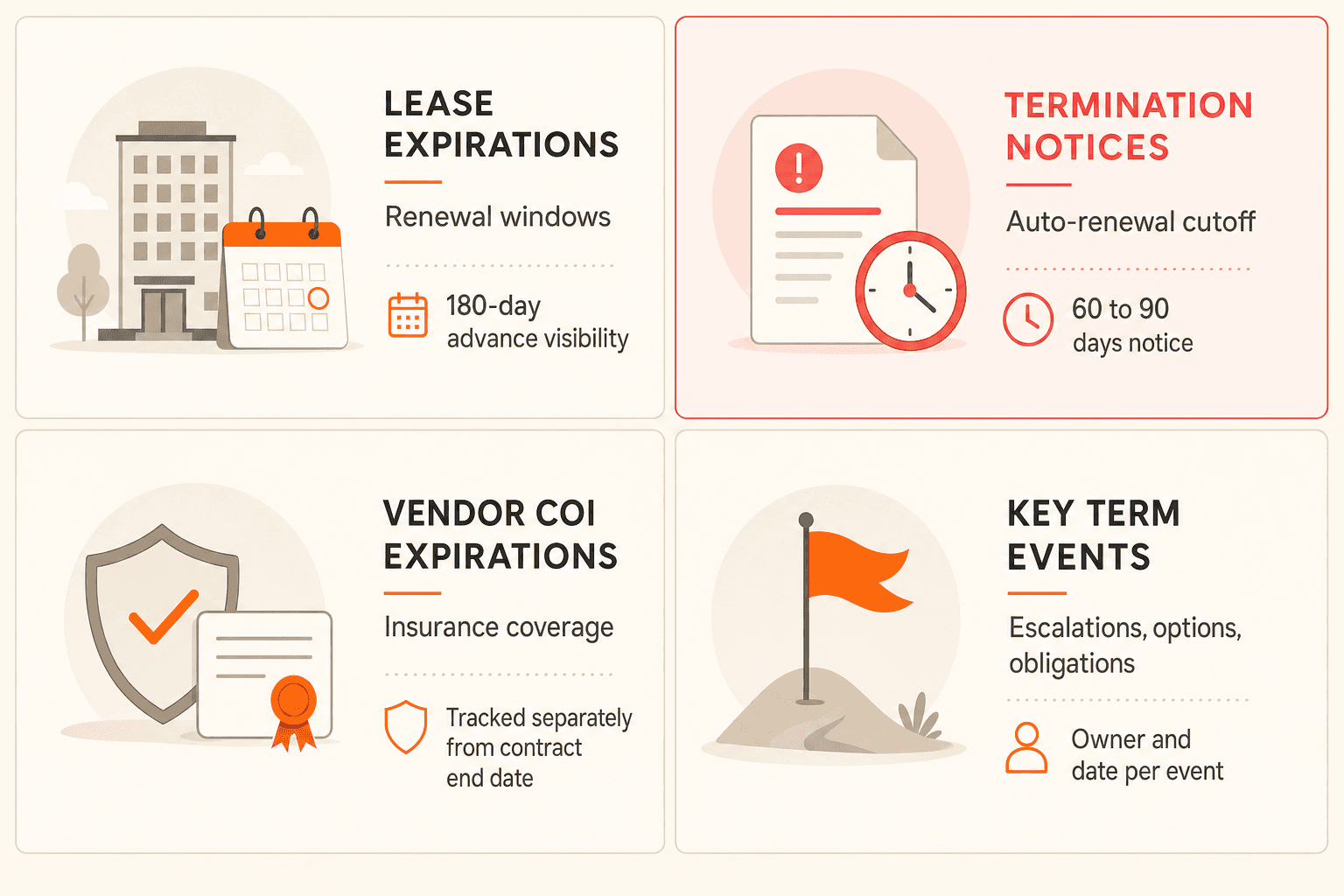
Lease expirations and renewal windows. Advance visibility of 180 days gives you room to negotiate rather than react.
Termination notice deadlines. Vendor agreements commonly require 60 to 90 days of advance notice to prevent auto-renewal. Property teams describe missed windows as a recurring pain that locks them into unwanted extensions.
Vendor COI expirations. A vendor contract may run for years while the insurance certificate renews annually. Track certificates as their own deadline type with their own alerts, independent of contract end dates.
Key term events. Rent escalations, option windows, and milestone obligations each carry dates and owners.
Vendor COI tracking deserves special attention. Teams consistently treat certificate expiration as more urgent than the underlying contract end date, because an expired certificate creates uninsured liability while the contract itself stays current. A PDF stored in a contract record does nothing on its own; you need expiration alerts, coverage checks, and an exception path when a vendor’s insurance lapses or falls short of requirements.
See certificate tracking in action
See how Concord tracks certificate expirations and routes exception alerts on your own portfolio. Book a demo.
Concord’s deadline management tracks renewals, expirations, termination notices, and key term events in list and calendar formats, with filtering by date range and event type.
Transcript: “Let’s say that I want to set up a certificate of insurance deadline, and I want to be notified when that’s coming due in the near future. So all I would do is create a new key term. I put in the title here, and then I can just choose when that’s going to actually happen, and I’ll save that. So I have my lifecycle deadline for this specific contract, but this certificate of insurance is actually going to be expiring at a separate time, and I want to make sure I get notified for both of them. So all I have to do is set up that deadline here under a key term, and it’s going to send out my notification for me for that.”
Transcript: “There’s even more things that you can do beyond just what is available in the dedicated lifecycle section. So for example, you can do recurring deadlines. I have somebody that has landscaping contracts for their properties, and they’ve set up recurring deadlines so that every month they get a reminder that the bushes need to be trimmed. If you just need a custom deadline, that’s a great way to unlock it.”
Portfolio visibility beats file-by-file review
A property manager responsible for 50 locations cannot set renewal priorities by opening 50 contract files. You need filtered views that answer questions like: every lease expiring in the next 180 days across the Northeast, or every vendor agreement with an auto-renewal clause requiring action this quarter.
Saved views let you build those filters once and share them with your team, so legal, finance, and property operations work from the same picture. Filtering by property, entity, vendor, or contract type turns deadline management from individual task tracking into portfolio strategy.
Notification format matters as much as the data. Property teams frequently describe Monday morning digest emails, showing upcoming deadlines with a 180-day look-ahead, as the most useful format. Syncing deadlines to Outlook or Google Calendar keeps critical dates inside the tools you already open every day, with no separate login required.
Transcript: “If I click into my calendar view, I can also see a calendar view of all my deadlines here. And of course, one thing that’s really nice about this is you can sync this with your own personal calendar. We do have that calendar sync now available. So if you want to have these deadlines show up on your Google Calendar, Outlook, whatever it might be, you can simply sync them and then have those show up over there in the system. So that is what that looks like. And yeah, I mean, I think one of the, honestly, most popular features in Concord are the deadline notifications and deadline tracking. It’s a really important part of what we do. So that is how that all works in the system.”
Vendor relationship views round out the picture. You should be able to link MSAs, amendments, and work orders to one vendor and filter by vendor name to see the complete relationship history. Isolated contract records hide the patterns that inform renewal and consolidation decisions.
Integrations are really about data ownership
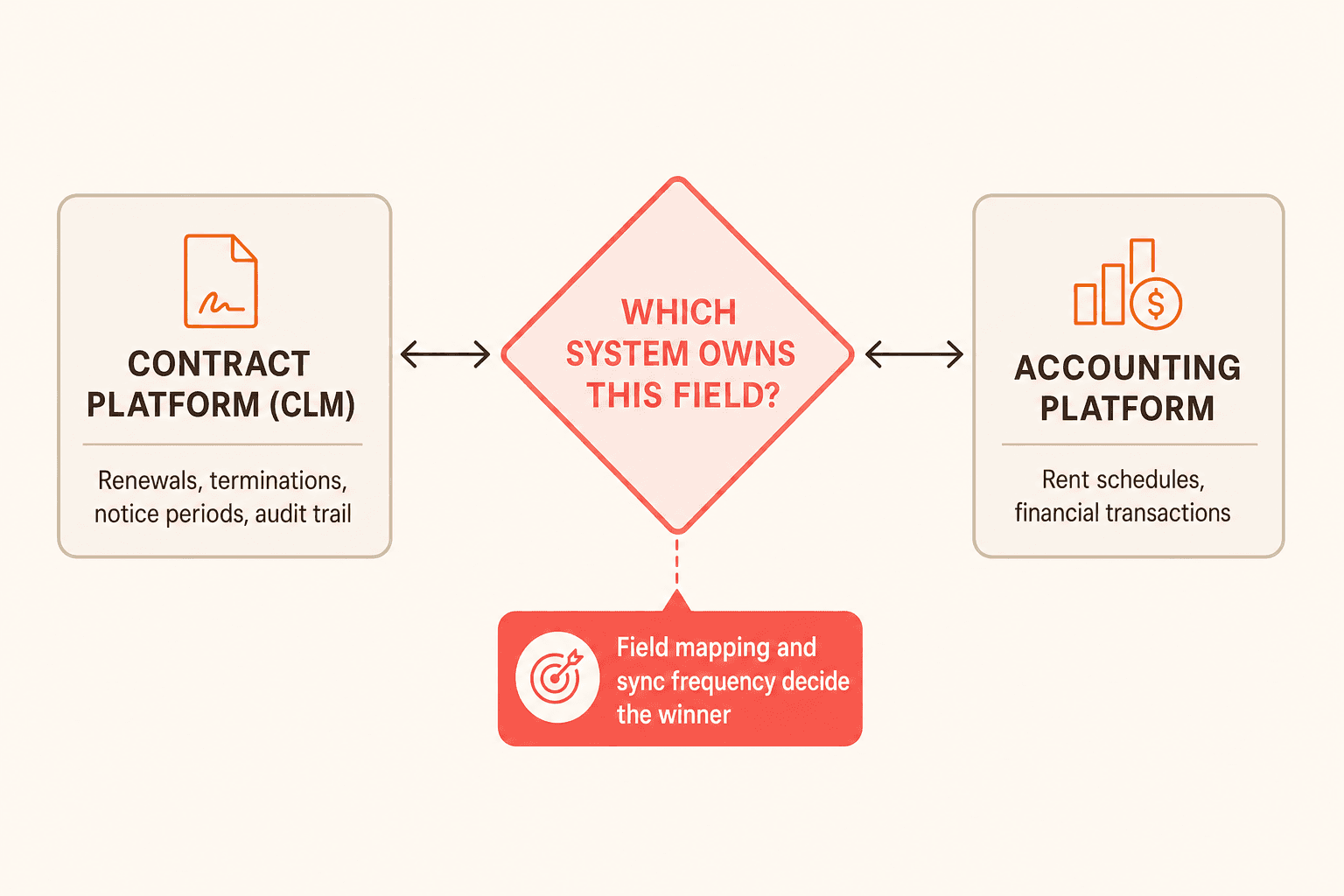
The question “does it connect to Yardi, MRI, or AppFolio?” usually hides a deeper one: which system owns which data? If your accounting platform holds rent schedules and your contract platform holds contract terms, one of them has to win when records conflict.
A practical split assigns contract lifecycle dates, meaning renewals, terminations, and notice periods, to the CLM with full audit trails, while financial transactions sync to accounting. Press vendors on field mapping, sync frequency, and error handling before you accept any integration claim. A checkbox that says “integrates” tells you nothing about which direction data flows or what happens when a sync fails.
Security means permission granularity
Abstract security claims matter less than who can see what. Regional property managers should see their own properties’ contracts without accessing other regions. Accounting staff should view financial terms without editing legal language, and outside vendors should upload certificates without browsing your full repository.
Role-based access control with property-level, entity-level, and document-level permissions is the real requirement. Ask vendors to demonstrate these controls against your org structure rather than a generic demo environment.
How to evaluate vendors with weighted criteria
Property teams evaluating contract platforms consistently describe weighted scorecards rather than feature demos alone. Use the following questions to decide how much weight each criterion should carry for your portfolio:
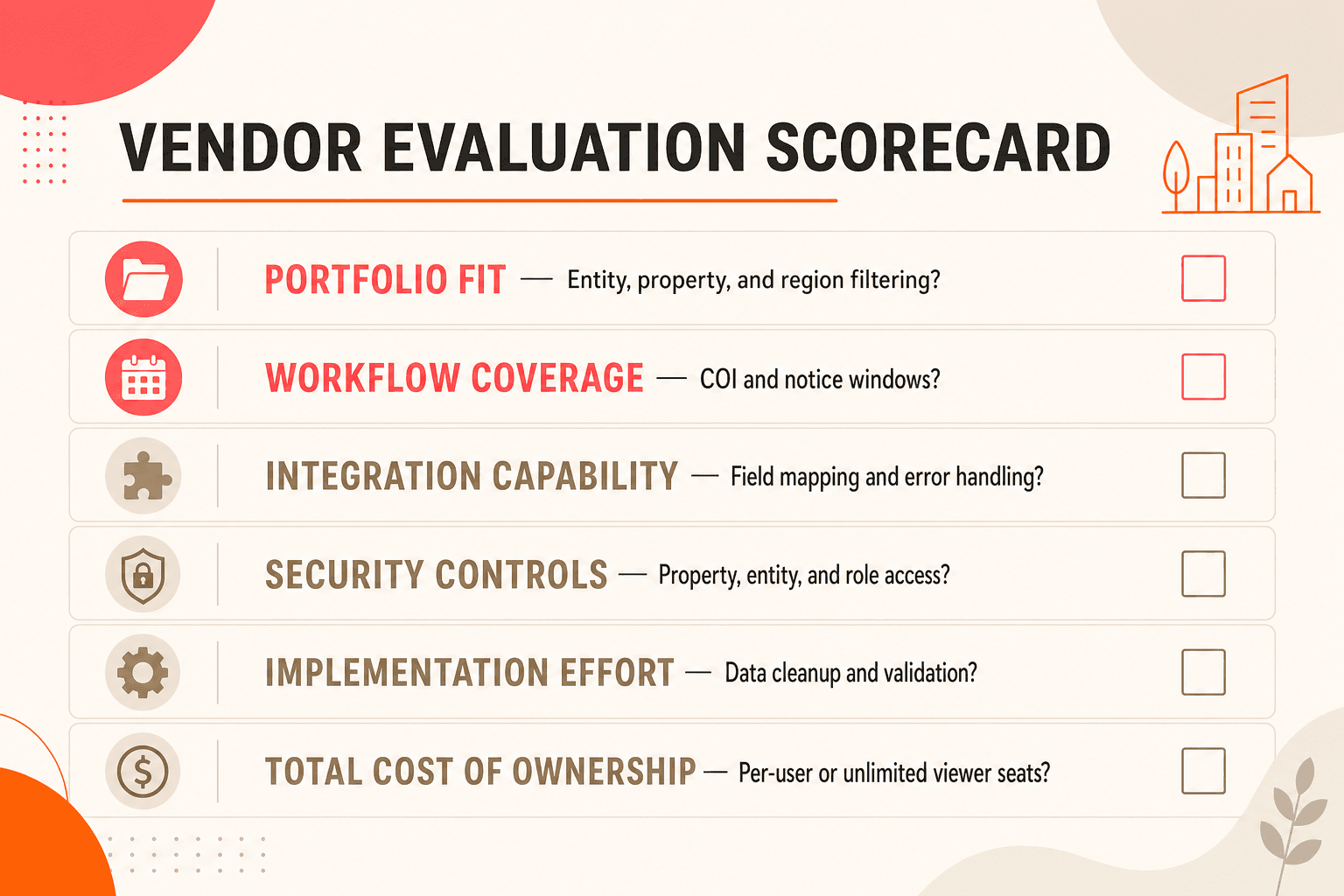
Criterion | What to ask vendors |
|---|---|
Portfolio fit | Does it handle your entity structure and let you filter by property, region, or asset class? |
Workflow coverage | Does it track your deadline types, including COI expirations and termination notice windows? |
Integration capability | Does it connect to your accounting stack with clear field mapping and error handling? |
Security controls | Can you segment access by property, entity, and role? |
Implementation effort | How much historical data cleanup and validation must happen before your team trusts the system? |
Total cost of ownership | Does pricing charge per user, or do unlimited viewer seats include every stakeholder? |
This mirrors procurement-style evaluation in regulated industries, where control quality outweighs convenience. Federal acquisition rules take the same position: DFARS 245.105 judges a contractor property management system by its recordkeeping, processes, and controls, not its feature list. Treat implementation as phases, covering data cleanup, migration, configuration, testing, training, and go-live support, rather than a single launch date.
This article covers contract management practices and software capabilities, not legal advice. Verify specific lease terms, notice requirements, and compliance obligations with qualified legal counsel.
Put every critical date on the record
Concord tracks lease renewals, vendor COIs, termination notice windows, and key term deadlines across every property and entity in your portfolio, with saved views, calendar sync, and weekly digest notifications built in. Book a demo to see deadline management across your portfolio.
A missed termination notice locks you into another year on a vendor agreement you meant to cancel. A lapsed certificate of insurance leaves a contractor working on your property without coverage. For property teams juggling leases, vendor agreements, and compliance deadlines across dozens or hundreds of locations, these misses are expensive and common.
Real estate contract management software replaces spreadsheets and scattered calendar reminders with systematic tracking of renewals, notice windows, and COI expirations across your full portfolio. This guide covers the deadline types that matter most, the capabilities that separate real date control from basic reminders, and the criteria that predict whether a platform will fit your portfolio.
Key takeaways
Four deadline types need separate tracking: lease renewals, termination notices, vendor COI expirations, and key term events each carry their own alert cadence.
Vendor certificates expire on their own timeline, independent of the contract term, so COI tracking needs its own alerts and an exception path for lapsed coverage.
Portfolio-wide filtered views, not file-by-file review, let a team prioritize renewals across dozens or hundreds of properties.
Contract lifecycle dates and financial transactions belong to different systems; decide which one wins before you connect them.
Weight vendors on portfolio fit, workflow coverage, integration, security, implementation effort, and total cost of ownership, not on a feature demo alone.
What is real estate contract management software?
Real estate contract management software is a system that tracks lease renewals, termination notice windows, vendor certificates of insurance, and other portfolio deadlines in one place, with alerts, saved filtered views, and audit trails. It replaces spreadsheets and calendar reminders with structured records tied to each property, entity, and vendor relationship.
Why spreadsheets break down across property portfolios
Property teams managing contracts across multiple legal entities and hundreds of properties often describe the same frustration: systems that force a single-company view. You need to categorize and filter by asset, entity, region, or property to see what actually requires attention. A flat list of contracts cannot answer portfolio questions.
Lease abstraction adds a second trap. Many teams treat abstraction as a one-time project: extract key dates, load them into a system, move on. Obligations actually shift constantly through amendments, renewals, side letters, and estoppel certificates.
When abstracted dates drift from source documents, your portfolio data turns into a liability. The value sits in ongoing accuracy as the portfolio evolves, not in the speed of the initial extraction. Any system you choose should preserve traceability back to source documents and refresh abstracted dates when underlying terms change.
What real estate contract management software should track
Date control beats date reminders. A calendar entry reading “lease expires March 31” tells you a deadline exists. A record reading “90-day termination notice due December 31 to stop auto-renewal” tells you what action to take, who owns it, and what a miss costs.
Four deadline types deserve distinct tracking:
Lease expirations and renewal windows. Advance visibility of 180 days gives you room to negotiate rather than react.
Termination notice deadlines. Vendor agreements commonly require 60 to 90 days of advance notice to prevent auto-renewal. Property teams describe missed windows as a recurring pain that locks them into unwanted extensions.
Vendor COI expirations. A vendor contract may run for years while the insurance certificate renews annually. Track certificates as their own deadline type with their own alerts, independent of contract end dates.
Key term events. Rent escalations, option windows, and milestone obligations each carry dates and owners.
Vendor COI tracking deserves special attention. Teams consistently treat certificate expiration as more urgent than the underlying contract end date, because an expired certificate creates uninsured liability while the contract itself stays current. A PDF stored in a contract record does nothing on its own; you need expiration alerts, coverage checks, and an exception path when a vendor’s insurance lapses or falls short of requirements.
See certificate tracking in action
See how Concord tracks certificate expirations and routes exception alerts on your own portfolio. Book a demo.
Concord’s deadline management tracks renewals, expirations, termination notices, and key term events in list and calendar formats, with filtering by date range and event type.
Transcript: “Let’s say that I want to set up a certificate of insurance deadline, and I want to be notified when that’s coming due in the near future. So all I would do is create a new key term. I put in the title here, and then I can just choose when that’s going to actually happen, and I’ll save that. So I have my lifecycle deadline for this specific contract, but this certificate of insurance is actually going to be expiring at a separate time, and I want to make sure I get notified for both of them. So all I have to do is set up that deadline here under a key term, and it’s going to send out my notification for me for that.”
Transcript: “There’s even more things that you can do beyond just what is available in the dedicated lifecycle section. So for example, you can do recurring deadlines. I have somebody that has landscaping contracts for their properties, and they’ve set up recurring deadlines so that every month they get a reminder that the bushes need to be trimmed. If you just need a custom deadline, that’s a great way to unlock it.”
Portfolio visibility beats file-by-file review
A property manager responsible for 50 locations cannot set renewal priorities by opening 50 contract files. You need filtered views that answer questions like: every lease expiring in the next 180 days across the Northeast, or every vendor agreement with an auto-renewal clause requiring action this quarter.
Saved views let you build those filters once and share them with your team, so legal, finance, and property operations work from the same picture. Filtering by property, entity, vendor, or contract type turns deadline management from individual task tracking into portfolio strategy.
Notification format matters as much as the data. Property teams frequently describe Monday morning digest emails, showing upcoming deadlines with a 180-day look-ahead, as the most useful format. Syncing deadlines to Outlook or Google Calendar keeps critical dates inside the tools you already open every day, with no separate login required.
Transcript: “If I click into my calendar view, I can also see a calendar view of all my deadlines here. And of course, one thing that’s really nice about this is you can sync this with your own personal calendar. We do have that calendar sync now available. So if you want to have these deadlines show up on your Google Calendar, Outlook, whatever it might be, you can simply sync them and then have those show up over there in the system. So that is what that looks like. And yeah, I mean, I think one of the, honestly, most popular features in Concord are the deadline notifications and deadline tracking. It’s a really important part of what we do. So that is how that all works in the system.”
Vendor relationship views round out the picture. You should be able to link MSAs, amendments, and work orders to one vendor and filter by vendor name to see the complete relationship history. Isolated contract records hide the patterns that inform renewal and consolidation decisions.
Integrations are really about data ownership
The question “does it connect to Yardi, MRI, or AppFolio?” usually hides a deeper one: which system owns which data? If your accounting platform holds rent schedules and your contract platform holds contract terms, one of them has to win when records conflict.
A practical split assigns contract lifecycle dates, meaning renewals, terminations, and notice periods, to the CLM with full audit trails, while financial transactions sync to accounting. Press vendors on field mapping, sync frequency, and error handling before you accept any integration claim. A checkbox that says “integrates” tells you nothing about which direction data flows or what happens when a sync fails.
Security means permission granularity
Abstract security claims matter less than who can see what. Regional property managers should see their own properties’ contracts without accessing other regions. Accounting staff should view financial terms without editing legal language, and outside vendors should upload certificates without browsing your full repository.
Role-based access control with property-level, entity-level, and document-level permissions is the real requirement. Ask vendors to demonstrate these controls against your org structure rather than a generic demo environment.
How to evaluate vendors with weighted criteria
Property teams evaluating contract platforms consistently describe weighted scorecards rather than feature demos alone. Use the following questions to decide how much weight each criterion should carry for your portfolio:
Criterion | What to ask vendors |
|---|---|
Portfolio fit | Does it handle your entity structure and let you filter by property, region, or asset class? |
Workflow coverage | Does it track your deadline types, including COI expirations and termination notice windows? |
Integration capability | Does it connect to your accounting stack with clear field mapping and error handling? |
Security controls | Can you segment access by property, entity, and role? |
Implementation effort | How much historical data cleanup and validation must happen before your team trusts the system? |
Total cost of ownership | Does pricing charge per user, or do unlimited viewer seats include every stakeholder? |
This mirrors procurement-style evaluation in regulated industries, where control quality outweighs convenience. Federal acquisition rules take the same position: DFARS 245.105 judges a contractor property management system by its recordkeeping, processes, and controls, not its feature list. Treat implementation as phases, covering data cleanup, migration, configuration, testing, training, and go-live support, rather than a single launch date.
This article covers contract management practices and software capabilities, not legal advice. Verify specific lease terms, notice requirements, and compliance obligations with qualified legal counsel.
Put every critical date on the record
Concord tracks lease renewals, vendor COIs, termination notice windows, and key term deadlines across every property and entity in your portfolio, with saved views, calendar sync, and weekly digest notifications built in. Book a demo to see deadline management across your portfolio.
Need to know
Frequently Asked Questions

Take the "management" out
of contract management.
Customer Support
Legal
Compare
Resources
Customer Support
Company
Legal
Compare
Resources
Customer Support
Company
Legal
Compare
© 2025 Concord. All rights reserved.