
What does it mean to redline a document?
What does it mean to redline a document?
What does it mean to redline a document?
What does it mean to redline a document?
contract management
Key Takeaways
Redlining means marking up a document so every party can see exactly what was added, removed, or changed during negotiation.
"Redline" and "track changes" are not the same. A redline is the marked-up outcome; track changes is one tool for producing it.
Email-and-Word redlining breaks down when several reviewers edit at once, versions live in filenames, and the audit trail disappears the moment someone accepts all changes.
A centralized contract platform makes redlining auditable by recording every edit, comment, and approval in one place.
AI does not decide whether to accept a change. It finds the clauses that need a human decision by flagging deviations and extracting changed terms.
Redlining a document means marking up proposed changes so every party can see exactly what has been added, removed, or modified. The term originates from the practice of using a red pen to annotate printed contracts during negotiation. Today, the question "what does it mean to redline a document?" comes up frequently among procurement professionals, paralegals, junior in-house counsel, and business stakeholders encountering the term for the first time in a professional setting.
The concept itself is straightforward. The execution, however, has evolved dramatically: from literal red ink on paper, to Word track changes sent over email, to AI-powered redlining inside contract platforms that eliminate version confusion and speed up deal cycles.
The core purpose of redlining
At its foundation, redlining is a communication protocol. It answers one question: what changed between the version you sent and the version coming back?
Every method of redlining, from a red pen on a printed page to a clause-by-clause AI comparison, attempts to make that answer visible, unambiguous, and auditable. The format changes. The purpose does not.
This matters because "redline" means different things to different people in practice. Business stakeholders often use the term loosely ("just redline what you don't like"), while legal teams expect a precise, tracked-changes markup showing every insertion, deletion, and modification. This mismatch creates confusion about whether changes were actually accepted or merely proposed.
A brief history: red ink to track changes to AI
Method | How changes are shown | Main limitation |
|---|---|---|
Red ink on paper | Red pen marks stand out against the black printed text | One reviewer at a time, fully physical |
Word track changes over email | Colored insertions, strikethrough deletions, comments in the margin | Version control lives in filenames, and copies conflict |
Platform-based redlining | Automatic version history, tracked approvals, and live status | Requires moving the document off email into a shared system |
AI-assisted redlining | Deviations from your standard terms flagged, changed data points extracted | Still needs human judgment on whether to accept each change |
Red ink on paper. The original method. A lawyer prints a draft, marks it up with a red pen, and sends it back. The red ink makes changes easy to spot against the black printed text. Simple, physical, and limited to one reviewer at a time.
Word track changes over email. Microsoft Word's track changes feature digitized the red pen. Insertions appear in color, deletions show as strikethroughs, and comments sit in the margin. This became the dominant redlining method for decades, and it still is in many organizations.
Platform-based redlining. Purpose-built contract platforms separate the document from the workflow. The document holds the content. The platform tracks who needs to review, in what order, what changed, and what got approved. Version history is automatic, not dependent on someone saving a new copy.
AI-assisted redlining. AI adds a layer on top of platform-based workflows. It can read a counterparty's redline, flag clauses that deviate from your standard terms, and extract changed data points like payment terms or liability caps, all without requiring a human to read every line.
Why email-based redlining breaks down
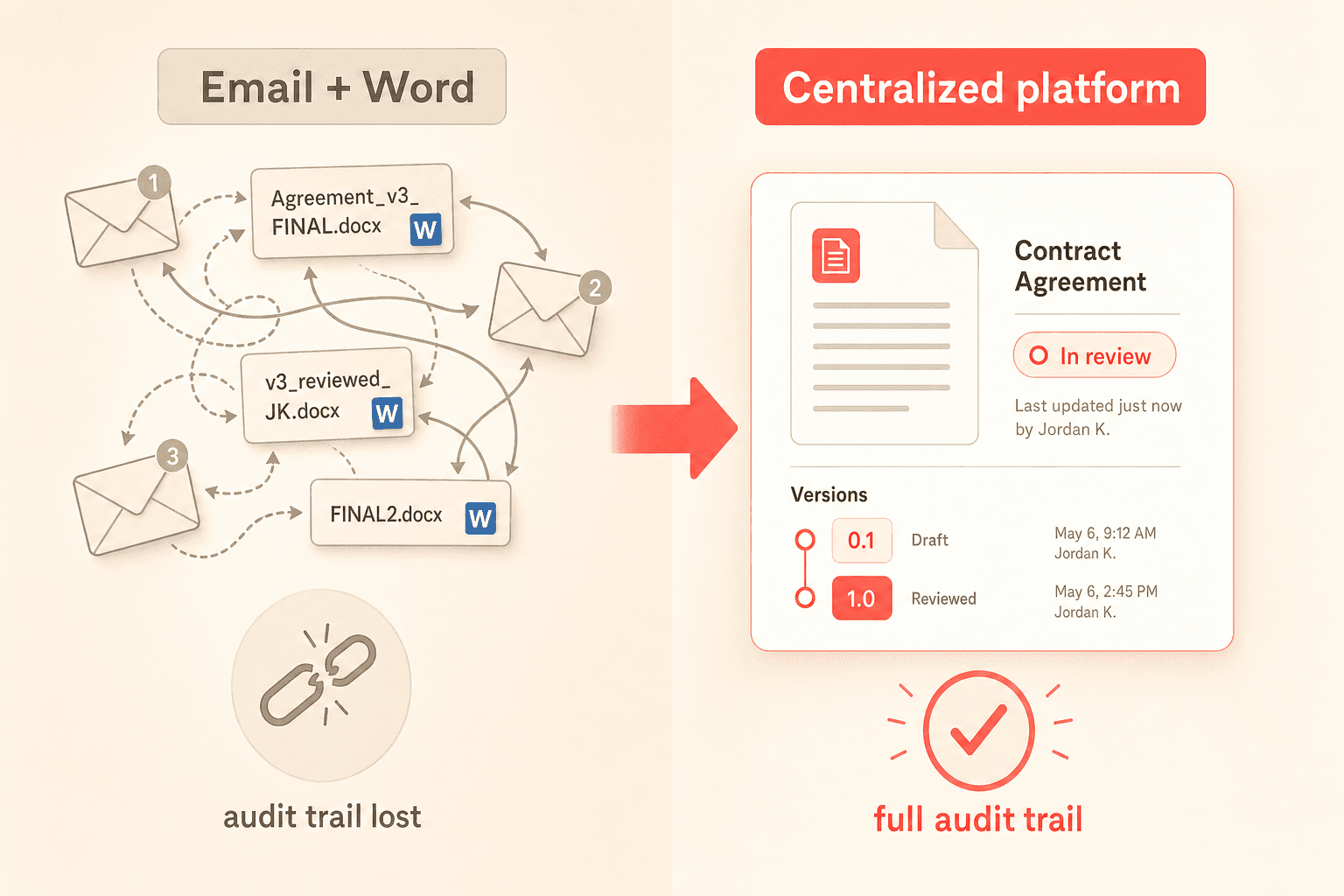
The email-plus-Word-attachment workflow was built for low-volume, high-touch negotiation. It works when one lawyer sends one contract to one counterparty. It breaks down in several common scenarios.
Multiple reviewers edit the same document. Conflicting track changes pile up. Some reviewers leave the document in "final" mode, others in "markup" mode. Reconciliation becomes manual detective work.
Version control lives in filenames. "Agreement_v3_FINAL_reviewed_JK_FINAL2.docx" is a universally recognized symptom of a workflow with no single source of truth. Legal ops professionals commonly report that contracts stall not because of substantive disagreement, but because redlined drafts sit in inboxes with no visibility into where the document is in the review chain.
The audit trail vanishes. If someone accepts all changes and resaves, the negotiation history disappears. No independent record exists of who changed what, when, or whether it was approved.
This is not a technology problem. It is an architectural one. A document file was never designed to be the system of record for a multi-party, multi-round negotiation.
Redline vs. track changes: what is the difference?
People often use "redline" and "track changes" interchangeably, but they refer to different things. A redline is the outcome: a marked-up document showing proposed modifications. Track changes is one tool for producing that outcome.
You can create a redline by comparing two clean documents side by side and generating a comparison report. You can also create one by editing a document with track changes turned on. The redline is the what. Track changes is one possible how.
This distinction matters when counterparties send back a "clean" version without tracked changes. In that case, you need a comparison tool to generate the redline yourself, which is where manual comparison becomes error-prone and time-consuming. Legal teams describe spending significant time reading documents line by line to catch unauthorized changes, a process that is tedious and susceptible to human error.
How modern contract platforms change the redlining workflow
Moving redlining into a purpose-built contract platform changes the underlying architecture. Several capabilities make the difference concrete.
Centralized document management. Rather than tracking contract versions across email threads and shared drives, a platform like Concord stores every version in one place. Every edit, every comment, and every approval is recorded automatically.
Real-time status tracking. Document status tracking provides visibility into where a redlined document sits in the review and approval process. Instead of wondering whether legal has reviewed the counterparty's redline, you can see exactly where the document is and who needs to act next.
Workflow automation for internal alignment. One of the biggest hidden time sinks in redlining is the internal review that happens before a redline goes to the counterparty. Legal, finance, and compliance may all need to weigh in, and coordinating that round through email can add days to the cycle. A workflow automation engine routes the document to the right reviewers based on contract conditions. If a counterparty changes an indemnification clause, the system can automatically flag it for senior counsel.
Familiar editing experience. Teams evaluating contract platforms frequently raise concerns about whether external parties will adopt an unfamiliar editing environment. The best platforms offer Word-style editing that feels natural but lives inside a centralized system, reducing friction for both internal and external collaborators.
How AI changes the redlining process
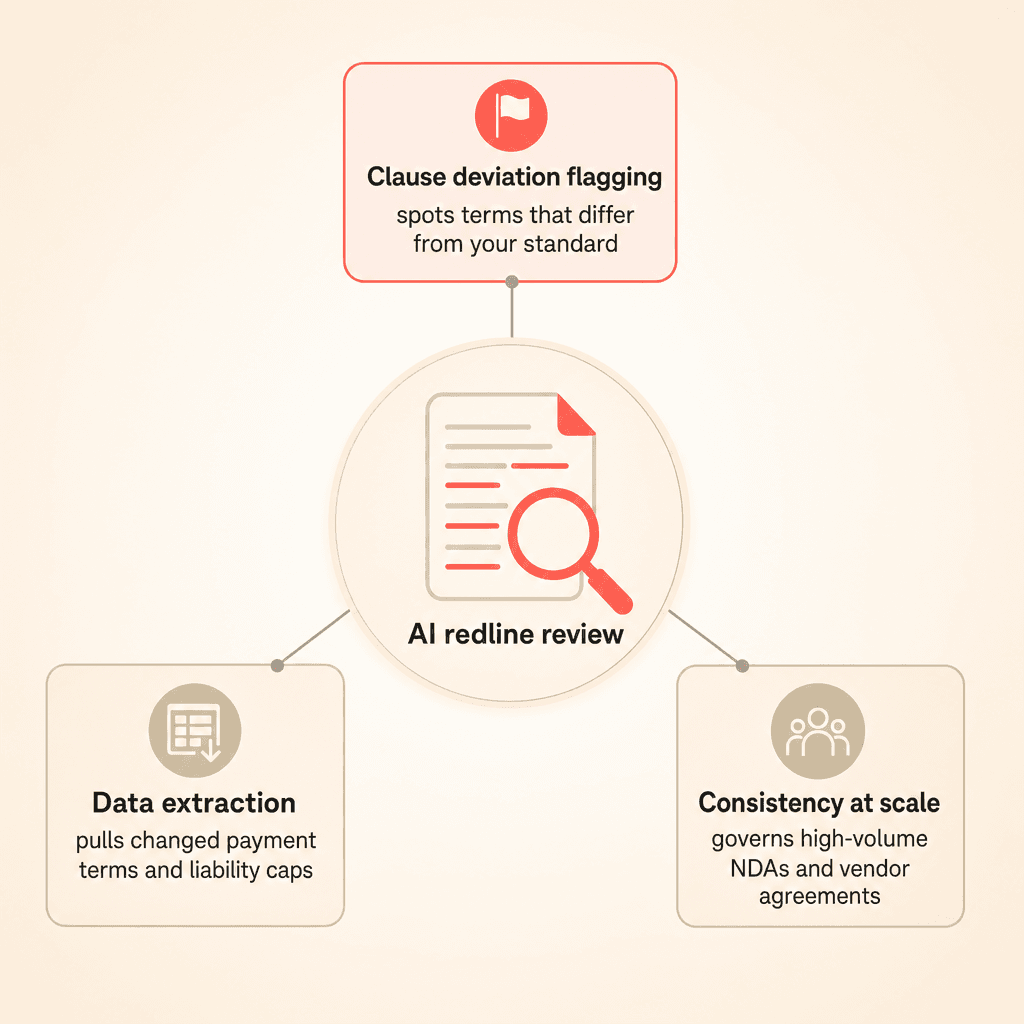
AI does not replace the judgment call of whether to accept or reject a proposed change. It replaces the manual, error-prone work of finding what needs a judgment call.
Clause comparison and deviation flagging. AI can read an incoming redline and identify which clauses deviate from your pre-approved standard terms. For organizations negotiating hundreds of similar agreements (NDAs, vendor agreements, statements of work), this turns redlining from an ad hoc exercise into a governed process.
Data extraction from redlined documents. When a redline changes a payment term, liability cap, or termination clause, AI-powered data extraction can pull those new values and surface them for review. This reduces the risk that a material change gets accepted without scrutiny. Concord's AI-powered data extraction makes this part of the standard review workflow.
Consistency across high-volume contracts. Organizations managing large contract portfolios can pre-define which clauses are acceptable and which require negotiation. AI flags deviations from those standards automatically, giving legal teams confidence that every redline gets the right level of review.
Why redlining matters beyond the legal team
Redlining is not exclusively a legal function. Procurement teams redline vendor agreements. Sales teams receive redlines from customers. Finance teams need to know when a redline changed a payment term.
The more redlining stays trapped in one team's email inbox, the less visibility the rest of the organization has into the terms they are actually bound by. Centralized redlining workflows that automate routing, track approvals, and extract key data points make contract terms visible to every stakeholder who needs them.
Key Takeaways
Redlining means marking up a document so every party can see exactly what was added, removed, or changed during negotiation.
"Redline" and "track changes" are not the same. A redline is the marked-up outcome; track changes is one tool for producing it.
Email-and-Word redlining breaks down when several reviewers edit at once, versions live in filenames, and the audit trail disappears the moment someone accepts all changes.
A centralized contract platform makes redlining auditable by recording every edit, comment, and approval in one place.
AI does not decide whether to accept a change. It finds the clauses that need a human decision by flagging deviations and extracting changed terms.
Redlining a document means marking up proposed changes so every party can see exactly what has been added, removed, or modified. The term originates from the practice of using a red pen to annotate printed contracts during negotiation. Today, the question "what does it mean to redline a document?" comes up frequently among procurement professionals, paralegals, junior in-house counsel, and business stakeholders encountering the term for the first time in a professional setting.
The concept itself is straightforward. The execution, however, has evolved dramatically: from literal red ink on paper, to Word track changes sent over email, to AI-powered redlining inside contract platforms that eliminate version confusion and speed up deal cycles.
The core purpose of redlining
At its foundation, redlining is a communication protocol. It answers one question: what changed between the version you sent and the version coming back?
Every method of redlining, from a red pen on a printed page to a clause-by-clause AI comparison, attempts to make that answer visible, unambiguous, and auditable. The format changes. The purpose does not.
This matters because "redline" means different things to different people in practice. Business stakeholders often use the term loosely ("just redline what you don't like"), while legal teams expect a precise, tracked-changes markup showing every insertion, deletion, and modification. This mismatch creates confusion about whether changes were actually accepted or merely proposed.
A brief history: red ink to track changes to AI
Method | How changes are shown | Main limitation |
|---|---|---|
Red ink on paper | Red pen marks stand out against the black printed text | One reviewer at a time, fully physical |
Word track changes over email | Colored insertions, strikethrough deletions, comments in the margin | Version control lives in filenames, and copies conflict |
Platform-based redlining | Automatic version history, tracked approvals, and live status | Requires moving the document off email into a shared system |
AI-assisted redlining | Deviations from your standard terms flagged, changed data points extracted | Still needs human judgment on whether to accept each change |
Red ink on paper. The original method. A lawyer prints a draft, marks it up with a red pen, and sends it back. The red ink makes changes easy to spot against the black printed text. Simple, physical, and limited to one reviewer at a time.
Word track changes over email. Microsoft Word's track changes feature digitized the red pen. Insertions appear in color, deletions show as strikethroughs, and comments sit in the margin. This became the dominant redlining method for decades, and it still is in many organizations.
Platform-based redlining. Purpose-built contract platforms separate the document from the workflow. The document holds the content. The platform tracks who needs to review, in what order, what changed, and what got approved. Version history is automatic, not dependent on someone saving a new copy.
AI-assisted redlining. AI adds a layer on top of platform-based workflows. It can read a counterparty's redline, flag clauses that deviate from your standard terms, and extract changed data points like payment terms or liability caps, all without requiring a human to read every line.
Why email-based redlining breaks down
The email-plus-Word-attachment workflow was built for low-volume, high-touch negotiation. It works when one lawyer sends one contract to one counterparty. It breaks down in several common scenarios.
Multiple reviewers edit the same document. Conflicting track changes pile up. Some reviewers leave the document in "final" mode, others in "markup" mode. Reconciliation becomes manual detective work.
Version control lives in filenames. "Agreement_v3_FINAL_reviewed_JK_FINAL2.docx" is a universally recognized symptom of a workflow with no single source of truth. Legal ops professionals commonly report that contracts stall not because of substantive disagreement, but because redlined drafts sit in inboxes with no visibility into where the document is in the review chain.
The audit trail vanishes. If someone accepts all changes and resaves, the negotiation history disappears. No independent record exists of who changed what, when, or whether it was approved.
This is not a technology problem. It is an architectural one. A document file was never designed to be the system of record for a multi-party, multi-round negotiation.
Redline vs. track changes: what is the difference?
People often use "redline" and "track changes" interchangeably, but they refer to different things. A redline is the outcome: a marked-up document showing proposed modifications. Track changes is one tool for producing that outcome.
You can create a redline by comparing two clean documents side by side and generating a comparison report. You can also create one by editing a document with track changes turned on. The redline is the what. Track changes is one possible how.
This distinction matters when counterparties send back a "clean" version without tracked changes. In that case, you need a comparison tool to generate the redline yourself, which is where manual comparison becomes error-prone and time-consuming. Legal teams describe spending significant time reading documents line by line to catch unauthorized changes, a process that is tedious and susceptible to human error.
How modern contract platforms change the redlining workflow
Moving redlining into a purpose-built contract platform changes the underlying architecture. Several capabilities make the difference concrete.
Centralized document management. Rather than tracking contract versions across email threads and shared drives, a platform like Concord stores every version in one place. Every edit, every comment, and every approval is recorded automatically.
Real-time status tracking. Document status tracking provides visibility into where a redlined document sits in the review and approval process. Instead of wondering whether legal has reviewed the counterparty's redline, you can see exactly where the document is and who needs to act next.
Workflow automation for internal alignment. One of the biggest hidden time sinks in redlining is the internal review that happens before a redline goes to the counterparty. Legal, finance, and compliance may all need to weigh in, and coordinating that round through email can add days to the cycle. A workflow automation engine routes the document to the right reviewers based on contract conditions. If a counterparty changes an indemnification clause, the system can automatically flag it for senior counsel.
Familiar editing experience. Teams evaluating contract platforms frequently raise concerns about whether external parties will adopt an unfamiliar editing environment. The best platforms offer Word-style editing that feels natural but lives inside a centralized system, reducing friction for both internal and external collaborators.
How AI changes the redlining process
AI does not replace the judgment call of whether to accept or reject a proposed change. It replaces the manual, error-prone work of finding what needs a judgment call.
Clause comparison and deviation flagging. AI can read an incoming redline and identify which clauses deviate from your pre-approved standard terms. For organizations negotiating hundreds of similar agreements (NDAs, vendor agreements, statements of work), this turns redlining from an ad hoc exercise into a governed process.
Data extraction from redlined documents. When a redline changes a payment term, liability cap, or termination clause, AI-powered data extraction can pull those new values and surface them for review. This reduces the risk that a material change gets accepted without scrutiny. Concord's AI-powered data extraction makes this part of the standard review workflow.
Consistency across high-volume contracts. Organizations managing large contract portfolios can pre-define which clauses are acceptable and which require negotiation. AI flags deviations from those standards automatically, giving legal teams confidence that every redline gets the right level of review.
Why redlining matters beyond the legal team
Redlining is not exclusively a legal function. Procurement teams redline vendor agreements. Sales teams receive redlines from customers. Finance teams need to know when a redline changed a payment term.
The more redlining stays trapped in one team's email inbox, the less visibility the rest of the organization has into the terms they are actually bound by. Centralized redlining workflows that automate routing, track approvals, and extract key data points make contract terms visible to every stakeholder who needs them.

Need to know
Frequently Asked Questions

Take the "management" out
of contract management.
Customer Support
Legal
Compare
Resources
Customer Support
Company
Legal
Compare
Resources
Customer Support
Company
Legal
Compare
© 2025 Concord. All rights reserved.

