
Contract notification management: fix alert fatigue
Contract notification management: fix alert fatigue
Contract notification management: fix alert fatigue
Contract notification management: fix alert fatigue
contract management

Key Takeaways
Alert fatigue comes from the wrong people getting the wrong alerts on a fixed schedule, not from too many notifications.
Folder access is the hidden driver. When ten people can see a folder, ten people get alerted about every contract in it.
Route alerts to the contract owner, vary lead times by contract type, and tie alerts to events instead of one weekly blast.
Calendar sync is the most effective fix, because deadlines show up where you already plan your week.
Strong notification control works at three levels: user, document, and system.
Every contract manager knows the feeling. Your inbox fills with deadline alerts every Monday morning, and by Wednesday, you've stopped reading them. That pattern is the core problem contract notification management is meant to address, and it's the reason so many teams miss the one renewal date that actually mattered.
Alert fatigue in contract management is not about receiving too much information. It's about receiving the wrong information on the wrong schedule to the wrong people. This post walks through why notification overload happens, what it costs you, and the specific controls that fix it.
Why contract notification overload happens
Most CLM platforms default to a single weekly email sent to everyone with access to a document. That sounds reasonable until you think about who actually has folder access at a mid-market company. Procurement leads, finance directors, IT admins, legal ops, and department heads often all sit inside the same folders for visibility, even though only one person per contract is the real owner.
The result: every Monday, dozens of stakeholders receive an identical deadline digest covering contracts they have no responsibility for.
Alert fatigue is a well-documented behavioral pattern. When repeated low-signal notifications arrive on a fixed schedule, recipients stop treating them as actionable. Email clients amplify the effect by deprioritizing messages that go unopened week after week.
The hidden cost of alert fatigue: missed renewals
The irony of notification overload is that it undermines the exact outcome notifications are designed to produce. When deadline emails get auto-filed or ignored, auto-renewals trigger without review, termination windows close unnoticed, and price protections expire.
The downstream cost shows up months later as a surprise renewal at an unfavorable rate or a vendor contract that quietly extended for another year. The notification did go out. Someone did receive it. But the alert was part of a weekly wall of noise, and nobody treated it as urgent.
Five best practices for contract notification management
The fix for alert fatigue is less about sending fewer notifications and more about sending the right notifications to the right people at the right time. Here are five practices that change the pattern.
1. Match notification scope to responsibility, not folder access
Folder-based permissions are a good starting point for who can see a contract, but they're a blunt instrument for who should be alerted about it. Designate specific owners per agreement and route deadline alerts to those owners rather than to everyone with view access.
2. Offer both individual alerts and digests, by user preference
Some stakeholders want a weekly summary. Others want a single alert 90 days before a renewal date. A strong contract notification management setup lets each user choose the format that fits their workflow rather than forcing one cadence on the entire team.
3. Vary lead times by contract type
A routine NDA does not need a 180-day warning. A strategic vendor contract with a 90-day termination notice window absolutely does. Build notification rules that reflect the real decision timelines your contracts require, not a single global default.
Contract type | Example | Recommended lead time |
|---|---|---|
Routine, low-risk | NDA, standard order form | 30 to 60 days |
Standard vendor | SaaS subscription, service agreement | 60 to 90 days |
Strategic, high-value | Vendor contract with a termination-notice window | 90 to 180 days |
4. Tie milestone alerts to events, not calendars
Event driven notifications, such as alerts when a contract is signed, when an intake is submitted, or when a counterparty has not responded to an invitation, carry far more signal than a scheduled digest. These alerts arrive because something happened, which makes them worth reading.
5. Give deadline visibility a home outside the inbox
Calendar sync is consistently described as the single most effective fatigue-reduction pattern in customer conversations. When deadlines appear in Outlook or Google Calendar alongside meetings, you see them in context without needing an inbox notification at all.
How permission design drives (or prevents) notification overload
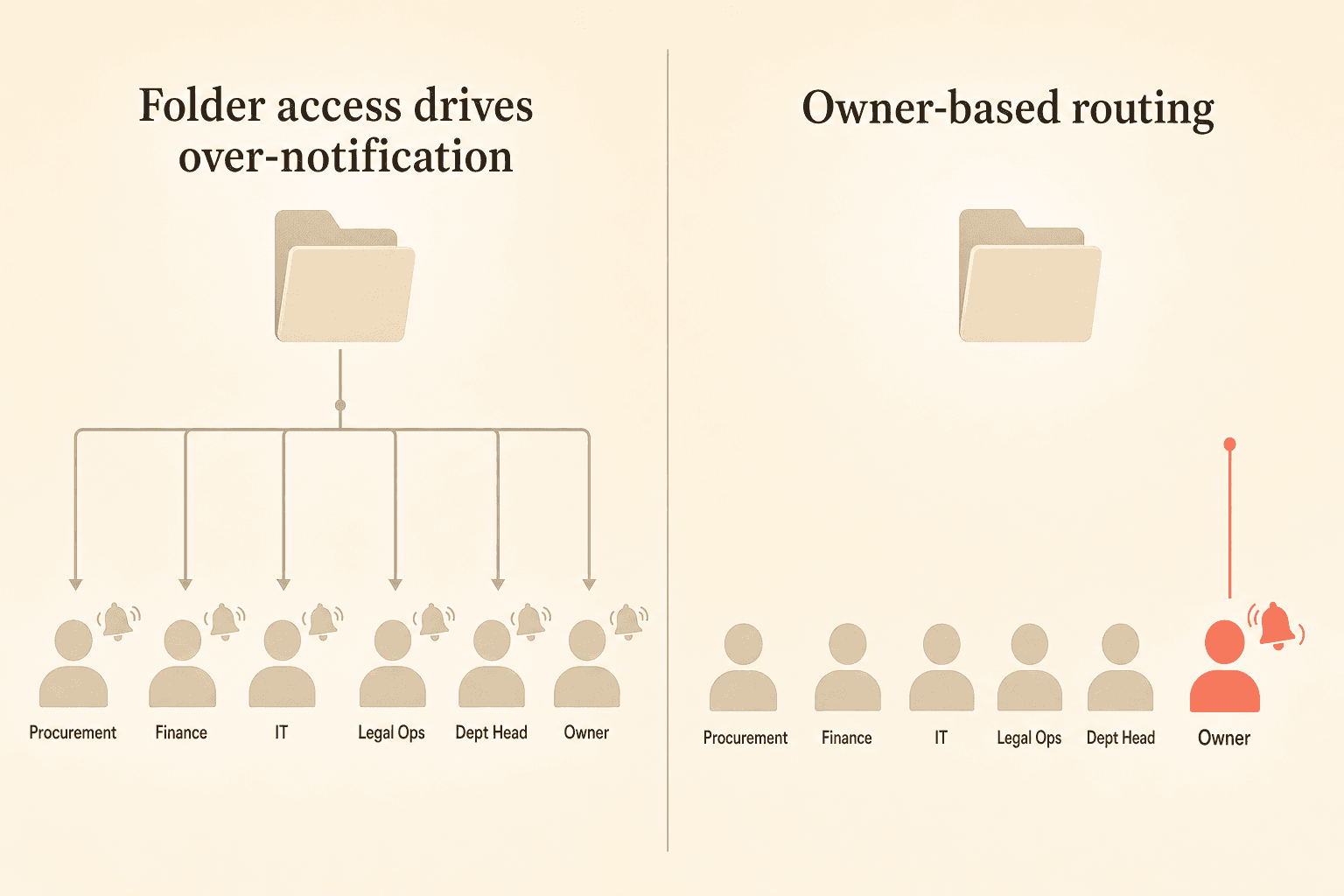
In any permission-driven system, broad access creates broad notification exposure. If ten people can see a folder, ten people will get alerts about every contract in it by default. That math does not hold up when procurement or finance teams carry view access across hundreds of agreements.
The fix starts with folder structure. Separate contracts into folders based on ownership and responsibility, not just department or category. A vendor contract that finance needs to approve but procurement actively manages should live where procurement owns notifications, with finance pulled in only for specific events.
Beyond folders, look for contract-level notification targeting. The ability to say "for this specific agreement, only these specific people get alerts" is what separates well-tuned notification management from a setup that reverts to over-alerting as soon as a folder grows.
Moving beyond the weekly email: calendar sync and targeted digests
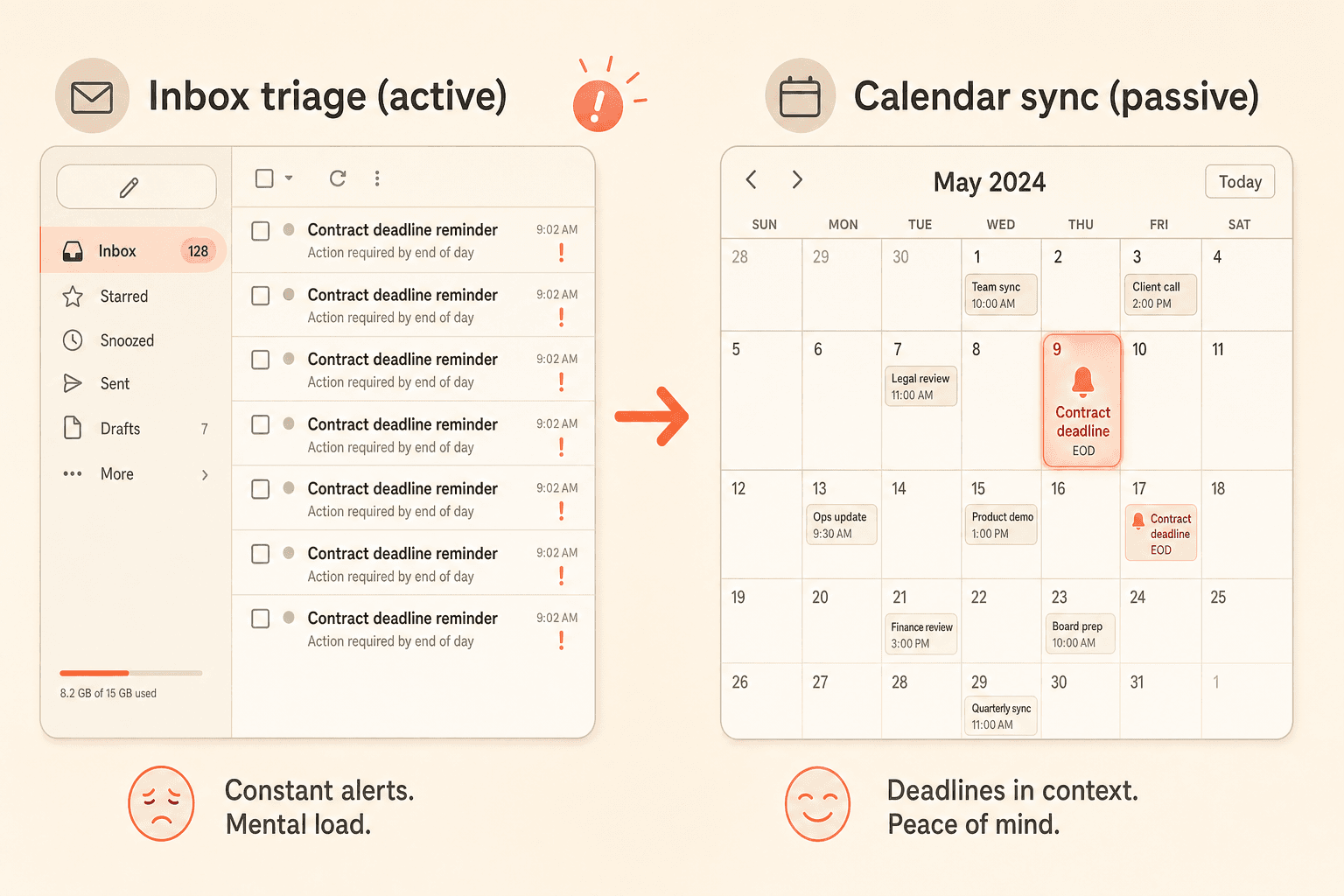
Calendar integration is the most-praised fatigue-reduction feature in the Concord deadline views. You subscribe your personal Outlook or Google Calendar to your Concord deadlines, and renewal dates, termination windows, and milestone dates populate your calendar automatically. Alert consumption becomes passive. You see the deadline when you're planning your week, not when you're triaging email.
Targeted digests are the second piece. Rather than one company-wide Monday blast, admins can build filtered views by date range, deadline type, owner, or custom property, and schedule digest emails tied to those specific views. A procurement lead sees only procurement contracts. A legal ops manager sees only agreements past their review SLA. Each digest is relevant to the person receiving it, which reverses the train-your-users-to-ignore-email effect.
What to look for in a CLM's notification controls
Control level | What to look for |
|---|---|
User level | Each person customizes which notifications they receive and how often, so no two roles are forced onto the same cadence. |
Document level | Contract-level and category-level notification targeting, plus adjustable lead times per contract type. |
System level | Milestone alerts tied to real events (signed, submitted, reminded), centralized in-app task queues, and unresponded-invite reminders. |
When you evaluate a CLM for notification management, ask about controls at three levels.
User-level controls. Each user should be able to customize which notifications they receive and configure their own preferences. Notification settings that are one-size-fits-all will generate fatigue no matter how good the underlying data is.
Document-level controls. Look for contract-level and category-level notification targeting, plus adjustable lead times per contract type. A 60-day window works for some agreements. A 180-day window works for others. Both should be possible without a workaround.
System-level controls. Milestone-based alerts tied to real events (signed, submitted, reminded, validated) matter as much as scheduled alerts. Centralized in-app task queues and unresponded-invite reminders reduce the manual follow-up that otherwise falls back on the contract owner's inbox.
Concord's notification framework covers all three levels today. User preferences are customizable per person. Deadline views support both individual alerts and digest emails with adjustable date-range windows. Milestone notifications cover agreement events like signatures and intake submissions. Calendar sync runs through the same deadline engine, and shared saved views let admins route targeted digests to the right audiences. For a broader view of how Concord handles renewals and obligations, see our contract renewal management guide and the CLM overview.
AI-powered data extraction also matters here, because the quality of your notifications depends on the quality of the dates, parties, and obligations pulled from your agreements in the first place. Our AI extraction page covers how that layer feeds the deadline engine.
Key Takeaways
Alert fatigue comes from the wrong people getting the wrong alerts on a fixed schedule, not from too many notifications.
Folder access is the hidden driver. When ten people can see a folder, ten people get alerted about every contract in it.
Route alerts to the contract owner, vary lead times by contract type, and tie alerts to events instead of one weekly blast.
Calendar sync is the most effective fix, because deadlines show up where you already plan your week.
Strong notification control works at three levels: user, document, and system.
Every contract manager knows the feeling. Your inbox fills with deadline alerts every Monday morning, and by Wednesday, you've stopped reading them. That pattern is the core problem contract notification management is meant to address, and it's the reason so many teams miss the one renewal date that actually mattered.
Alert fatigue in contract management is not about receiving too much information. It's about receiving the wrong information on the wrong schedule to the wrong people. This post walks through why notification overload happens, what it costs you, and the specific controls that fix it.
Why contract notification overload happens
Most CLM platforms default to a single weekly email sent to everyone with access to a document. That sounds reasonable until you think about who actually has folder access at a mid-market company. Procurement leads, finance directors, IT admins, legal ops, and department heads often all sit inside the same folders for visibility, even though only one person per contract is the real owner.
The result: every Monday, dozens of stakeholders receive an identical deadline digest covering contracts they have no responsibility for.
Alert fatigue is a well-documented behavioral pattern. When repeated low-signal notifications arrive on a fixed schedule, recipients stop treating them as actionable. Email clients amplify the effect by deprioritizing messages that go unopened week after week.
The hidden cost of alert fatigue: missed renewals
The irony of notification overload is that it undermines the exact outcome notifications are designed to produce. When deadline emails get auto-filed or ignored, auto-renewals trigger without review, termination windows close unnoticed, and price protections expire.
The downstream cost shows up months later as a surprise renewal at an unfavorable rate or a vendor contract that quietly extended for another year. The notification did go out. Someone did receive it. But the alert was part of a weekly wall of noise, and nobody treated it as urgent.
Five best practices for contract notification management
The fix for alert fatigue is less about sending fewer notifications and more about sending the right notifications to the right people at the right time. Here are five practices that change the pattern.
1. Match notification scope to responsibility, not folder access
Folder-based permissions are a good starting point for who can see a contract, but they're a blunt instrument for who should be alerted about it. Designate specific owners per agreement and route deadline alerts to those owners rather than to everyone with view access.
2. Offer both individual alerts and digests, by user preference
Some stakeholders want a weekly summary. Others want a single alert 90 days before a renewal date. A strong contract notification management setup lets each user choose the format that fits their workflow rather than forcing one cadence on the entire team.
3. Vary lead times by contract type
A routine NDA does not need a 180-day warning. A strategic vendor contract with a 90-day termination notice window absolutely does. Build notification rules that reflect the real decision timelines your contracts require, not a single global default.
Contract type | Example | Recommended lead time |
|---|---|---|
Routine, low-risk | NDA, standard order form | 30 to 60 days |
Standard vendor | SaaS subscription, service agreement | 60 to 90 days |
Strategic, high-value | Vendor contract with a termination-notice window | 90 to 180 days |
4. Tie milestone alerts to events, not calendars
Event driven notifications, such as alerts when a contract is signed, when an intake is submitted, or when a counterparty has not responded to an invitation, carry far more signal than a scheduled digest. These alerts arrive because something happened, which makes them worth reading.
5. Give deadline visibility a home outside the inbox
Calendar sync is consistently described as the single most effective fatigue-reduction pattern in customer conversations. When deadlines appear in Outlook or Google Calendar alongside meetings, you see them in context without needing an inbox notification at all.
How permission design drives (or prevents) notification overload
In any permission-driven system, broad access creates broad notification exposure. If ten people can see a folder, ten people will get alerts about every contract in it by default. That math does not hold up when procurement or finance teams carry view access across hundreds of agreements.
The fix starts with folder structure. Separate contracts into folders based on ownership and responsibility, not just department or category. A vendor contract that finance needs to approve but procurement actively manages should live where procurement owns notifications, with finance pulled in only for specific events.
Beyond folders, look for contract-level notification targeting. The ability to say "for this specific agreement, only these specific people get alerts" is what separates well-tuned notification management from a setup that reverts to over-alerting as soon as a folder grows.
Moving beyond the weekly email: calendar sync and targeted digests
Calendar integration is the most-praised fatigue-reduction feature in the Concord deadline views. You subscribe your personal Outlook or Google Calendar to your Concord deadlines, and renewal dates, termination windows, and milestone dates populate your calendar automatically. Alert consumption becomes passive. You see the deadline when you're planning your week, not when you're triaging email.
Targeted digests are the second piece. Rather than one company-wide Monday blast, admins can build filtered views by date range, deadline type, owner, or custom property, and schedule digest emails tied to those specific views. A procurement lead sees only procurement contracts. A legal ops manager sees only agreements past their review SLA. Each digest is relevant to the person receiving it, which reverses the train-your-users-to-ignore-email effect.
What to look for in a CLM's notification controls
Control level | What to look for |
|---|---|
User level | Each person customizes which notifications they receive and how often, so no two roles are forced onto the same cadence. |
Document level | Contract-level and category-level notification targeting, plus adjustable lead times per contract type. |
System level | Milestone alerts tied to real events (signed, submitted, reminded), centralized in-app task queues, and unresponded-invite reminders. |
When you evaluate a CLM for notification management, ask about controls at three levels.
User-level controls. Each user should be able to customize which notifications they receive and configure their own preferences. Notification settings that are one-size-fits-all will generate fatigue no matter how good the underlying data is.
Document-level controls. Look for contract-level and category-level notification targeting, plus adjustable lead times per contract type. A 60-day window works for some agreements. A 180-day window works for others. Both should be possible without a workaround.
System-level controls. Milestone-based alerts tied to real events (signed, submitted, reminded, validated) matter as much as scheduled alerts. Centralized in-app task queues and unresponded-invite reminders reduce the manual follow-up that otherwise falls back on the contract owner's inbox.
Concord's notification framework covers all three levels today. User preferences are customizable per person. Deadline views support both individual alerts and digest emails with adjustable date-range windows. Milestone notifications cover agreement events like signatures and intake submissions. Calendar sync runs through the same deadline engine, and shared saved views let admins route targeted digests to the right audiences. For a broader view of how Concord handles renewals and obligations, see our contract renewal management guide and the CLM overview.
AI-powered data extraction also matters here, because the quality of your notifications depends on the quality of the dates, parties, and obligations pulled from your agreements in the first place. Our AI extraction page covers how that layer feeds the deadline engine.

Need to know
Frequently Asked Questions

Take the "management" out
of contract management.
Customer Support
Legal
Compare
Resources
Customer Support
Company
Legal
Compare
Resources
Customer Support
Company
Legal
Compare
© 2025 Concord. All rights reserved.

