
Organize Your Contracts: Best Practices for Contract Management in Concord
Organize Your Contracts: Best Practices for Contract Management in Concord
Organize Your Contracts: Best Practices for Contract Management in Concord
Organize Your Contracts: Best Practices for Contract Management in Concord
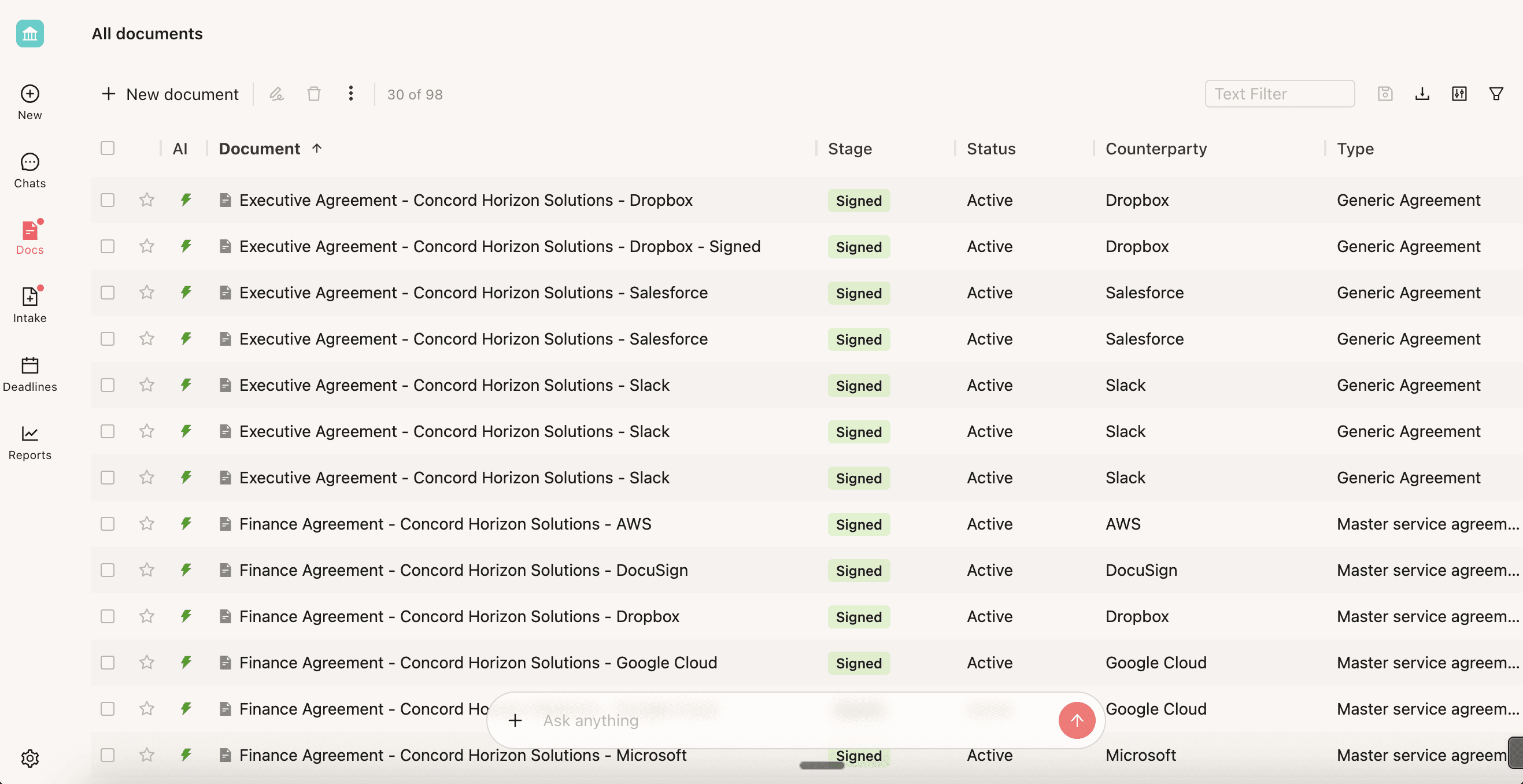
A messy contract system wastes time. When someone needs to find an agreement fast for an audit, a renewal decision, or a legal question, they shouldn't have to dig through folders or ping three colleagues. In our recent webinar, Zach Hintze (Head of Sales, 10+ years at Concord) and Dakota McDurham (Product Manager) shared tips from working with hundreds of customers.
Here’s everything you need to know to keep your contracts organized in Concord.
1. Master Your Inbox
Your Concord inbox should work like your email inbox: a place for active work, not a storage dump.
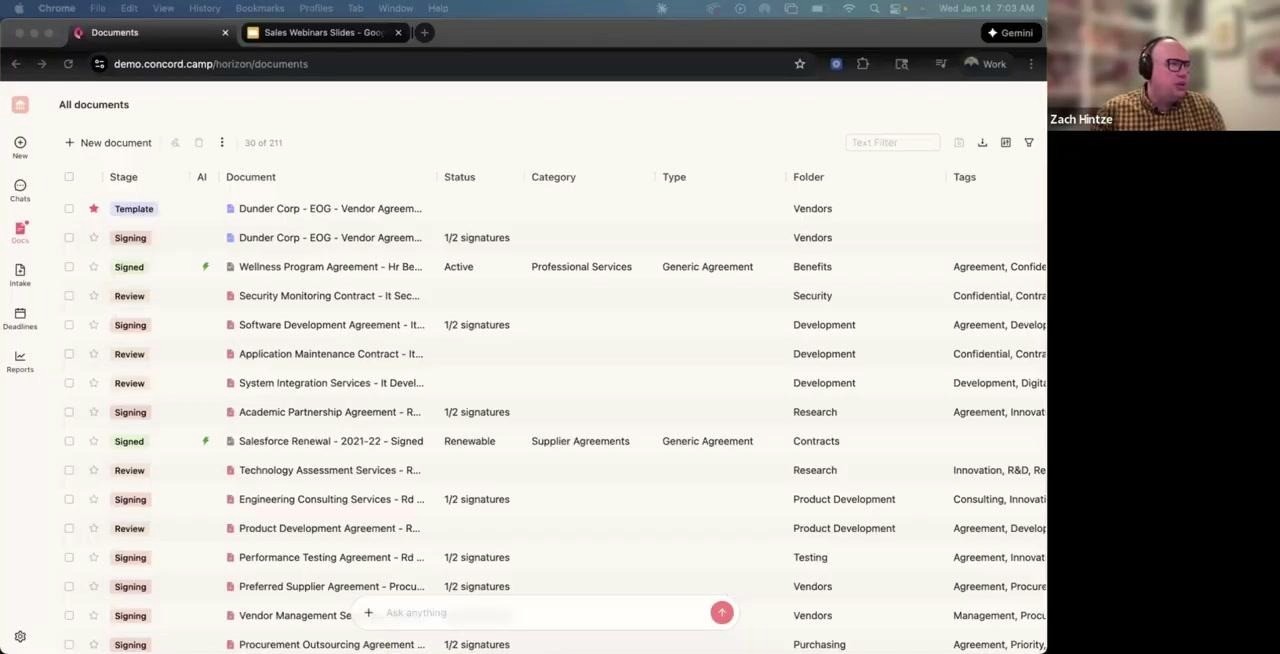
Customize your inbox view to show only the fields you need
Customize Your View
The inbox can display any data field you want, so take the time to strip it down to the essentials. Remove fields you don’t check regularly and add the custom fields your company actually tracks, such as risk level or department owner. If you’re using Horizon, you can add standard fields, custom fields, and smart fields directly to the inbox view with just a few clicks.
Adopt “Inbox Zero”
The best practice is to treat your Concord inbox like email. Only keep documents you’re actively working on visible in your inbox. Once something is signed and processed, archive it. If you won’t need to revisit a document for a few months, set a deadline on it and archive it until then.
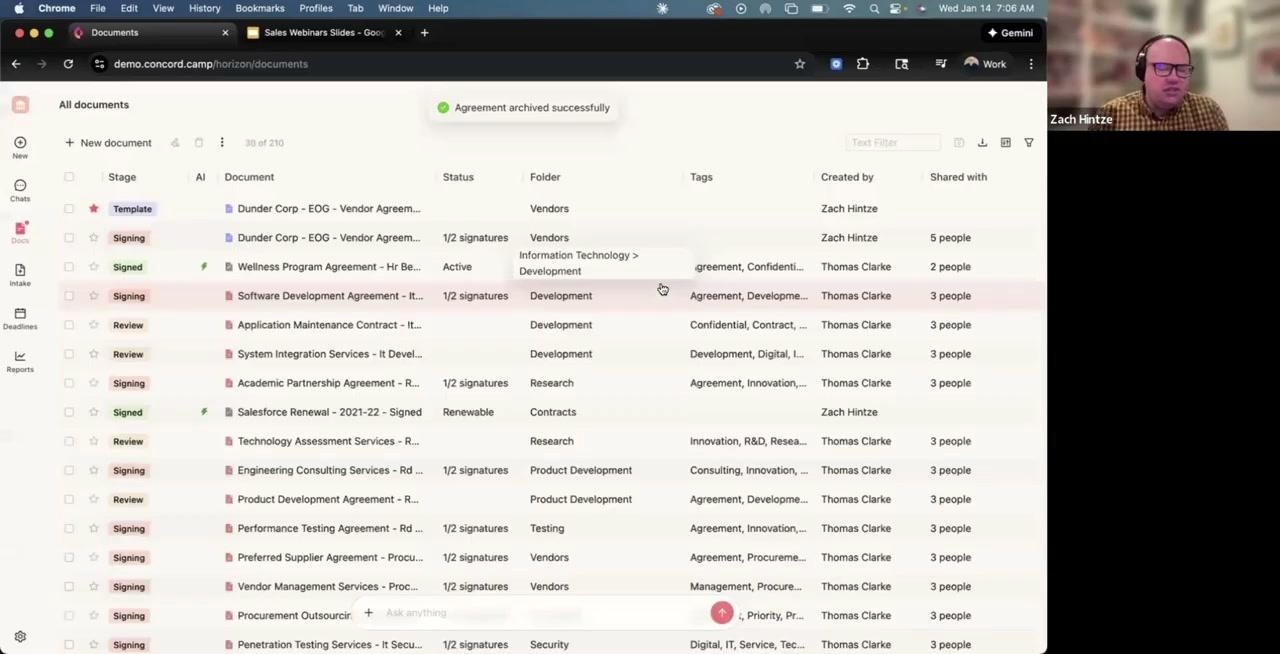
Archive documents to remove them from your inbox without deleting them
One important thing to know: archiving is individual. It only affects your view, so your teammates will still see the document in their inbox until they archive it themselves. You don’t need to worry about hiding something from a colleague who still needs it.
2. Use Favorites for Quick Access
The star feature lets you favorite documents for quick retrieval.
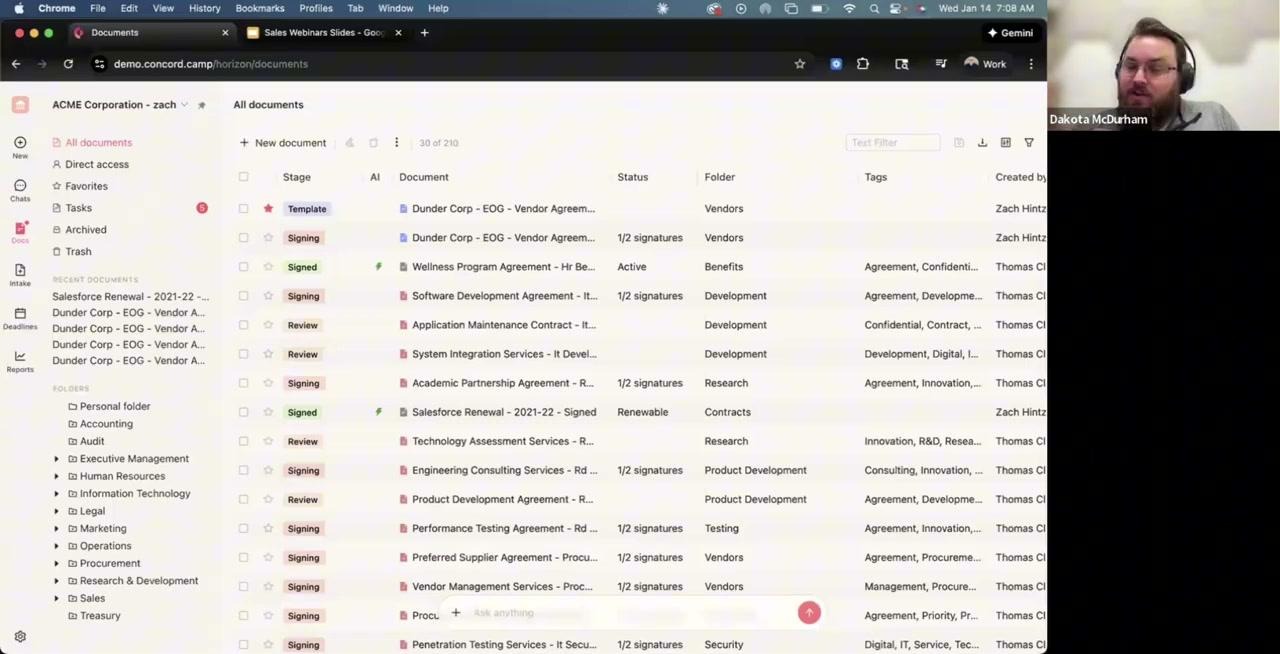
Star your most-used templates for instant access
This is especially useful for templates. Star all your commonly used documents like NDAs, order forms, and standard agreements. When you need to send something out, just click Favorites and your templates are right there. No more digging through folders to find that one NDA template you use every week.
3. Build a Scalable Folder Structure
Folders serve two critical purposes in Concord. First, they help with organization so you can find documents quickly. Second, they control access by determining who can see what in the system.
The Recommended Structure
The most effective approach we’ve seen is organizing by department first, then by contract type within each department. For example, your HR folder would contain subfolders for Benefits, Recruiting, and Training. Your Finance folder would have Accounting, Audit, and Treasury. This structure scales well and makes it intuitive for anyone to find what they need.
Some companies prefer to organize folders by vendor name, but this approach tends to break down as you scale. After a year of adding vendors, customers often find themselves needing to restructure entirely. Instead of creating vendor folders, use the Party field to filter. You can quickly pull up all contracts with a specific vendor without maintaining hundreds of vendor-specific folders.
Think About Scale
When setting up folders, think ahead. Consider how the structure will look with ten times more documents. Ask yourself how access permissions will work as you add more team members and whether new employees will intuitively understand where to find things. A little planning upfront saves significant reorganization later.
4. Upload Documents to the Right Place
How you upload documents matters more than you might think.
Horizon vs. Classic
In Horizon, when you drag and drop a document, the system immediately asks which folder to save it in. This simple prompt prevents documents from getting lost in your personal folder.
Classic works differently. Documents default to your personal folder unless you’re already inside a specific folder when uploading. If you’re using Classic, make a habit of moving documents to the correct folder right after upload.
Here’s why this matters: documents in your personal folder are only visible to you and admins. If you leave the company, nobody will be able to find them. Always save shared documents to proper folders so your team can access them when needed.
5. Establish Naming Conventions
Consistent naming makes documents scannable and searchable. The format we use internally at Concord, and recommend to customers, is simple: Document Type, then Vendor Name, then Year when relevant.
So a mutual NDA with Acme Corp becomes “Mutual NDA - Acme Corp.” An order form with Widget Inc for 2026 becomes “Order Form - Widget Inc - 2026.” Amendments follow the same pattern: “Amendment 1 - Acme Corp - 2026.”
This format lets you quickly scan a list and identify document types at a glance. You can easily find all documents for a specific vendor, and adding the year helps track renewals and amendments over time.
6. Leverage Custom Properties for Better Data
Good data in means good data out. Custom properties let you track exactly what your business needs beyond the standard fields.
Available Field Types
Concord offers a wide range of field types to match your needs. You can create short or long text fields, number fields, single or multi-select dropdowns, date and date-time fields, yes/no toggles, currency fields, and even user selection fields.
Common Use Cases
Many customers create a Risk Level field with Low, Medium, and High options for compliance tracking. A Contract Owner field helps identify who’s responsible internally. Department fields enable cross-departmental visibility, and Renewal Status fields track whether contracts auto-renew or require manual renewal.
Once you create custom properties, they become powerful tools throughout the system. You can add them to your inbox view for at-a-glance information, use them in filters and saved searches to find specific contracts, and include them in reports and exports for analysis.
7. Set Up Deadline Alerts
Never miss a renewal or termination deadline again.
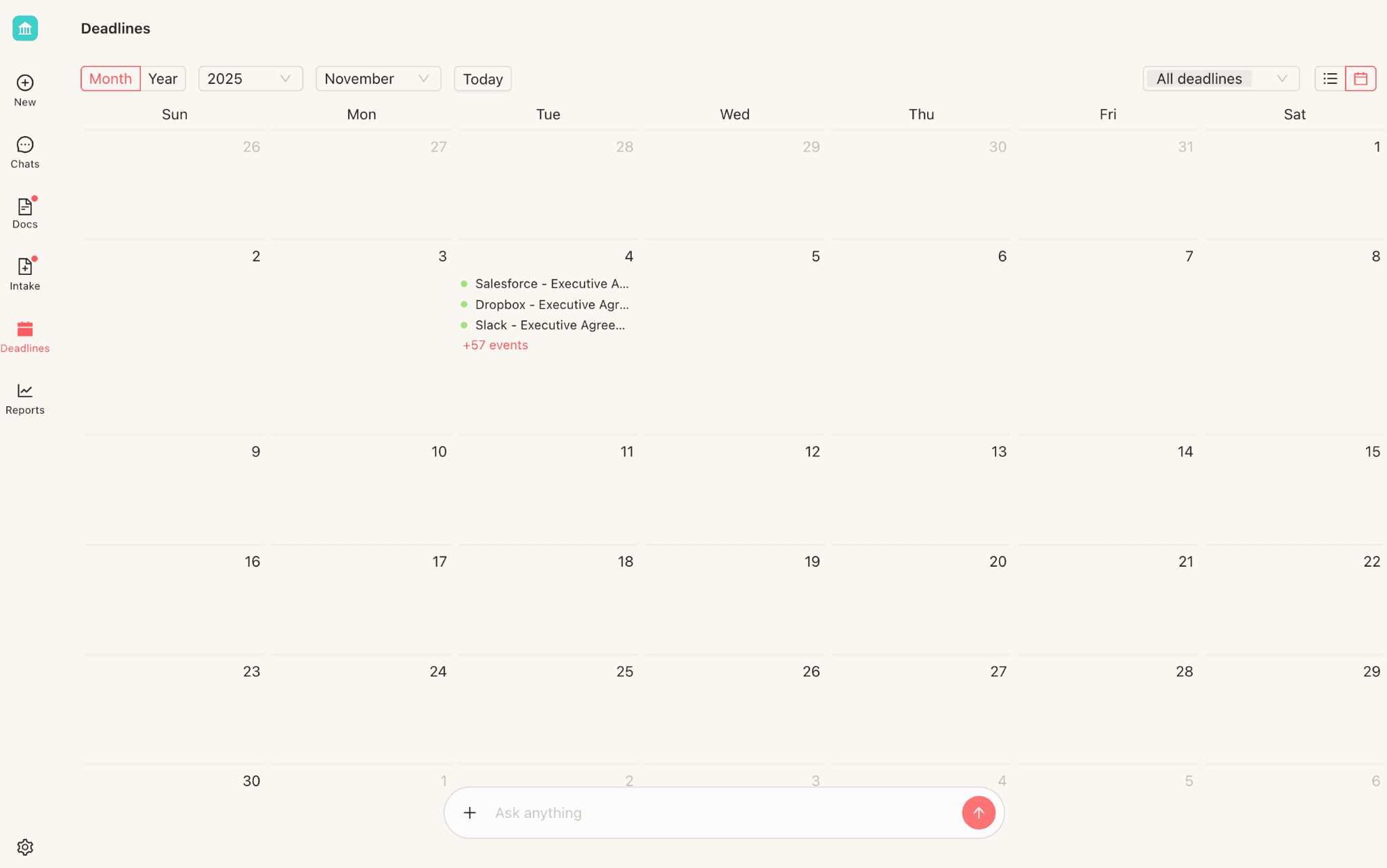
View all upcoming deadlines in calendar or list format
How It Works
Concord automatically extracts lifecycle data using AI, including signing dates, effective dates, duration, renewal terms, and early termination notice periods. You can also manually input or adjust this data when needed.
Automatic Reminders
Once deadline data is set, Concord takes care of the rest. You’ll receive a weekly deadline digest email showing all upcoming deadlines in one place. The calendar view lets you see deadlines by month, and you can sync everything with your personal calendar in Google or Outlook to stay on top of important dates.
Quick Reference: Best Practices Checklist
Area | Best Practice |
|---|---|
Inbox | Keep only active documents; archive completed work |
Favorites | Star frequently used templates |
Folders | Organize by department, then contract type |
Uploads | Always save to a proper folder, not personal |
Naming | Use format: Type - Vendor - Year |
Fields | Create custom properties for business-specific data |
Deadlines | Ensure lifecycle data is set for automatic alerts |
Need Help Restructuring?
If you’ve been using Concord for a while and your organization has grown beyond your current folder structure, don’t worry. It’s fixable. Concord offers bulk move actions to migrate documents between folders, and the Customer Success team is happy to help you create a restructuring plan.
Have questions? Reach out to your CSM or contact us at support@concord.app.
This blog post is based on our “Organize Your Contracts: Best Practices” webinar featuring Zach Hintze and Dakota McDurham.
A messy contract system wastes time. When someone needs to find an agreement fast for an audit, a renewal decision, or a legal question, they shouldn't have to dig through folders or ping three colleagues. In our recent webinar, Zach Hintze (Head of Sales, 10+ years at Concord) and Dakota McDurham (Product Manager) shared tips from working with hundreds of customers.
Here’s everything you need to know to keep your contracts organized in Concord.
1. Master Your Inbox
Your Concord inbox should work like your email inbox: a place for active work, not a storage dump.
Customize your inbox view to show only the fields you need
Customize Your View
The inbox can display any data field you want, so take the time to strip it down to the essentials. Remove fields you don’t check regularly and add the custom fields your company actually tracks, such as risk level or department owner. If you’re using Horizon, you can add standard fields, custom fields, and smart fields directly to the inbox view with just a few clicks.
Adopt “Inbox Zero”
The best practice is to treat your Concord inbox like email. Only keep documents you’re actively working on visible in your inbox. Once something is signed and processed, archive it. If you won’t need to revisit a document for a few months, set a deadline on it and archive it until then.
Archive documents to remove them from your inbox without deleting them
One important thing to know: archiving is individual. It only affects your view, so your teammates will still see the document in their inbox until they archive it themselves. You don’t need to worry about hiding something from a colleague who still needs it.
2. Use Favorites for Quick Access
The star feature lets you favorite documents for quick retrieval.
Star your most-used templates for instant access
This is especially useful for templates. Star all your commonly used documents like NDAs, order forms, and standard agreements. When you need to send something out, just click Favorites and your templates are right there. No more digging through folders to find that one NDA template you use every week.
3. Build a Scalable Folder Structure
Folders serve two critical purposes in Concord. First, they help with organization so you can find documents quickly. Second, they control access by determining who can see what in the system.
The Recommended Structure
The most effective approach we’ve seen is organizing by department first, then by contract type within each department. For example, your HR folder would contain subfolders for Benefits, Recruiting, and Training. Your Finance folder would have Accounting, Audit, and Treasury. This structure scales well and makes it intuitive for anyone to find what they need.
Some companies prefer to organize folders by vendor name, but this approach tends to break down as you scale. After a year of adding vendors, customers often find themselves needing to restructure entirely. Instead of creating vendor folders, use the Party field to filter. You can quickly pull up all contracts with a specific vendor without maintaining hundreds of vendor-specific folders.
Think About Scale
When setting up folders, think ahead. Consider how the structure will look with ten times more documents. Ask yourself how access permissions will work as you add more team members and whether new employees will intuitively understand where to find things. A little planning upfront saves significant reorganization later.
4. Upload Documents to the Right Place
How you upload documents matters more than you might think.
Horizon vs. Classic
In Horizon, when you drag and drop a document, the system immediately asks which folder to save it in. This simple prompt prevents documents from getting lost in your personal folder.
Classic works differently. Documents default to your personal folder unless you’re already inside a specific folder when uploading. If you’re using Classic, make a habit of moving documents to the correct folder right after upload.
Here’s why this matters: documents in your personal folder are only visible to you and admins. If you leave the company, nobody will be able to find them. Always save shared documents to proper folders so your team can access them when needed.
5. Establish Naming Conventions
Consistent naming makes documents scannable and searchable. The format we use internally at Concord, and recommend to customers, is simple: Document Type, then Vendor Name, then Year when relevant.
So a mutual NDA with Acme Corp becomes “Mutual NDA - Acme Corp.” An order form with Widget Inc for 2026 becomes “Order Form - Widget Inc - 2026.” Amendments follow the same pattern: “Amendment 1 - Acme Corp - 2026.”
This format lets you quickly scan a list and identify document types at a glance. You can easily find all documents for a specific vendor, and adding the year helps track renewals and amendments over time.
6. Leverage Custom Properties for Better Data
Good data in means good data out. Custom properties let you track exactly what your business needs beyond the standard fields.
Available Field Types
Concord offers a wide range of field types to match your needs. You can create short or long text fields, number fields, single or multi-select dropdowns, date and date-time fields, yes/no toggles, currency fields, and even user selection fields.
Common Use Cases
Many customers create a Risk Level field with Low, Medium, and High options for compliance tracking. A Contract Owner field helps identify who’s responsible internally. Department fields enable cross-departmental visibility, and Renewal Status fields track whether contracts auto-renew or require manual renewal.
Once you create custom properties, they become powerful tools throughout the system. You can add them to your inbox view for at-a-glance information, use them in filters and saved searches to find specific contracts, and include them in reports and exports for analysis.
7. Set Up Deadline Alerts
Never miss a renewal or termination deadline again.
View all upcoming deadlines in calendar or list format
How It Works
Concord automatically extracts lifecycle data using AI, including signing dates, effective dates, duration, renewal terms, and early termination notice periods. You can also manually input or adjust this data when needed.
Automatic Reminders
Once deadline data is set, Concord takes care of the rest. You’ll receive a weekly deadline digest email showing all upcoming deadlines in one place. The calendar view lets you see deadlines by month, and you can sync everything with your personal calendar in Google or Outlook to stay on top of important dates.
Quick Reference: Best Practices Checklist
Area | Best Practice |
|---|---|
Inbox | Keep only active documents; archive completed work |
Favorites | Star frequently used templates |
Folders | Organize by department, then contract type |
Uploads | Always save to a proper folder, not personal |
Naming | Use format: Type - Vendor - Year |
Fields | Create custom properties for business-specific data |
Deadlines | Ensure lifecycle data is set for automatic alerts |
Need Help Restructuring?
If you’ve been using Concord for a while and your organization has grown beyond your current folder structure, don’t worry. It’s fixable. Concord offers bulk move actions to migrate documents between folders, and the Customer Success team is happy to help you create a restructuring plan.
Have questions? Reach out to your CSM or contact us at support@concord.app.
This blog post is based on our “Organize Your Contracts: Best Practices” webinar featuring Zach Hintze and Dakota McDurham.


Take the "management" out
of contract management.
Customer Support
Legal
Compare
Resources
Customer Support
Company
Legal
Compare
Resources
Customer Support
Company
Legal
Compare
© 2025 Concord. All rights reserved.

