
Contract Lifecycle Management Software Finance Can Trust for Renewal Reporting
Contract Lifecycle Management Software Finance Can Trust for Renewal Reporting
Contract Lifecycle Management Software Finance Can Trust for Renewal Reporting
Contract Lifecycle Management Software Finance Can Trust for Renewal Reporting
Finance trusts renewal exposure when three things are true:
The table is complete.
The logic is repeatable.
Every row ties back to an agreement someone can open and verify.
That is why renewal exposure is one of the fastest ways to judge whether your contract lifecycle management software is doing real work or just storing PDFs. If renewal reporting lives in spreadsheets, finance learns to treat it as a one-off exercise. If renewal reporting lives in the system, it becomes an operating rhythm.
If you are evaluating your current setup, it helps to understand what modern contract management software should deliver for finance teams.
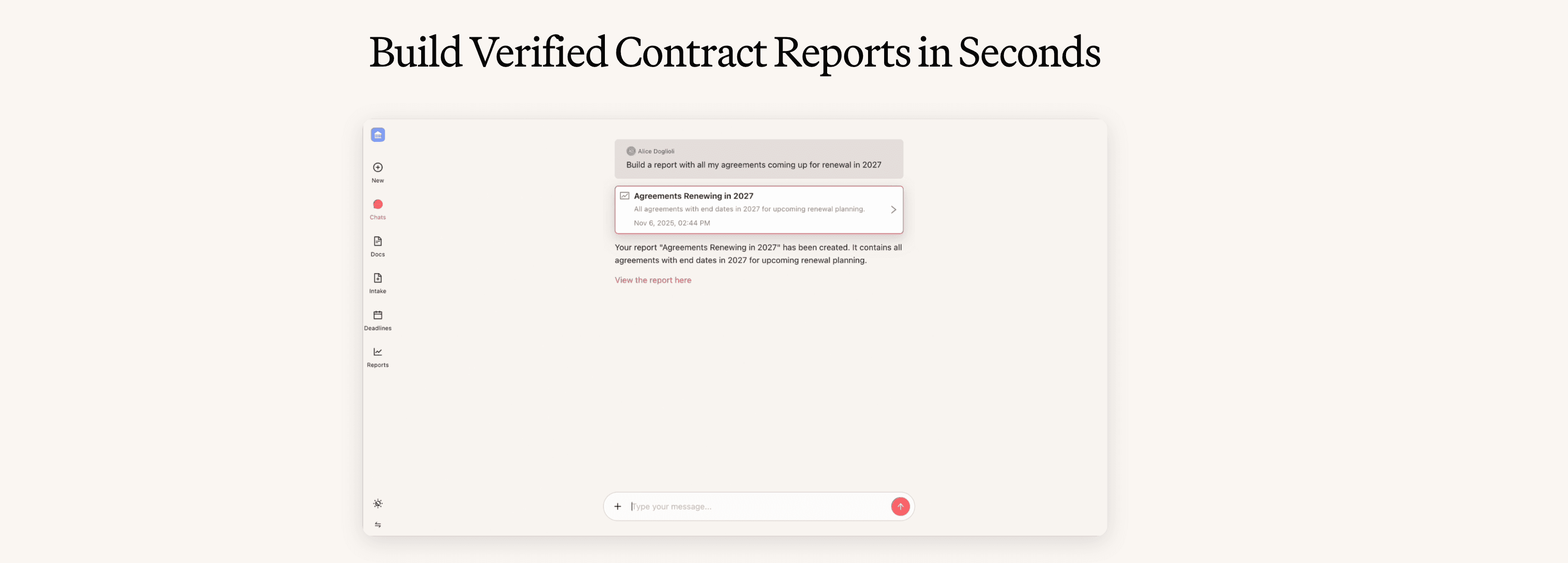
In Concord Horizon, we build renewal exposure around structured fields and deterministic reporting. AI Reporting is the piece that turns a plain-language question into a saved, reusable table that stays consistent month after month.
What a finance-grade renewal exposure table contains
A renewal exposure table finance will use answers five questions in one view.
What renews in the window
What is the exposure tied to each renewal
When a notice deadline hits
Which renewals are exceptions that need human review
How to validate any row fast
If your table cannot answer all five, the meeting turns into follow-up work, and the report stops getting opened.
Step 1: Model renewal terms as fields
Renewal exposure breaks when renewal terms live in text. The fix is to model renewal terms as fields, even when contracts are messy.
Start with a small set of lifecycle fields that define time.
Signed date
Effective date
Term end date or expiration date
Renewal term details
Termination notice days
In Concord, those live in the Lifecycle fields section.
Then add a controlled layer for how the renewal behaves. This is where finance trust comes from, because the same contract type behaves the same way in the report.
Create these fields as Custom document properties, and keep them as dropdowns or numeric types whenever you plan to filter, group, or total.
Renewal fields that make reporting stable
Renewal structure
Dropdown values: Auto-renew, Optional renewal, Fixed term, Evergreen, Needs reviewRenewal status
Dropdown values: Not started, In review, Negotiating, Executed, TerminatingRenewal owner
Internal user field, one accountable person per contractRenewal value
Monetary amount, defined once so totals stay consistentRenewal exception type
Dropdown values: Co-termination, Conditional renewal, Notice-driven renewal, Termination initiated, Not applicable
This is the minimum set that lets you run a complete renewal table without hiding edge cases.
How to fill renewals consistently
If you are updating an executed agreement, use the renewal workflow in Renewing a contract so the renewal is captured as part of the lifecycle record, not as a free-text note.
One rule keeps your data usable.
If a renewal can affect forecast or risk, it needs a Renewal structure value and a Renewal value.
Step 2: Define what renewal exposure means
Renewal exposure becomes a fight when “exposure” means different things to different people.
Pick one definition and use it everywhere. Typical definitions finance accepts include:
Annualized renewal value
Value for the renewal term
Total remaining committed spend tied to the renewal decision
Whatever definition you pick, store it in Renewal value, and treat that field as the source of totals. That single choice prevents the report from turning into spreadsheet math and side conversations.
Step 3: Build the renewal exposure table in AI Reporting
Once renewal terms are structured, build the table as a saved report you rerun on cadence.
In AI Reporting, start with a question written like a finance request.
Example prompt
Create a renewal exposure table for the next 180 days. Include contract title, counterparty, term end date, termination notice days, renewal structure, renewal value, renewal owner, renewal status, and renewal exception type. Keep rows with missing data and flag them.
Then tighten it into two saved outputs.
Table for finance review
Filters
Term end date in next 180 days
Exclude contracts marked terminated, if you track that status
Columns
Contract title
Counterparty
Term end date
Termination notice days
Renewal structure
Renewal value
Renewal owner
Renewal status
Renewal exception type
Data quality flag
This is the table that goes into the monthly close rhythm.
Table for cleanup work
Filters
Term end date is blank OR Renewal structure is blank OR Renewal value is blank
Columns
Contract title
Counterparty
Missing fields
Renewal owner
This is how you keep the system honest without polluting finance totals.
Step 4: Handle exceptions without dropping rows
The fastest way to destroy trust is to “clean” a report by excluding exceptions. Finance reads that as incomplete.
Keep every contract in the table and separate exceptions with fields.
Use three buckets driven by Renewal exception type and missing-field flags.
Bucket A - standard renewals
Term end date, Renewal structure, and Renewal value are filled.
Bucket B - known exceptions
Renewal exception type is filled. These remain part of exposure review, but they get handled with a different playbook.
Bucket C - missing data
Key fields are blank. These remain visible and become a managed backlog.
A complete table with visible exceptions builds more trust than a tidy table that silently drops the hard cases.
Step 5: Link every row back to the agreement
A finance-grade table is auditable. Any reviewer should be able to take a line item and validate it in under a minute.
Use three mechanisms that travel well across reviews and exports.
Keep a stable identifier in every export
When finance needs a spreadsheet snapshot, include the Concord unique ID in the export. The Inbox export includes that ID, which gives you a stable handle for tracing a row back to the exact agreement.
Make drill-down natural
A renewal table is only useful if it supports fast validation. Deadline Management gives your team a clickable list of upcoming deadlines tied to lifecycle fields, and selecting an item opens the underlying contract for review. Pairing a renewal exposure table with a deadlines list keeps both finance and legal aligned on what needs action next.
Export snapshots without breaking traceability
When finance wants a file, export the report as Excel or CSV using Report export and keep the stable ID column. That lets finance work in a spreadsheet while keeping the audit trail anchored to the system of record.
Common failure points and how to avoid them
Missing end dates
Treat them as a visible exception category, not a reason to exclude rows.Free-text renewal terms
Move renewal structure into a dropdown so reporting stays consistent.Totals built from inconsistent value definitions
Pick one renewal value definition and store it in one field.Exceptions handled in side spreadsheets
Keep exceptions in the same table, segmented by Renewal exception type.
The outcome finance actually cares about
When renewal exposure reporting lives inside contract lifecycle management software, finance gets a table that can be rerun on cadence, audited in minutes, and trusted in planning conversations.
That is the point where renewals stop being a quarterly scramble and start being managed exposure.
Finance trusts renewal exposure when three things are true:
The table is complete.
The logic is repeatable.
Every row ties back to an agreement someone can open and verify.
That is why renewal exposure is one of the fastest ways to judge whether your contract lifecycle management software is doing real work or just storing PDFs. If renewal reporting lives in spreadsheets, finance learns to treat it as a one-off exercise. If renewal reporting lives in the system, it becomes an operating rhythm.
If you are evaluating your current setup, it helps to understand what modern contract management software should deliver for finance teams.
In Concord Horizon, we build renewal exposure around structured fields and deterministic reporting. AI Reporting is the piece that turns a plain-language question into a saved, reusable table that stays consistent month after month.
What a finance-grade renewal exposure table contains
A renewal exposure table finance will use answers five questions in one view.
What renews in the window
What is the exposure tied to each renewal
When a notice deadline hits
Which renewals are exceptions that need human review
How to validate any row fast
If your table cannot answer all five, the meeting turns into follow-up work, and the report stops getting opened.
Step 1: Model renewal terms as fields
Renewal exposure breaks when renewal terms live in text. The fix is to model renewal terms as fields, even when contracts are messy.
Start with a small set of lifecycle fields that define time.
Signed date
Effective date
Term end date or expiration date
Renewal term details
Termination notice days
In Concord, those live in the Lifecycle fields section.
Then add a controlled layer for how the renewal behaves. This is where finance trust comes from, because the same contract type behaves the same way in the report.
Create these fields as Custom document properties, and keep them as dropdowns or numeric types whenever you plan to filter, group, or total.
Renewal fields that make reporting stable
Renewal structure
Dropdown values: Auto-renew, Optional renewal, Fixed term, Evergreen, Needs reviewRenewal status
Dropdown values: Not started, In review, Negotiating, Executed, TerminatingRenewal owner
Internal user field, one accountable person per contractRenewal value
Monetary amount, defined once so totals stay consistentRenewal exception type
Dropdown values: Co-termination, Conditional renewal, Notice-driven renewal, Termination initiated, Not applicable
This is the minimum set that lets you run a complete renewal table without hiding edge cases.
How to fill renewals consistently
If you are updating an executed agreement, use the renewal workflow in Renewing a contract so the renewal is captured as part of the lifecycle record, not as a free-text note.
One rule keeps your data usable.
If a renewal can affect forecast or risk, it needs a Renewal structure value and a Renewal value.
Step 2: Define what renewal exposure means
Renewal exposure becomes a fight when “exposure” means different things to different people.
Pick one definition and use it everywhere. Typical definitions finance accepts include:
Annualized renewal value
Value for the renewal term
Total remaining committed spend tied to the renewal decision
Whatever definition you pick, store it in Renewal value, and treat that field as the source of totals. That single choice prevents the report from turning into spreadsheet math and side conversations.
Step 3: Build the renewal exposure table in AI Reporting
Once renewal terms are structured, build the table as a saved report you rerun on cadence.
In AI Reporting, start with a question written like a finance request.
Example prompt
Create a renewal exposure table for the next 180 days. Include contract title, counterparty, term end date, termination notice days, renewal structure, renewal value, renewal owner, renewal status, and renewal exception type. Keep rows with missing data and flag them.
Then tighten it into two saved outputs.
Table for finance review
Filters
Term end date in next 180 days
Exclude contracts marked terminated, if you track that status
Columns
Contract title
Counterparty
Term end date
Termination notice days
Renewal structure
Renewal value
Renewal owner
Renewal status
Renewal exception type
Data quality flag
This is the table that goes into the monthly close rhythm.
Table for cleanup work
Filters
Term end date is blank OR Renewal structure is blank OR Renewal value is blank
Columns
Contract title
Counterparty
Missing fields
Renewal owner
This is how you keep the system honest without polluting finance totals.
Step 4: Handle exceptions without dropping rows
The fastest way to destroy trust is to “clean” a report by excluding exceptions. Finance reads that as incomplete.
Keep every contract in the table and separate exceptions with fields.
Use three buckets driven by Renewal exception type and missing-field flags.
Bucket A - standard renewals
Term end date, Renewal structure, and Renewal value are filled.
Bucket B - known exceptions
Renewal exception type is filled. These remain part of exposure review, but they get handled with a different playbook.
Bucket C - missing data
Key fields are blank. These remain visible and become a managed backlog.
A complete table with visible exceptions builds more trust than a tidy table that silently drops the hard cases.
Step 5: Link every row back to the agreement
A finance-grade table is auditable. Any reviewer should be able to take a line item and validate it in under a minute.
Use three mechanisms that travel well across reviews and exports.
Keep a stable identifier in every export
When finance needs a spreadsheet snapshot, include the Concord unique ID in the export. The Inbox export includes that ID, which gives you a stable handle for tracing a row back to the exact agreement.
Make drill-down natural
A renewal table is only useful if it supports fast validation. Deadline Management gives your team a clickable list of upcoming deadlines tied to lifecycle fields, and selecting an item opens the underlying contract for review. Pairing a renewal exposure table with a deadlines list keeps both finance and legal aligned on what needs action next.
Export snapshots without breaking traceability
When finance wants a file, export the report as Excel or CSV using Report export and keep the stable ID column. That lets finance work in a spreadsheet while keeping the audit trail anchored to the system of record.
Common failure points and how to avoid them
Missing end dates
Treat them as a visible exception category, not a reason to exclude rows.Free-text renewal terms
Move renewal structure into a dropdown so reporting stays consistent.Totals built from inconsistent value definitions
Pick one renewal value definition and store it in one field.Exceptions handled in side spreadsheets
Keep exceptions in the same table, segmented by Renewal exception type.
The outcome finance actually cares about
When renewal exposure reporting lives inside contract lifecycle management software, finance gets a table that can be rerun on cadence, audited in minutes, and trusted in planning conversations.
That is the point where renewals stop being a quarterly scramble and start being managed exposure.


Take the "management" out
of contract management.
Customer Support
Legal
Compare
Resources
Customer Support
Company
Legal
Compare
Resources
Customer Support
Company
Legal
Compare
© 2025 Concord. All rights reserved.

