
HubSpot contract management: how to connect deals to contracts
HubSpot contract management: how to connect deals to contracts
HubSpot contract management: how to connect deals to contracts
HubSpot contract management: how to connect deals to contracts
contract management
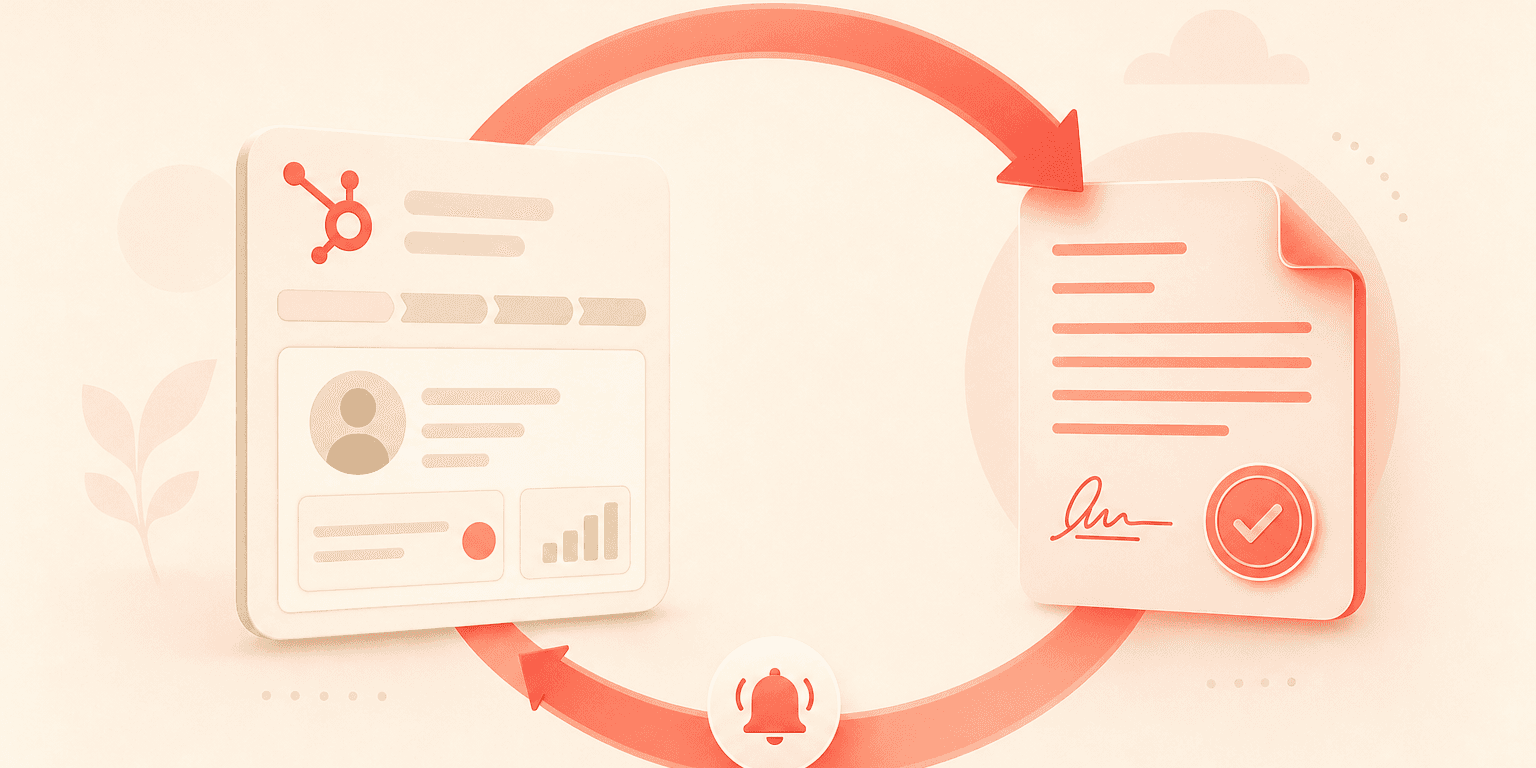
If your sales team runs on HubSpot, you already know the platform excels at pipeline management, contact tracking, and deal progression. But HubSpot contract management is a different story. Contracts stored as flat file attachments on deal records offer no lifecycle tracking, no approval routing, and no automated renewal alerts. As contract volume grows, that gap becomes expensive.
The good news: you do not need to replace HubSpot. You need to extend it. This guide walks through how to connect HubSpot deals directly to Concord, giving your sales team one-click contract generation, built-in approvals, e-signature, and bidirectional data sync without leaving the CRM.
Why HubSpot alone is not a contract management system
HubSpot was built for pipeline velocity and marketing automation. It was never designed to manage the full lifecycle of a contract. When your team stores a signed PDF as a deal attachment, you lose version control, structured metadata, renewal tracking, and any form of automated compliance workflow.
The workarounds are familiar: spreadsheets tracking expiration dates, email threads for manager approvals, and no single source of truth for contract terms. These manual processes hold together when you have six reps. They fracture when you have 36.
HubSpot-native organizations frequently discover that the tools they evaluate either lack a HubSpot connector entirely or offer a stripped-down version with limited functionality. Concord's native HubSpot integration was built to treat HubSpot as a first-class CRM, not a secondary connector.
Step 1: Connect HubSpot to Concord
The integration setup is a self-service process. Through Concord's admin configuration panel, you authenticate your HubSpot account and map the connection between the two platforms. No engineering resources or professional services are required.
Once connected, Concord pulls in your HubSpot objects: deals, contacts, companies, and products. This object mapping forms the foundation for everything that follows, from template building to document generation to post-signature tracking.
RevOps leaders frequently express that setup speed matters. A configuration process measured in minutes rather than days means your team can begin generating contracts from HubSpot the same afternoon you activate the integration.
Step 2: Build templates with HubSpot field mapping
With the integration active, you can build contract templates that pull data directly from HubSpot deal records. Concord's field management system lets admins drag and drop HubSpot fields into document templates, including deal amount, contact name, company details, and product line items.
The template builder supports text fields, dropdowns, checkboxes, and signature blocks. Your admin can create a sales order form template, for example, that automatically populates the customer name, deal value, product selections, and payment terms based on whatever exists in the HubSpot deal record.
This matters because manual re-entry of pricing data into a separate system is a common dealbreaker for high-volume teams. When product line items map directly from HubSpot into the generated contract, you eliminate transcription errors and save reps from toggling between systems. For more on building reusable templates, see this guide on contract template management.
Step 3: Generate contracts from the HubSpot deal view
This is where the integration pays off for your reps. From within a HubSpot deal record, a rep clicks a single button to generate a contract in Concord. The document appears pre-populated with all mapped deal data: contact information, company name, product line items, pricing, and any custom fields your admin has configured.
The rep never logs into a separate platform for routine contract creation. The goal is to make the CLM invisible for standard deals. Your rep clicks a button, reviews the pre-filled document, and sends it for signature, all from a workflow that starts and ends in HubSpot.
This reduction in context-switching directly affects deal velocity. Every additional platform login, tab switch, or copy-paste step adds friction between a verbal "yes" and an executed contract. By keeping reps inside HubSpot, you compress that timeline considerably.
Step 4: Route contracts through approval workflows
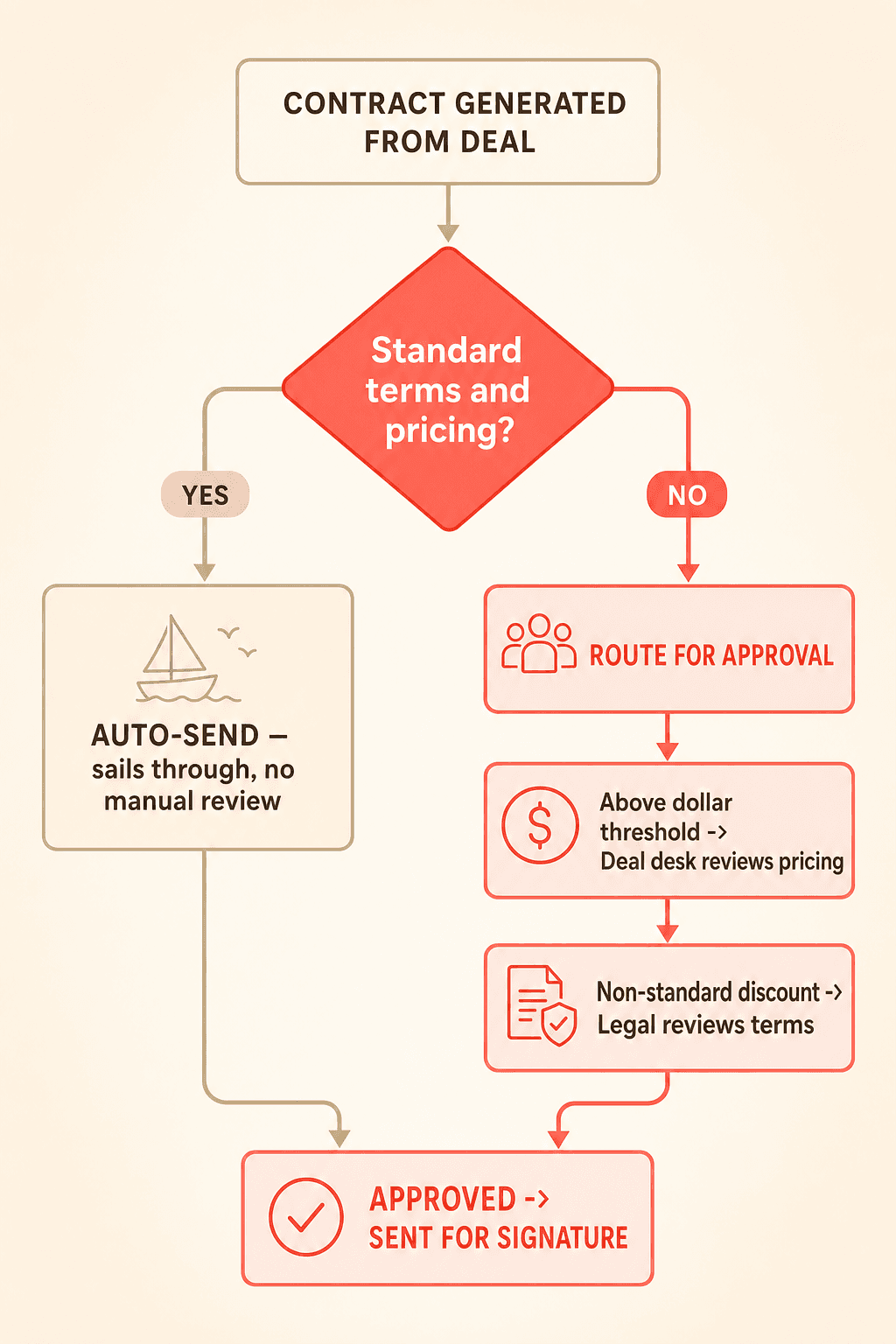
Small teams can rely on a manager eyeballing every contract before it goes out. That approach collapses at scale. Concord lets you configure conditional approval workflows that automatically route contracts based on predefined rules.
For example, you can set a rule where any contract above a certain dollar threshold routes to a deal desk for review. Contracts with non-standard discount terms can require legal sign-off before the rep can send them. Multi-step approvals let you chain reviewers in sequence, so a deal desk approves pricing before legal reviews terms.
These guardrails do not slow your team down. They create defined boundaries within which reps can move fast. A contract that falls within standard terms and pricing sails through automatically. A contract that deviates gets flagged and routed, without relying on a manager to catch it manually.
Step 5: Negotiate and sign within the platform
Once a contract is generated and approved, your counterparty receives it for review. Concord includes a built-in negotiation layer where both parties can redline, comment, and propose changes with full version tracking. Every edit is logged, creating an auditable history of what changed and who changed it.
When both parties agree on final terms, Concord's native e-signature capability lets the counterparty sign directly. No third-party e-signature tool is required for basic workflows, though Concord also integrates with DocuSign if your organization has an existing e-signature standard.
Step 6: Sync contract status back to HubSpot
Bidirectional sync is non-negotiable for teams that want a single source of truth. When a contract's status changes in Concord (draft, in review, pending signature, executed), that status automatically pushes back to the HubSpot deal record. Field updates made during negotiation, such as a revised deal amount or modified payment terms, also sync back to the CRM.
This eliminates the "two systems of record" problem. Your reps check HubSpot for pipeline status and contract status in the same view. Your legal team checks Concord for terms and sees deal context. Both systems reflect the same reality without manual data entry from either side.
Concord's integration event system also triggers notifications to external tools like Slack when contracts hit milestones such as signing or execution. Your team stays informed without checking dashboards.
Step 7: Manage contracts after signature
The moment a contract is signed, most teams shift attention to the next deal. Renewal dates, auto-renewal windows, and termination notice periods get buried in file attachments and forgotten. This is where manual processes fail silently.
Concord extracts lifecycle dates from signed contracts and makes them actionable. Weekly deadline emails alert contract owners to upcoming renewals. Calendar sync pushes key dates into your team's workflow automatically. Direct links to the signed document remain accessible from the HubSpot deal view, so anyone reviewing the account can find the executed agreement in seconds.
For a deeper look at post-signature workflows, see this guide on contract lifecycle management fundamentals.
What this means for your RevOps team
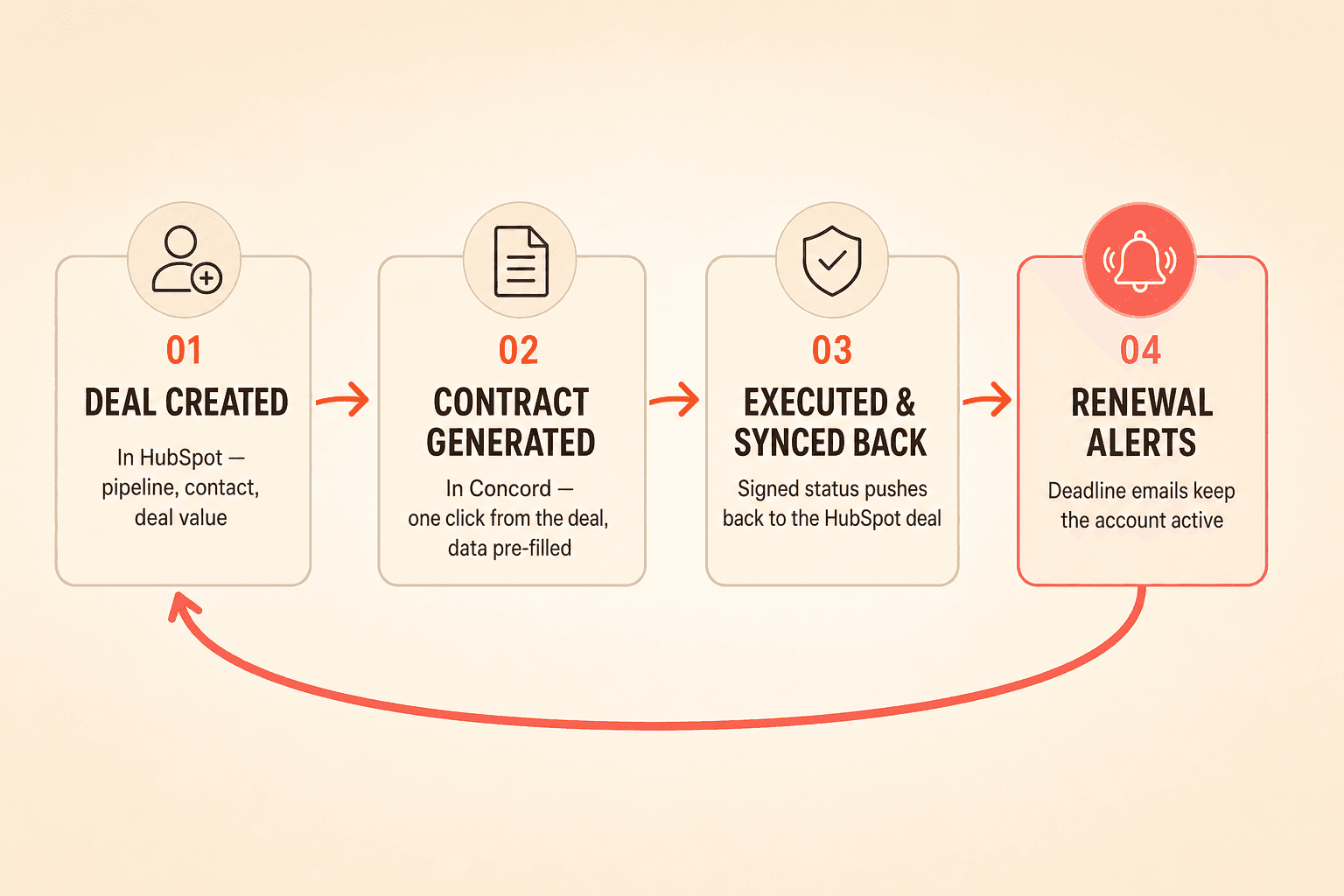
The integration creates a closed loop: deal creation in HubSpot triggers contract generation in Concord, contract execution syncs back to HubSpot, and renewal alerts keep the account active long after the initial sale. Your reps stay in HubSpot. Your legal team gets the approval controls they need. Your RevOps team gets clean data in both systems.
As your headcount scales, the approval workflows and template library scale with you. Adding a new rep means they inherit the same guardrails, templates, and automated routing that every other rep uses. No additional training on a separate platform is required for routine contract work.
If your sales team runs on HubSpot, you already know the platform excels at pipeline management, contact tracking, and deal progression. But HubSpot contract management is a different story. Contracts stored as flat file attachments on deal records offer no lifecycle tracking, no approval routing, and no automated renewal alerts. As contract volume grows, that gap becomes expensive.
The good news: you do not need to replace HubSpot. You need to extend it. This guide walks through how to connect HubSpot deals directly to Concord, giving your sales team one-click contract generation, built-in approvals, e-signature, and bidirectional data sync without leaving the CRM.
Why HubSpot alone is not a contract management system
HubSpot was built for pipeline velocity and marketing automation. It was never designed to manage the full lifecycle of a contract. When your team stores a signed PDF as a deal attachment, you lose version control, structured metadata, renewal tracking, and any form of automated compliance workflow.
The workarounds are familiar: spreadsheets tracking expiration dates, email threads for manager approvals, and no single source of truth for contract terms. These manual processes hold together when you have six reps. They fracture when you have 36.
HubSpot-native organizations frequently discover that the tools they evaluate either lack a HubSpot connector entirely or offer a stripped-down version with limited functionality. Concord's native HubSpot integration was built to treat HubSpot as a first-class CRM, not a secondary connector.
Step 1: Connect HubSpot to Concord
The integration setup is a self-service process. Through Concord's admin configuration panel, you authenticate your HubSpot account and map the connection between the two platforms. No engineering resources or professional services are required.
Once connected, Concord pulls in your HubSpot objects: deals, contacts, companies, and products. This object mapping forms the foundation for everything that follows, from template building to document generation to post-signature tracking.
RevOps leaders frequently express that setup speed matters. A configuration process measured in minutes rather than days means your team can begin generating contracts from HubSpot the same afternoon you activate the integration.
Step 2: Build templates with HubSpot field mapping
With the integration active, you can build contract templates that pull data directly from HubSpot deal records. Concord's field management system lets admins drag and drop HubSpot fields into document templates, including deal amount, contact name, company details, and product line items.
The template builder supports text fields, dropdowns, checkboxes, and signature blocks. Your admin can create a sales order form template, for example, that automatically populates the customer name, deal value, product selections, and payment terms based on whatever exists in the HubSpot deal record.
This matters because manual re-entry of pricing data into a separate system is a common dealbreaker for high-volume teams. When product line items map directly from HubSpot into the generated contract, you eliminate transcription errors and save reps from toggling between systems. For more on building reusable templates, see this guide on contract template management.
Step 3: Generate contracts from the HubSpot deal view
This is where the integration pays off for your reps. From within a HubSpot deal record, a rep clicks a single button to generate a contract in Concord. The document appears pre-populated with all mapped deal data: contact information, company name, product line items, pricing, and any custom fields your admin has configured.
The rep never logs into a separate platform for routine contract creation. The goal is to make the CLM invisible for standard deals. Your rep clicks a button, reviews the pre-filled document, and sends it for signature, all from a workflow that starts and ends in HubSpot.
This reduction in context-switching directly affects deal velocity. Every additional platform login, tab switch, or copy-paste step adds friction between a verbal "yes" and an executed contract. By keeping reps inside HubSpot, you compress that timeline considerably.
Step 4: Route contracts through approval workflows
Small teams can rely on a manager eyeballing every contract before it goes out. That approach collapses at scale. Concord lets you configure conditional approval workflows that automatically route contracts based on predefined rules.
For example, you can set a rule where any contract above a certain dollar threshold routes to a deal desk for review. Contracts with non-standard discount terms can require legal sign-off before the rep can send them. Multi-step approvals let you chain reviewers in sequence, so a deal desk approves pricing before legal reviews terms.
These guardrails do not slow your team down. They create defined boundaries within which reps can move fast. A contract that falls within standard terms and pricing sails through automatically. A contract that deviates gets flagged and routed, without relying on a manager to catch it manually.
Step 5: Negotiate and sign within the platform
Once a contract is generated and approved, your counterparty receives it for review. Concord includes a built-in negotiation layer where both parties can redline, comment, and propose changes with full version tracking. Every edit is logged, creating an auditable history of what changed and who changed it.
When both parties agree on final terms, Concord's native e-signature capability lets the counterparty sign directly. No third-party e-signature tool is required for basic workflows, though Concord also integrates with DocuSign if your organization has an existing e-signature standard.
Step 6: Sync contract status back to HubSpot
Bidirectional sync is non-negotiable for teams that want a single source of truth. When a contract's status changes in Concord (draft, in review, pending signature, executed), that status automatically pushes back to the HubSpot deal record. Field updates made during negotiation, such as a revised deal amount or modified payment terms, also sync back to the CRM.
This eliminates the "two systems of record" problem. Your reps check HubSpot for pipeline status and contract status in the same view. Your legal team checks Concord for terms and sees deal context. Both systems reflect the same reality without manual data entry from either side.
Concord's integration event system also triggers notifications to external tools like Slack when contracts hit milestones such as signing or execution. Your team stays informed without checking dashboards.
Step 7: Manage contracts after signature
The moment a contract is signed, most teams shift attention to the next deal. Renewal dates, auto-renewal windows, and termination notice periods get buried in file attachments and forgotten. This is where manual processes fail silently.
Concord extracts lifecycle dates from signed contracts and makes them actionable. Weekly deadline emails alert contract owners to upcoming renewals. Calendar sync pushes key dates into your team's workflow automatically. Direct links to the signed document remain accessible from the HubSpot deal view, so anyone reviewing the account can find the executed agreement in seconds.
For a deeper look at post-signature workflows, see this guide on contract lifecycle management fundamentals.
What this means for your RevOps team
The integration creates a closed loop: deal creation in HubSpot triggers contract generation in Concord, contract execution syncs back to HubSpot, and renewal alerts keep the account active long after the initial sale. Your reps stay in HubSpot. Your legal team gets the approval controls they need. Your RevOps team gets clean data in both systems.
As your headcount scales, the approval workflows and template library scale with you. Adding a new rep means they inherit the same guardrails, templates, and automated routing that every other rep uses. No additional training on a separate platform is required for routine contract work.

Need to know
Frequently Asked Questions

Take the "management" out
of contract management.
Customer Support
Legal
Compare
Resources
Customer Support
Company
Legal
Compare
Resources
Customer Support
Company
Legal
Compare
© 2025 Concord. All rights reserved.

