
Excel Contract Tracking Is a Mess: What to Switch To
Excel Contract Tracking Is a Mess: What to Switch To
Excel Contract Tracking Is a Mess: What to Switch To
Excel Contract Tracking Is a Mess: What to Switch To
contract management

Your spreadsheet worked when you had 20 contracts. You built it yourself, color-coded the tabs, and set calendar reminders for renewals. It was the right tool at the time. But now your contract tracking spreadsheet replacement search has brought you here, and that tells you something important: the spreadsheet stopped working a while ago. You just couldn't ignore it anymore.
This guide maps every common Excel failure mode to the CLM capability that fixes it, then gives you a practical evaluation checklist so you can make an informed decision.
Why Excel breaks down for contract tracking
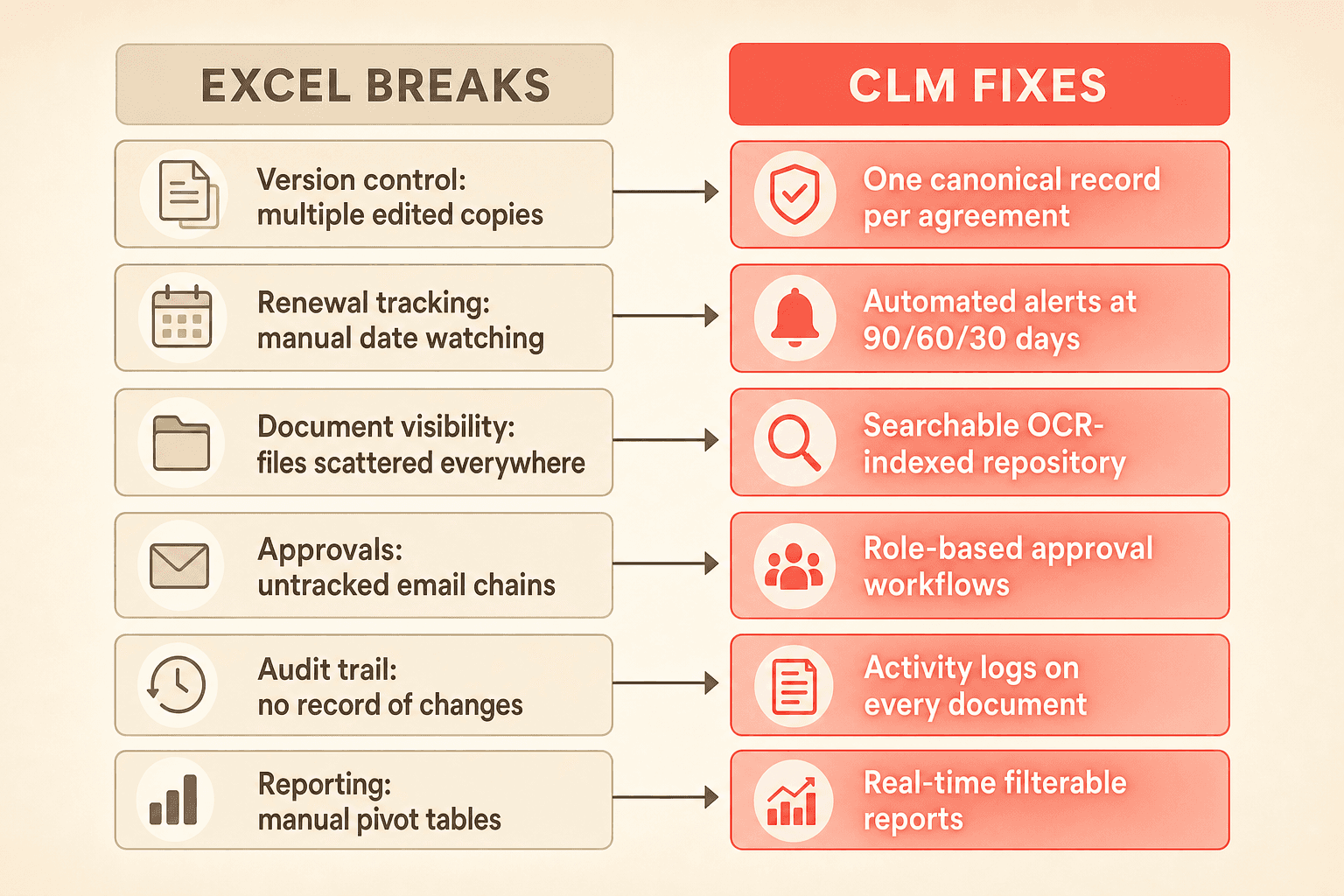
Excel is a calculation tool. It was never designed to manage documents, track deadlines across a growing portfolio, or control who sees what. As contract volume and team size grow, it breaks down at six predictable points.
Excel failure modeWhy it breaksWhat a CLM fixesVersion controlMultiple people edit copies; no single source of truthCentralized repository with one canonical record per agreementRenewal and deadline trackingManual date monitoring with no automated alertsAutomated deadline alerts at configurable intervals (90, 60, 30 days) with calendar syncDocument visibilityFiles scattered across inboxes, drives, and laptopsSearchable, OCR-indexed repository with folder-based access permissionsApproval workflowsEmail chains with no status trackingConfigurable approval workflows with role-based routingAudit trailNo record of who changed what or whenSystem-maintained activity logs on every documentReportingManual pivot tables built on incomplete dataFilterable, real-time reports with AI-assisted query building
These are not hypothetical risks. They are the exact Excel contract management problems that teams describe when they start evaluating CLM systems.
The spreadsheet gives you a false sense of control
When teams build a tracking spreadsheet, it typically captures only contracts signed after the initiative started. Years of historical agreements remain completely untracked. The spreadsheet becomes a partial view that feels like coverage but leaves critical gaps.
You cannot search across document text. You cannot link related agreements, like an MSA to its SOWs. You have no automated alerts.
Most teams do not realize the gap until they miss a termination window or cannot locate a contract under time pressure. The spreadsheet does not scale. It hides risk until the risk materializes.
What to look for in a contract tracking spreadsheet replacement
Not all CLM systems are built for the same buyer. A platform designed for a 5,000-person enterprise legal department will overwhelm a 100-person company that just needs to stop missing renewals. Here is what matters when you are switching from Excel to CLM for the first time.
AI data extraction that actually works
The highest-friction task teams describe is validating that their spreadsheet data matches what is actually in the contracts. A CLM with AI data extraction reads every uploaded document and automatically populates key metadata: parties, effective dates, renewal terms, termination notice periods, and financial values.
Concord's AI extraction handles scanned images through OCR and lets you correct any field manually. Your corrections stick. The AI does not override them.
Deadline alerts you do not have to build yourself
The most common trigger for a CLM search is a missed or nearly missed renewal deadline. Look for configurable alerts at custom intervals, a weekly digest email, and a calendar view that syncs with Outlook or Google Calendar. Concord scopes alerts to each user's document access, so people only see deadlines relevant to them.
A searchable repository with access controls
Excel offers no native access control. A CLM with folder-based permissions lets you organize contracts by department, location, or type, then restrict visibility so sales sees sales contracts and HR sees HR documents. Concord supports bulk upload during implementation, so your existing contracts are centralized from day one.
Document linking and relationship mapping
Your MSA connects to three SOWs and an amendment. In Excel, that relationship lives in your head or in a cell note nobody reads. A CLM should let you link contracts together and display those relationships clearly. Tags provide additional categorization.
Natural-language search across your full portfolio
Replacing Ctrl+F across a folder of PDFs with a search that spans every document in your repository is a fundamental shift. Concord's AI copilot lets you ask questions like "find all contracts containing a non-compete clause" or "show me agreements with termination notice periods under 60 days."
Intake forms that replace email requests
When contract review depends on emailing documents and chasing people for responses, contracts sit in limbo for days or weeks. Customizable intake forms route requests to the right team, attach documents, and track status, so requesters can check progress without sending follow-up emails.
CLM evaluation checklist
Use this checklist when comparing platforms. It reflects the capabilities that matter most when you are moving from a spreadsheet for the first time.
Evaluation criteriaQuestions to askImplementation speedCan you go live in two weeks or less? What is included: configuration, data migration, training?AI extraction accuracyDoes the system OCR scanned documents? Can you correct extracted data without it being overwritten?Deadline managementAre alerts configurable at custom intervals? Is there a calendar sync? Do users get a weekly digest?Repository and permissionsCan you organize by folder with role-based access? Is bulk upload supported?Search capabilityCan you search across full document text, not just metadata? Is natural-language query available?Document linkingCan you link related agreements (MSA to SOW to amendment)?ReportingCan you build custom reports with filters? Can you export to Excel? Are pre-built templates available?Pricing transparencyIs pricing published on the website? Are AI features included in all plans or priced as add-ons?Collaboration toolsDoes the platform support in-document commenting, approval workflows, and status tracking?Scalability pathCan you start with repository-only and add drafting, negotiation, and e-signature later?
Start with the repository, then layer on everything else
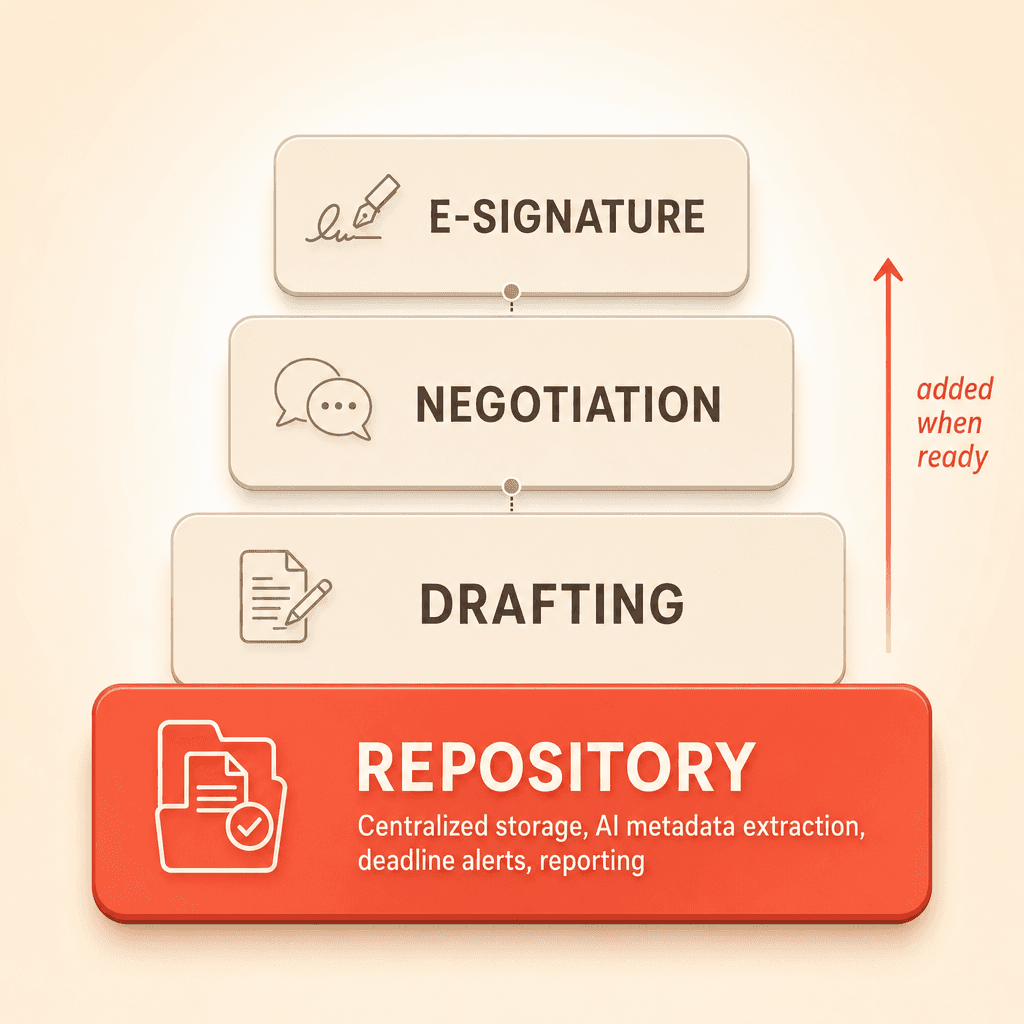
Teams frequently debate whether to adopt the full lifecycle (drafting, negotiation, e-signature) or just the repository. The pragmatic answer: start with the repository.
Upload your existing contracts. Let AI extract the metadata. Get deadline alerts running and build reporting. Then layer on drafting, negotiation, and e-signature workflows over time. This approach delivers immediate value without requiring a full process change on day one.
What your first two weeks look like
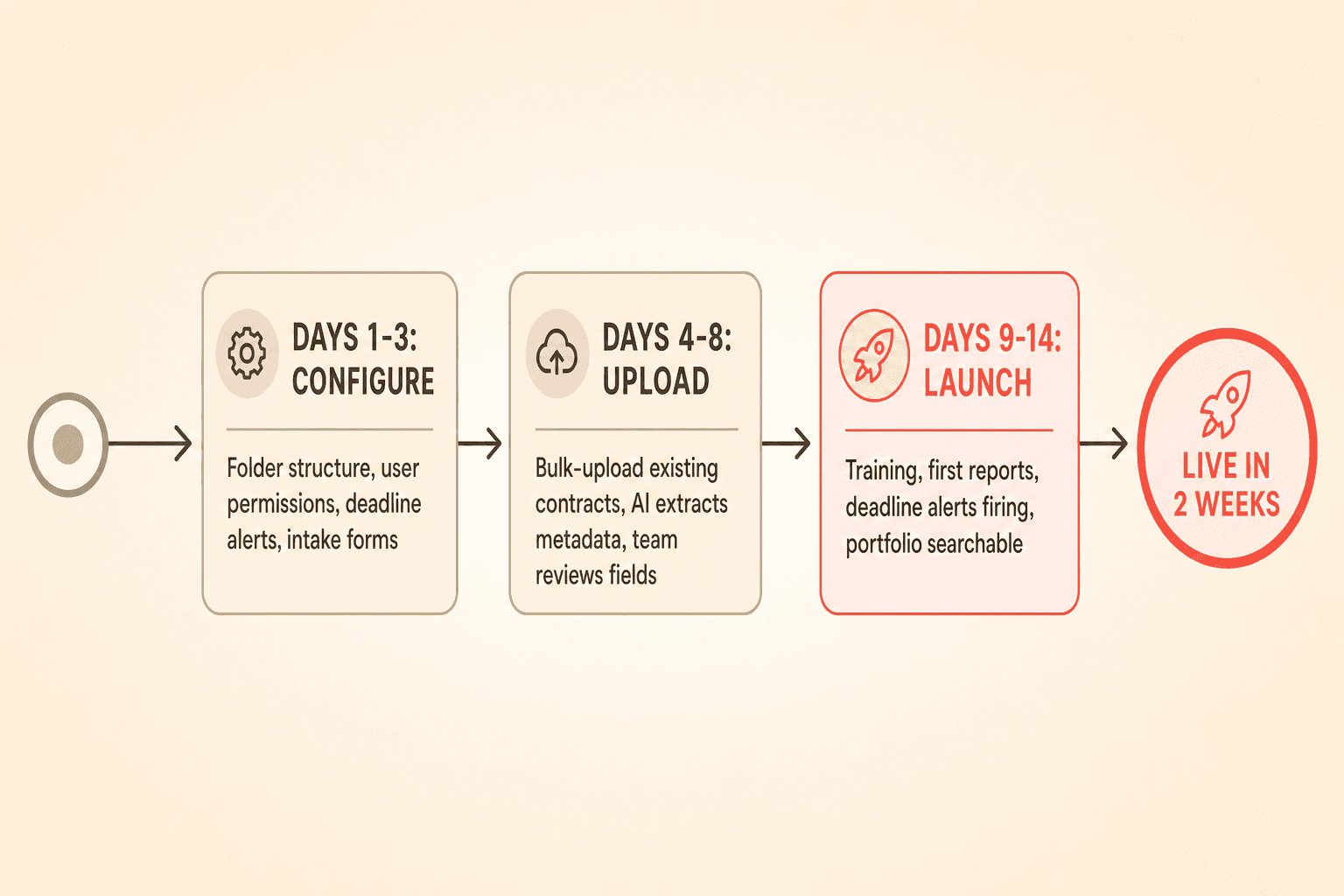
Days one through three: Configuration. Your folder structure, user permissions, and deadline alert settings are set up. Intake forms are customized to match your request process.
Days four through eight: Data upload. Existing contracts are bulk-uploaded. AI extraction populates metadata across your portfolio. Your team reviews and corrects any fields that need adjustment.
Days nine through fourteen: Training and launch. Your team learns the platform, runs their first reports, and confirms deadline alerts are firing correctly. By the end of week two, your contract portfolio is searchable, your deadlines are monitored, and your reporting runs on live data instead of a stale spreadsheet.
Your spreadsheet worked when you had 20 contracts. You built it yourself, color-coded the tabs, and set calendar reminders for renewals. It was the right tool at the time. But now your contract tracking spreadsheet replacement search has brought you here, and that tells you something important: the spreadsheet stopped working a while ago. You just couldn't ignore it anymore.
This guide maps every common Excel failure mode to the CLM capability that fixes it, then gives you a practical evaluation checklist so you can make an informed decision.
Why Excel breaks down for contract tracking
Excel is a calculation tool. It was never designed to manage documents, track deadlines across a growing portfolio, or control who sees what. As contract volume and team size grow, it breaks down at six predictable points.
Excel failure modeWhy it breaksWhat a CLM fixesVersion controlMultiple people edit copies; no single source of truthCentralized repository with one canonical record per agreementRenewal and deadline trackingManual date monitoring with no automated alertsAutomated deadline alerts at configurable intervals (90, 60, 30 days) with calendar syncDocument visibilityFiles scattered across inboxes, drives, and laptopsSearchable, OCR-indexed repository with folder-based access permissionsApproval workflowsEmail chains with no status trackingConfigurable approval workflows with role-based routingAudit trailNo record of who changed what or whenSystem-maintained activity logs on every documentReportingManual pivot tables built on incomplete dataFilterable, real-time reports with AI-assisted query building
These are not hypothetical risks. They are the exact Excel contract management problems that teams describe when they start evaluating CLM systems.
The spreadsheet gives you a false sense of control
When teams build a tracking spreadsheet, it typically captures only contracts signed after the initiative started. Years of historical agreements remain completely untracked. The spreadsheet becomes a partial view that feels like coverage but leaves critical gaps.
You cannot search across document text. You cannot link related agreements, like an MSA to its SOWs. You have no automated alerts.
Most teams do not realize the gap until they miss a termination window or cannot locate a contract under time pressure. The spreadsheet does not scale. It hides risk until the risk materializes.
What to look for in a contract tracking spreadsheet replacement
Not all CLM systems are built for the same buyer. A platform designed for a 5,000-person enterprise legal department will overwhelm a 100-person company that just needs to stop missing renewals. Here is what matters when you are switching from Excel to CLM for the first time.
AI data extraction that actually works
The highest-friction task teams describe is validating that their spreadsheet data matches what is actually in the contracts. A CLM with AI data extraction reads every uploaded document and automatically populates key metadata: parties, effective dates, renewal terms, termination notice periods, and financial values.
Concord's AI extraction handles scanned images through OCR and lets you correct any field manually. Your corrections stick. The AI does not override them.
Deadline alerts you do not have to build yourself
The most common trigger for a CLM search is a missed or nearly missed renewal deadline. Look for configurable alerts at custom intervals, a weekly digest email, and a calendar view that syncs with Outlook or Google Calendar. Concord scopes alerts to each user's document access, so people only see deadlines relevant to them.
A searchable repository with access controls
Excel offers no native access control. A CLM with folder-based permissions lets you organize contracts by department, location, or type, then restrict visibility so sales sees sales contracts and HR sees HR documents. Concord supports bulk upload during implementation, so your existing contracts are centralized from day one.
Document linking and relationship mapping
Your MSA connects to three SOWs and an amendment. In Excel, that relationship lives in your head or in a cell note nobody reads. A CLM should let you link contracts together and display those relationships clearly. Tags provide additional categorization.
Natural-language search across your full portfolio
Replacing Ctrl+F across a folder of PDFs with a search that spans every document in your repository is a fundamental shift. Concord's AI copilot lets you ask questions like "find all contracts containing a non-compete clause" or "show me agreements with termination notice periods under 60 days."
Intake forms that replace email requests
When contract review depends on emailing documents and chasing people for responses, contracts sit in limbo for days or weeks. Customizable intake forms route requests to the right team, attach documents, and track status, so requesters can check progress without sending follow-up emails.
CLM evaluation checklist
Use this checklist when comparing platforms. It reflects the capabilities that matter most when you are moving from a spreadsheet for the first time.
Evaluation criteriaQuestions to askImplementation speedCan you go live in two weeks or less? What is included: configuration, data migration, training?AI extraction accuracyDoes the system OCR scanned documents? Can you correct extracted data without it being overwritten?Deadline managementAre alerts configurable at custom intervals? Is there a calendar sync? Do users get a weekly digest?Repository and permissionsCan you organize by folder with role-based access? Is bulk upload supported?Search capabilityCan you search across full document text, not just metadata? Is natural-language query available?Document linkingCan you link related agreements (MSA to SOW to amendment)?ReportingCan you build custom reports with filters? Can you export to Excel? Are pre-built templates available?Pricing transparencyIs pricing published on the website? Are AI features included in all plans or priced as add-ons?Collaboration toolsDoes the platform support in-document commenting, approval workflows, and status tracking?Scalability pathCan you start with repository-only and add drafting, negotiation, and e-signature later?
Start with the repository, then layer on everything else
Teams frequently debate whether to adopt the full lifecycle (drafting, negotiation, e-signature) or just the repository. The pragmatic answer: start with the repository.
Upload your existing contracts. Let AI extract the metadata. Get deadline alerts running and build reporting. Then layer on drafting, negotiation, and e-signature workflows over time. This approach delivers immediate value without requiring a full process change on day one.
What your first two weeks look like
Days one through three: Configuration. Your folder structure, user permissions, and deadline alert settings are set up. Intake forms are customized to match your request process.
Days four through eight: Data upload. Existing contracts are bulk-uploaded. AI extraction populates metadata across your portfolio. Your team reviews and corrects any fields that need adjustment.
Days nine through fourteen: Training and launch. Your team learns the platform, runs their first reports, and confirms deadline alerts are firing correctly. By the end of week two, your contract portfolio is searchable, your deadlines are monitored, and your reporting runs on live data instead of a stale spreadsheet.

Need to know
Frequently Asked Questions

Take the "management" out
of contract management.
Customer Support
Legal
Compare
Resources
Customer Support
Company
Legal
Compare
Resources
Customer Support
Company
Legal
Compare
© 2025 Concord. All rights reserved.

