
How to triage 100+ active negotiations with contract negotiation tracking software
How to triage 100+ active negotiations with contract negotiation tracking software
How to triage 100+ active negotiations with contract negotiation tracking software
How to triage 100+ active negotiations with contract negotiation tracking software
contract management
KEY TAKEAWAYS
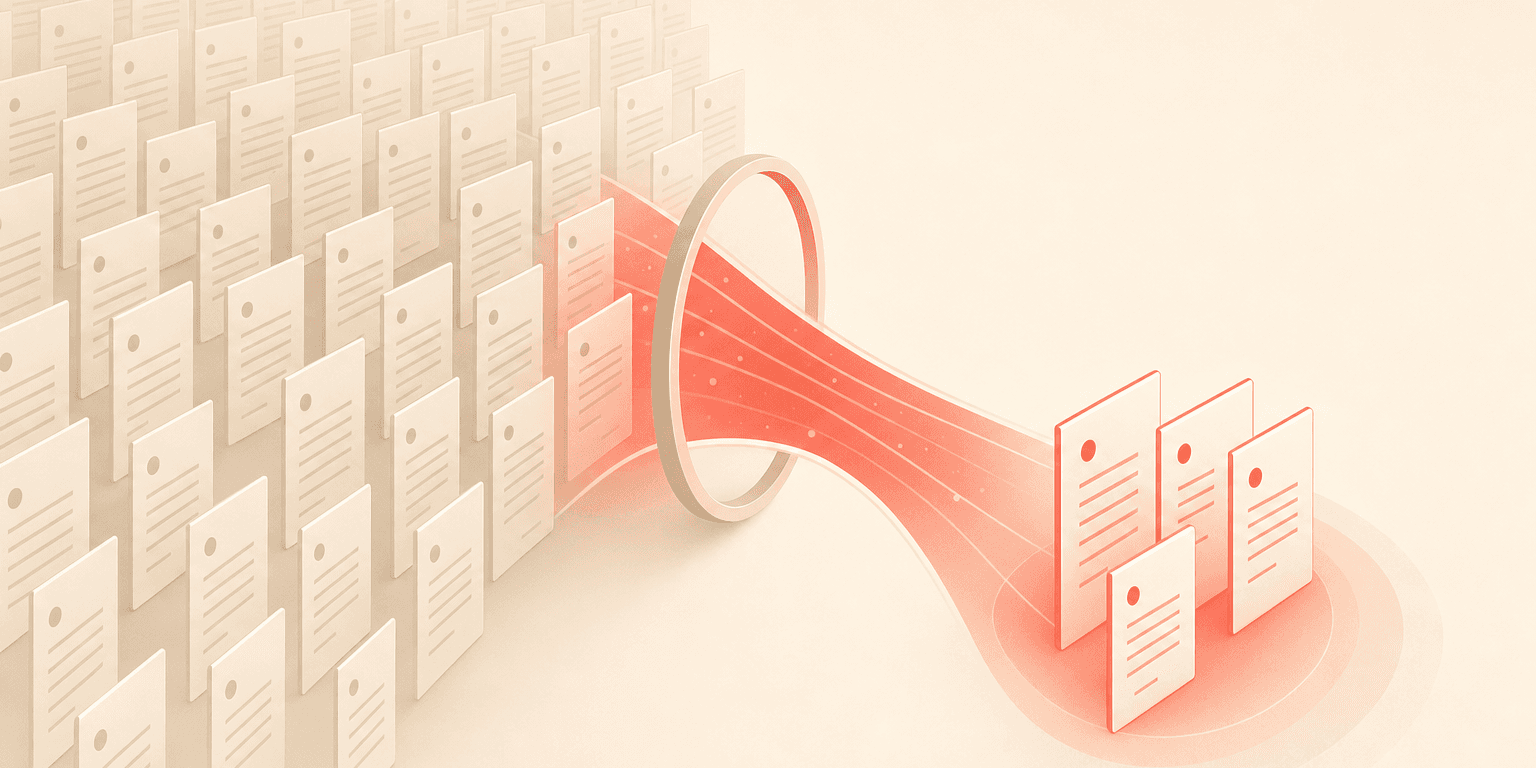
At 100 or more open negotiations, the problem is not storing contracts. It is knowing which one needs you next.
Tracking software replaces manual spreadsheet triage with multi-criteria filtered views (status, counterparty, value, deadline).
Saved views turn one-time triage into recurring reporting, so you do not rebuild the same filter every Monday.
Permission-scoped views let legal, sales, and finance each see only their slice.
Teams cut "where does this contract stand?" lookups from minutes to seconds.
Legal ops teams juggling dozens of active deals at once know the feeling: contracts scattered across email threads, spreadsheets, and shared drives, with no clear way to tell which ones need attention right now. Contract negotiation tracking software with advanced filtering changes that equation entirely. Instead of scrolling through a flat list of every agreement your organization has ever touched, you can slice your active portfolio by status, counterparty, dollar amount, and deadline to surface exactly what matters today.
This post walks through how filtering works in a high-volume negotiation environment, why it matters more than storage or search alone, and how to set up a triage system that keeps 100+ deals moving without anything slipping through the cracks.
The real bottleneck is not storage
Most teams that outgrow spreadsheets do not lack a place to store contracts. They lack the ability to find and prioritize the right contracts at the right time. The bottleneck is retrieval and triage, not repository capacity.
Think about it: when you manage 100+ active negotiations, every contract sits at a different stage, involves a different counterparty, carries a different dollar value, and runs on a different timeline. Without multi-dimensional filtering, your only option is to manually scan a flat list or maintain a parallel tracking spreadsheet. That parallel spreadsheet defeats the entire purpose of adopting a CLM platform.
Legal ops professionals frequently describe this exact pain point. They moved contracts into a centralized system, but the system returned every result at once, with no way to exclude irrelevant categories or refine by multiple criteria simultaneously. The volume of results became its own problem.
Spreadsheet or email triage | Negotiation tracking software | |
|---|---|---|
Find "what needs me today" | Manual scan, every time | One saved filtered view |
Status accuracy | Stale the moment it is typed | Live, updated on every action |
Cross-team visibility | Forwarded threads | Permission-scoped views |
Reporting | Rebuild the sheet | Saved view is the report |
Scales to 100 or more deals | Breaks down | Designed for it |
How filtering turns your workspace into a triage system
Effective deal triage follows a natural decision hierarchy that mirrors how legal ops professionals already think about their workload. The question is whether your tool supports this mental model natively or forces you to approximate it with manual workarounds.
Filter by status first
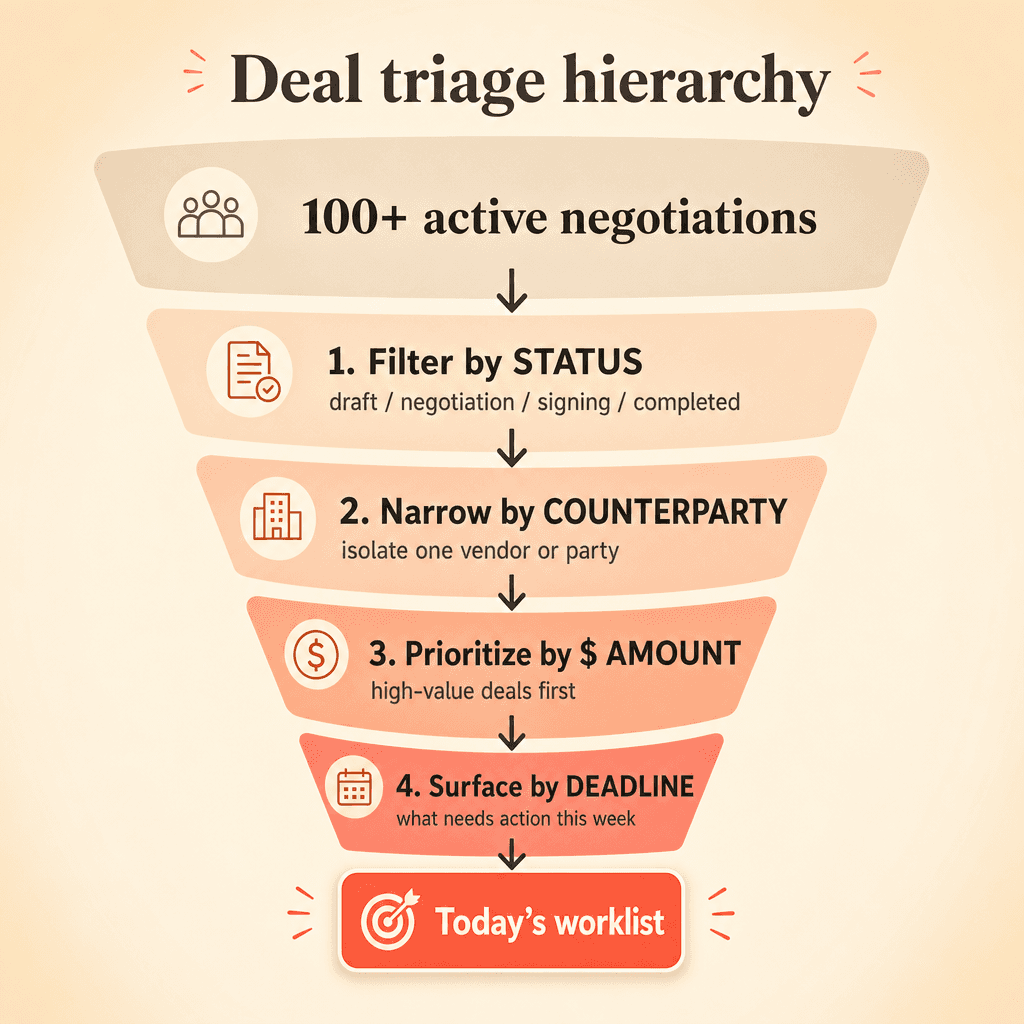
Your first filter should answer: what needs my attention right now? Concord's agreement stage filtering lets you isolate contracts by workflow stage, including draft, negotiation, signing, and completed. Apply this filter, and everything that is signed, archived, or still in early draft falls away. You see only the contracts that are actively in play.
Document stage filtering adds a more granular layer beneath agreement stages. You can drill into specific sub-stages within the negotiation process, distinguishing between contracts awaiting internal approval and those stuck in redline with a counterparty. For a legal ops manager running a morning triage, this distinction is the difference between sending a Slack message to your sales team and picking up the phone to call outside counsel.
Then narrow by counterparty
When you manage vendor contracts and sales agreements simultaneously, filtering by counterparty isolates the relevant subset immediately. If your general counsel asks for a status update on all active negotiations with a specific vendor, you should not have to scroll through 150 records to find the answer. A single party filter surfaces only those deals.
Prioritize by dollar amount
Filtering by total agreement value lets you prioritize high-value negotiations that carry more financial exposure or require executive approval. A $500,000 vendor agreement stuck in redline for two weeks demands a different response than a $5,000 SaaS subscription. Your contract management guide should reflect this kind of value-based prioritization in your team's workflow.
Surface what is time-sensitive
Date-based filtering answers the question: what needs action this week versus this quarter? Concord's deadline filter views let you build custom filtered views specifically for contract deadlines, with configurable columns and sharing capabilities. Calendar sync with Google and Outlook turns these deadline filters into calendar events, so time-sensitive negotiations show up where your team already manages their day.
The inbox zero approach to contract negotiation management
The most productive pattern for high-volume teams is not to see everything. It is to see only what matters right now.
An inbox-style workspace where completed or paused negotiations are archived out of the active view reduces cognitive load significantly. Concord's document management workspace functions as this centralized inbox, with customizable columns, bulk actions, and folder organization forming the foundation of your triage workflow.
Legal ops leaders consistently respond to the concept of a contract workspace that works like an email inbox. Completed items archived out of view. Active items front and center. The metaphor bridges how people already manage work and how a CLM should function. Your contract lifecycle management guide covers more on how this inbox model fits into the broader agreement workflow.
Combined with saved filter views, this approach creates a repeatable daily workflow: open the workspace, apply your saved filter for "my active negotiations this week," and work the list top to bottom. No scrolling through hundreds of irrelevant records.
Saved views turn triage into reporting
Here is where filtering becomes something larger than daily task management. The same filters that power your morning triage also serve as the foundation for reporting.
A saved view of all contracts over $50,000 in active negotiation is not just a worklist. It is a report your general counsel can review in a weekly pipeline meeting. When filters are saveable, shareable, and exportable, the line between triage and executive reporting collapses. You get both without maintaining separate systems.
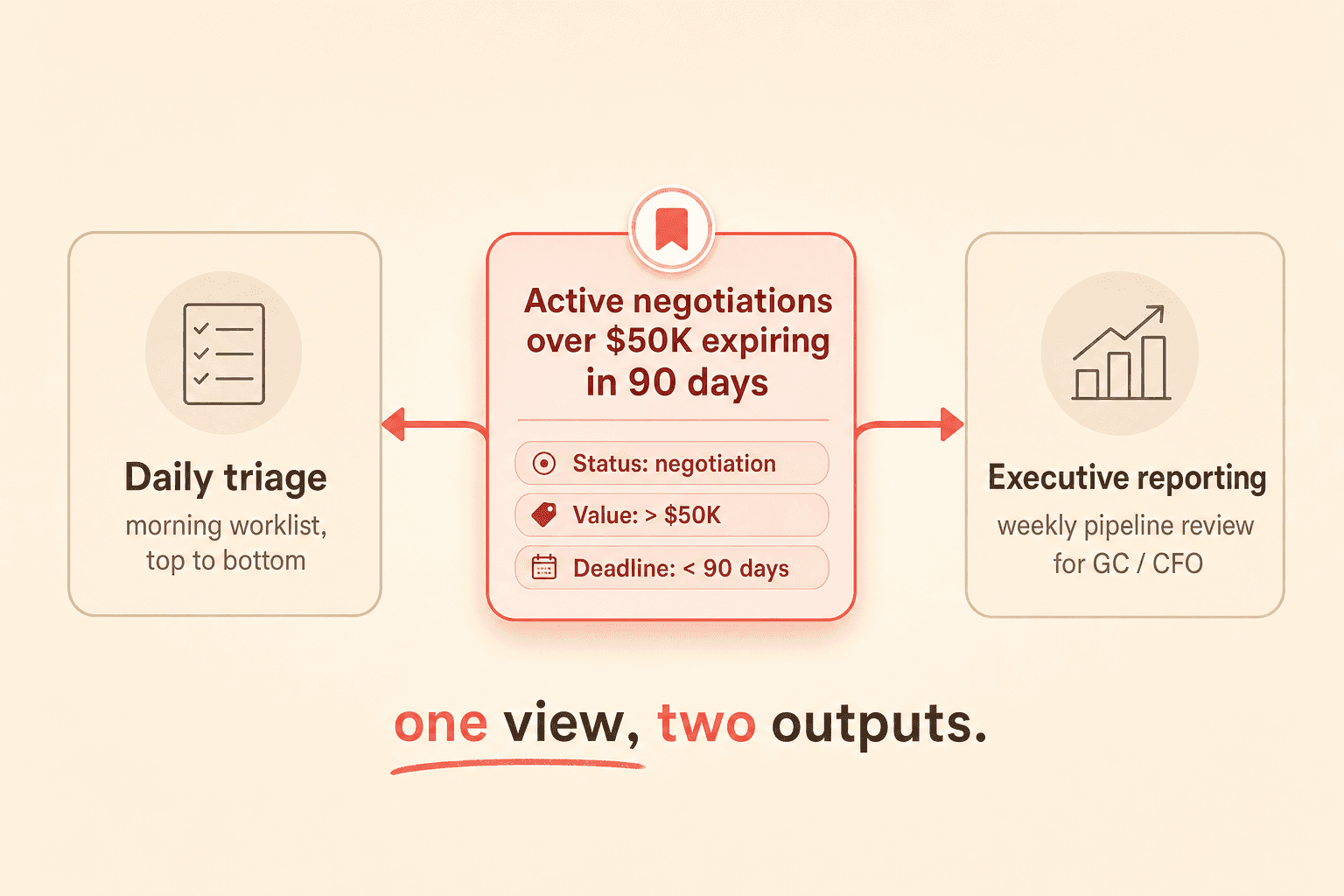
Concord's filter views feature lets you create, save, and share custom filtered views across your organization. A legal ops lead can build a view called "Active negotiations over $50K expiring in 90 days" and share it with the legal team, the CFO, or anyone else who needs visibility into the negotiation pipeline. Automated digest notifications keep stakeholders updated without requiring them to log in and check manually.
Why multi-criteria filtering beats search alone
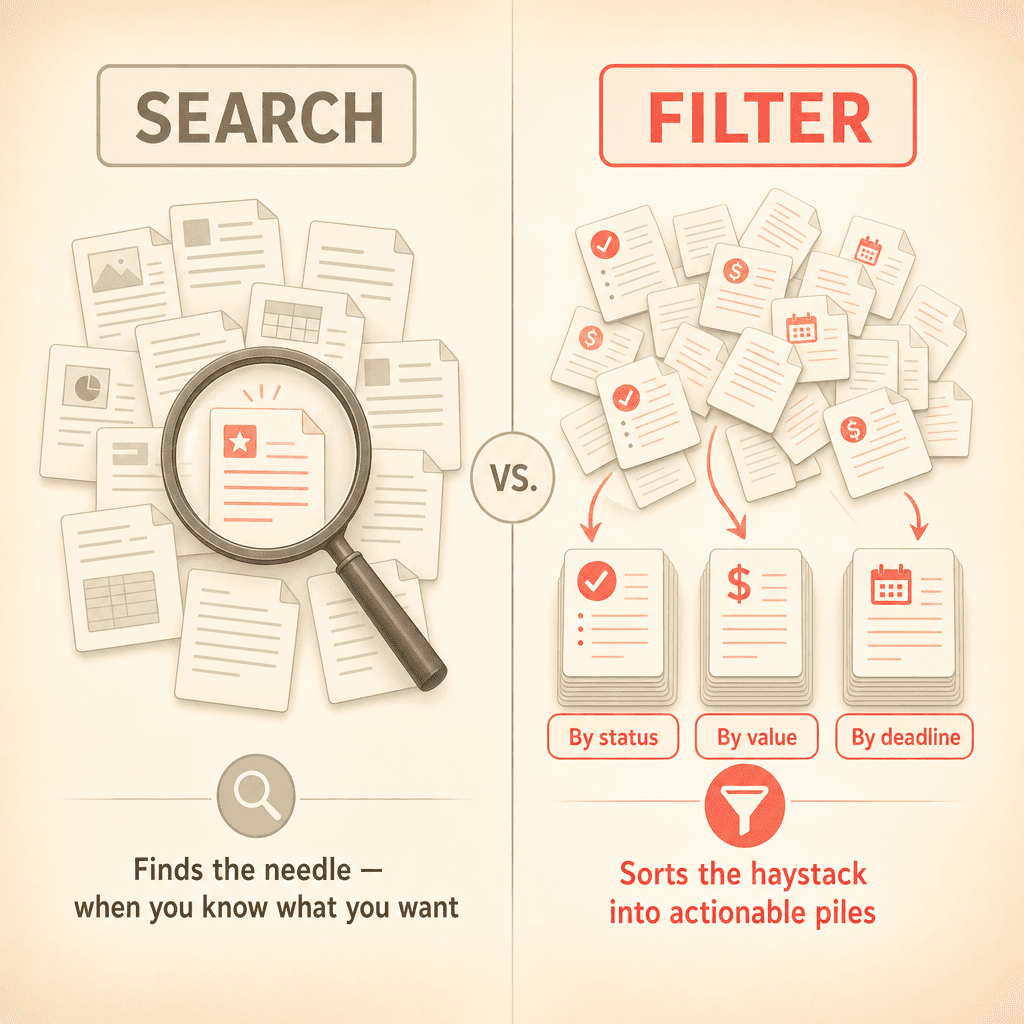
Search is powerful when you know exactly what you are looking for. Type in a contract name or a clause, and a good search tool will find it. Concord's AI-powered search and co-pilot capabilities handle this well, especially for clause-based searches.
But search falls short when you need to surface patterns across a portfolio. Filtering by stage plus amount plus date range answers the question: "What high-value deals are stuck in negotiation and expiring within 60 days?" Full-text search cannot answer that question regardless of how sophisticated the AI behind it is.
The two capabilities complement each other. Search finds the needle. Filtering sorts the haystack into piles you can act on. For teams managing volume, filtering is the backbone of daily work.
Permission-scoped views for cross-functional teams
Organizations with multiple departments touching contracts need filtered views scoped by role. Your sales reps should see only their deals. Your legal team needs a cross-cutting view across all departments. Your procurement team needs visibility into vendor agreements without seeing sales contracts.
Concord's folder-based permissions combined with filtering address this directly. Each team gets a filtered view that matches their responsibilities, reducing noise and keeping sensitive information appropriately scoped. Your guide to contract collaboration explores how these permission structures work in practice.
Handling hybrid workflows with external counterparties
Legal ops leaders frequently note that external counterparties prefer to work in Word rather than a browser-based editor. This reality means documents flow in and out of your system constantly, with new versions arriving via email and revised drafts uploaded back into the platform.
In a hybrid workflow like this, status tracking and version visibility become even more critical. Your filtering workspace needs to reflect the current state of each negotiation even when the most recent edits happened outside the system. Concord's task management dashboard surfaces pending actions like approvals, signatures, and reviews in one centralized view, complementing your filtered workspace by showing what specifically requires your action across your active portfolio.
Bulk actions applied across filtered results make this practical at scale. Select a filtered set of contracts, then archive, tag, move, or trigger AI extraction across the entire batch. That is where filtering becomes more than a viewing tool; it becomes the basis for acting on your portfolio efficiently.
KEY TAKEAWAYS
At 100 or more open negotiations, the problem is not storing contracts. It is knowing which one needs you next.
Tracking software replaces manual spreadsheet triage with multi-criteria filtered views (status, counterparty, value, deadline).
Saved views turn one-time triage into recurring reporting, so you do not rebuild the same filter every Monday.
Permission-scoped views let legal, sales, and finance each see only their slice.
Teams cut "where does this contract stand?" lookups from minutes to seconds.
Legal ops teams juggling dozens of active deals at once know the feeling: contracts scattered across email threads, spreadsheets, and shared drives, with no clear way to tell which ones need attention right now. Contract negotiation tracking software with advanced filtering changes that equation entirely. Instead of scrolling through a flat list of every agreement your organization has ever touched, you can slice your active portfolio by status, counterparty, dollar amount, and deadline to surface exactly what matters today.
This post walks through how filtering works in a high-volume negotiation environment, why it matters more than storage or search alone, and how to set up a triage system that keeps 100+ deals moving without anything slipping through the cracks.
The real bottleneck is not storage
Most teams that outgrow spreadsheets do not lack a place to store contracts. They lack the ability to find and prioritize the right contracts at the right time. The bottleneck is retrieval and triage, not repository capacity.
Think about it: when you manage 100+ active negotiations, every contract sits at a different stage, involves a different counterparty, carries a different dollar value, and runs on a different timeline. Without multi-dimensional filtering, your only option is to manually scan a flat list or maintain a parallel tracking spreadsheet. That parallel spreadsheet defeats the entire purpose of adopting a CLM platform.
Legal ops professionals frequently describe this exact pain point. They moved contracts into a centralized system, but the system returned every result at once, with no way to exclude irrelevant categories or refine by multiple criteria simultaneously. The volume of results became its own problem.
Spreadsheet or email triage | Negotiation tracking software | |
|---|---|---|
Find "what needs me today" | Manual scan, every time | One saved filtered view |
Status accuracy | Stale the moment it is typed | Live, updated on every action |
Cross-team visibility | Forwarded threads | Permission-scoped views |
Reporting | Rebuild the sheet | Saved view is the report |
Scales to 100 or more deals | Breaks down | Designed for it |
How filtering turns your workspace into a triage system
Effective deal triage follows a natural decision hierarchy that mirrors how legal ops professionals already think about their workload. The question is whether your tool supports this mental model natively or forces you to approximate it with manual workarounds.
Filter by status first
Your first filter should answer: what needs my attention right now? Concord's agreement stage filtering lets you isolate contracts by workflow stage, including draft, negotiation, signing, and completed. Apply this filter, and everything that is signed, archived, or still in early draft falls away. You see only the contracts that are actively in play.
Document stage filtering adds a more granular layer beneath agreement stages. You can drill into specific sub-stages within the negotiation process, distinguishing between contracts awaiting internal approval and those stuck in redline with a counterparty. For a legal ops manager running a morning triage, this distinction is the difference between sending a Slack message to your sales team and picking up the phone to call outside counsel.
Then narrow by counterparty
When you manage vendor contracts and sales agreements simultaneously, filtering by counterparty isolates the relevant subset immediately. If your general counsel asks for a status update on all active negotiations with a specific vendor, you should not have to scroll through 150 records to find the answer. A single party filter surfaces only those deals.
Prioritize by dollar amount
Filtering by total agreement value lets you prioritize high-value negotiations that carry more financial exposure or require executive approval. A $500,000 vendor agreement stuck in redline for two weeks demands a different response than a $5,000 SaaS subscription. Your contract management guide should reflect this kind of value-based prioritization in your team's workflow.
Surface what is time-sensitive
Date-based filtering answers the question: what needs action this week versus this quarter? Concord's deadline filter views let you build custom filtered views specifically for contract deadlines, with configurable columns and sharing capabilities. Calendar sync with Google and Outlook turns these deadline filters into calendar events, so time-sensitive negotiations show up where your team already manages their day.
The inbox zero approach to contract negotiation management
The most productive pattern for high-volume teams is not to see everything. It is to see only what matters right now.
An inbox-style workspace where completed or paused negotiations are archived out of the active view reduces cognitive load significantly. Concord's document management workspace functions as this centralized inbox, with customizable columns, bulk actions, and folder organization forming the foundation of your triage workflow.
Legal ops leaders consistently respond to the concept of a contract workspace that works like an email inbox. Completed items archived out of view. Active items front and center. The metaphor bridges how people already manage work and how a CLM should function. Your contract lifecycle management guide covers more on how this inbox model fits into the broader agreement workflow.
Combined with saved filter views, this approach creates a repeatable daily workflow: open the workspace, apply your saved filter for "my active negotiations this week," and work the list top to bottom. No scrolling through hundreds of irrelevant records.
Saved views turn triage into reporting
Here is where filtering becomes something larger than daily task management. The same filters that power your morning triage also serve as the foundation for reporting.
A saved view of all contracts over $50,000 in active negotiation is not just a worklist. It is a report your general counsel can review in a weekly pipeline meeting. When filters are saveable, shareable, and exportable, the line between triage and executive reporting collapses. You get both without maintaining separate systems.
Concord's filter views feature lets you create, save, and share custom filtered views across your organization. A legal ops lead can build a view called "Active negotiations over $50K expiring in 90 days" and share it with the legal team, the CFO, or anyone else who needs visibility into the negotiation pipeline. Automated digest notifications keep stakeholders updated without requiring them to log in and check manually.
Why multi-criteria filtering beats search alone
Search is powerful when you know exactly what you are looking for. Type in a contract name or a clause, and a good search tool will find it. Concord's AI-powered search and co-pilot capabilities handle this well, especially for clause-based searches.
But search falls short when you need to surface patterns across a portfolio. Filtering by stage plus amount plus date range answers the question: "What high-value deals are stuck in negotiation and expiring within 60 days?" Full-text search cannot answer that question regardless of how sophisticated the AI behind it is.
The two capabilities complement each other. Search finds the needle. Filtering sorts the haystack into piles you can act on. For teams managing volume, filtering is the backbone of daily work.
Permission-scoped views for cross-functional teams
Organizations with multiple departments touching contracts need filtered views scoped by role. Your sales reps should see only their deals. Your legal team needs a cross-cutting view across all departments. Your procurement team needs visibility into vendor agreements without seeing sales contracts.
Concord's folder-based permissions combined with filtering address this directly. Each team gets a filtered view that matches their responsibilities, reducing noise and keeping sensitive information appropriately scoped. Your guide to contract collaboration explores how these permission structures work in practice.
Handling hybrid workflows with external counterparties
Legal ops leaders frequently note that external counterparties prefer to work in Word rather than a browser-based editor. This reality means documents flow in and out of your system constantly, with new versions arriving via email and revised drafts uploaded back into the platform.
In a hybrid workflow like this, status tracking and version visibility become even more critical. Your filtering workspace needs to reflect the current state of each negotiation even when the most recent edits happened outside the system. Concord's task management dashboard surfaces pending actions like approvals, signatures, and reviews in one centralized view, complementing your filtered workspace by showing what specifically requires your action across your active portfolio.
Bulk actions applied across filtered results make this practical at scale. Select a filtered set of contracts, then archive, tag, move, or trigger AI extraction across the entire batch. That is where filtering becomes more than a viewing tool; it becomes the basis for acting on your portfolio efficiently.

Need to know
Frequently Asked Questions

Take the "management" out
of contract management.
Customer Support
Legal
Compare
Resources
Customer Support
Company
Legal
Compare
Resources
Customer Support
Company
Legal
Compare
© 2025 Concord. All rights reserved.

