How to Kill Email-Based Contracts in 30 Days
How to Kill Email-Based Contracts in 30 Days
How to Kill Email-Based Contracts in 30 Days
How to Kill Email-Based Contracts in 30 Days
contract management

Key takeaways
Running contracts through email quietly builds in version chaos, scattered storage, missing audit trails, and missed renewals.
Moving to a centralized CLM is realistic in about 30 days because AI extraction fills in metadata for your existing contracts instead of manual re-keying.
The plan runs in four one-week phases: audit and organize, upload and extract, move intake and negotiation into the platform, then train users and archive email.
Once email is out of the loop you get one current copy of every contract, automatic renewal tracking, and full contract status across every team.
Your contract management process probably starts in Outlook. Legal drafts a contract, attaches it to an email, and sends it off. The counterparty replies with edits, you reply with more edits, and the same document bounces back and forth several times before anyone signs anything.
If that sounds familiar, you are not alone. Email and Word attachments remain the default way many teams handle contracts, and the friction is real. This guide walks through the hidden costs of that approach and gives you a concrete plan to move to a centralized contract lifecycle management (CLM) system in about 30 days.
Why the email-based contract process quietly costs you so much
Running contracts through email feels normal because it is what everyone does. But the costs pile up in ways that rarely show up on a report. Here is what happens underneath the surface.
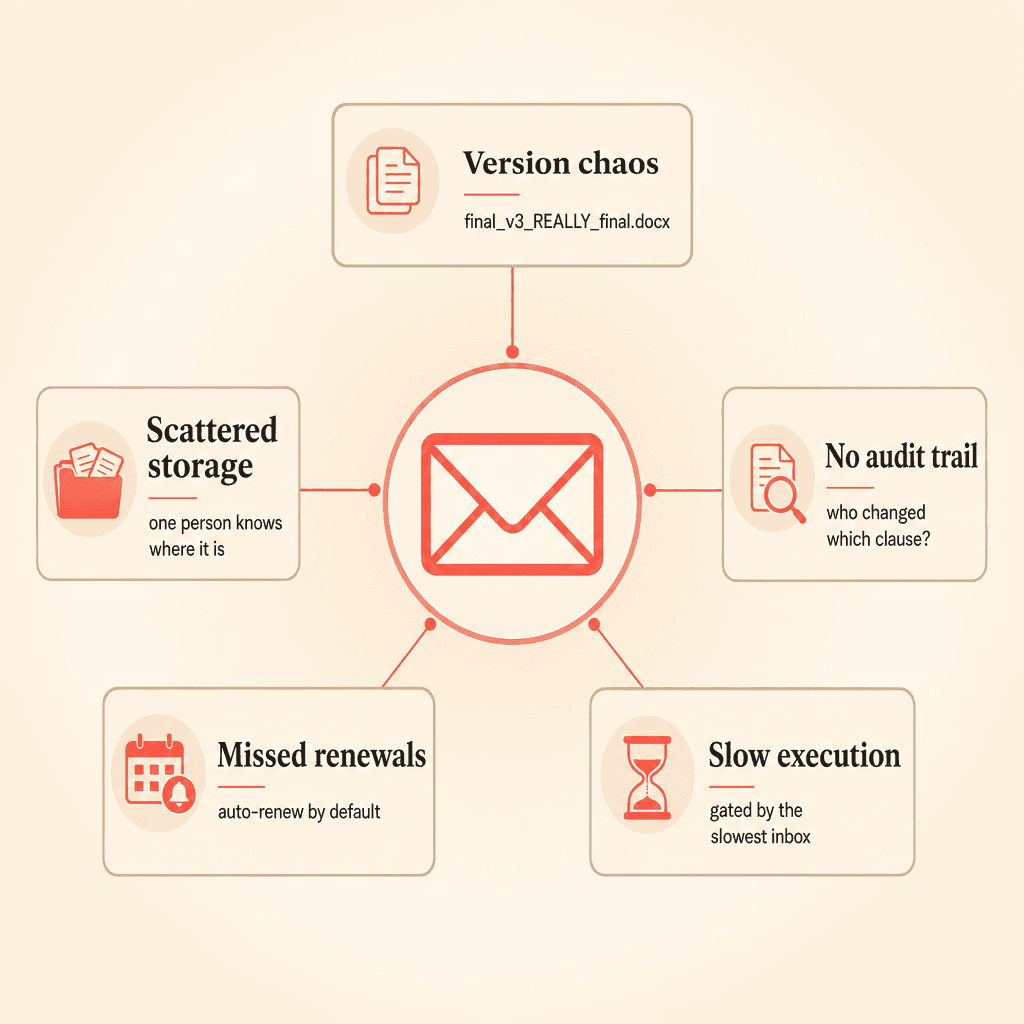
Version chaos is built into the format
When a document lives as attachments across multiple inboxes, there is no single source of truth. Every round of edits creates a new file, and the predictable result is a folder full of “final_v3_REALLY_final.docx.”
Teams commonly describe passing the same contract back and forth several times before reaching a version everyone agrees on. Nobody is certain which copy is current, so someone has to reconcile changes by hand. That manual reconciliation is slow and error-prone.
Scattered storage creates single-person bottlenecks
Contracts saved to individual desktops or ad-hoc drive folders depend on one person being available. When HR, talent acquisition, and procurement each create and store their own agreements, no one has a full picture.
Legal ops leaders frequently report that finding a signed contract means asking around, digging through inboxes, or waiting for the one person who knows where it went. Access should not hinge on someone remembering a file path.
Email leaves no audit trail
An email thread cannot reconstruct who changed which clause and when. Without a logged version history, proving diligence or reconstructing a negotiation becomes manual archaeology.
For organizations with multiple divisions or locations, this gap is worse. Distribution happens over email, so contract status across the business is essentially invisible.
Renewals slip through the cracks
Email has no concept of a contract deadline. If nobody manually notes a termination-notice window, the organization auto-renews or misses the window by default.
Teams running renewals on spreadsheets commonly describe the same problem: tracking expirations and notice periods by memory does not scale. One missed date can lock you into another year of a contract you meant to cancel.
Speed is capped by the slowest inbox
Execution time in an email-based process is gated by human routing and follow-up. When signing depends on registered mail, wet signatures on every page, or a chain of forwarded messages, a contract can take weeks.
Centralized creation, negotiation, and signature collapse that timeline. Contracts that once took weeks can move to a day or less.
Email-based process vs. CLM process
A side-by-side view makes the difference concrete.
Task | Email-based process | CLM process |
|---|---|---|
Drafting | Word attachment sent by email | Templates and intake forms inside the platform |
Negotiation | Redlines traded as new files | Redlining and version history in one place |
Storage | Desktops, inboxes, shared drives | Central repository with permissions |
Renewals | Manual reminders, if any | Automatic deadline tracking and alerts |
Visibility | Scattered, person-dependent | Full status across teams |
Audit trail | Reconstructed from email threads | Logged version history |
Execution time | Weeks | Minutes to a day |
Your 30-day plan to eliminate email contract negotiation
Migration sounds daunting, but the timeline is shorter than most people expect. Onboarding is commonly described as a one-to-two-week process, which leaves the rest of the month for configuration and adoption. Here is a week-by-week plan.
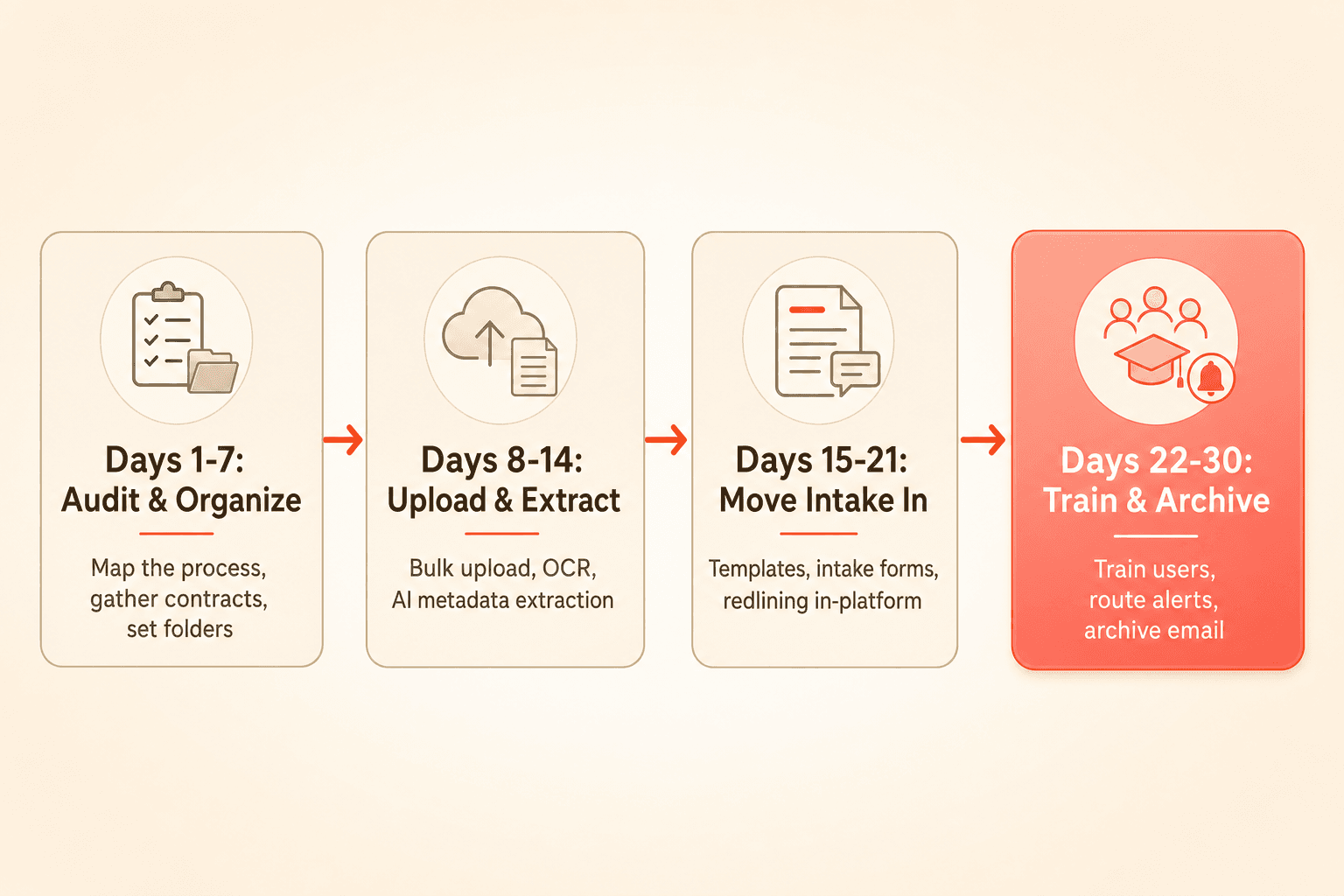
Days 1 to 7: Audit and organize
Start by mapping how contracts actually move today. Note where they get drafted, who negotiates them, and where signed copies end up.
Gather your existing contracts from inboxes, desktops, and shared drives. Define a folder structure and set access permissions so the right people see the right agreements. If you already have a folder system that works, you can preserve it during migration to lower the change-management burden.
Days 8 to 14: Upload and extract
Bulk-upload your existing contracts into the platform. With AI-powered data extraction, OCR makes each document searchable and the system automatically pulls parties, agreement category, lifecycle dates, renewal and termination terms, and financial values.
This is the step that makes a fast migration realistic. Your existing contracts arrive with metadata populated rather than blank, so you are not re-keying anything by hand. Once dates are extracted, configure deadline alerts so nothing depends on memory.
Here Concord walks through bulk-uploading a full folder of existing contracts, then sending AI extraction agents to pull the key terms automatically. This is the heart of the Days 8 to 14 migration step.
Days 15 to 21: Stop new contracts from starting in email
Stand up templates and contract intake forms so business stakeholders submit requests directly into the system. This is where you break the habit of new agreements beginning as email attachments.
Move negotiation and redlining into the platform too. Built-in redlining and version history give you a full audit trail, and compatibility with Word and Google Docs means counterparties who prefer those formats are not a blocker.
In this clip, Concord shows how an intake form lets anyone in the business submit a contract request directly into the platform, so new agreements stop starting as email attachments.
Days 22 to 30: Train, route, and archive email
Train your users on the new workflow. Set up notification routing so deadline alerts and approvals reach the right people based on folder access.
Then archive the old email workflow. Establish the deadline digest and calendar as the new source of truth so your team stops checking inboxes for contract status. By the end of the month, the contract management process runs in one place.
Ready to see this on your own contracts? Request a Concord demo and we will map a 30-day move off email to your back catalog.
The features that make this work
A 30-day migration is only realistic because the underlying tools do the heavy lifting. Here is what carries the load.
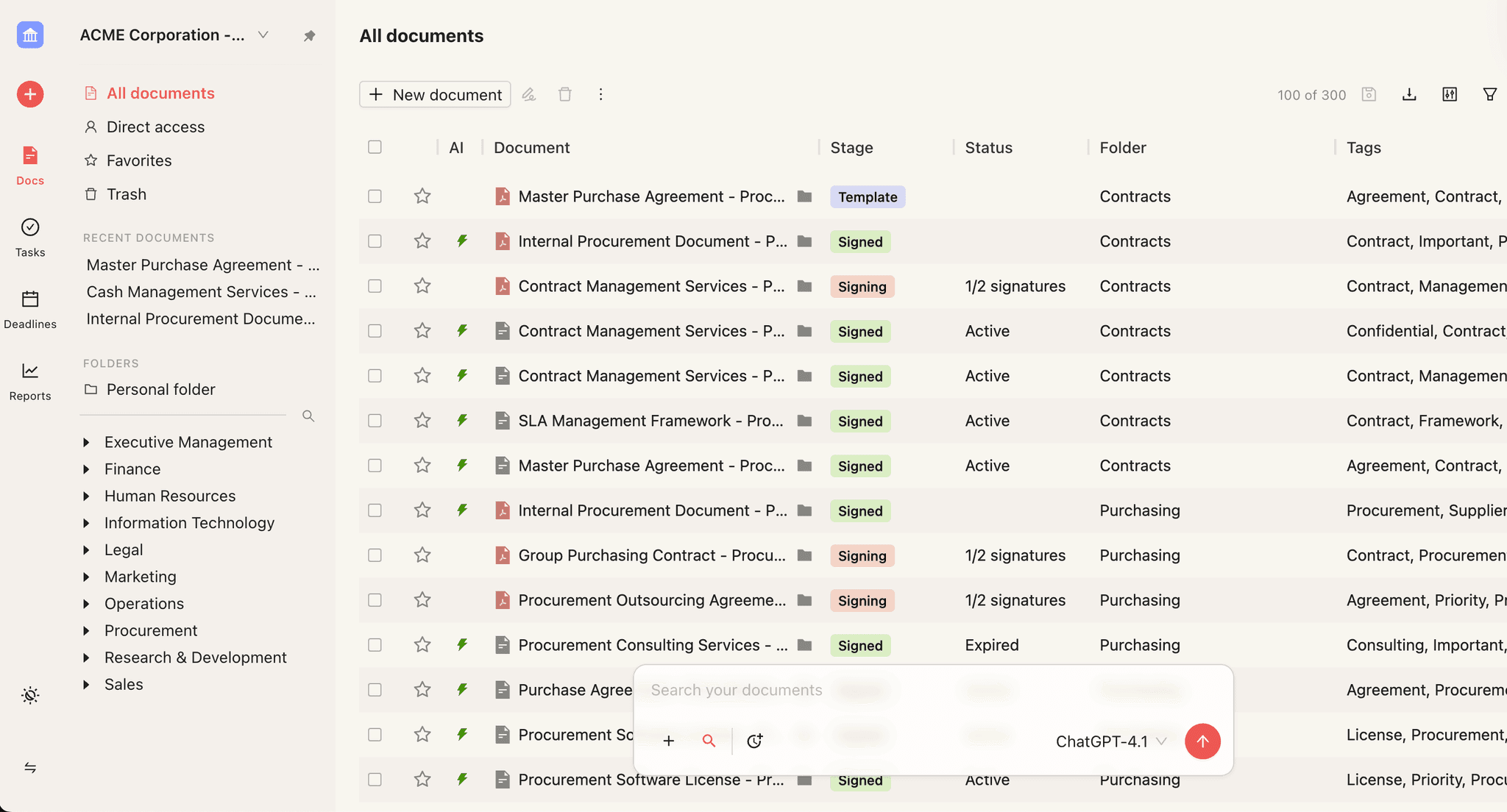
Document management with AI extraction is the engine. Bulk upload plus OCR and automatic metadata extraction means your back catalog becomes searchable and structured from day one.
Deadline management directly solves missed renewals. Calendar and list views track renewals, expirations, and notice periods, with calendar sync so dates land where your team already looks.
A daily digest and deadline notifications replace the “nobody remembered the renewal” failure mode. Summaries of pending items and deadline alerts route to the right users automatically.
Intake forms stop contracts from starting in email, and workflow automation replaces the manual approval chains that used to live in forwarded messages. Together, these close the gaps that email leaves open.
What changes once email is out of the loop
The payoff shows up quickly. Version confusion drops because there is one current copy, not five attachments. Storage stops depending on one person’s memory because everything sits in a central repository.
Renewals get tracked automatically, so you stop auto-renewing contracts by accident. Execution speeds up because routing no longer waits on the slowest inbox. And for the first time, you can see contract status across every team and division.
Switching off email is usually the whole point of adopting a CLM. Most teams evaluating one already know their email-driven process has to change. The 30-day plan simply gives that change a shape.
Key takeaways
Running contracts through email quietly builds in version chaos, scattered storage, missing audit trails, and missed renewals.
Moving to a centralized CLM is realistic in about 30 days because AI extraction fills in metadata for your existing contracts instead of manual re-keying.
The plan runs in four one-week phases: audit and organize, upload and extract, move intake and negotiation into the platform, then train users and archive email.
Once email is out of the loop you get one current copy of every contract, automatic renewal tracking, and full contract status across every team.
Your contract management process probably starts in Outlook. Legal drafts a contract, attaches it to an email, and sends it off. The counterparty replies with edits, you reply with more edits, and the same document bounces back and forth several times before anyone signs anything.
If that sounds familiar, you are not alone. Email and Word attachments remain the default way many teams handle contracts, and the friction is real. This guide walks through the hidden costs of that approach and gives you a concrete plan to move to a centralized contract lifecycle management (CLM) system in about 30 days.
Why the email-based contract process quietly costs you so much
Running contracts through email feels normal because it is what everyone does. But the costs pile up in ways that rarely show up on a report. Here is what happens underneath the surface.
Version chaos is built into the format
When a document lives as attachments across multiple inboxes, there is no single source of truth. Every round of edits creates a new file, and the predictable result is a folder full of “final_v3_REALLY_final.docx.”
Teams commonly describe passing the same contract back and forth several times before reaching a version everyone agrees on. Nobody is certain which copy is current, so someone has to reconcile changes by hand. That manual reconciliation is slow and error-prone.
Scattered storage creates single-person bottlenecks
Contracts saved to individual desktops or ad-hoc drive folders depend on one person being available. When HR, talent acquisition, and procurement each create and store their own agreements, no one has a full picture.
Legal ops leaders frequently report that finding a signed contract means asking around, digging through inboxes, or waiting for the one person who knows where it went. Access should not hinge on someone remembering a file path.
Email leaves no audit trail
An email thread cannot reconstruct who changed which clause and when. Without a logged version history, proving diligence or reconstructing a negotiation becomes manual archaeology.
For organizations with multiple divisions or locations, this gap is worse. Distribution happens over email, so contract status across the business is essentially invisible.
Renewals slip through the cracks
Email has no concept of a contract deadline. If nobody manually notes a termination-notice window, the organization auto-renews or misses the window by default.
Teams running renewals on spreadsheets commonly describe the same problem: tracking expirations and notice periods by memory does not scale. One missed date can lock you into another year of a contract you meant to cancel.
Speed is capped by the slowest inbox
Execution time in an email-based process is gated by human routing and follow-up. When signing depends on registered mail, wet signatures on every page, or a chain of forwarded messages, a contract can take weeks.
Centralized creation, negotiation, and signature collapse that timeline. Contracts that once took weeks can move to a day or less.
Email-based process vs. CLM process
A side-by-side view makes the difference concrete.
Task | Email-based process | CLM process |
|---|---|---|
Drafting | Word attachment sent by email | Templates and intake forms inside the platform |
Negotiation | Redlines traded as new files | Redlining and version history in one place |
Storage | Desktops, inboxes, shared drives | Central repository with permissions |
Renewals | Manual reminders, if any | Automatic deadline tracking and alerts |
Visibility | Scattered, person-dependent | Full status across teams |
Audit trail | Reconstructed from email threads | Logged version history |
Execution time | Weeks | Minutes to a day |
Your 30-day plan to eliminate email contract negotiation
Migration sounds daunting, but the timeline is shorter than most people expect. Onboarding is commonly described as a one-to-two-week process, which leaves the rest of the month for configuration and adoption. Here is a week-by-week plan.
Days 1 to 7: Audit and organize
Start by mapping how contracts actually move today. Note where they get drafted, who negotiates them, and where signed copies end up.
Gather your existing contracts from inboxes, desktops, and shared drives. Define a folder structure and set access permissions so the right people see the right agreements. If you already have a folder system that works, you can preserve it during migration to lower the change-management burden.
Days 8 to 14: Upload and extract
Bulk-upload your existing contracts into the platform. With AI-powered data extraction, OCR makes each document searchable and the system automatically pulls parties, agreement category, lifecycle dates, renewal and termination terms, and financial values.
This is the step that makes a fast migration realistic. Your existing contracts arrive with metadata populated rather than blank, so you are not re-keying anything by hand. Once dates are extracted, configure deadline alerts so nothing depends on memory.
Here Concord walks through bulk-uploading a full folder of existing contracts, then sending AI extraction agents to pull the key terms automatically. This is the heart of the Days 8 to 14 migration step.
Days 15 to 21: Stop new contracts from starting in email
Stand up templates and contract intake forms so business stakeholders submit requests directly into the system. This is where you break the habit of new agreements beginning as email attachments.
Move negotiation and redlining into the platform too. Built-in redlining and version history give you a full audit trail, and compatibility with Word and Google Docs means counterparties who prefer those formats are not a blocker.
In this clip, Concord shows how an intake form lets anyone in the business submit a contract request directly into the platform, so new agreements stop starting as email attachments.
Days 22 to 30: Train, route, and archive email
Train your users on the new workflow. Set up notification routing so deadline alerts and approvals reach the right people based on folder access.
Then archive the old email workflow. Establish the deadline digest and calendar as the new source of truth so your team stops checking inboxes for contract status. By the end of the month, the contract management process runs in one place.
Ready to see this on your own contracts? Request a Concord demo and we will map a 30-day move off email to your back catalog.
The features that make this work
A 30-day migration is only realistic because the underlying tools do the heavy lifting. Here is what carries the load.
Document management with AI extraction is the engine. Bulk upload plus OCR and automatic metadata extraction means your back catalog becomes searchable and structured from day one.
Deadline management directly solves missed renewals. Calendar and list views track renewals, expirations, and notice periods, with calendar sync so dates land where your team already looks.
A daily digest and deadline notifications replace the “nobody remembered the renewal” failure mode. Summaries of pending items and deadline alerts route to the right users automatically.
Intake forms stop contracts from starting in email, and workflow automation replaces the manual approval chains that used to live in forwarded messages. Together, these close the gaps that email leaves open.
What changes once email is out of the loop
The payoff shows up quickly. Version confusion drops because there is one current copy, not five attachments. Storage stops depending on one person’s memory because everything sits in a central repository.
Renewals get tracked automatically, so you stop auto-renewing contracts by accident. Execution speeds up because routing no longer waits on the slowest inbox. And for the first time, you can see contract status across every team and division.
Switching off email is usually the whole point of adopting a CLM. Most teams evaluating one already know their email-driven process has to change. The 30-day plan simply gives that change a shape.
Need to know
Frequently Asked Questions

Take the "management" out
of contract management.
Customer Support
Legal
Compare
Resources
Customer Support
Company
Legal
Compare
Resources
Customer Support
Company
Legal
Compare
© 2025 Concord. All rights reserved.