Executed contract: Meaning, checks, and common mistakes
Executed contract: Meaning, checks, and common mistakes
Executed contract: Meaning, checks, and common mistakes
Executed contract: Meaning, checks, and common mistakes
executed contract, contract execution, signer authority, contract management

Your team reaches a renewal deadline and discovers that the statement of work was signed by a subsidiary, not the parent company listed in your records. Procurement has a draft, legal has a signed copy, and neither knows whether the supplier countersigned. Before you can assess notice rights, you must reconstruct which document became final and who actually signed it.
An executed contract is an agreement with all required signatures and applicable execution formalities complete. Execution does not necessarily mean that obligations begin immediately, that the agreement is enforceable in every circumstance, or that your administrative work is finished.
This article provides general information, not legal advice. Requirements vary by jurisdiction and document type, so verify the specifics with legal counsel.
Key takeaways
An executed contract has all required signatures and applicable execution formalities complete, which is not the same as being effective or fully administered.
Execution date and effective date are separate fields, even when the dates match. Copying the final signature date into the effective-date field can throw off renewals, notices, and reports.
Approval authority is not signing authority. Confirm that each signer can bind the named legal entity, not just that they approved the deal.
After signature, preserve the final copy, reconcile the record against the signed terms, and assign an owner to every deadline.
What makes an executed contract complete?
A signature image alone cannot answer whether the right entity signed, whether the signer had authority, or whether the parties signed the same final document. Your review must address those questions alongside any applicable witnessing, notarization, delivery, or other requirements.
“Fully executed” generally signals that all required signatures and execution formalities are complete. However, teams sometimes use “executed” loosely to mean “signed,” so your contract records should define the status clearly.
Internal approval is a separate check. An approved agreement may still lack a required signature, while a missed internal approval does not automatically invalidate an otherwise signed agreement.
Signed, fully executed, delivered, and effective
These terms describe different events, even when they happen on the same day.
Term | Meaning | What you should check |
|---|---|---|
Signed | A party has applied a signature. | Whose signature is present, and which signatures remain outstanding? |
Fully executed | All required signatures and applicable execution formalities are complete. | Does the document or applicable law require anything beyond signatures? |
Delivered | The agreement has been provided or released as required. | Does delivery affect completion or effectiveness? |
Effective | The agreement, or specified obligations, has taken effect. | What date, event, or condition triggers the relevant obligations? |
Countersignature | A signature added by another party or an approving authority. | Does that person have authority to sign in the required capacity? |
Execution date vs. effective date
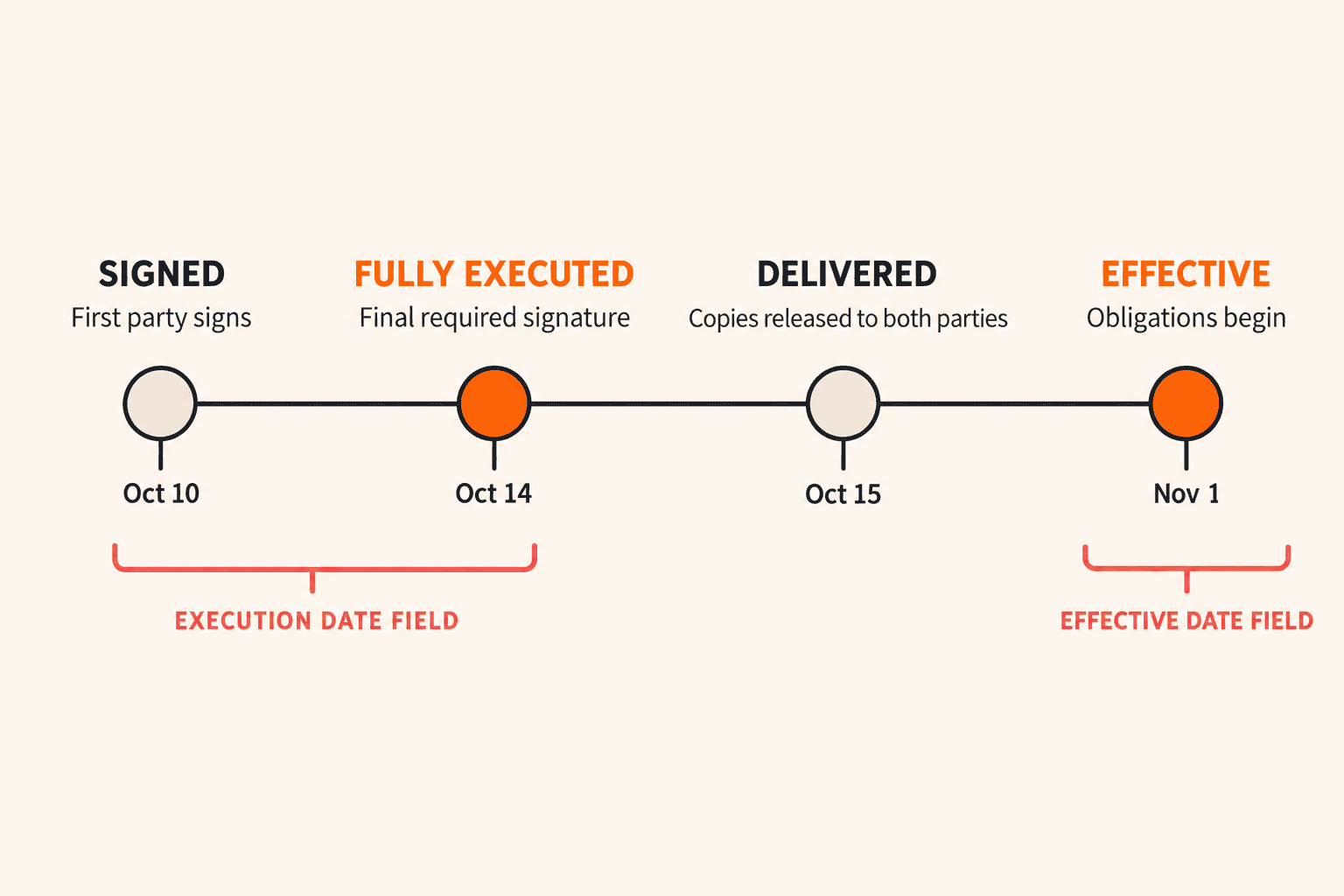
The execution date generally records when the required party or parties sign. If signatures occur on different days, preserve those individual dates and follow a documented convention for any single execution-date field.
The effective date identifies when the agreement or specified obligations begin. A contract signed in October might specify a November effective date or make performance conditional on another event.
Do not automatically copy the final signature date into the effective-date field. Read the agreement, including any conditions precedent, and ask counsel about ambiguous wording.
Contract execution requirements to check
Before and during signing, confirm three things: the right entities and signers, the complete final version, and any formalities the document or jurisdiction requires.
The correct entities and authorized signers
Check each party’s legal name against the agreement and signature block. A parent company, subsidiary, and trading name are not interchangeable.
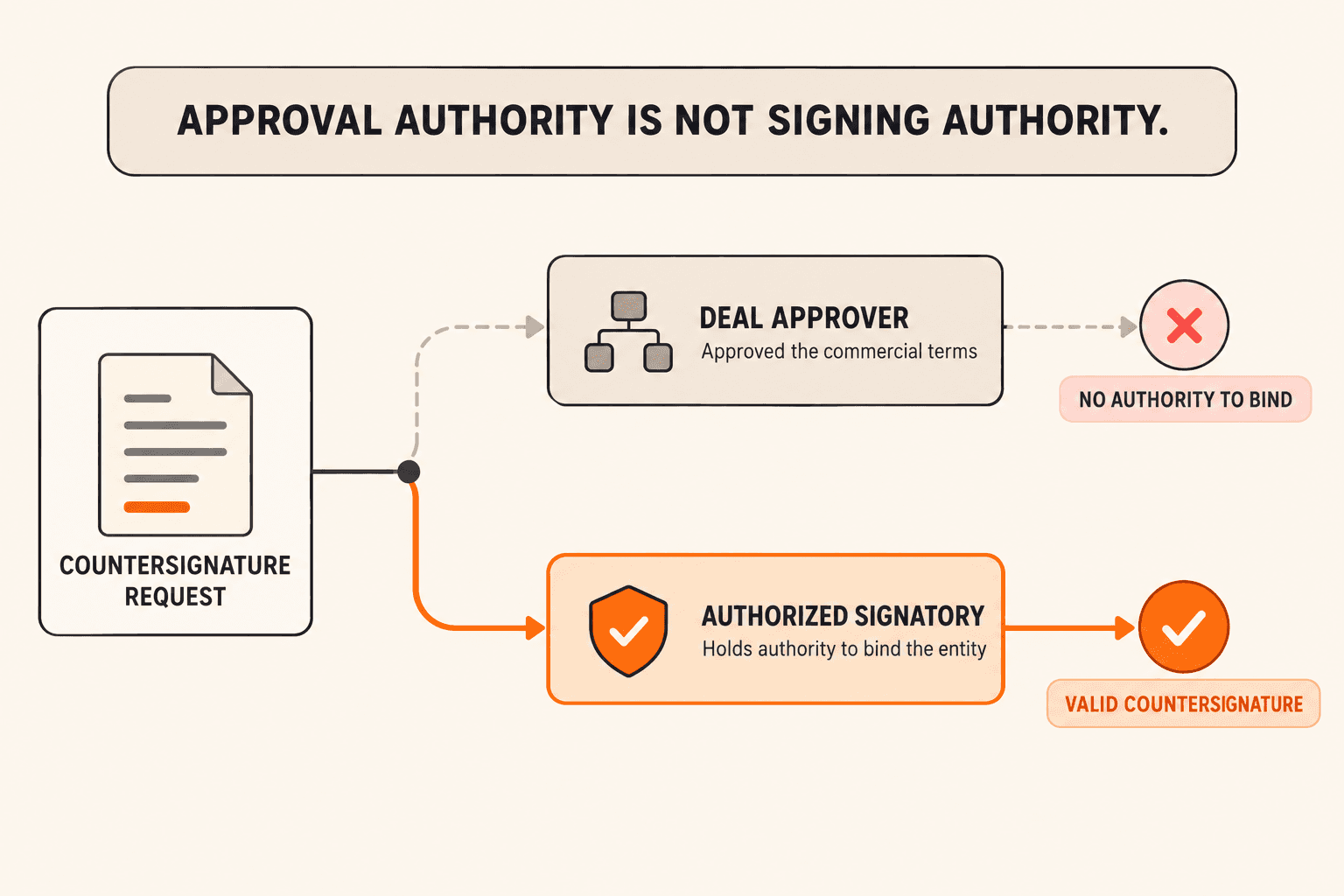
Also distinguish approval authority from signing authority. A common routing trap occurs when the countersignature request reaches the manager who approved the commercial terms, even though someone else holds authority to bind the entity.
Your contract approval workflow should make that distinction explicit rather than treating every approver as a potential signer.
The complete final version
Confirm that the signature version contains the agreed terms, completed variables, and required schedules or exhibits. If the parties use separate signature copies, check that each relates to the same final agreement.
Related documents matter when the agreement incorporates or depends on them. Not every contract requires a master agreement or statement of work, but relevant document relationships should be clear.
Applicable formalities and electronic signatures
Requirements for witnesses, notarization, delivery, or filing depend on the document and jurisdiction. Confirm the signing method before circulating the agreement, especially when special formalities may apply.
For covered U.S. transactions, electronic form alone generally does not defeat a signature’s legal effect. The U.S. Department of Homeland Security’s electronic-signature guidance addresses considerations such as intent, signer attribution, association with the document, and reliable retention and access.
An audit trail can provide evidence about the signing process. It does not substitute for signer authority or satisfy every document-specific formality.
Common mistakes before and after execution
Most execution mistakes fall into two groups: signing problems that affect whether the agreement is complete, and handoff problems that make a valid agreement hard to manage.
Execution and legal-review risks
A missing countersignature can hide behind a completed status. Your team may receive a signed PDF from one party and mark the agreement complete before checking the remaining signature blocks.
Another risk is treating a familiar contact as an authorized signer. The person who negotiated pricing may understand the deal thoroughly but lack authority to bind the contracting entity.
An incomplete or altered signature version creates a different problem: the parties may not have signed the terms they intended to accept. Check attachments, unresolved placeholders, and changes made after approval, then confirm any applicable formalities rather than assuming an electronic signature covers them.
Administrative handoff risks
After execution, a contract can remain legally significant yet practically difficult to manage. The final copy may sit in an inbox while procurement works from a draft and finance relies on an outdated start date.
Inconsistent records compound that confusion. If your effective-date field contains the last signature date, reports and reminders may follow the wrong schedule.
Missing ownership creates another gap: a renewal notice, insurance expiration, or recurring commitment may appear in the contract without anyone being responsible for it. These administrative failures do not necessarily invalidate the agreement, but they can interfere with performance and decision-making.

Your contract execution checklist
Before and during signature
Confirm the parties: Check legal entity names and signature blocks.
Verify authority: Identify who may bind each entity and in what capacity.
Complete approvals: Finish applicable internal reviews before signature.
Lock the final version: Check agreed terms, completed fields, and required attachments.
Check formalities: Confirm required signatures, witnesses, notarization, delivery, or other steps.
Separate the dates: Record signature dates, the effective date, and relevant conditions distinctly.
After execution
Preserve the agreement: Retain the final document and available signing-process evidence.
Reconcile the record: Compare names, dates, amounts, and notice periods against the executed terms.
Connect related documents: Associate applicable amendments, schedules, and governing agreements.
Assign responsibilities: Give each relevant obligation and deadline an owner.
Track future events: Record renewal dates, termination notices, and milestones.
This handoff connects execution to contract lifecycle management. A signed document becomes a usable record only when your team can locate it, interpret its dates, and act on its commitments.
How Concord supports a clearer handoff
Concord’s configurable workflows, conditional logic, and actions can support consistent routing when agreements need different approval paths. Your team still needs to define who approves and who signs; workflow completion does not establish legal authority.
For inconsistent contract fields, Concord’s agreement property validation checks properties and helps catch invalid entries or configuration issues during processing. That supports data quality, but a valid date entry can still be the wrong date, so someone must compare execution and effective dates with the signed terms.
Concord’s contract reporting covers signatures, pending approvals, expirations, and outstanding documents, helping you identify items that need follow-through. Deadline events can track renewal dates, termination notices, and milestones once your team has identified and recorded them.
Your team reaches a renewal deadline and discovers that the statement of work was signed by a subsidiary, not the parent company listed in your records. Procurement has a draft, legal has a signed copy, and neither knows whether the supplier countersigned. Before you can assess notice rights, you must reconstruct which document became final and who actually signed it.
An executed contract is an agreement with all required signatures and applicable execution formalities complete. Execution does not necessarily mean that obligations begin immediately, that the agreement is enforceable in every circumstance, or that your administrative work is finished.
This article provides general information, not legal advice. Requirements vary by jurisdiction and document type, so verify the specifics with legal counsel.
Key takeaways
An executed contract has all required signatures and applicable execution formalities complete, which is not the same as being effective or fully administered.
Execution date and effective date are separate fields, even when the dates match. Copying the final signature date into the effective-date field can throw off renewals, notices, and reports.
Approval authority is not signing authority. Confirm that each signer can bind the named legal entity, not just that they approved the deal.
After signature, preserve the final copy, reconcile the record against the signed terms, and assign an owner to every deadline.
What makes an executed contract complete?
A signature image alone cannot answer whether the right entity signed, whether the signer had authority, or whether the parties signed the same final document. Your review must address those questions alongside any applicable witnessing, notarization, delivery, or other requirements.
“Fully executed” generally signals that all required signatures and execution formalities are complete. However, teams sometimes use “executed” loosely to mean “signed,” so your contract records should define the status clearly.
Internal approval is a separate check. An approved agreement may still lack a required signature, while a missed internal approval does not automatically invalidate an otherwise signed agreement.
Signed, fully executed, delivered, and effective
These terms describe different events, even when they happen on the same day.
Term | Meaning | What you should check |
|---|---|---|
Signed | A party has applied a signature. | Whose signature is present, and which signatures remain outstanding? |
Fully executed | All required signatures and applicable execution formalities are complete. | Does the document or applicable law require anything beyond signatures? |
Delivered | The agreement has been provided or released as required. | Does delivery affect completion or effectiveness? |
Effective | The agreement, or specified obligations, has taken effect. | What date, event, or condition triggers the relevant obligations? |
Countersignature | A signature added by another party or an approving authority. | Does that person have authority to sign in the required capacity? |
Execution date vs. effective date
The execution date generally records when the required party or parties sign. If signatures occur on different days, preserve those individual dates and follow a documented convention for any single execution-date field.
The effective date identifies when the agreement or specified obligations begin. A contract signed in October might specify a November effective date or make performance conditional on another event.
Do not automatically copy the final signature date into the effective-date field. Read the agreement, including any conditions precedent, and ask counsel about ambiguous wording.
Contract execution requirements to check
Before and during signing, confirm three things: the right entities and signers, the complete final version, and any formalities the document or jurisdiction requires.
The correct entities and authorized signers
Check each party’s legal name against the agreement and signature block. A parent company, subsidiary, and trading name are not interchangeable.
Also distinguish approval authority from signing authority. A common routing trap occurs when the countersignature request reaches the manager who approved the commercial terms, even though someone else holds authority to bind the entity.
Your contract approval workflow should make that distinction explicit rather than treating every approver as a potential signer.
The complete final version
Confirm that the signature version contains the agreed terms, completed variables, and required schedules or exhibits. If the parties use separate signature copies, check that each relates to the same final agreement.
Related documents matter when the agreement incorporates or depends on them. Not every contract requires a master agreement or statement of work, but relevant document relationships should be clear.
Applicable formalities and electronic signatures
Requirements for witnesses, notarization, delivery, or filing depend on the document and jurisdiction. Confirm the signing method before circulating the agreement, especially when special formalities may apply.
For covered U.S. transactions, electronic form alone generally does not defeat a signature’s legal effect. The U.S. Department of Homeland Security’s electronic-signature guidance addresses considerations such as intent, signer attribution, association with the document, and reliable retention and access.
An audit trail can provide evidence about the signing process. It does not substitute for signer authority or satisfy every document-specific formality.
Common mistakes before and after execution
Most execution mistakes fall into two groups: signing problems that affect whether the agreement is complete, and handoff problems that make a valid agreement hard to manage.
Execution and legal-review risks
A missing countersignature can hide behind a completed status. Your team may receive a signed PDF from one party and mark the agreement complete before checking the remaining signature blocks.
Another risk is treating a familiar contact as an authorized signer. The person who negotiated pricing may understand the deal thoroughly but lack authority to bind the contracting entity.
An incomplete or altered signature version creates a different problem: the parties may not have signed the terms they intended to accept. Check attachments, unresolved placeholders, and changes made after approval, then confirm any applicable formalities rather than assuming an electronic signature covers them.
Administrative handoff risks
After execution, a contract can remain legally significant yet practically difficult to manage. The final copy may sit in an inbox while procurement works from a draft and finance relies on an outdated start date.
Inconsistent records compound that confusion. If your effective-date field contains the last signature date, reports and reminders may follow the wrong schedule.
Missing ownership creates another gap: a renewal notice, insurance expiration, or recurring commitment may appear in the contract without anyone being responsible for it. These administrative failures do not necessarily invalidate the agreement, but they can interfere with performance and decision-making.
Your contract execution checklist
Before and during signature
Confirm the parties: Check legal entity names and signature blocks.
Verify authority: Identify who may bind each entity and in what capacity.
Complete approvals: Finish applicable internal reviews before signature.
Lock the final version: Check agreed terms, completed fields, and required attachments.
Check formalities: Confirm required signatures, witnesses, notarization, delivery, or other steps.
Separate the dates: Record signature dates, the effective date, and relevant conditions distinctly.
After execution
Preserve the agreement: Retain the final document and available signing-process evidence.
Reconcile the record: Compare names, dates, amounts, and notice periods against the executed terms.
Connect related documents: Associate applicable amendments, schedules, and governing agreements.
Assign responsibilities: Give each relevant obligation and deadline an owner.
Track future events: Record renewal dates, termination notices, and milestones.
This handoff connects execution to contract lifecycle management. A signed document becomes a usable record only when your team can locate it, interpret its dates, and act on its commitments.
How Concord supports a clearer handoff
Concord’s configurable workflows, conditional logic, and actions can support consistent routing when agreements need different approval paths. Your team still needs to define who approves and who signs; workflow completion does not establish legal authority.
For inconsistent contract fields, Concord’s agreement property validation checks properties and helps catch invalid entries or configuration issues during processing. That supports data quality, but a valid date entry can still be the wrong date, so someone must compare execution and effective dates with the signed terms.
Concord’s contract reporting covers signatures, pending approvals, expirations, and outstanding documents, helping you identify items that need follow-through. Deadline events can track renewal dates, termination notices, and milestones once your team has identified and recorded them.
Need to know
Frequently Asked Questions

Take the "management" out
of contract management.
Customer Support
Legal
Compare
Resources
Customer Support
Company
Legal
Compare
Resources
Customer Support
Company
Legal
Compare
© 2025 Concord. All rights reserved.