
Best contract management software for startups that grow with you
Best contract management software for startups that grow with you
Best contract management software for startups that grow with you
Best contract management software for startups that grow with you
contract management

Finding the best contract management software for startups is not about picking the flashiest tool on the market. It is about choosing a platform that works on day one, when you have 75 contracts scattered across Google Drive and your CRM, and still works 18 months later when your headcount has doubled, your contract volume has tripled, and your processes have matured beyond what any spreadsheet can handle.
This guide gives you a practical framework for evaluating any CLM against seven specific dimensions of growth-readiness, with a checklist you can take into your next vendor demo.
Why startups outgrow their contract setup so quickly
The pattern is remarkably consistent. A growing company starts by storing contracts as file attachments inside a CRM, a shared drive, or a Notion workspace. One or two people, often a long-tenured administrator or the sole general counsel, hold all institutional knowledge about renewal dates, termination windows, and process steps.
This works at 50 employees. It breaks at 150. When that single person can no longer touch every deal, and when the team can no longer manually validate dates across hundreds of contracts, the cracks become costly. Missed auto-renewal windows, duplicate agreements, and unsigned contracts sitting in someone's inbox are symptoms of a system that was never designed for the volume it now carries.
Seven dimensions to evaluate any CLM for growth-readiness
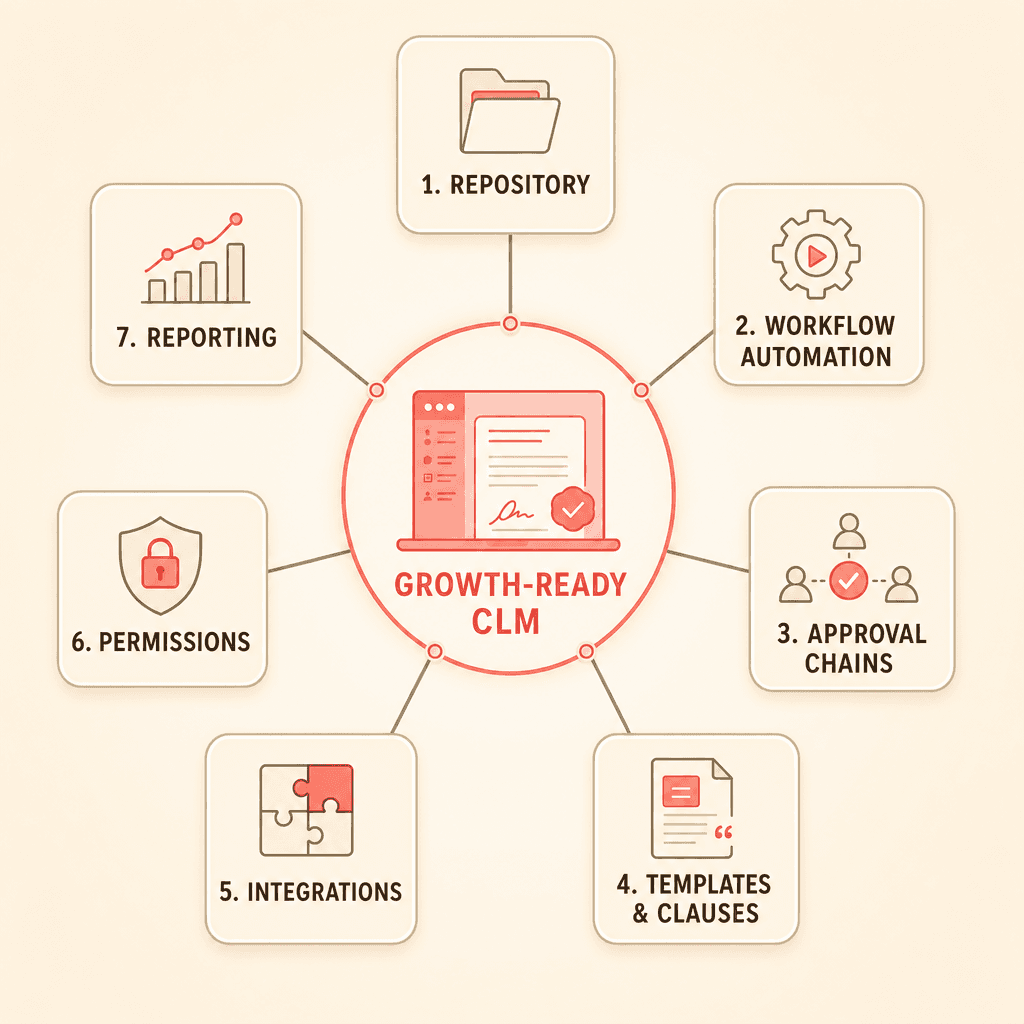
Startups should evaluate contract management software against seven specific dimensions. Each one represents a capability that may not matter on day one but will become critical within 12 to 18 months.
1. Contract repository growth
Contract repository refers to the centralized, searchable database where all your agreements live. The baseline question: does the system impose document caps or charge per document? As contract volume doubles, will storage or search performance degrade?
Look for unlimited document storage with OCR-powered full-text search. Your repository should make every uploaded PDF and Word document fully searchable without manual tagging. Concord provides this out of the box, with no per-document charges that penalize you as your library grows. Learn more about building a contract repository.
2. Workflow automation
Contract workflow automation is the ability to replace ad hoc email chains with structured intake forms, routing rules, and status tracking. Your system should let business stakeholders submit contract requests through a standardized process rather than sending a Slack message to legal.
The key question for growth: can the workflow engine adapt as your processes evolve? A two-step intake process today may need department-specific routing, conditional logic, and escalation rules within a year.
3. Approval chains
At 50 employees, your approval chain might be "legal reviews, CEO signs." At 200 employees, you may need multi-level approvals that vary based on contract value, type, or risk level.
Evaluate whether the CLM supports conditional approval logic. Can you set a threshold where contracts above a certain dollar value require CFO sign-off, while standard vendor agreements route only through the department head? Concord's approval workflows support this kind of conditional routing and can be reconfigured without developer involvement as your org chart changes. Explore approval workflow capabilities.
4. Templates and clause libraries
Can your team start with five standard templates and grow to 50 without needing a developer? Look for template systems that include conditional logic and pre-approved clause alternatives. Your sales team should be able to generate a first draft from a template without waiting for legal to customize every agreement.
5. Integrations with your existing stack
Your CLM needs to connect to the tools you already use: your CRM, Slack, e-signature tools. But it also needs to accommodate the tools you will add in 18 months.
Look for native integrations with your current stack plus APIs, webhooks, and middleware support (like Zapier) for future connections. Concord offers native integrations with Salesforce, HubSpot, Slack, and DocuSign, with API and Zapier support for custom workflows. See the full integrations list.
6. Permissions and access control
This is where many CLMs force a hard choice between access and control. Small legal teams consistently express that they need a system where account managers, sales reps, and finance leads can view relevant contracts and receive deadline alerts without every action routing through legal.
The licensing model matters enormously here. If every viewer requires a paid seat, your costs scale linearly with headcount. Concord offers unlimited free viewer/read-only licenses. Viewers can submit intake requests, access permitted documents, and receive deadline alerts without adding to your subscription cost.
7. Reporting and analytics
Can the system produce custom reports on contract status, expiration timelines, financial exposure, and signing velocity? Are reports filterable by entity, department, tag, or custom field?
Growing teams need answers to questions like "how much are we spending on auto-renewing vendor contracts this quarter?" without pulling data into a spreadsheet. Concord's custom report builder uses any metadata in the system and filters by date ranges, tags, stages, contract value, and custom properties.
Startup CLM checklist: seven questions for your next vendor demo
Use this checklist to evaluate any contract management software for growth-readiness:
Repository: Does the system offer unlimited document storage with full-text OCR search, with no per-document fees?
Workflow: Can intake forms and routing rules be modified without developer support as processes evolve?
Approvals: Does the approval engine support conditional logic based on contract value, type, or department?
Templates: Can non-technical users create and modify templates with conditional clauses?
Integrations: Does the platform offer native CRM and e-signature integrations plus API/webhook access for future tools?
Permissions: Are viewer/read-only licenses free, and can viewers submit requests and receive alerts?
Reporting: Can custom reports filter by entity, department, and custom fields without data export?
A "yes" across all seven means the platform can grow with you. A "no" on any dimension signals a potential rip-and-replace migration in your future.
Why the "start small, grow into it" model wins
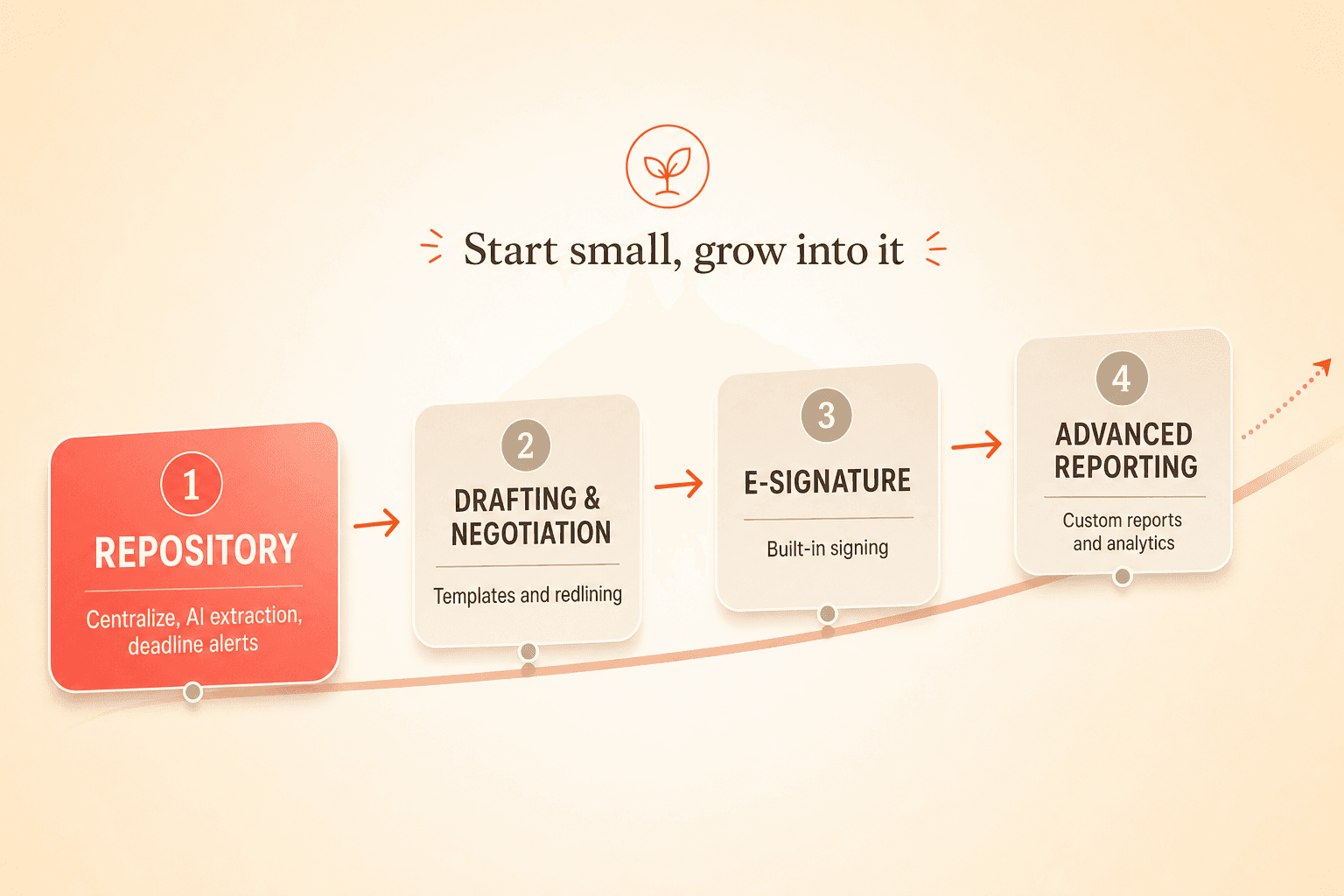
The most common pattern among fast-growing teams that adopt CLM tools is to start with the repository use case: centralize existing contracts, run AI extraction on uploaded documents, and set up deadline alerts. Then, over the following months, progressively activate drafting, negotiation, e-signature, and advanced reporting.
A CLM that forces full lifecycle adoption on day one creates unnecessary implementation friction for a team that just needs to stop managing contracts in a spreadsheet. The right architecture makes every feature available from the start but does not require configuring all of them to get value.
Concord is built around this model. Implementation typically takes one to two weeks across three phases: system configuration, data upload with AI-powered extraction, and end-user training. A dedicated implementation manager and customer team are included at no extra cost.
AI extraction removes the migration barrier
The biggest obstacle to adopting a CLM at a fast-growing startup is the perceived effort of moving existing contracts into the new system. Teams describe hundreds of documents scattered across multiple locations and dread the manual work of uploading and tagging each one.
AI-powered data extraction changes this equation. Concord's AI co-pilot automatically pulls key terms from bulk-uploaded documents, including parties, effective dates, renewal dates, termination clauses, and financial values. Migration becomes a one-time bulk upload with automated metadata population rather than a months-long manual project.
Why fast-growing teams reject enterprise CLMs
Buyers in the startup and scale-up segment consistently report that enterprise-focused platforms with six-figure annual price tags and multi-month implementations are dismissed early in the evaluation process. The functional value gap between enterprise platforms and well-designed mid-market CLMs is perceived as narrow. The cost and complexity gap is wide.
Concord is purpose-built for small and mid-sized companies. Per-user pricing (not per-document), built-in e-signature, Microsoft Word and Google Docs compatibility, and AWS-hosted data with GDPR compliance for European operations make it a fit for companies that need full lifecycle capability without enterprise overhead.
Finding the best contract management software for startups is not about picking the flashiest tool on the market. It is about choosing a platform that works on day one, when you have 75 contracts scattered across Google Drive and your CRM, and still works 18 months later when your headcount has doubled, your contract volume has tripled, and your processes have matured beyond what any spreadsheet can handle.
This guide gives you a practical framework for evaluating any CLM against seven specific dimensions of growth-readiness, with a checklist you can take into your next vendor demo.
Why startups outgrow their contract setup so quickly
The pattern is remarkably consistent. A growing company starts by storing contracts as file attachments inside a CRM, a shared drive, or a Notion workspace. One or two people, often a long-tenured administrator or the sole general counsel, hold all institutional knowledge about renewal dates, termination windows, and process steps.
This works at 50 employees. It breaks at 150. When that single person can no longer touch every deal, and when the team can no longer manually validate dates across hundreds of contracts, the cracks become costly. Missed auto-renewal windows, duplicate agreements, and unsigned contracts sitting in someone's inbox are symptoms of a system that was never designed for the volume it now carries.
Seven dimensions to evaluate any CLM for growth-readiness
Startups should evaluate contract management software against seven specific dimensions. Each one represents a capability that may not matter on day one but will become critical within 12 to 18 months.
1. Contract repository growth
Contract repository refers to the centralized, searchable database where all your agreements live. The baseline question: does the system impose document caps or charge per document? As contract volume doubles, will storage or search performance degrade?
Look for unlimited document storage with OCR-powered full-text search. Your repository should make every uploaded PDF and Word document fully searchable without manual tagging. Concord provides this out of the box, with no per-document charges that penalize you as your library grows. Learn more about building a contract repository.
2. Workflow automation
Contract workflow automation is the ability to replace ad hoc email chains with structured intake forms, routing rules, and status tracking. Your system should let business stakeholders submit contract requests through a standardized process rather than sending a Slack message to legal.
The key question for growth: can the workflow engine adapt as your processes evolve? A two-step intake process today may need department-specific routing, conditional logic, and escalation rules within a year.
3. Approval chains
At 50 employees, your approval chain might be "legal reviews, CEO signs." At 200 employees, you may need multi-level approvals that vary based on contract value, type, or risk level.
Evaluate whether the CLM supports conditional approval logic. Can you set a threshold where contracts above a certain dollar value require CFO sign-off, while standard vendor agreements route only through the department head? Concord's approval workflows support this kind of conditional routing and can be reconfigured without developer involvement as your org chart changes. Explore approval workflow capabilities.
4. Templates and clause libraries
Can your team start with five standard templates and grow to 50 without needing a developer? Look for template systems that include conditional logic and pre-approved clause alternatives. Your sales team should be able to generate a first draft from a template without waiting for legal to customize every agreement.
5. Integrations with your existing stack
Your CLM needs to connect to the tools you already use: your CRM, Slack, e-signature tools. But it also needs to accommodate the tools you will add in 18 months.
Look for native integrations with your current stack plus APIs, webhooks, and middleware support (like Zapier) for future connections. Concord offers native integrations with Salesforce, HubSpot, Slack, and DocuSign, with API and Zapier support for custom workflows. See the full integrations list.
6. Permissions and access control
This is where many CLMs force a hard choice between access and control. Small legal teams consistently express that they need a system where account managers, sales reps, and finance leads can view relevant contracts and receive deadline alerts without every action routing through legal.
The licensing model matters enormously here. If every viewer requires a paid seat, your costs scale linearly with headcount. Concord offers unlimited free viewer/read-only licenses. Viewers can submit intake requests, access permitted documents, and receive deadline alerts without adding to your subscription cost.
7. Reporting and analytics
Can the system produce custom reports on contract status, expiration timelines, financial exposure, and signing velocity? Are reports filterable by entity, department, tag, or custom field?
Growing teams need answers to questions like "how much are we spending on auto-renewing vendor contracts this quarter?" without pulling data into a spreadsheet. Concord's custom report builder uses any metadata in the system and filters by date ranges, tags, stages, contract value, and custom properties.
Startup CLM checklist: seven questions for your next vendor demo
Use this checklist to evaluate any contract management software for growth-readiness:
Repository: Does the system offer unlimited document storage with full-text OCR search, with no per-document fees?
Workflow: Can intake forms and routing rules be modified without developer support as processes evolve?
Approvals: Does the approval engine support conditional logic based on contract value, type, or department?
Templates: Can non-technical users create and modify templates with conditional clauses?
Integrations: Does the platform offer native CRM and e-signature integrations plus API/webhook access for future tools?
Permissions: Are viewer/read-only licenses free, and can viewers submit requests and receive alerts?
Reporting: Can custom reports filter by entity, department, and custom fields without data export?
A "yes" across all seven means the platform can grow with you. A "no" on any dimension signals a potential rip-and-replace migration in your future.
Why the "start small, grow into it" model wins
The most common pattern among fast-growing teams that adopt CLM tools is to start with the repository use case: centralize existing contracts, run AI extraction on uploaded documents, and set up deadline alerts. Then, over the following months, progressively activate drafting, negotiation, e-signature, and advanced reporting.
A CLM that forces full lifecycle adoption on day one creates unnecessary implementation friction for a team that just needs to stop managing contracts in a spreadsheet. The right architecture makes every feature available from the start but does not require configuring all of them to get value.
Concord is built around this model. Implementation typically takes one to two weeks across three phases: system configuration, data upload with AI-powered extraction, and end-user training. A dedicated implementation manager and customer team are included at no extra cost.
AI extraction removes the migration barrier
The biggest obstacle to adopting a CLM at a fast-growing startup is the perceived effort of moving existing contracts into the new system. Teams describe hundreds of documents scattered across multiple locations and dread the manual work of uploading and tagging each one.
AI-powered data extraction changes this equation. Concord's AI co-pilot automatically pulls key terms from bulk-uploaded documents, including parties, effective dates, renewal dates, termination clauses, and financial values. Migration becomes a one-time bulk upload with automated metadata population rather than a months-long manual project.
Why fast-growing teams reject enterprise CLMs
Buyers in the startup and scale-up segment consistently report that enterprise-focused platforms with six-figure annual price tags and multi-month implementations are dismissed early in the evaluation process. The functional value gap between enterprise platforms and well-designed mid-market CLMs is perceived as narrow. The cost and complexity gap is wide.
Concord is purpose-built for small and mid-sized companies. Per-user pricing (not per-document), built-in e-signature, Microsoft Word and Google Docs compatibility, and AWS-hosted data with GDPR compliance for European operations make it a fit for companies that need full lifecycle capability without enterprise overhead.

Need to know
Frequently Asked Questions

Take the "management" out
of contract management.
Customer Support
Legal
Compare
Resources
Customer Support
Company
Legal
Compare
Resources
Customer Support
Company
Legal
Compare
© 2025 Concord. All rights reserved.

