E-signature adoption guide: getting your whole team signing digitally
E-signature adoption guide: getting your whole team signing digitally
E-signature adoption guide: getting your whole team signing digitally
E-signature adoption guide: getting your whole team signing digitally
contract management

Your organization already has electronic signatures built into your contract platform. The capability is live, unlimited, and ready to go. So why are half your teams still printing, scanning, and emailing PDFs for wet signatures?
The gap between "we have e-sig" and "everyone signs digitally" is one of the most common sticking points contract administrators and legal ops managers face. This guide provides a practical, step-by-step adoption playbook to close that gap, covering the human friction, the process missteps, and the specific features that eliminate the most common objections.
The adoption gap is a people problem, not a tech problem
Your electronic signatures work. The technology is not the issue. What's missing is typically a combination of three things: an internal champion who owns the rollout, simple documentation of the steps each role needs to follow, and prepared answers to the questions counterparties will ask.
Legal ops managers frequently describe the same pattern. A few power users adopted digital signing early, but the rest of the organization never received clear guidance on when or how to use it. Without that guidance, people default to what they know, which is printing, scanning, and emailing.
The fix is treating adoption as a lightweight internal project, not a technology implementation. You don't need a months-long initiative. You need a two-week plan with clear owners, a defined starting document type, and a short training session that addresses the five questions below.
Five questions that stall rollout (and their answers)
Before you announce anything to your team, prepare answers to these common concerns. Each one maps to a real friction point that surfaces repeatedly in onboarding conversations.
"Will our counterparties need to create an account?" No. External signers receive an email with a link. They click it, fill in any required fields, and sign. No account creation. No software download. The experience is functionally identical to, and often simpler than, standalone e-signature tools your counterparties already accept.
"What's the difference between sharing a document and requesting a signature?" This is the most common source of confusion. Being shared on a document does not automatically trigger a signature request. The signature request is a separate, deliberate step. Some signers see a grayed-out sign button and don't realize they need to complete required fields (like their name) first. Your rollout training should walk through this distinction with screenshots.
"Will people get spammed with emails if we have lots of signers?" Only if you don't configure signing order. When a document requires five or more signers and no order is set, each subsequent signer receives a notification every time a prior signer completes. Setting a deliberate signing order prevents inbox fatigue and signer drop-off. For more on structuring your approval and signing workflows, spend a few minutes configuring the sequence before sending.
"What does the 'automatic request signature' setting do?" This setting applies after one signer completes. It then auto-requests from the next signer in the configured order. It does not fire on document creation. Clarifying this during rollout prevents frustration and unnecessary support tickets.
"Is this legally valid?" Electronic signatures carry legal weight under frameworks like the ESIGN Act, UETA, and eIDAS. Concord's digital signature certificate management feature maintains certificates that support authenticity and enforceability. Signature snapshots capture point-in-time records of the signing process, giving compliance-focused teams a defensible history of every step.
Phase your rollout by document type
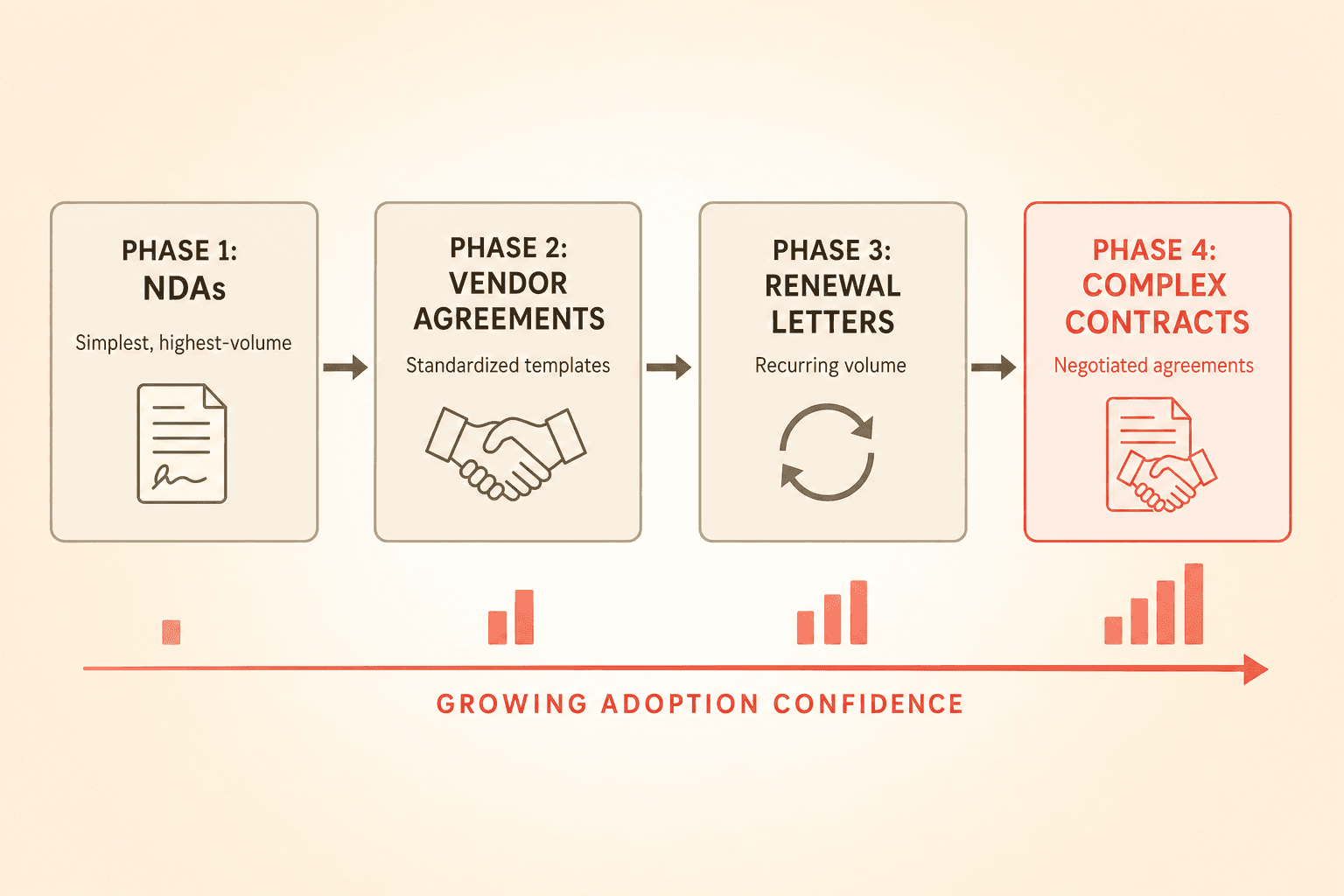
Teams that try to switch every document type at once often stall. A phased approach works better.
Start with your simplest, highest-volume document type. NDAs, vendor agreements, and renewal letters are common starting points. The vast majority of signing use cases are simple signature collection with no redlining expected, which means the rollout path for most users is shorter than they assume. They only need to learn the share-and-sign workflow, not the full negotiation feature set. Your contract templates guide can help you set up standardized documents that are ready for one-click signature requests.
Run that document type for two weeks. Track completion rates using signature requirement tracking, which gives administrators visibility into which agreements are still waiting on signatures. This replaces the spreadsheet-and-email tracking most teams rely on today.
Then expand to the next document type. Each round builds internal confidence. By the third or fourth document type, you'll find teams requesting to be added to the digital workflow rather than needing to be pushed.
The features that remove perceived barriers
Many adoption objections map directly to features that already exist but haven't been surfaced. Your rollout plan should include explicit feature awareness for each of these.
Bulk signature requests. Teams with high-volume signing needs rarely discover this feature on their own. If you're sending the same agreement to dozens of counterparties, bulk signature requests let you handle them simultaneously rather than one at a time. This single capability converts skeptics who believe digital signing is slower than their current process.
Configurable signing order. As covered above, this prevents notification overload. It also gives you control over the sequence when certain signers need to review before others.
Auto-request signatures. Once configured, the system automatically prompts the next signer after the previous one completes. This reduces manual follow-up and makes the process self-sustaining.
Signature requirement tracking. Your dashboard shows exactly which agreements are pending, who hasn't signed yet, and where bottlenecks sit. This is the feature that replaces your tracking spreadsheet.
Signature snapshots and certificate management. For compliance-conscious teams, these features provide the audit trail that printing and scanning can never offer.
Every document signed outside the platform is a missed audit trail
This point deserves its own section because it reframes the adoption conversation from convenience to risk.
When team members default to wet signatures or a separate tool, you lose the full record: who viewed the document, when they viewed it, when they signed, the certificate, and the version history. You also lose the ability to track signing status in one place, which means someone is maintaining a spreadsheet or chasing email confirmations.
The argument for full adoption is not just about speed. It's about having a defensible, centralized record of every signing event. For regulated industries or any team subject to audits, this is the argument that moves leadership from "nice to have" to "mandatory."
Stop paying twice for the same capability
Here is a pattern that surfaces in nearly every conversation with teams evaluating their contract stack: the organization pays per-envelope fees on an external e-signature tool while Concord's built-in electronic signatures, unlimited documents, unlimited signatures, sit unused.
That cost structure scales linearly with volume. Every new hire, every new vendor, every renewal adds cost. Concord's built-in capability is already included in your subscription with no per-document or per-signature fees. But the savings only materialize if people actually use it.
If your team currently uses a separate tool, consider a parallel-running period. Route new, simple document types through the built-in capability while keeping the external tool active for legacy workflows. Once your team is comfortable, sunset the separate tool entirely.
Counterparty friction is lower than you think
The most common reason teams delay rollout is fear that counterparties won't cooperate. In practice, even counterparties who prefer to redline in Microsoft Word or Google Docs typically have no issue clicking a link to sign.
The external signer experience is: receive an email, click a link, complete any required fields, sign. That's it. No training. No onboarding. No software. E-signature adoption can proceed independently of whether your counterparties adopt any other part of your platform.
Your two-week adoption plan
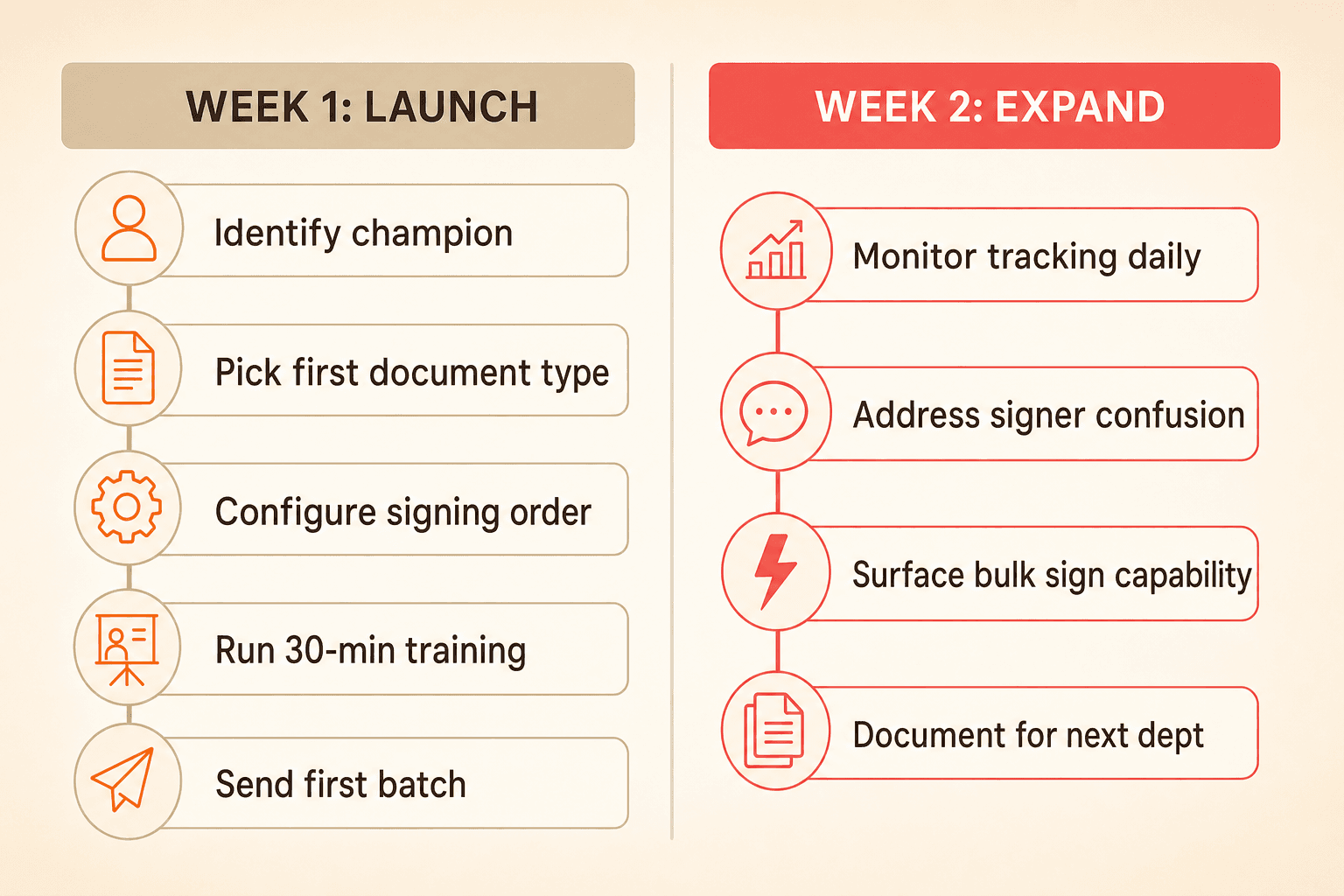
Week one:
Identify your champion (operations lead or contract administrator).
Pick one document type to start with.
Configure signing order and auto-request settings for that document type.
Run a 30-minute training session covering the five questions above.
Send your first batch of digital signature requests.
Week two:
Monitor signature requirement tracking daily.
Address any signer confusion (usually the "share vs. request" distinction).
Surface bulk sign capability to high-volume users.
Document your process for the next department.
By the end of two weeks, you'll have a working reference workflow and a group of users who can advocate for the next phase.
Your organization already has electronic signatures built into your contract platform. The capability is live, unlimited, and ready to go. So why are half your teams still printing, scanning, and emailing PDFs for wet signatures?
The gap between "we have e-sig" and "everyone signs digitally" is one of the most common sticking points contract administrators and legal ops managers face. This guide provides a practical, step-by-step adoption playbook to close that gap, covering the human friction, the process missteps, and the specific features that eliminate the most common objections.
The adoption gap is a people problem, not a tech problem
Your electronic signatures work. The technology is not the issue. What's missing is typically a combination of three things: an internal champion who owns the rollout, simple documentation of the steps each role needs to follow, and prepared answers to the questions counterparties will ask.
Legal ops managers frequently describe the same pattern. A few power users adopted digital signing early, but the rest of the organization never received clear guidance on when or how to use it. Without that guidance, people default to what they know, which is printing, scanning, and emailing.
The fix is treating adoption as a lightweight internal project, not a technology implementation. You don't need a months-long initiative. You need a two-week plan with clear owners, a defined starting document type, and a short training session that addresses the five questions below.
Five questions that stall rollout (and their answers)
Before you announce anything to your team, prepare answers to these common concerns. Each one maps to a real friction point that surfaces repeatedly in onboarding conversations.
"Will our counterparties need to create an account?" No. External signers receive an email with a link. They click it, fill in any required fields, and sign. No account creation. No software download. The experience is functionally identical to, and often simpler than, standalone e-signature tools your counterparties already accept.
"What's the difference between sharing a document and requesting a signature?" This is the most common source of confusion. Being shared on a document does not automatically trigger a signature request. The signature request is a separate, deliberate step. Some signers see a grayed-out sign button and don't realize they need to complete required fields (like their name) first. Your rollout training should walk through this distinction with screenshots.
"Will people get spammed with emails if we have lots of signers?" Only if you don't configure signing order. When a document requires five or more signers and no order is set, each subsequent signer receives a notification every time a prior signer completes. Setting a deliberate signing order prevents inbox fatigue and signer drop-off. For more on structuring your approval and signing workflows, spend a few minutes configuring the sequence before sending.
"What does the 'automatic request signature' setting do?" This setting applies after one signer completes. It then auto-requests from the next signer in the configured order. It does not fire on document creation. Clarifying this during rollout prevents frustration and unnecessary support tickets.
"Is this legally valid?" Electronic signatures carry legal weight under frameworks like the ESIGN Act, UETA, and eIDAS. Concord's digital signature certificate management feature maintains certificates that support authenticity and enforceability. Signature snapshots capture point-in-time records of the signing process, giving compliance-focused teams a defensible history of every step.
Phase your rollout by document type
Teams that try to switch every document type at once often stall. A phased approach works better.
Start with your simplest, highest-volume document type. NDAs, vendor agreements, and renewal letters are common starting points. The vast majority of signing use cases are simple signature collection with no redlining expected, which means the rollout path for most users is shorter than they assume. They only need to learn the share-and-sign workflow, not the full negotiation feature set. Your contract templates guide can help you set up standardized documents that are ready for one-click signature requests.
Run that document type for two weeks. Track completion rates using signature requirement tracking, which gives administrators visibility into which agreements are still waiting on signatures. This replaces the spreadsheet-and-email tracking most teams rely on today.
Then expand to the next document type. Each round builds internal confidence. By the third or fourth document type, you'll find teams requesting to be added to the digital workflow rather than needing to be pushed.
The features that remove perceived barriers
Many adoption objections map directly to features that already exist but haven't been surfaced. Your rollout plan should include explicit feature awareness for each of these.
Bulk signature requests. Teams with high-volume signing needs rarely discover this feature on their own. If you're sending the same agreement to dozens of counterparties, bulk signature requests let you handle them simultaneously rather than one at a time. This single capability converts skeptics who believe digital signing is slower than their current process.
Configurable signing order. As covered above, this prevents notification overload. It also gives you control over the sequence when certain signers need to review before others.
Auto-request signatures. Once configured, the system automatically prompts the next signer after the previous one completes. This reduces manual follow-up and makes the process self-sustaining.
Signature requirement tracking. Your dashboard shows exactly which agreements are pending, who hasn't signed yet, and where bottlenecks sit. This is the feature that replaces your tracking spreadsheet.
Signature snapshots and certificate management. For compliance-conscious teams, these features provide the audit trail that printing and scanning can never offer.
Every document signed outside the platform is a missed audit trail
This point deserves its own section because it reframes the adoption conversation from convenience to risk.
When team members default to wet signatures or a separate tool, you lose the full record: who viewed the document, when they viewed it, when they signed, the certificate, and the version history. You also lose the ability to track signing status in one place, which means someone is maintaining a spreadsheet or chasing email confirmations.
The argument for full adoption is not just about speed. It's about having a defensible, centralized record of every signing event. For regulated industries or any team subject to audits, this is the argument that moves leadership from "nice to have" to "mandatory."
Stop paying twice for the same capability
Here is a pattern that surfaces in nearly every conversation with teams evaluating their contract stack: the organization pays per-envelope fees on an external e-signature tool while Concord's built-in electronic signatures, unlimited documents, unlimited signatures, sit unused.
That cost structure scales linearly with volume. Every new hire, every new vendor, every renewal adds cost. Concord's built-in capability is already included in your subscription with no per-document or per-signature fees. But the savings only materialize if people actually use it.
If your team currently uses a separate tool, consider a parallel-running period. Route new, simple document types through the built-in capability while keeping the external tool active for legacy workflows. Once your team is comfortable, sunset the separate tool entirely.
Counterparty friction is lower than you think
The most common reason teams delay rollout is fear that counterparties won't cooperate. In practice, even counterparties who prefer to redline in Microsoft Word or Google Docs typically have no issue clicking a link to sign.
The external signer experience is: receive an email, click a link, complete any required fields, sign. That's it. No training. No onboarding. No software. E-signature adoption can proceed independently of whether your counterparties adopt any other part of your platform.
Your two-week adoption plan
Week one:
Identify your champion (operations lead or contract administrator).
Pick one document type to start with.
Configure signing order and auto-request settings for that document type.
Run a 30-minute training session covering the five questions above.
Send your first batch of digital signature requests.
Week two:
Monitor signature requirement tracking daily.
Address any signer confusion (usually the "share vs. request" distinction).
Surface bulk sign capability to high-volume users.
Document your process for the next department.
By the end of two weeks, you'll have a working reference workflow and a group of users who can advocate for the next phase.
Need to know
Frequently Asked Questions

Take the "management" out
of contract management.
Customer Support
Legal
Compare
Resources
Customer Support
Company
Legal
Compare
Resources
Customer Support
Company
Legal
Compare
© 2025 Concord. All rights reserved.