
Contract search software: find any contract in seconds
Contract search software: find any contract in seconds
Contract search software: find any contract in seconds
Contract search software: find any contract in seconds
contract management

Finding a specific contract should take seconds. For most teams, it takes minutes, sometimes hours. The contract you need is buried in a shared drive, a filing cabinet, or a repository with a search bar that returns inconsistent results. If your organization manages hundreds or thousands of agreements, this problem compounds daily. Contract search software that combines OCR, AI-powered metadata extraction, and natural-language search changes the equation entirely. Concord's advanced search and filtering capabilities treat every uploaded document the same, whether it was born digital or scanned from paper, and make it findable from the moment it enters your repository.
This post walks through how those layers work together and why each one matters.
The compounding cost of poor contract findability
Most teams don't realize search is broken until they cross a threshold, typically around 500 contracts. Below that number, you can get by with memory, folder names, and basic keyword matching. Above it, the cracks appear.
Keyword-only search returns too many irrelevant results because the same term appears in dozens of unrelated documents. Tag-based search depends on humans tagging perfectly, and humans don't tag perfectly. Manual scanning of folders becomes unsustainable as volumes grow.
Every contract you add without proper search infrastructure makes the next one harder to find. The problem compounds because the data deficit is invisible. You don't know what you can't find until someone asks for it during an audit, a renewal cycle, or a compliance review.
How OCR, metadata extraction, and AI search work as a unified system
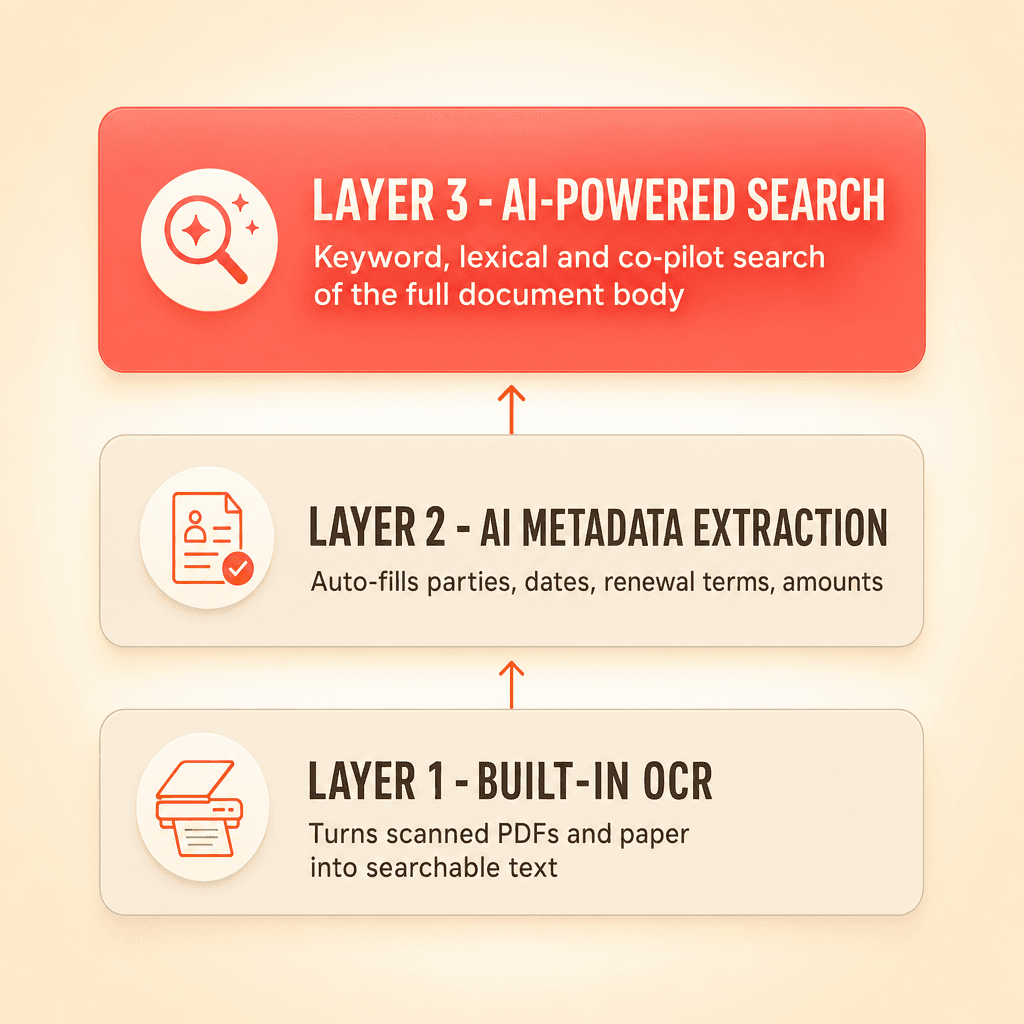
Concord's contract search software operates as a three-layer pipeline. Each layer builds on the one before it.
Layer 1: Built-in OCR on every upload
The moment you upload a document, whether individually or through bulk upload via a zip folder, the system creates an OCR copy. This converts scanned PDFs, signed agreements from e-signature platforms, and legacy paper contracts into machine-readable text.
OCR is the unglamorous feature that makes everything else possible. Without it, a scanned vendor agreement from 2019 is just an image file, invisible to any search. With it, that same agreement becomes fully readable text that AI can search through, extract data from, and include in reports.
Teams with large legacy repositories benefit most here. You don't need to pre-process archives through a separate OCR tool before uploading. The system handles it automatically on ingest.
Layer 2: AI-powered metadata extraction
Once the OCR text is available, Concord's bulk AI data extraction populates metadata fields automatically. This includes agreement category, document type, parties, effective dates, duration, renewal terms, early termination notice periods, and financial amounts.
This step matters because metadata-based filtering is only as useful as the metadata that exists. Historically, populating these fields required manual data entry. That meant most contracts had incomplete or missing information, a classic "garbage in, garbage out" problem that undermined every downstream workflow.
Automatic extraction removes the dependency on human discipline. Your filtering infrastructure gets populated on upload, not months later when someone finally gets around to a data-entry backlog.
Layer 3: Search that reads the full document body
The third layer is the search itself, powered by enterprise search engine for speed and relevance ranking. This is where keyword search, AI-powered lexical search, and the co-pilot converge.
Not every search works the same way, and your contract search and filtering needs should dictate which mode you use:
Keyword search works when you know the exact contract name, a counterparty, or a specific term. You type it, results appear in your contract inbox.
AI-powered lexical search works when you need something conceptual. You can type a natural-language question like "show me all contracts with early termination notice under 60 days" and get accurate results, even if the exact phrase varies across documents. This is the capability that consistently surprises teams during evaluations. Contract managers expect basic keyword search as a baseline. AI-powered natural-language search is the differentiator.
The co-pilot handles complex, multi-parameter queries that span document body content and metadata. Think of it as a conversational interface for questions that combine clause content, dates, and financial thresholds into a single request.
These three modes complement each other rather than competing. You can start with a keyword search, layer on metadata filters, and then ask the co-pilot a follow-up question about the results.
Search results that live in your contract inbox
A common frustration with legacy search experiences is that results appear in a separate window where you can't do much with them. You get a list, but you can't sort it, filter it further, customize which columns appear, or export it in a useful format.
Concord's advanced search returns results directly in your contract analytics and reporting dashboard inbox view. This means every search result set is fully sortable, filterable, and customizable with columns. You can add or remove fields, apply additional metadata filters on top of your search, save the view as a report, and export it to Excel or CSV.
This distinction matters because the people searching for contracts are usually doing so for a specific purpose. An auditor needs a list of all contracts over a certain dollar threshold. A procurement lead needs every vendor agreement expiring in Q3. A board member's office requests a summary of all active agreements with a particular counterparty.
In each case, the search result needs to be a deliverable, not a starting point for manual reformatting. Returning results in the inbox eliminates the copy-paste step entirely.
Searching by clause content, not just metadata or tags
One of the most common requests from legal ops professionals is the ability to search for contracts containing specific provisions. Termination for convenience clauses. Indemnity language. Auto-renewal terms. Confidentiality provisions with expiration dates.
Without AI-powered contract search software, finding these clauses requires someone to have pre-tagged each document with the right labels. That approach breaks down at scale because tagging is inconsistent, subjective, and often incomplete.
Concord's AI search reads the full document body, not just metadata fields. This is a fundamental shift. You can search for clause content directly, and the system will return matching contracts regardless of whether anyone tagged them. Combined with the contract deadlines filtering feature, you can narrow results to contracts where specific clause types intersect with upcoming deadlines.
Permissions carry through to every search result
For organizations with sensitive HR, finance, or legal documents, a valid concern about AI-powered search is whether it respects existing access controls. If someone in marketing runs a search, will they see results from the legal team's confidential folder?
Concord's search and co-pilot only return results from contracts the user has permission to access. Folder-based access controls apply to every search query and every AI interaction. This means you can roll out advanced search to your entire organization without worrying about unauthorized visibility into restricted documents.
The six-step workflow: from upload to exportable report
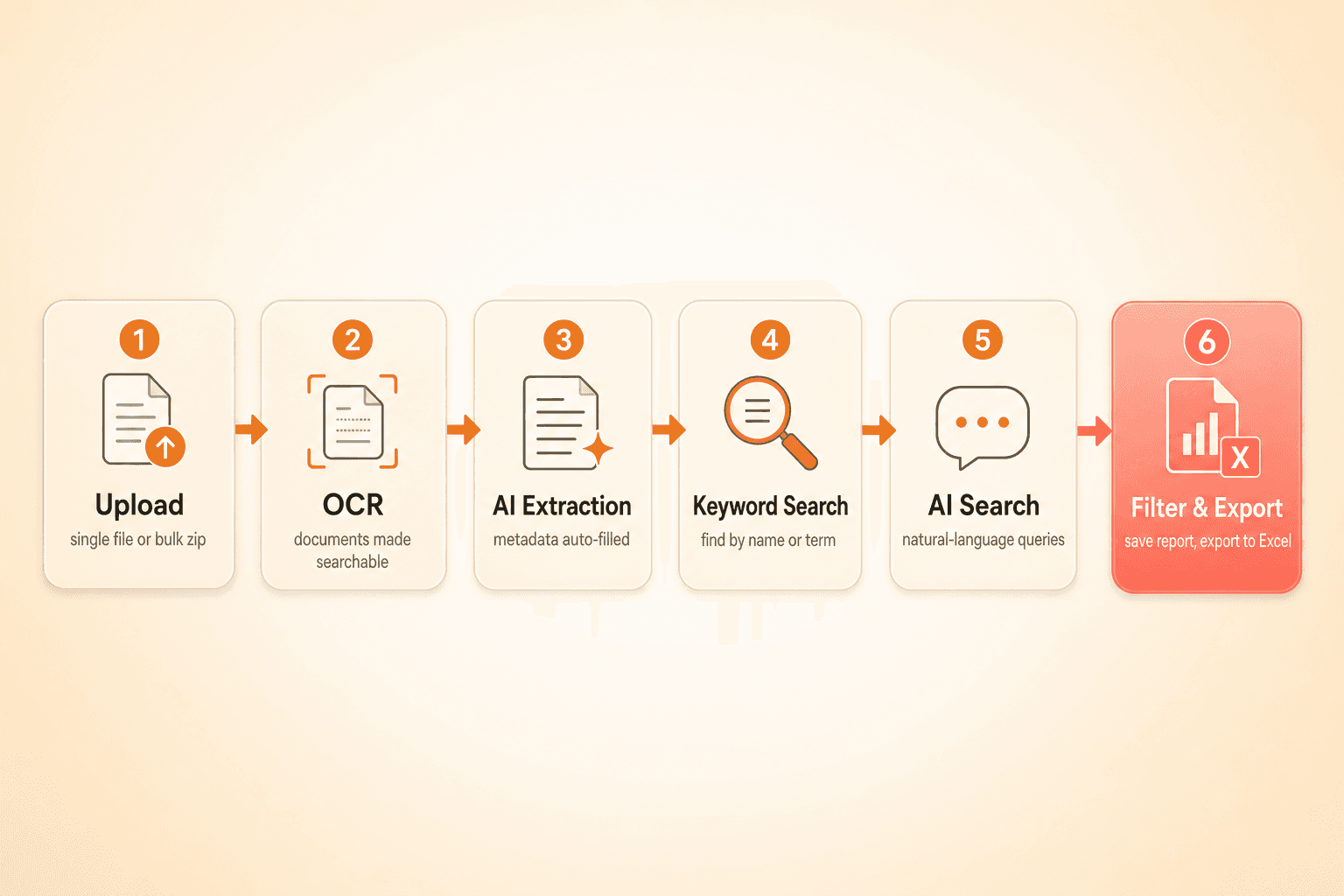
Here's how the complete pipeline looks in practice:
Upload a document or bulk upload a zip folder of existing contracts.
OCR runs automatically on every file, converting scanned and image-based documents into searchable text.
AI extraction populates metadata including parties, dates, financials, and lifecycle details without manual data entry.
Keyword search finds contracts by name, counterparty, or exact term.
AI-powered search answers natural-language questions about clause content, financial terms, or conceptual queries.
Filter, customize, save, and export results as a report in Excel or CSV format, with exactly the columns and data you see on screen.
This pipeline means your entire repository is searchable from day one. You don't need a three-month data cleanup project before your CLM system becomes useful.
Finding a specific contract should take seconds. For most teams, it takes minutes, sometimes hours. The contract you need is buried in a shared drive, a filing cabinet, or a repository with a search bar that returns inconsistent results. If your organization manages hundreds or thousands of agreements, this problem compounds daily. Contract search software that combines OCR, AI-powered metadata extraction, and natural-language search changes the equation entirely. Concord's advanced search and filtering capabilities treat every uploaded document the same, whether it was born digital or scanned from paper, and make it findable from the moment it enters your repository.
This post walks through how those layers work together and why each one matters.
The compounding cost of poor contract findability
Most teams don't realize search is broken until they cross a threshold, typically around 500 contracts. Below that number, you can get by with memory, folder names, and basic keyword matching. Above it, the cracks appear.
Keyword-only search returns too many irrelevant results because the same term appears in dozens of unrelated documents. Tag-based search depends on humans tagging perfectly, and humans don't tag perfectly. Manual scanning of folders becomes unsustainable as volumes grow.
Every contract you add without proper search infrastructure makes the next one harder to find. The problem compounds because the data deficit is invisible. You don't know what you can't find until someone asks for it during an audit, a renewal cycle, or a compliance review.
How OCR, metadata extraction, and AI search work as a unified system
Concord's contract search software operates as a three-layer pipeline. Each layer builds on the one before it.
Layer 1: Built-in OCR on every upload
The moment you upload a document, whether individually or through bulk upload via a zip folder, the system creates an OCR copy. This converts scanned PDFs, signed agreements from e-signature platforms, and legacy paper contracts into machine-readable text.
OCR is the unglamorous feature that makes everything else possible. Without it, a scanned vendor agreement from 2019 is just an image file, invisible to any search. With it, that same agreement becomes fully readable text that AI can search through, extract data from, and include in reports.
Teams with large legacy repositories benefit most here. You don't need to pre-process archives through a separate OCR tool before uploading. The system handles it automatically on ingest.
Layer 2: AI-powered metadata extraction
Once the OCR text is available, Concord's bulk AI data extraction populates metadata fields automatically. This includes agreement category, document type, parties, effective dates, duration, renewal terms, early termination notice periods, and financial amounts.
This step matters because metadata-based filtering is only as useful as the metadata that exists. Historically, populating these fields required manual data entry. That meant most contracts had incomplete or missing information, a classic "garbage in, garbage out" problem that undermined every downstream workflow.
Automatic extraction removes the dependency on human discipline. Your filtering infrastructure gets populated on upload, not months later when someone finally gets around to a data-entry backlog.
Layer 3: Search that reads the full document body
The third layer is the search itself, powered by enterprise search engine for speed and relevance ranking. This is where keyword search, AI-powered lexical search, and the co-pilot converge.
Not every search works the same way, and your contract search and filtering needs should dictate which mode you use:
Keyword search works when you know the exact contract name, a counterparty, or a specific term. You type it, results appear in your contract inbox.
AI-powered lexical search works when you need something conceptual. You can type a natural-language question like "show me all contracts with early termination notice under 60 days" and get accurate results, even if the exact phrase varies across documents. This is the capability that consistently surprises teams during evaluations. Contract managers expect basic keyword search as a baseline. AI-powered natural-language search is the differentiator.
The co-pilot handles complex, multi-parameter queries that span document body content and metadata. Think of it as a conversational interface for questions that combine clause content, dates, and financial thresholds into a single request.
These three modes complement each other rather than competing. You can start with a keyword search, layer on metadata filters, and then ask the co-pilot a follow-up question about the results.
Search results that live in your contract inbox
A common frustration with legacy search experiences is that results appear in a separate window where you can't do much with them. You get a list, but you can't sort it, filter it further, customize which columns appear, or export it in a useful format.
Concord's advanced search returns results directly in your contract analytics and reporting dashboard inbox view. This means every search result set is fully sortable, filterable, and customizable with columns. You can add or remove fields, apply additional metadata filters on top of your search, save the view as a report, and export it to Excel or CSV.
This distinction matters because the people searching for contracts are usually doing so for a specific purpose. An auditor needs a list of all contracts over a certain dollar threshold. A procurement lead needs every vendor agreement expiring in Q3. A board member's office requests a summary of all active agreements with a particular counterparty.
In each case, the search result needs to be a deliverable, not a starting point for manual reformatting. Returning results in the inbox eliminates the copy-paste step entirely.
Searching by clause content, not just metadata or tags
One of the most common requests from legal ops professionals is the ability to search for contracts containing specific provisions. Termination for convenience clauses. Indemnity language. Auto-renewal terms. Confidentiality provisions with expiration dates.
Without AI-powered contract search software, finding these clauses requires someone to have pre-tagged each document with the right labels. That approach breaks down at scale because tagging is inconsistent, subjective, and often incomplete.
Concord's AI search reads the full document body, not just metadata fields. This is a fundamental shift. You can search for clause content directly, and the system will return matching contracts regardless of whether anyone tagged them. Combined with the contract deadlines filtering feature, you can narrow results to contracts where specific clause types intersect with upcoming deadlines.
Permissions carry through to every search result
For organizations with sensitive HR, finance, or legal documents, a valid concern about AI-powered search is whether it respects existing access controls. If someone in marketing runs a search, will they see results from the legal team's confidential folder?
Concord's search and co-pilot only return results from contracts the user has permission to access. Folder-based access controls apply to every search query and every AI interaction. This means you can roll out advanced search to your entire organization without worrying about unauthorized visibility into restricted documents.
The six-step workflow: from upload to exportable report
Here's how the complete pipeline looks in practice:
Upload a document or bulk upload a zip folder of existing contracts.
OCR runs automatically on every file, converting scanned and image-based documents into searchable text.
AI extraction populates metadata including parties, dates, financials, and lifecycle details without manual data entry.
Keyword search finds contracts by name, counterparty, or exact term.
AI-powered search answers natural-language questions about clause content, financial terms, or conceptual queries.
Filter, customize, save, and export results as a report in Excel or CSV format, with exactly the columns and data you see on screen.
This pipeline means your entire repository is searchable from day one. You don't need a three-month data cleanup project before your CLM system becomes useful.

Need to know
Frequently Asked Questions

Take the "management" out
of contract management.
Customer Support
Legal
Compare
Resources
Customer Support
Company
Legal
Compare
Resources
Customer Support
Company
Legal
Compare
© 2025 Concord. All rights reserved.

