
Contract metadata strategy: stop losing data in your repository
Contract metadata strategy: stop losing data in your repository
Contract metadata strategy: stop losing data in your repository
Contract metadata strategy: stop losing data in your repository
contract management

Your contract repository is full. That part is done. You centralized hundreds, maybe thousands, of agreements into a single platform. But when someone asks you to pull a list of all vendor contracts renewing in Q3 with annual values above $50,000, you draw a blank. Not because the data doesn't exist, but because no one structured it in a way that makes that question answerable.
This is the core problem with contract metadata management: most teams treat their repository as a file cabinet with a search bar, not as an intelligence system. The contracts are technically "in one place," but finding, filtering, and reporting on them remains manual labor.
The fix isn't more uploads. It's a metadata taxonomy.
What contract metadata actually means (and why most repositories lack it)
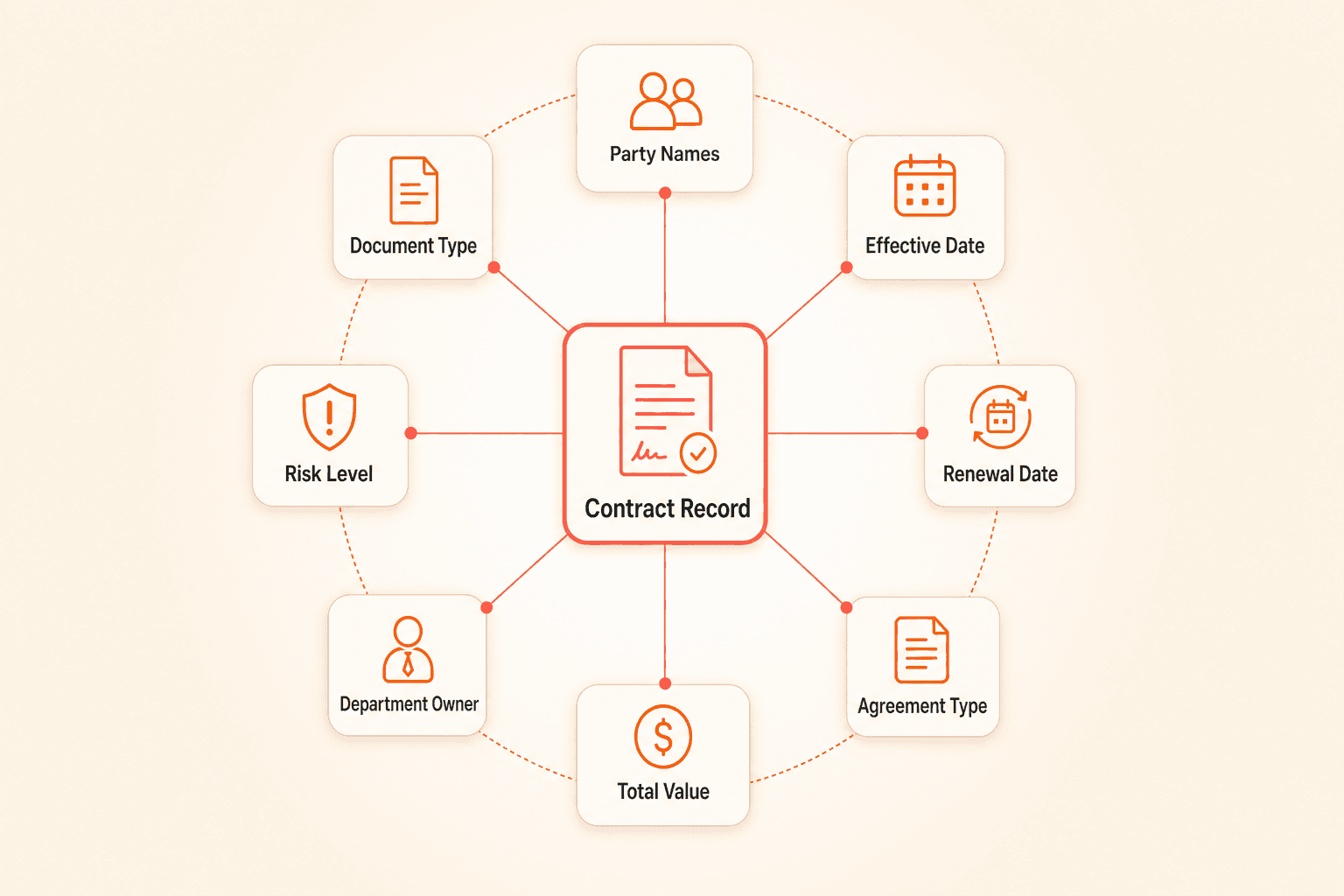
Contract metadata is every structured data point attached to a contract record beyond the document itself. Party names, effective dates, renewal deadlines, agreement type, total value, department owner, risk classification. These fields turn a PDF into a queryable record.
The problem is straightforward: most repositories grow organically. Someone uploads a contract. Maybe they fill in a few fields. Maybe they don't. The next person uses different labels. A third person skips tagging entirely. Over months and years, the repository accumulates documents with inconsistent, incomplete, or entirely missing metadata.
Legal ops leaders frequently describe their repository exports as unhelpful. Labels applied inconsistently. Tags created ad hoc. Document types indistinguishable from one another. The data exists inside the PDFs, but it can't be sliced, filtered, or reported on in any meaningful way.
The real root cause: system design, not discipline
Teams commonly recognize that metadata quality degrades when it depends on individuals remembering to fill in fields correctly at the point of upload. People skip steps, misclassify documents, and forget to link related agreements.
This isn't a training problem. It's a system design problem. You can run workshops, send reminder emails, and build intake checklists, but any process that relies on consistent manual entry across dozens of users will degrade over time. The immediate consequence of skipping a tag is zero. The long-term consequence is a repository that can't answer basic questions about your contract portfolio.
The answer involves two layers working together: a deliberate metadata taxonomy that defines what data must be captured, and automated extraction that fills in as many fields as possible without human intervention.
Step one: design your taxonomy before you configure anything
Before touching your CLM settings, define three things on paper (or in a shared doc).
Your folder structure. Organize by contract type or department, not by vendor name. Vendor-based folders scale poorly. When you have 200 vendors, you have 200 folders, and cross-portfolio questions become impossible. A structure like `NDAs > [Vendor]` or `Vendor Agreements > Services` gives you both categorization and specificity.
Your required metadata fields. This is your "minimum viable metadata set," the fields every single contract record must have before it's considered complete. A practical starting framework:
Agreement category (vendor, customer, employment, real estate, other)
Document type (MSA, SOW, NDA, amendment, order form)
Primary counterparty
Contract owner (internal)
Department stakeholder
Effective date
Expiration or renewal date
Total agreement value
Renewal type (auto-renew, manual, none)
Risk level (low, medium, high)
You can add more fields by contract type. For NDAs, you might capture confidentiality duration. For vendor agreements, you might capture payment terms or SLA thresholds. The point is to define the baseline before anyone starts uploading.
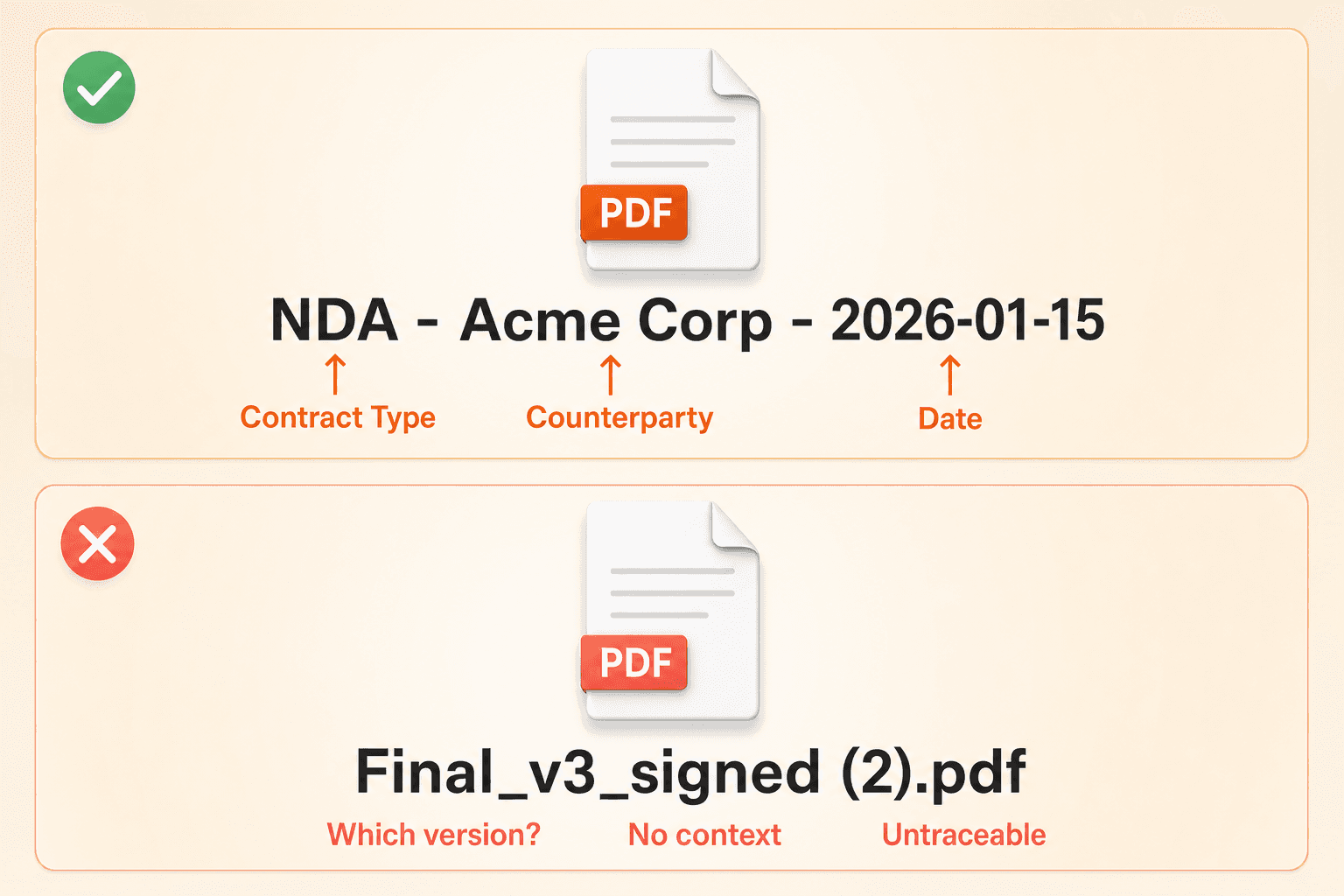
Your linking and naming conventions. Every amendment should link to its master agreement. Every statement of work should link to its framework contract. Define these relationships explicitly. For naming, keep it simple and consistent: `[Contract Type] - [Counterparty] - [YYYY-MM-DD]`. A file named `NDA - Acme Corp - 2026-01-15` is instantly identifiable. A file named `Final_v3_signed (2).pdf` is not.
Step two: automate what can be extracted from the document itself
Once your taxonomy is defined, the next question is: which fields can the system fill in automatically?
Concord's AI data extraction pulls structured fields directly from uploaded documents: agreement category, document type, parties, description, signature date, effective date, duration, renewal terms, early termination notice periods, and total agreement value. OCR converts scanned images and text PDFs into searchable content first, so extraction works regardless of file format.
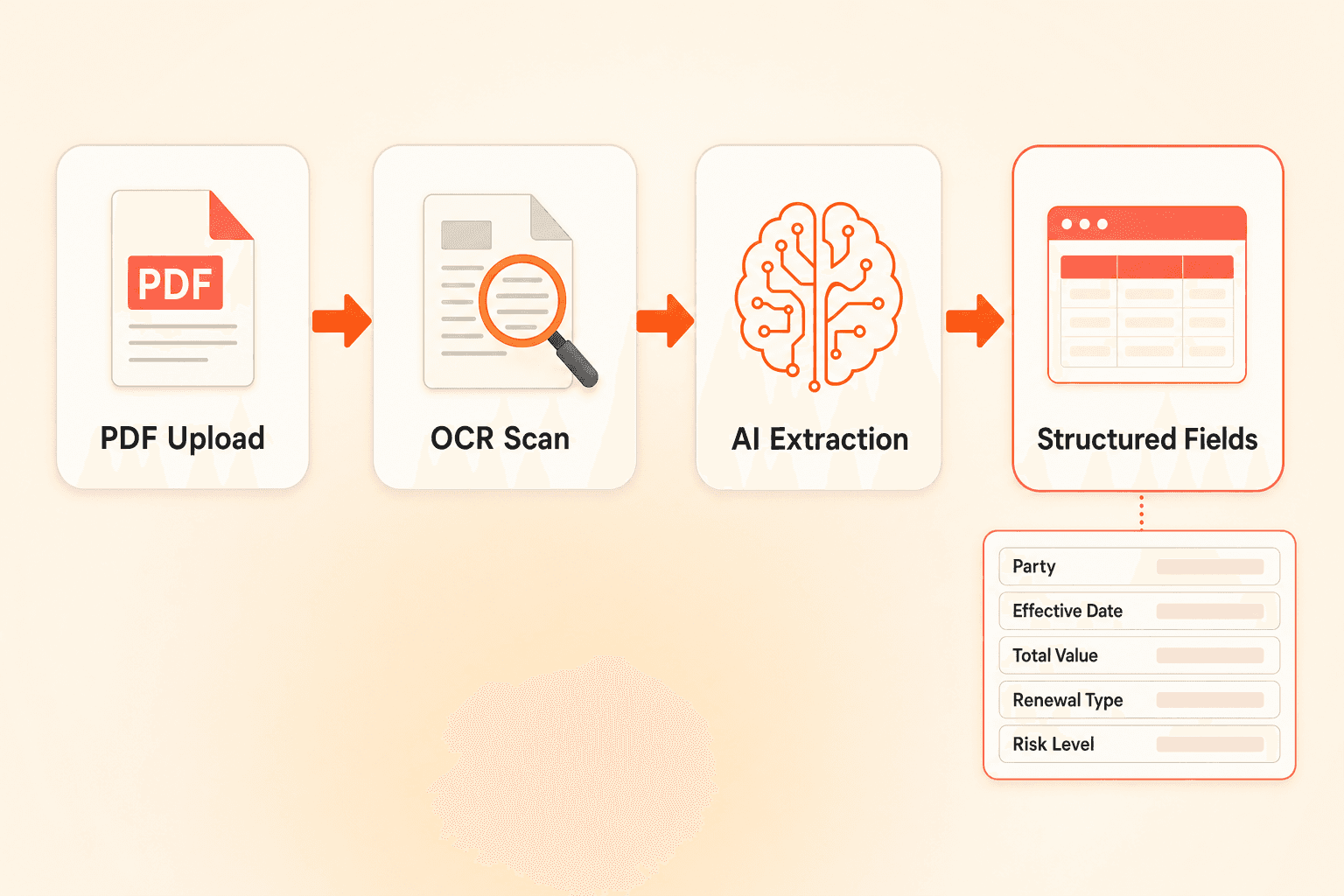
This automation layer eliminates the biggest bottleneck in contract metadata management. Instead of a person reading each contract and keying data into a spreadsheet, the system populates core fields at upload. Teams that previously described manually reviewing each agreement and entering client names, renewal dates, and financial terms into spreadsheets can redirect that effort toward higher-judgment work.
For organization-specific fields that fall outside standard categories, Concord's custom AI extraction lets you train the system to pull different data points by contract type. For NDAs, extract confidentiality duration and governing law. For vendor agreements, extract processing fee rates, payment schedules, or compliance-specific terms. This runs retroactively across all existing documents in the repository, which matters significantly for teams inheriting years of unstructured uploads.
Reserve manual entry only for fields that genuinely require human judgment: risk level, internal owner, department assignment, or strategic classification. Custom properties in Concord support unlimited additional fields (text, multiple choice, date, and other formats) so your taxonomy isn't constrained by pre-built templates. You can learn more about configuring your repository in Concord's contract management guide.
Step three: link your documents or lose context forever
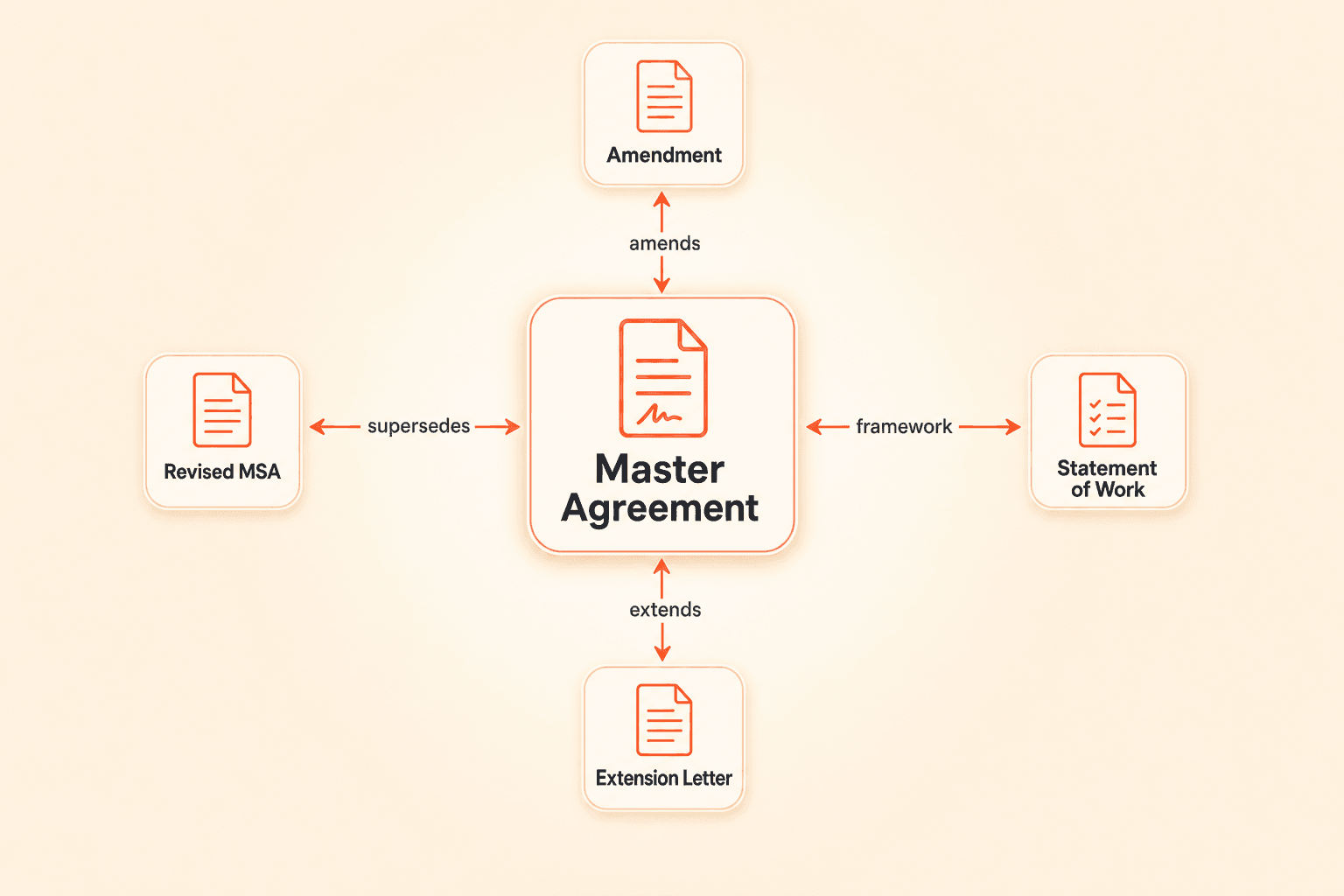
Document linking is metadata, not an afterthought. When related documents aren't connected at upload time, legal and operations teams later waste significant effort tracing which documents belong together, who uploaded them, and what they relate to. Retroactive cleanup of these relationships is consistently described as painful and time-consuming.
Concord's document linking feature supports defined relationship types: amends, supersedes, extends, and framework agreement connections. Relationships display bidirectionally on each contract record, so viewing a master agreement shows all its amendments, and viewing an amendment shows its parent.
Build linking into your upload process. Make it a required step, not an optional one. If an amendment is uploaded without a link to its master agreement, it becomes an orphaned document that no one can contextualize six months later. For more detail on structuring relationships between agreements, see Concord's contract lifecycle guide.
Step four: clean your historical clutter
Organizations that store years of expired, superseded, or redundant contracts alongside active ones describe the repository as bogged down. Active-only repositories with clean data are the goal, but cleaning up years of accumulated documents is a major barrier.
A practical approach: run bulk AI extraction across your entire existing repository first. This backfills metadata on every document, giving you the structured data you need to filter and sort. Then use filtering and saved views to identify expired, superseded, or duplicate records. Archive or remove what's no longer active.
Concord's automated file cleanup removes orphaned files when contracts are deleted, preventing storage bloat and maintaining data consistency over time. The bulk upload and bulk AI extraction features handle the initial heavy lift during implementation, running OCR and extraction automatically across hundreds or thousands of documents in a single batch.
The payoff: what a strong taxonomy makes possible
Once your metadata taxonomy is in place and populated (through extraction and structured manual entry), your repository transforms from passive storage into something you can actually query.
Filtering and reporting. Filter your contract inbox by any metadata field, custom property, or tag. Save filtered views as reusable reports. "Show me all vendor agreements expiring in Q4 with values over $25,000" becomes a two-click operation instead of a spreadsheet project.
Deadline and renewal management. With lifecycle dates extracted and structured, automated alerts for renewals, expirations, and notice periods become reliable. Without clean date metadata, these alerts either don't fire or fire incorrectly. For more on managing contract deadlines, see Concord's renewal management guide.
Natural language querying. Concord's Co-Pilot AI assistant lets you query all contract metadata and full-text content in natural language. Ask it to find contracts with specific clauses, surface financial exposure across a vendor category, or build a summary report. The quality of these results depends directly on the quality of your underlying metadata.
Frequently asked questions
Q: Can AI extraction replace the need for a metadata taxonomy? No. AI extraction is the automation layer, not the strategy layer. It fills in fields, but you need to define which fields matter, how they're categorized, and what conventions your team follows. Without a taxonomy, extraction populates data into an unstructured framework, and your reporting stays inconsistent.
Q: What if we already have thousands of contracts uploaded with no metadata? Retroactive cleanup is possible. Bulk AI extraction can backfill metadata across your entire existing repository, and custom extraction can pull organization-specific fields by contract type. The process works, but it's always more efficient to define your taxonomy before a bulk upload. The cost of retroactive cleanup scales with document volume; the cost of upfront taxonomy design is fixed.
Q: How many custom metadata fields should we create? Start with your minimum viable metadata set (eight to 12 fields that apply to every contract) and add contract-type-specific fields as needed. Too few fields and your reporting is limited. Too many and adoption drops because users skip the ones that feel irrelevant. Audit your field usage quarterly and retire any that aren't being populated or queried.
Your contract repository is full. That part is done. You centralized hundreds, maybe thousands, of agreements into a single platform. But when someone asks you to pull a list of all vendor contracts renewing in Q3 with annual values above $50,000, you draw a blank. Not because the data doesn't exist, but because no one structured it in a way that makes that question answerable.
This is the core problem with contract metadata management: most teams treat their repository as a file cabinet with a search bar, not as an intelligence system. The contracts are technically "in one place," but finding, filtering, and reporting on them remains manual labor.
The fix isn't more uploads. It's a metadata taxonomy.
What contract metadata actually means (and why most repositories lack it)
Contract metadata is every structured data point attached to a contract record beyond the document itself. Party names, effective dates, renewal deadlines, agreement type, total value, department owner, risk classification. These fields turn a PDF into a queryable record.
The problem is straightforward: most repositories grow organically. Someone uploads a contract. Maybe they fill in a few fields. Maybe they don't. The next person uses different labels. A third person skips tagging entirely. Over months and years, the repository accumulates documents with inconsistent, incomplete, or entirely missing metadata.
Legal ops leaders frequently describe their repository exports as unhelpful. Labels applied inconsistently. Tags created ad hoc. Document types indistinguishable from one another. The data exists inside the PDFs, but it can't be sliced, filtered, or reported on in any meaningful way.
The real root cause: system design, not discipline
Teams commonly recognize that metadata quality degrades when it depends on individuals remembering to fill in fields correctly at the point of upload. People skip steps, misclassify documents, and forget to link related agreements.
This isn't a training problem. It's a system design problem. You can run workshops, send reminder emails, and build intake checklists, but any process that relies on consistent manual entry across dozens of users will degrade over time. The immediate consequence of skipping a tag is zero. The long-term consequence is a repository that can't answer basic questions about your contract portfolio.
The answer involves two layers working together: a deliberate metadata taxonomy that defines what data must be captured, and automated extraction that fills in as many fields as possible without human intervention.
Step one: design your taxonomy before you configure anything
Before touching your CLM settings, define three things on paper (or in a shared doc).
Your folder structure. Organize by contract type or department, not by vendor name. Vendor-based folders scale poorly. When you have 200 vendors, you have 200 folders, and cross-portfolio questions become impossible. A structure like `NDAs > [Vendor]` or `Vendor Agreements > Services` gives you both categorization and specificity.
Your required metadata fields. This is your "minimum viable metadata set," the fields every single contract record must have before it's considered complete. A practical starting framework:
Agreement category (vendor, customer, employment, real estate, other)
Document type (MSA, SOW, NDA, amendment, order form)
Primary counterparty
Contract owner (internal)
Department stakeholder
Effective date
Expiration or renewal date
Total agreement value
Renewal type (auto-renew, manual, none)
Risk level (low, medium, high)
You can add more fields by contract type. For NDAs, you might capture confidentiality duration. For vendor agreements, you might capture payment terms or SLA thresholds. The point is to define the baseline before anyone starts uploading.
Your linking and naming conventions. Every amendment should link to its master agreement. Every statement of work should link to its framework contract. Define these relationships explicitly. For naming, keep it simple and consistent: `[Contract Type] - [Counterparty] - [YYYY-MM-DD]`. A file named `NDA - Acme Corp - 2026-01-15` is instantly identifiable. A file named `Final_v3_signed (2).pdf` is not.
Step two: automate what can be extracted from the document itself
Once your taxonomy is defined, the next question is: which fields can the system fill in automatically?
Concord's AI data extraction pulls structured fields directly from uploaded documents: agreement category, document type, parties, description, signature date, effective date, duration, renewal terms, early termination notice periods, and total agreement value. OCR converts scanned images and text PDFs into searchable content first, so extraction works regardless of file format.
This automation layer eliminates the biggest bottleneck in contract metadata management. Instead of a person reading each contract and keying data into a spreadsheet, the system populates core fields at upload. Teams that previously described manually reviewing each agreement and entering client names, renewal dates, and financial terms into spreadsheets can redirect that effort toward higher-judgment work.
For organization-specific fields that fall outside standard categories, Concord's custom AI extraction lets you train the system to pull different data points by contract type. For NDAs, extract confidentiality duration and governing law. For vendor agreements, extract processing fee rates, payment schedules, or compliance-specific terms. This runs retroactively across all existing documents in the repository, which matters significantly for teams inheriting years of unstructured uploads.
Reserve manual entry only for fields that genuinely require human judgment: risk level, internal owner, department assignment, or strategic classification. Custom properties in Concord support unlimited additional fields (text, multiple choice, date, and other formats) so your taxonomy isn't constrained by pre-built templates. You can learn more about configuring your repository in Concord's contract management guide.
Step three: link your documents or lose context forever
Document linking is metadata, not an afterthought. When related documents aren't connected at upload time, legal and operations teams later waste significant effort tracing which documents belong together, who uploaded them, and what they relate to. Retroactive cleanup of these relationships is consistently described as painful and time-consuming.
Concord's document linking feature supports defined relationship types: amends, supersedes, extends, and framework agreement connections. Relationships display bidirectionally on each contract record, so viewing a master agreement shows all its amendments, and viewing an amendment shows its parent.
Build linking into your upload process. Make it a required step, not an optional one. If an amendment is uploaded without a link to its master agreement, it becomes an orphaned document that no one can contextualize six months later. For more detail on structuring relationships between agreements, see Concord's contract lifecycle guide.
Step four: clean your historical clutter
Organizations that store years of expired, superseded, or redundant contracts alongside active ones describe the repository as bogged down. Active-only repositories with clean data are the goal, but cleaning up years of accumulated documents is a major barrier.
A practical approach: run bulk AI extraction across your entire existing repository first. This backfills metadata on every document, giving you the structured data you need to filter and sort. Then use filtering and saved views to identify expired, superseded, or duplicate records. Archive or remove what's no longer active.
Concord's automated file cleanup removes orphaned files when contracts are deleted, preventing storage bloat and maintaining data consistency over time. The bulk upload and bulk AI extraction features handle the initial heavy lift during implementation, running OCR and extraction automatically across hundreds or thousands of documents in a single batch.
The payoff: what a strong taxonomy makes possible
Once your metadata taxonomy is in place and populated (through extraction and structured manual entry), your repository transforms from passive storage into something you can actually query.
Filtering and reporting. Filter your contract inbox by any metadata field, custom property, or tag. Save filtered views as reusable reports. "Show me all vendor agreements expiring in Q4 with values over $25,000" becomes a two-click operation instead of a spreadsheet project.
Deadline and renewal management. With lifecycle dates extracted and structured, automated alerts for renewals, expirations, and notice periods become reliable. Without clean date metadata, these alerts either don't fire or fire incorrectly. For more on managing contract deadlines, see Concord's renewal management guide.
Natural language querying. Concord's Co-Pilot AI assistant lets you query all contract metadata and full-text content in natural language. Ask it to find contracts with specific clauses, surface financial exposure across a vendor category, or build a summary report. The quality of these results depends directly on the quality of your underlying metadata.
Frequently asked questions
Q: Can AI extraction replace the need for a metadata taxonomy? No. AI extraction is the automation layer, not the strategy layer. It fills in fields, but you need to define which fields matter, how they're categorized, and what conventions your team follows. Without a taxonomy, extraction populates data into an unstructured framework, and your reporting stays inconsistent.
Q: What if we already have thousands of contracts uploaded with no metadata? Retroactive cleanup is possible. Bulk AI extraction can backfill metadata across your entire existing repository, and custom extraction can pull organization-specific fields by contract type. The process works, but it's always more efficient to define your taxonomy before a bulk upload. The cost of retroactive cleanup scales with document volume; the cost of upfront taxonomy design is fixed.
Q: How many custom metadata fields should we create? Start with your minimum viable metadata set (eight to 12 fields that apply to every contract) and add contract-type-specific fields as needed. Too few fields and your reporting is limited. Too many and adoption drops because users skip the ones that feel irrelevant. Audit your field usage quarterly and retire any that aren't being populated or queried.


Take the "management" out
of contract management.
Customer Support
Legal
Compare
Resources
Customer Support
Company
Legal
Compare
Resources
Customer Support
Company
Legal
Compare
© 2025 Concord. All rights reserved.

