
Contract amendment management: a practical guide to document linking
Contract amendment management: a practical guide to document linking
Contract amendment management: a practical guide to document linking
Contract amendment management: a practical guide to document linking
contract management
Every commercial relationship generates more than one document. A master service agreement sets the governing terms. Statements of work define deliverables. Amendments modify dates, pricing, or scope. Renewals extend the relationship forward. If your team manages these as isolated files scattered across shared drives, email threads, or spreadsheets, you already know the pain: orphaned amendments with no visible connection to the parent MSA, missed deadline changes buried in PDFs nobody can find, and hours spent hunting for the right version of the right document.
Effective contract amendment management requires more than storage. It requires structure. Concord's document linking feature lets you build and maintain contract family trees, connecting MSAs to SOWs, amendments, and renewals, so every related document is discoverable from a single summary panel with separate lifecycle tracking for each.
This guide walks you through the practical steps of setting up and maintaining contract families in Concord.
Why a contract is a family, not a single file
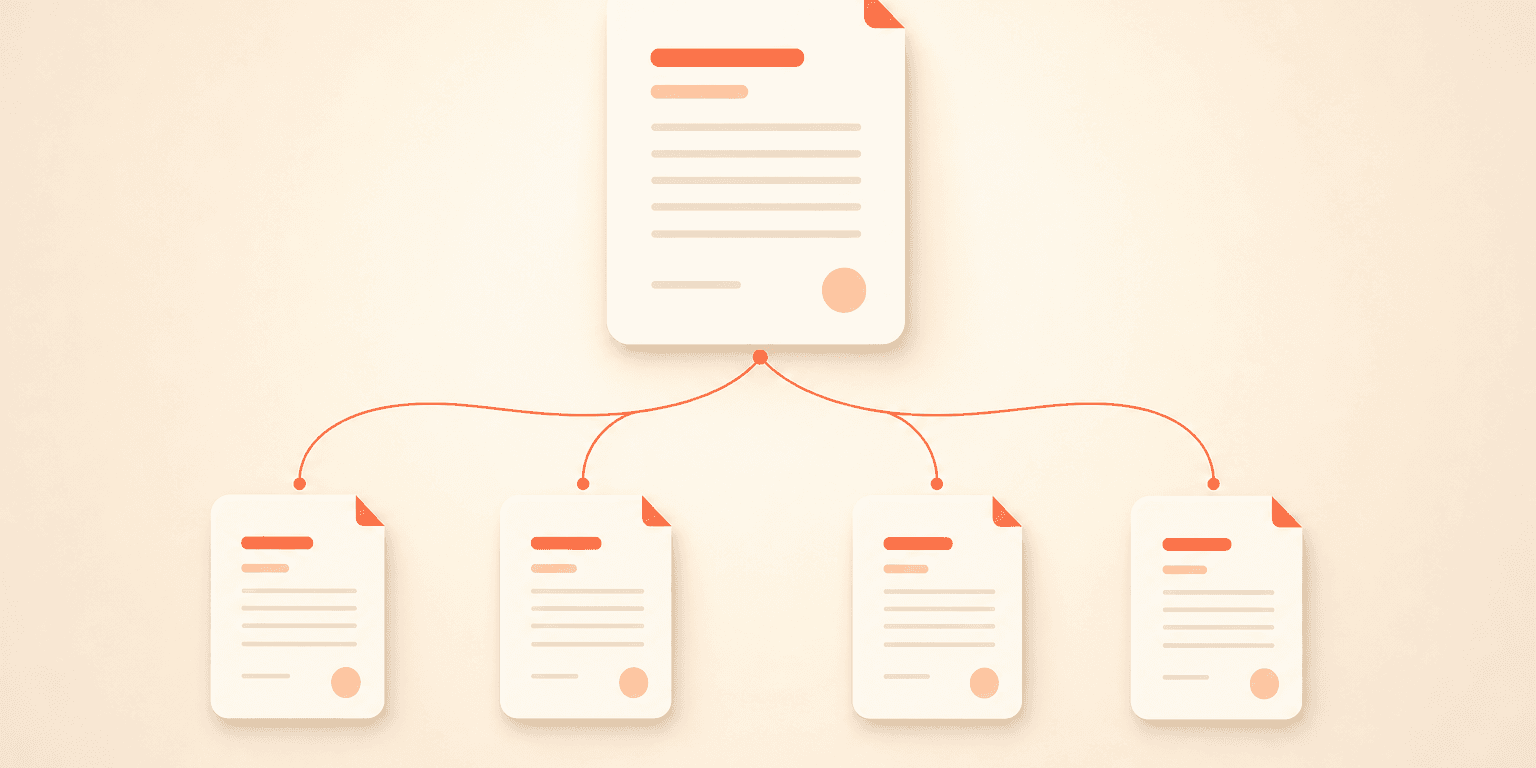
Most vendor and client relationships produce a hierarchy of documents over time. An MSA sits at the top. SOWs branch from it. Amendments modify either the MSA or individual SOWs. Renewals extend the timeline.
Managing these documents in isolation breaks the logical connections between them. When someone reviews an SOW, they need instant access to the governing MSA. When an amendment changes a renewal date, the team tracking that deadline needs to know.
Document linking reconstructs these natural relationships inside your contract repository. Instead of relying on memory, folder names, or spreadsheet cross-references, you get a navigable tree anchored to the parent agreement.
Before you start: choosing links over attachments
Teams often debate whether to attach amendments directly to a parent contract or upload them as standalone documents with links. The practical answer is almost always standalone documents with links, and the reasons are concrete.
Attachments cannot carry their own lifecycle details, such as signature dates, durations, or renewal terms. They do not appear in deadline reports or saved views. They cannot be individually searched or included in bulk downloads.
Linked documents, by contrast, maintain their own metadata, their own deadlines, and their own financial terms while preserving the relationship to the parent. Each document in the family gets its own identity. For anything that carries trackable dates or terms, linking is the right approach.
Step 1: Upload and extract the master contract
Start with the MSA or governing agreement. Upload it to the appropriate folder in your Concord repository. Upon upload, Concord's AI data extraction automatically identifies and populates key fields: agreement category, document type, parties, lifecycle details, and financial terms.
Review the extracted data for accuracy. Confirm that the effective date, duration, renewal terms, and early termination notice period are correct. These fields form the baseline that amendments will later modify.
Step 2: Establish naming conventions
This step is easy to skip and costly to ignore. When your team has dozens of master contracts for overlapping vendors, the search step during linking becomes the bottleneck. Concord's linking search relies on document titles and descriptions, so consistent naming conventions transform the process from a hunting exercise into a predictable lookup.
A practical naming format includes three elements: document type, vendor identifier, and effective date. For example: "MSA | Acme Corp | 2025-01-15" or "SOW-002 | Acme Corp | 2025-06-01" or "Amendment 1 | Acme Corp MSA | 2026-03-10."
Teams that skip this step consistently report friction when linking later. Teams that adopt it early describe the process as fast and predictable. Build the convention into your standard operating procedures and share it with anyone who uploads contracts.
Step 3: Upload child documents and extract their data
Upload each SOW, amendment, or renewal as its own document. Let AI extraction populate the fields, then review and correct as needed. Pay special attention to lifecycle dates on amendments, since an amendment that changes a renewal deadline carries different dates than the parent MSA.
For teams onboarding a backlog of legacy amendments, Concord's bulk document management actions allow you to upload, extract, and tag documents in batches, which significantly reduces the setup time for large repositories.
Step 4: Link child documents to the parent
Open the child document (for example, Amendment 1) and navigate to the summary panel. Select the linking option, search for the parent MSA by title, and specify the relationship type.
Concord supports several relationship types. Here is a practical mapping for common scenarios:
Child document | Parent document | Relationship type |
|---|---|---|
Amendment | MSA | Amends |
SOW | MSA | Framework of |
Renewal | MSA | Extends |
Replacement agreement | Old MSA | Supersedes |
Links are bidirectional. When you link Amendment 1 to the MSA with the "amends" relationship, the MSA's summary panel displays Amendment 1 as a child, and Amendment 1's panel displays the MSA as the parent with the inverse label.
The verify step: After creating the link, click through to the target document and confirm it is the correct parent. This takes seconds and prevents mis-links that are easy to fix but annoying to discover weeks later.
Step 5: Update the parent's lifecycle details
This step is the one teams most commonly miss. When an amendment changes a contract's duration, renewal date, or termination notice period, the linked amendment does not automatically update the parent MSA's lifecycle fields.
This is a deliberate design choice, not a gap. Automatic propagation sounds appealing but introduces real risk. An amendment might change one deadline while leaving others intact, or it might contain conditional extensions tied to performance milestones. Requiring a manual update to the parent makes sure a human reviews the change and applies it correctly.
After linking an amendment that modifies lifecycle terms, open the parent MSA and update the relevant fields. Add a note or tag referencing the amendment number so the change is traceable. Your lifecycle and deadline tracking will then reflect the current state of the relationship.
Step 6: Tag the family for cross-document filtering
Concord's tag management system supports hierarchical tags with parent-child relationships. Apply a shared tag to every document in a contract family, such as the vendor name or project code.
Tags provide a second axis of organization alongside linking. If you need to pull every document related to a specific vendor across multiple MSAs, a vendor-level tag surfaces them all in a single filtered view.
Understanding the tree structure
A common initial expectation is that linking Amendment 3 to the MSA will automatically surface Amendments 1 and 2 from within Amendment 3's view. In practice, the parent document (MSA) shows all children, but sibling documents only display their direct link to the parent.
This tree model mirrors how contract families actually work. The MSA is the authoritative hub. You navigate to it, see the full family, and click into whichever child you need. Teams that try to build web-like cross-references between every sibling document create maintenance overhead without meaningful navigational benefit. Keep all links anchored to the parent and navigate from there.
Building linking into your process, not just your system
Even when organizations establish linking as a required step, end users sometimes skip it, leaving legal admins to backfill relationships after the fact. The teams that maintain clean contract family trees build linking into their standard operating procedures at the point of upload.
Consider making linking part of your upload checklist: upload, review extracted data, apply naming convention, link to parent, verify the link, update parent lifecycle if needed, and apply tags. When these steps are habitual, the repository stays clean. Linking discipline compounds over time: the more consistently your team links during onboarding, the less cleanup you face as the repository grows.
For teams with custom data needs, Concord's custom AI extraction can be configured to identify amendment-specific fields automatically upon upload, reducing the manual review step before linking.
Frequently asked questions
Can you link a document to more than one parent? Yes. A document can carry multiple links. However, the recommended practice is to anchor each child to a single parent MSA and navigate the family from that root. Multiple parent links can create confusion about which agreement governs which terms.
What happens if a user does not have folder access to a linked document? Folder permissions govern link visibility. The user will see the relationship label on the summary panel, indicating that a linked document exists, but they will not be able to click into the document itself. This preserves confidentiality while still signaling the relationship.
How do you handle amendments that modify an SOW rather than the MSA? Link the amendment directly to the SOW it modifies, using the "amends" relationship type. The SOW remains linked to the MSA, so the full hierarchy is navigable from the MSA's summary panel: MSA → SOW → Amendment.
Build your first contract family tree
Your contracts already have relationships. The question is whether those relationships are visible and navigable or buried in folder names and tribal knowledge. Concord's document linking gives you a structured, searchable way to manage contract families with independent lifecycle tracking for every document in the tree.
Book a guided implementation walkthrough or start a free trial to build your first contract family tree and see how linked documents change the way your team works with amendments, SOWs, and renewals.
Every commercial relationship generates more than one document. A master service agreement sets the governing terms. Statements of work define deliverables. Amendments modify dates, pricing, or scope. Renewals extend the relationship forward. If your team manages these as isolated files scattered across shared drives, email threads, or spreadsheets, you already know the pain: orphaned amendments with no visible connection to the parent MSA, missed deadline changes buried in PDFs nobody can find, and hours spent hunting for the right version of the right document.
Effective contract amendment management requires more than storage. It requires structure. Concord's document linking feature lets you build and maintain contract family trees, connecting MSAs to SOWs, amendments, and renewals, so every related document is discoverable from a single summary panel with separate lifecycle tracking for each.
This guide walks you through the practical steps of setting up and maintaining contract families in Concord.
Why a contract is a family, not a single file
Most vendor and client relationships produce a hierarchy of documents over time. An MSA sits at the top. SOWs branch from it. Amendments modify either the MSA or individual SOWs. Renewals extend the timeline.
Managing these documents in isolation breaks the logical connections between them. When someone reviews an SOW, they need instant access to the governing MSA. When an amendment changes a renewal date, the team tracking that deadline needs to know.
Document linking reconstructs these natural relationships inside your contract repository. Instead of relying on memory, folder names, or spreadsheet cross-references, you get a navigable tree anchored to the parent agreement.
Before you start: choosing links over attachments
Teams often debate whether to attach amendments directly to a parent contract or upload them as standalone documents with links. The practical answer is almost always standalone documents with links, and the reasons are concrete.
Attachments cannot carry their own lifecycle details, such as signature dates, durations, or renewal terms. They do not appear in deadline reports or saved views. They cannot be individually searched or included in bulk downloads.
Linked documents, by contrast, maintain their own metadata, their own deadlines, and their own financial terms while preserving the relationship to the parent. Each document in the family gets its own identity. For anything that carries trackable dates or terms, linking is the right approach.
Step 1: Upload and extract the master contract
Start with the MSA or governing agreement. Upload it to the appropriate folder in your Concord repository. Upon upload, Concord's AI data extraction automatically identifies and populates key fields: agreement category, document type, parties, lifecycle details, and financial terms.
Review the extracted data for accuracy. Confirm that the effective date, duration, renewal terms, and early termination notice period are correct. These fields form the baseline that amendments will later modify.
Step 2: Establish naming conventions
This step is easy to skip and costly to ignore. When your team has dozens of master contracts for overlapping vendors, the search step during linking becomes the bottleneck. Concord's linking search relies on document titles and descriptions, so consistent naming conventions transform the process from a hunting exercise into a predictable lookup.
A practical naming format includes three elements: document type, vendor identifier, and effective date. For example: "MSA | Acme Corp | 2025-01-15" or "SOW-002 | Acme Corp | 2025-06-01" or "Amendment 1 | Acme Corp MSA | 2026-03-10."
Teams that skip this step consistently report friction when linking later. Teams that adopt it early describe the process as fast and predictable. Build the convention into your standard operating procedures and share it with anyone who uploads contracts.
Step 3: Upload child documents and extract their data
Upload each SOW, amendment, or renewal as its own document. Let AI extraction populate the fields, then review and correct as needed. Pay special attention to lifecycle dates on amendments, since an amendment that changes a renewal deadline carries different dates than the parent MSA.
For teams onboarding a backlog of legacy amendments, Concord's bulk document management actions allow you to upload, extract, and tag documents in batches, which significantly reduces the setup time for large repositories.
Step 4: Link child documents to the parent
Open the child document (for example, Amendment 1) and navigate to the summary panel. Select the linking option, search for the parent MSA by title, and specify the relationship type.
Concord supports several relationship types. Here is a practical mapping for common scenarios:
Child document | Parent document | Relationship type |
|---|---|---|
Amendment | MSA | Amends |
SOW | MSA | Framework of |
Renewal | MSA | Extends |
Replacement agreement | Old MSA | Supersedes |
Links are bidirectional. When you link Amendment 1 to the MSA with the "amends" relationship, the MSA's summary panel displays Amendment 1 as a child, and Amendment 1's panel displays the MSA as the parent with the inverse label.
The verify step: After creating the link, click through to the target document and confirm it is the correct parent. This takes seconds and prevents mis-links that are easy to fix but annoying to discover weeks later.
Step 5: Update the parent's lifecycle details
This step is the one teams most commonly miss. When an amendment changes a contract's duration, renewal date, or termination notice period, the linked amendment does not automatically update the parent MSA's lifecycle fields.
This is a deliberate design choice, not a gap. Automatic propagation sounds appealing but introduces real risk. An amendment might change one deadline while leaving others intact, or it might contain conditional extensions tied to performance milestones. Requiring a manual update to the parent makes sure a human reviews the change and applies it correctly.
After linking an amendment that modifies lifecycle terms, open the parent MSA and update the relevant fields. Add a note or tag referencing the amendment number so the change is traceable. Your lifecycle and deadline tracking will then reflect the current state of the relationship.
Step 6: Tag the family for cross-document filtering
Concord's tag management system supports hierarchical tags with parent-child relationships. Apply a shared tag to every document in a contract family, such as the vendor name or project code.
Tags provide a second axis of organization alongside linking. If you need to pull every document related to a specific vendor across multiple MSAs, a vendor-level tag surfaces them all in a single filtered view.
Understanding the tree structure
A common initial expectation is that linking Amendment 3 to the MSA will automatically surface Amendments 1 and 2 from within Amendment 3's view. In practice, the parent document (MSA) shows all children, but sibling documents only display their direct link to the parent.
This tree model mirrors how contract families actually work. The MSA is the authoritative hub. You navigate to it, see the full family, and click into whichever child you need. Teams that try to build web-like cross-references between every sibling document create maintenance overhead without meaningful navigational benefit. Keep all links anchored to the parent and navigate from there.
Building linking into your process, not just your system
Even when organizations establish linking as a required step, end users sometimes skip it, leaving legal admins to backfill relationships after the fact. The teams that maintain clean contract family trees build linking into their standard operating procedures at the point of upload.
Consider making linking part of your upload checklist: upload, review extracted data, apply naming convention, link to parent, verify the link, update parent lifecycle if needed, and apply tags. When these steps are habitual, the repository stays clean. Linking discipline compounds over time: the more consistently your team links during onboarding, the less cleanup you face as the repository grows.
For teams with custom data needs, Concord's custom AI extraction can be configured to identify amendment-specific fields automatically upon upload, reducing the manual review step before linking.
Frequently asked questions
Can you link a document to more than one parent? Yes. A document can carry multiple links. However, the recommended practice is to anchor each child to a single parent MSA and navigate the family from that root. Multiple parent links can create confusion about which agreement governs which terms.
What happens if a user does not have folder access to a linked document? Folder permissions govern link visibility. The user will see the relationship label on the summary panel, indicating that a linked document exists, but they will not be able to click into the document itself. This preserves confidentiality while still signaling the relationship.
How do you handle amendments that modify an SOW rather than the MSA? Link the amendment directly to the SOW it modifies, using the "amends" relationship type. The SOW remains linked to the MSA, so the full hierarchy is navigable from the MSA's summary panel: MSA → SOW → Amendment.
Build your first contract family tree
Your contracts already have relationships. The question is whether those relationships are visible and navigable or buried in folder names and tribal knowledge. Concord's document linking gives you a structured, searchable way to manage contract families with independent lifecycle tracking for every document in the tree.
Book a guided implementation walkthrough or start a free trial to build your first contract family tree and see how linked documents change the way your team works with amendments, SOWs, and renewals.


Take the "management" out
of contract management.
Customer Support
Legal
Compare
Resources
Customer Support
Company
Legal
Compare
Resources
Customer Support
Company
Legal
Compare
© 2025 Concord. All rights reserved.

