
Contract management nonprofit teams can actually afford
Contract management nonprofit teams can actually afford
Contract management nonprofit teams can actually afford
Contract management nonprofit teams can actually afford
contract management

Your contracts live in a shared drive, a filing cabinet, two email threads, and one person's memory. That system worked when your nonprofit had 20 vendor agreements. Now you have 80, and budgeting season means opening every single document to verify renewal dates, rates, and vendor names.
Contract management nonprofit organizations rely on today, built from spreadsheets and email chains, breaks down somewhere between 50 and 100 active agreements. The good news: you do not need a six-figure enterprise platform to fix it. You need a right-sized tool designed for teams that wear multiple hats and spend every dollar with accountability.
Why contract management breaks for nonprofits and government agencies
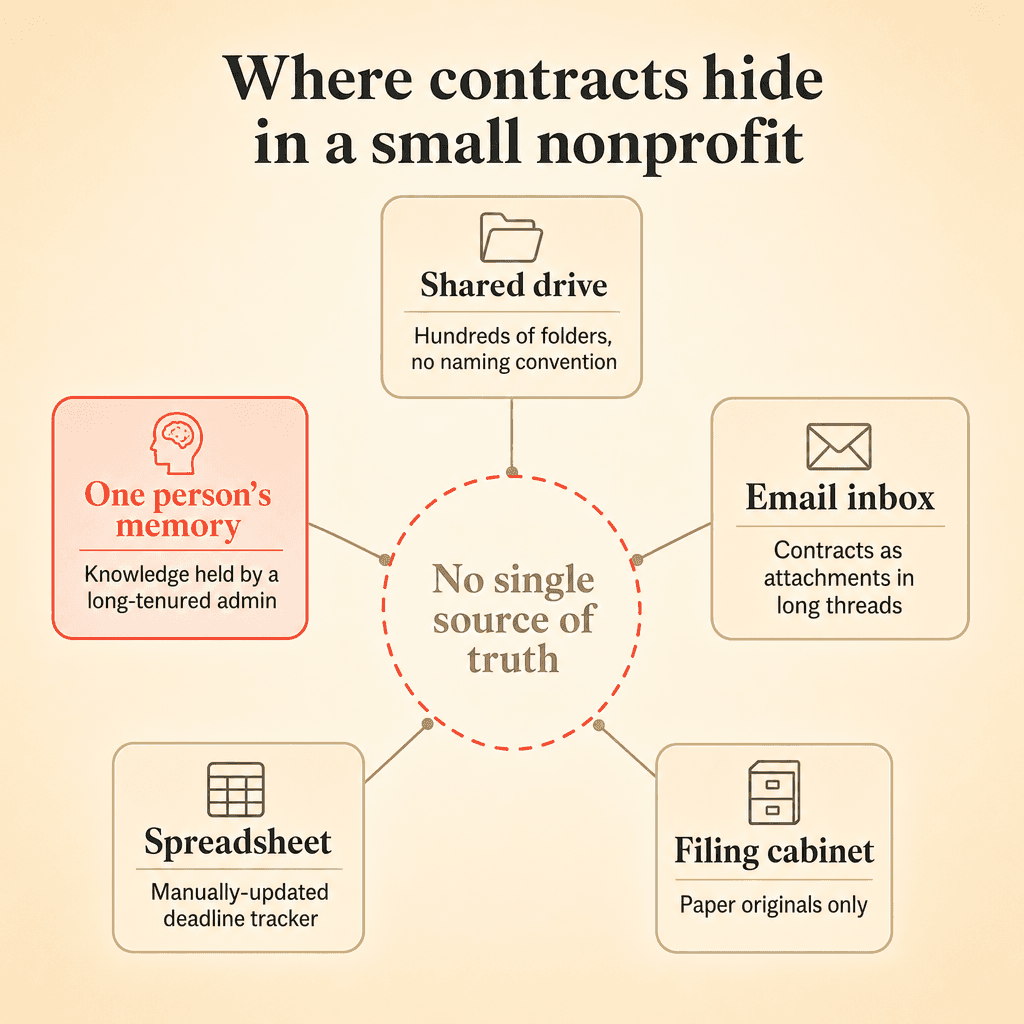
The pattern is remarkably consistent. Operations leaders at mission-driven organizations describe contracts scattered across shared drives, email inboxes, filing cabinets, and individual desktops. Finding the current state of a single vendor relationship means searching four or five different locations.
That fragmentation creates real, measurable consequences:
Missed renewals cost mission dollars. An auto-renewal on an unneeded vendor contract is money directly diverted from your programs. For a nonprofit running on donor and grant funding, every dollar that slips through a contract gap is a dollar that cannot serve your community.
Email-based workflows create black holes. Organizations frequently describe a contract process that runs entirely through email, from initial distribution to redlining to final signature. Contracts sit for weeks with no visibility into who has them, what stage they are in, or whether deadlines are approaching. No one intends to let things stall. The tools just do not support tracking.
Paper processes persist longer than you might expect. Local government agencies sometimes process all contracts on paper, making it difficult to know who has a contract at any given time. One common scenario involves physical routing slips moving between offices, with no central record of where an agreement sits in the approval chain.
Institutional knowledge walks out the door. Contract administrators with decades of experience carry critical knowledge about terms, vendor relationships, and internal processes that exists nowhere else. When that person retires, goes on leave, or simply takes a vacation, the organization is exposed.
What to look for in a right-sized CLM
Nonprofits and local government agencies evaluating contract lifecycle management for the first time often feel caught between two extremes. On one side, enterprise platforms with six-month implementations and price tags that exceed the annual budget for an entire department. On the other side, standalone e-signature tools that handle signing but ignore everything before and after it.
The right tool for a 50 to 200 contract portfolio should meet these criteria:
All-in-one functionality. Your contract administrator is also handling budgeting, operations, HR, or legal duties. Stitching together a shared drive for storage, a separate e-signature tool, a spreadsheet for tracking deadlines, and email for collaboration creates fragmentation that increases the administrative burden. A full lifecycle CLM consolidates these functions into a single platform.
Immediate value on day one. You should be able to upload your existing contracts and immediately gain searchability, extracted metadata, and deadline visibility without overhauling your entire process first.
Affordable access for the whole organization. Board members, department heads, accountants, and program managers all need to see contracts. They should not each require a paid license to get read-only access.
Room to grow, but no pressure to overcomplicate. The platform should let you start with a contract repository and layer on drafting, approval workflows, and e-signature as your comfort and capacity grow.
How Concord addresses each pain point
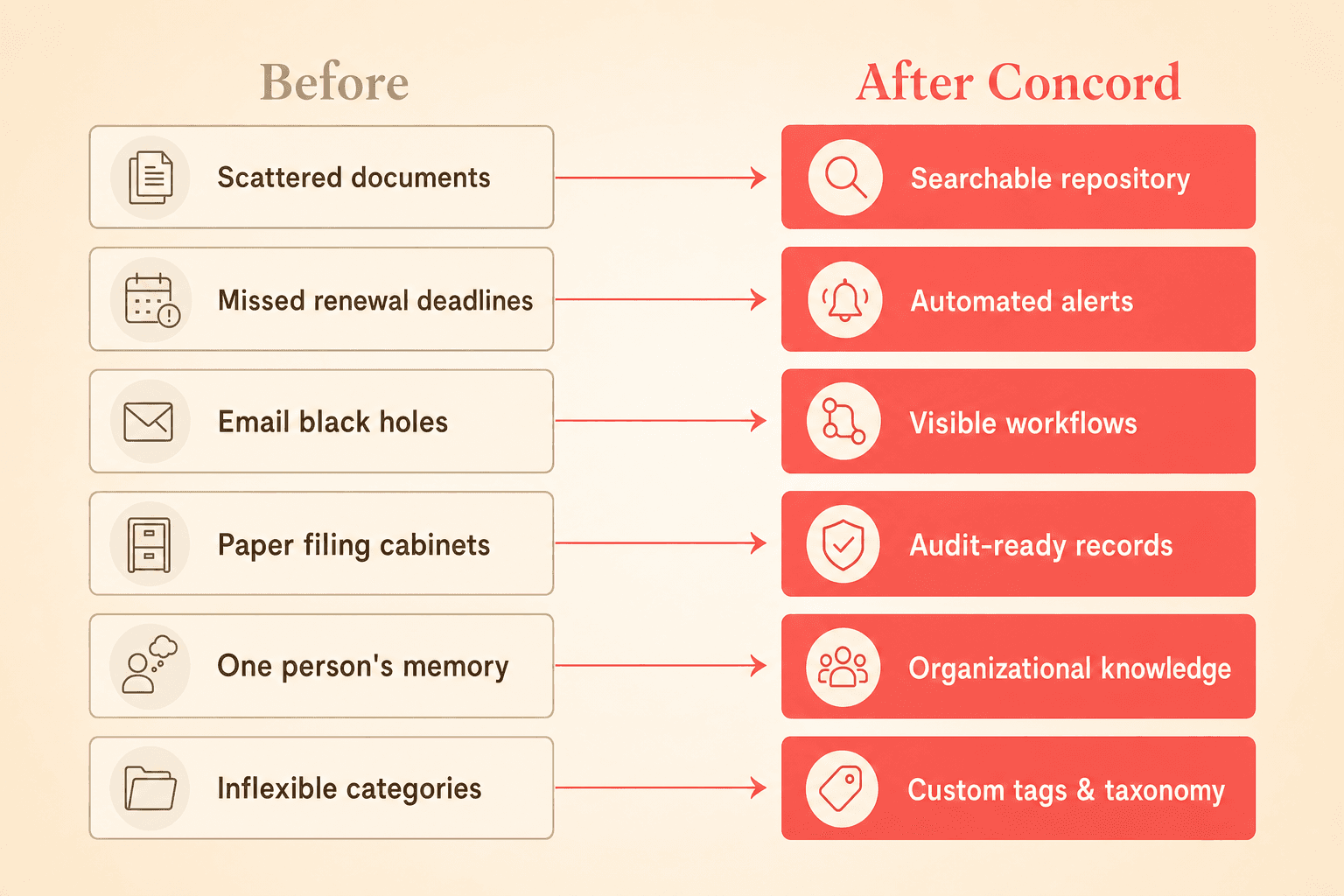
Scattered documents become a searchable repository
Concord's document management feature lets you bulk upload existing contracts from shared drives, folders, or desktops. AI-powered OCR and data extraction mean that even scanned PDFs or hand-signed documents become searchable and structured immediately. You can find any contract by vendor name, keyword, clause language, or custom tag without opening a single file.
For a nonprofit managing annual vendor contract cycles, think about what this replaces: no more blasting out emails, compiling responses in a spreadsheet, and hunting through folders for the latest version. Everything lives in one place, organized the way your team actually works.
Missed deadlines become automated alerts
Concord's deadline management tools send automatic alerts for renewals, expirations, and early termination notice periods. Weekly email digests, calendar views, and Google or Outlook calendar sync put critical dates in front of the people responsible for acting on them.
For a COO managing roughly 100 contracts alongside a dozen other responsibilities, this eliminates the annual ritual of manually reviewing every agreement to validate renewal dates and rates for budgeting. The system surfaces what needs attention, and you focus your time on decisions rather than data gathering.
Email black holes become visible workflows
Instead of contracts disappearing into email threads, Concord tracks every stage of the contract lifecycle. You can see who has a document, what edits have been made, where approvals stand, and whether a signature is pending. No more wondering if a contract "is sitting with someone" or following up blindly.
Filing cabinets become audit-ready records
Government agencies that move from paper to a digital platform commonly report that the vast majority of contracts are processed digitally within months of adoption, saving taxpayer money through efficiency gains. Concord's role-based permissions and folder-level access controls let administrators restrict who can view, edit, or delete contracts, which is critical when board members, finance staff, and program managers all need different levels of access.
One person's memory becomes organizational knowledge
Concord automatically extracts and structures contract data: parties, terms, renewal dates, financial amounts, and key clauses. When your contract administrator retires after 25 years, the institutional knowledge about your vendor relationships, insurance requirements, and termination provisions lives in the system, not just in that person's head.
Your team can use the clause management features to search across your entire portfolio for specific language, such as indemnification clauses, insurance requirements, or auto-renewal terms, without opening documents individually.
Start with a repository, grow into full lifecycle management
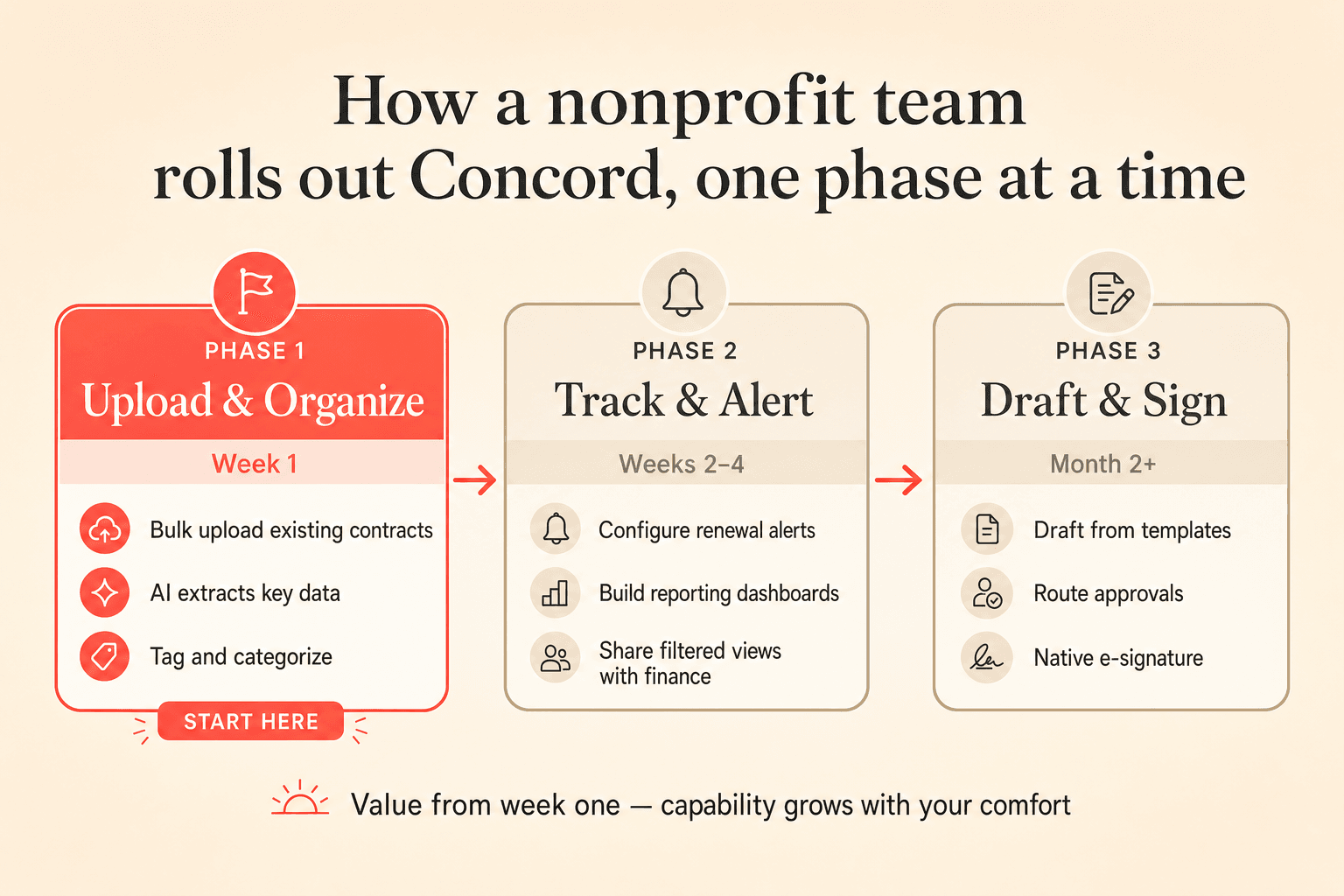
Teams evaluating CLM for the first time consistently express concern about change management. The most effective adoption path reduces that risk by breaking implementation into phases:
Phase one: Upload and organize. Bulk upload your existing contracts. Let the AI extract key data points. Tag and organize. Your team immediately gains searchability and deadline visibility.
Phase two: Track and alert. Configure renewal alerts and reporting dashboards. Build custom reports on expiring contracts, pending signatures, or contracts by financial value. Share filtered views with finance during budgeting season.
Phase three: Draft and sign. Begin drafting new contracts within the platform using templates. Route for internal approval. Collect e-signatures without switching to a separate tool. The full lifecycle now runs in one place.
This phased approach means your team never faces a "big bang" transition. You get value from week one and expand capabilities as your comfort grows.
Your contracts live in a shared drive, a filing cabinet, two email threads, and one person's memory. That system worked when your nonprofit had 20 vendor agreements. Now you have 80, and budgeting season means opening every single document to verify renewal dates, rates, and vendor names.
Contract management nonprofit organizations rely on today, built from spreadsheets and email chains, breaks down somewhere between 50 and 100 active agreements. The good news: you do not need a six-figure enterprise platform to fix it. You need a right-sized tool designed for teams that wear multiple hats and spend every dollar with accountability.
Why contract management breaks for nonprofits and government agencies
The pattern is remarkably consistent. Operations leaders at mission-driven organizations describe contracts scattered across shared drives, email inboxes, filing cabinets, and individual desktops. Finding the current state of a single vendor relationship means searching four or five different locations.
That fragmentation creates real, measurable consequences:
Missed renewals cost mission dollars. An auto-renewal on an unneeded vendor contract is money directly diverted from your programs. For a nonprofit running on donor and grant funding, every dollar that slips through a contract gap is a dollar that cannot serve your community.
Email-based workflows create black holes. Organizations frequently describe a contract process that runs entirely through email, from initial distribution to redlining to final signature. Contracts sit for weeks with no visibility into who has them, what stage they are in, or whether deadlines are approaching. No one intends to let things stall. The tools just do not support tracking.
Paper processes persist longer than you might expect. Local government agencies sometimes process all contracts on paper, making it difficult to know who has a contract at any given time. One common scenario involves physical routing slips moving between offices, with no central record of where an agreement sits in the approval chain.
Institutional knowledge walks out the door. Contract administrators with decades of experience carry critical knowledge about terms, vendor relationships, and internal processes that exists nowhere else. When that person retires, goes on leave, or simply takes a vacation, the organization is exposed.
What to look for in a right-sized CLM
Nonprofits and local government agencies evaluating contract lifecycle management for the first time often feel caught between two extremes. On one side, enterprise platforms with six-month implementations and price tags that exceed the annual budget for an entire department. On the other side, standalone e-signature tools that handle signing but ignore everything before and after it.
The right tool for a 50 to 200 contract portfolio should meet these criteria:
All-in-one functionality. Your contract administrator is also handling budgeting, operations, HR, or legal duties. Stitching together a shared drive for storage, a separate e-signature tool, a spreadsheet for tracking deadlines, and email for collaboration creates fragmentation that increases the administrative burden. A full lifecycle CLM consolidates these functions into a single platform.
Immediate value on day one. You should be able to upload your existing contracts and immediately gain searchability, extracted metadata, and deadline visibility without overhauling your entire process first.
Affordable access for the whole organization. Board members, department heads, accountants, and program managers all need to see contracts. They should not each require a paid license to get read-only access.
Room to grow, but no pressure to overcomplicate. The platform should let you start with a contract repository and layer on drafting, approval workflows, and e-signature as your comfort and capacity grow.
How Concord addresses each pain point
Scattered documents become a searchable repository
Concord's document management feature lets you bulk upload existing contracts from shared drives, folders, or desktops. AI-powered OCR and data extraction mean that even scanned PDFs or hand-signed documents become searchable and structured immediately. You can find any contract by vendor name, keyword, clause language, or custom tag without opening a single file.
For a nonprofit managing annual vendor contract cycles, think about what this replaces: no more blasting out emails, compiling responses in a spreadsheet, and hunting through folders for the latest version. Everything lives in one place, organized the way your team actually works.
Missed deadlines become automated alerts
Concord's deadline management tools send automatic alerts for renewals, expirations, and early termination notice periods. Weekly email digests, calendar views, and Google or Outlook calendar sync put critical dates in front of the people responsible for acting on them.
For a COO managing roughly 100 contracts alongside a dozen other responsibilities, this eliminates the annual ritual of manually reviewing every agreement to validate renewal dates and rates for budgeting. The system surfaces what needs attention, and you focus your time on decisions rather than data gathering.
Email black holes become visible workflows
Instead of contracts disappearing into email threads, Concord tracks every stage of the contract lifecycle. You can see who has a document, what edits have been made, where approvals stand, and whether a signature is pending. No more wondering if a contract "is sitting with someone" or following up blindly.
Filing cabinets become audit-ready records
Government agencies that move from paper to a digital platform commonly report that the vast majority of contracts are processed digitally within months of adoption, saving taxpayer money through efficiency gains. Concord's role-based permissions and folder-level access controls let administrators restrict who can view, edit, or delete contracts, which is critical when board members, finance staff, and program managers all need different levels of access.
One person's memory becomes organizational knowledge
Concord automatically extracts and structures contract data: parties, terms, renewal dates, financial amounts, and key clauses. When your contract administrator retires after 25 years, the institutional knowledge about your vendor relationships, insurance requirements, and termination provisions lives in the system, not just in that person's head.
Your team can use the clause management features to search across your entire portfolio for specific language, such as indemnification clauses, insurance requirements, or auto-renewal terms, without opening documents individually.
Start with a repository, grow into full lifecycle management
Teams evaluating CLM for the first time consistently express concern about change management. The most effective adoption path reduces that risk by breaking implementation into phases:
Phase one: Upload and organize. Bulk upload your existing contracts. Let the AI extract key data points. Tag and organize. Your team immediately gains searchability and deadline visibility.
Phase two: Track and alert. Configure renewal alerts and reporting dashboards. Build custom reports on expiring contracts, pending signatures, or contracts by financial value. Share filtered views with finance during budgeting season.
Phase three: Draft and sign. Begin drafting new contracts within the platform using templates. Route for internal approval. Collect e-signatures without switching to a separate tool. The full lifecycle now runs in one place.
This phased approach means your team never faces a "big bang" transition. You get value from week one and expand capabilities as your comfort grows.

Need to know
Frequently Asked Questions

Take the "management" out
of contract management.
Customer Support
Legal
Compare
Resources
Customer Support
Company
Legal
Compare
Resources
Customer Support
Company
Legal
Compare
© 2025 Concord. All rights reserved.

