
How to set up conditional contract approval workflows that scale
How to set up conditional contract approval workflows that scale
How to set up conditional contract approval workflows that scale
How to set up conditional contract approval workflows that scale
contract management

Every contract touches multiple hands before it gets signed. Legal reviews risk language. Finance checks the numbers. An executive gives the final nod. The question is whether those handoffs happen through a structured contract approval workflow or through a tangle of forwarded emails, Slack pings, and spreadsheet trackers.
If your team is still routing contracts manually, you already know the cost: bottlenecks when a key person is out of office, approvals that slip through cracks, and a persistent dependency on one or two people who "know the process." This post walks through how to build multi-step conditional approval workflows in Concord, including practical guidance for handling third-party paper, structuring parallel and sequential steps, and removing the human bottleneck from contract routing.
Why manual routing breaks down at scale
A contract approval workflow managed through email or spreadsheets creates a single point of failure. One person, typically a legal ops lead or contract administrator, determines who needs to review each contract, sends it to the right people, and tracks whether each step is complete. If that person is on vacation, sick, or simply overwhelmed, the entire pipeline stalls.
This pattern is especially painful for mid-market organizations managing five or more contract types, each with different approval requirements. A standard NDA follows a different path than a six-figure vendor agreement. A renewal with modified terms needs different eyes than a straightforward extension.
Conditional approval workflows remove this dependency by encoding routing logic directly into the document template. The system reads the contract's own data, such as value, risk level, or contract type, and determines the approval path automatically. No one needs to play traffic cop.
Understanding the four levels of contract approval workflow configuration
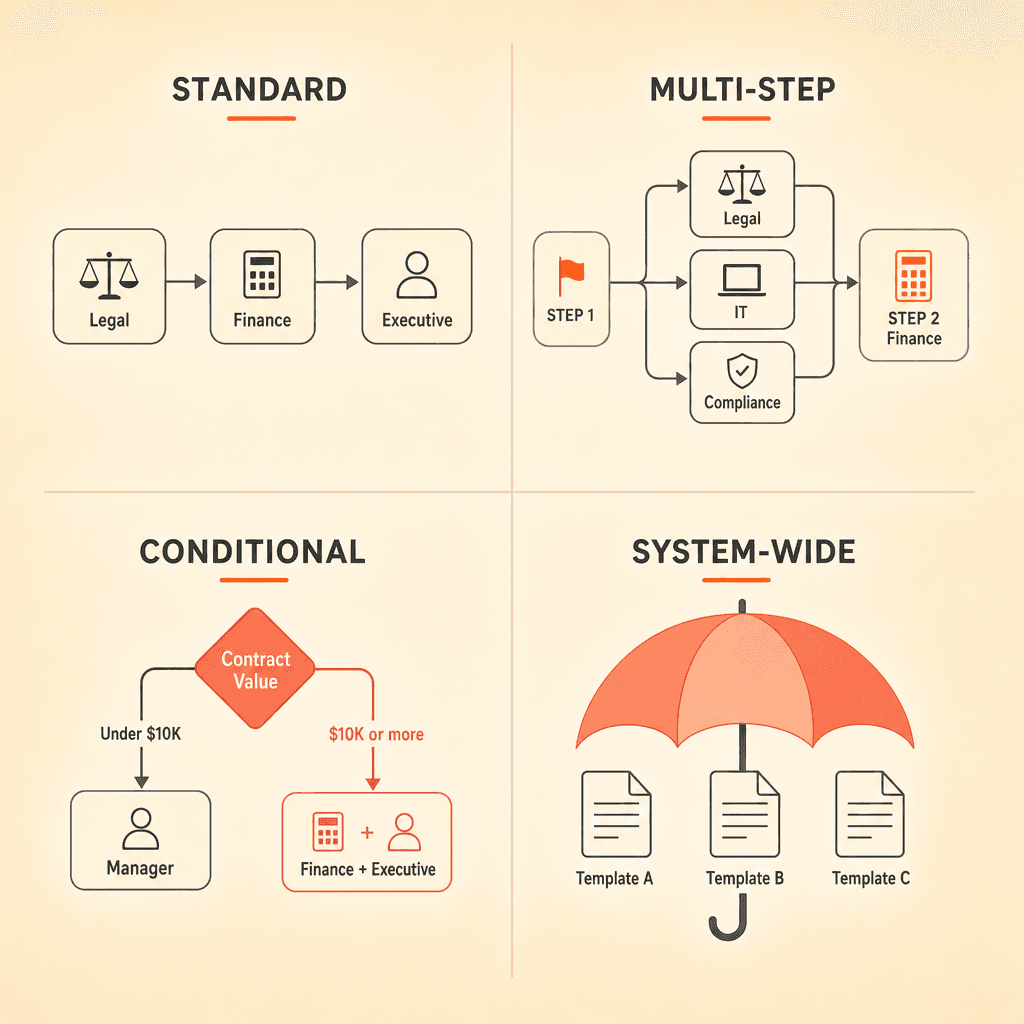
Concord supports four distinct layers of approval workflow configuration. Each one adds flexibility, and most teams end up using a combination.
Standard approval workflows
A standard workflow is a fixed set of steps applied to every contract created from a given template. Step one might be deal desk review, step two might be legal, and step three might be the department head. Every contract follows the same path regardless of its characteristics.
This works well for simple, low-variability contract types like NDAs or standard service agreements. You set it once and forget it.
Multi-step approval workflows
Multi-step workflows let you place multiple approvers at a single step or distribute them across sequential steps. If legal, IT, and compliance all need to review but their concerns don't overlap, you can assign them to the same step so they review in parallel. If finance needs to wait until legal confirms the terms, you place finance on a later step.
The ability to mix parallel and sequential approvals within a single chain is critical. Most real-world approval processes contain both patterns, and forcing everything into a single linear queue adds unnecessary delay.
Conditional approval workflows
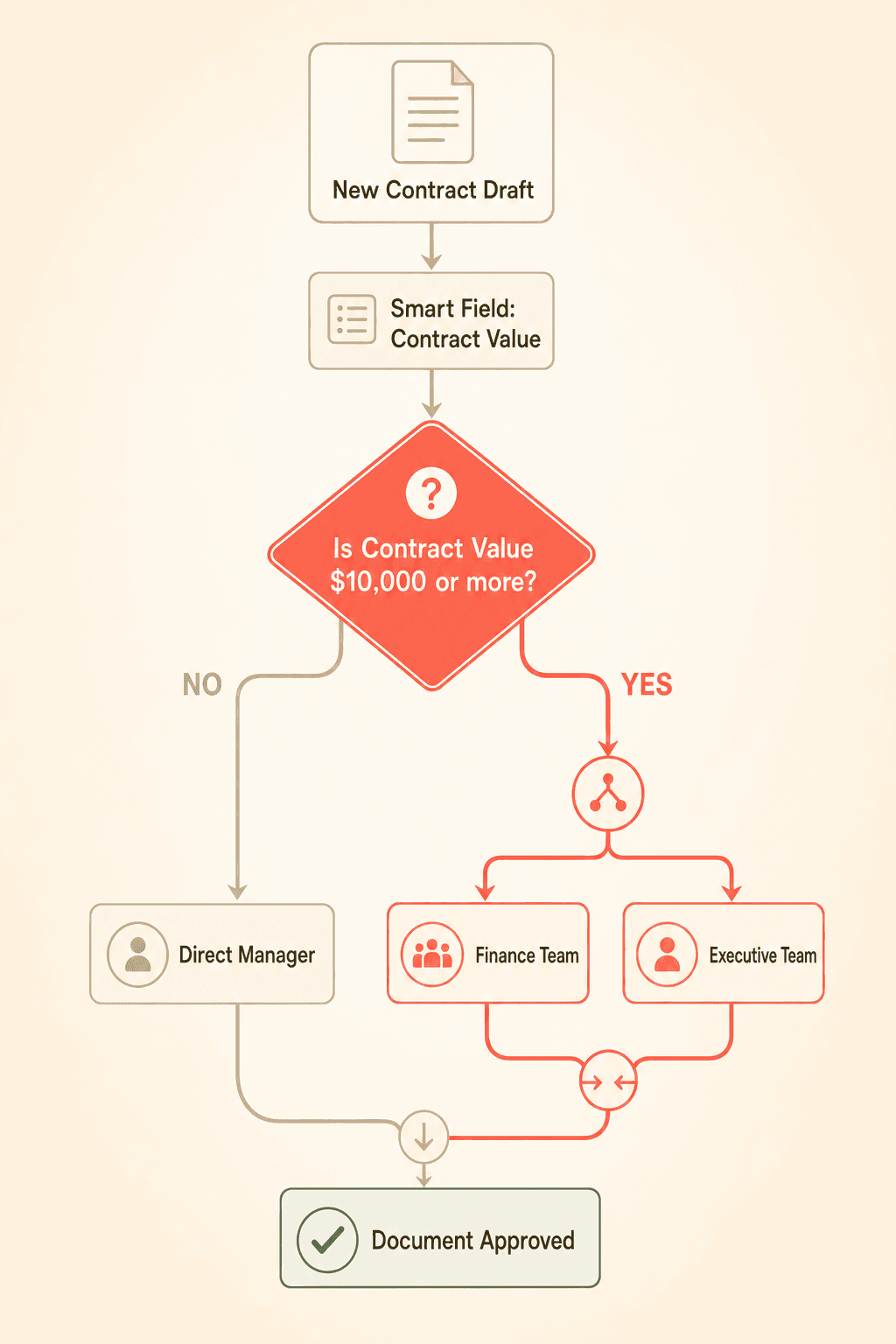
This is where the real power lives. Conditional steps fire based on smart field values inside the contract. The most common trigger, by far, is contract value. Contracts below a certain dollar amount route to a direct manager. Contracts above that threshold automatically add an executive or finance approval step.
Other common conditional triggers include contract type, department, geography, and renewal versus new business. The conditional logic reads structured data from the document's smart fields and adapts the workflow accordingly.
System-wide workflows
System-wide workflows apply automatically across the organization based on contract type. Instead of configuring each template individually, administrators set rules at the company level. When a new contract is created from any template tagged with a specific type, the corresponding workflow kicks in automatically.
This is particularly valuable for organizations onboarding new contract administrators. The routing logic belongs to the institution, not to any individual's memory of how things should work.
Handling third-party paper without breaking your approval chain
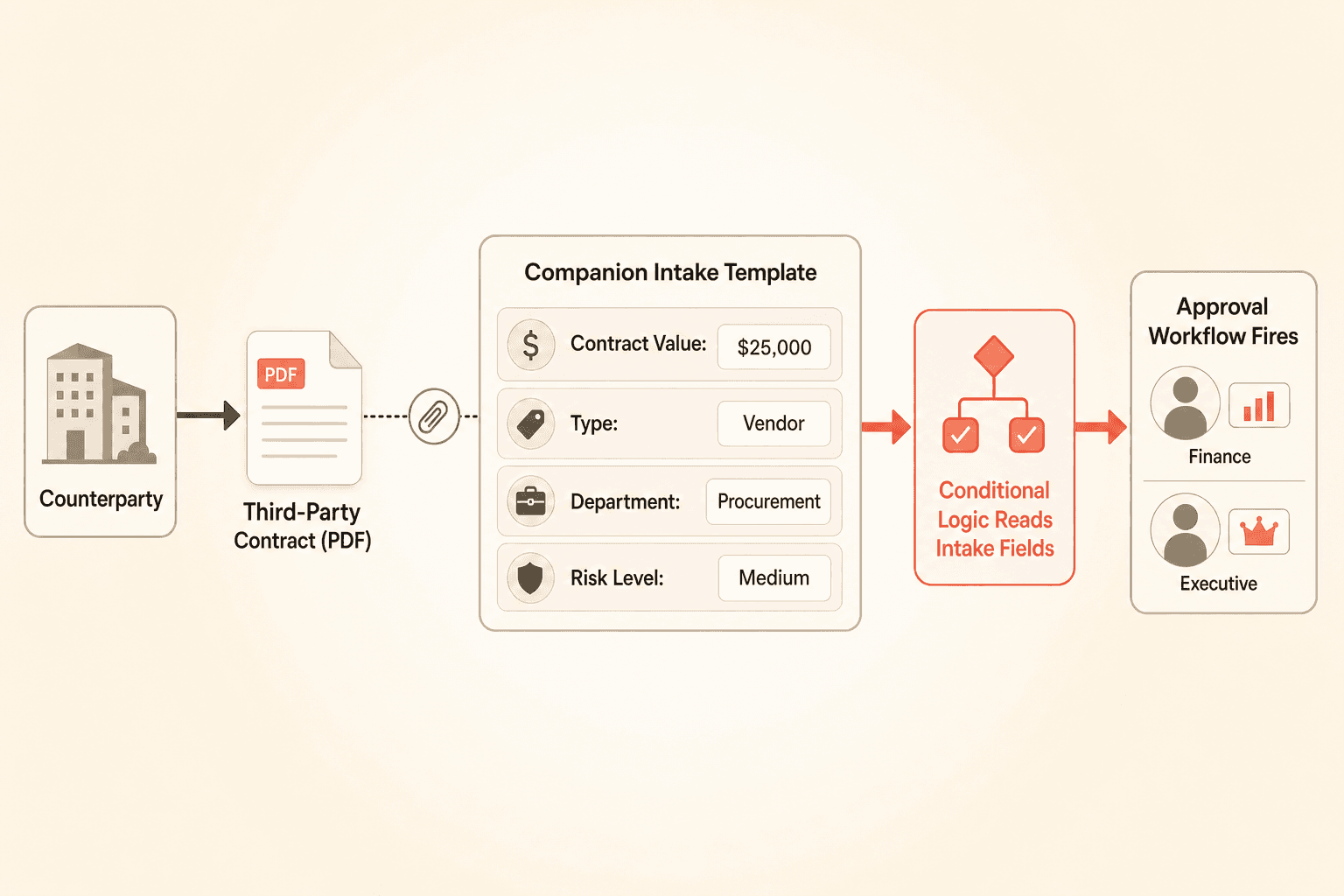
Teams frequently raise a concern about conditional approval workflows: what happens when the contract comes from a counterparty? Third-party paper, uploaded as a PDF or Word document, doesn't contain the smart fields that conditional logic depends on.
This is a real limitation, but the workaround is straightforward and already in use by teams managing vendor contracts and procurement agreements.
The approach is to create a companion intake template, essentially a "contract request" record, that carries the structured fields driving the conditional logic. Your team fills out the intake form with the relevant data (contract value, type, department, risk category), and the third-party document is attached to that record. The approval workflow runs on the intake record's fields while the actual counterparty document lives as an attachment.
This pattern gives you the full power of conditional routing even when you don't control the originating document. For a deeper look at how intake forms connect to downstream workflows, see Concord's guide to contract intake processes.
Practical tips for structuring your approval chain
Legal ops leaders and contract administrators frequently describe their approval processes as overwhelmingly complex when they first attempt to map them out. Fifteen contract types, each with different stakeholders, dollar thresholds, and regional requirements, can feel unmanageable on paper.
The reality is that complexity collapses once the workflow is templatized. Each approver sees only their step, approves or rejects, and the system advances automatically. The trick is in how you structure the chain upfront.
Put deal-killing approvals first, not last
If a budget sign-off could kill the deal, place it at the beginning of the workflow. Too many teams put finance approval at the end, after legal, IT, and compliance have already invested review time. When finance rejects the contract on financial grounds at the final step, all that upstream work is wasted.
Front-loading the steps most likely to result in rejection saves everyone's time and keeps the pipeline moving.
Use a hybrid manual-then-automated pattern for edge cases
Many sales-driven teams adopt a hybrid model: a standard first approval step where a human reviewer (deal desk or sales ops) determines the right path, followed by automated conditional steps for the rest of the workflow. This gives your team flexibility to handle unusual contracts while still automating the predictable portions.
Assign per-template workflows, then override when needed
Organizations managing 10 or more contract types need different approval workflows attached to each template. Concord supports per-template configuration with the option to override on individual drafts. This means your standard process handles 90 percent of contracts automatically, and your team can adjust the remaining 10 percent on a case-by-case basis.
For more on how templates and smart fields power this flexibility, check out Concord's guide to contract templates and smart fields.
What happens when a counterparty changes the document
Here's a scenario that catches teams off guard the first time they encounter it: your internal stakeholders have all approved the contract, but the counterparty then edits a clause during negotiation. In Concord, that external edit automatically resets the internal approval chain.
Some teams initially react with frustration. But consider the alternative. If a counterparty modifies payment terms after finance has already signed off, and nobody re-reviews, your organization could end up signing a contract with unreviewed changes. The automatic reset is a compliance safeguard that's nearly impossible to enforce through manual processes.
This behavior protects your team from the exact scenario that causes the most painful post-signature disputes: "I didn't approve that version."
Tracking and auditing approvals
A contract approval workflow is only as good as its audit trail. Concord captures the full state of the approval workflow at each point, creating an immutable record of who approved what, when, and under which rules.
Agreement approval workflow snapshots preserve the exact configuration that was active at the time of approval. This matters for regulated industries and audit scenarios where you need to prove that the right people reviewed the contract under the right conditions, not just that someone clicked "approve."
Centralized approvals management gives administrators visibility into pending, completed, and rejected approvals across the entire organization. Instead of chasing status updates through email, you can see every contract's position in its approval chain from a single view.
Take the routing out of your hands
If your contract approval workflow still depends on someone manually deciding who needs to review each document, you're one sick day away from a stalled pipeline. Concord's conditional approval workflows encode your routing logic into the system itself, so contracts find their way to the right reviewers based on their own data, not someone's memory.
Every contract touches multiple hands before it gets signed. Legal reviews risk language. Finance checks the numbers. An executive gives the final nod. The question is whether those handoffs happen through a structured contract approval workflow or through a tangle of forwarded emails, Slack pings, and spreadsheet trackers.
If your team is still routing contracts manually, you already know the cost: bottlenecks when a key person is out of office, approvals that slip through cracks, and a persistent dependency on one or two people who "know the process." This post walks through how to build multi-step conditional approval workflows in Concord, including practical guidance for handling third-party paper, structuring parallel and sequential steps, and removing the human bottleneck from contract routing.
Why manual routing breaks down at scale
A contract approval workflow managed through email or spreadsheets creates a single point of failure. One person, typically a legal ops lead or contract administrator, determines who needs to review each contract, sends it to the right people, and tracks whether each step is complete. If that person is on vacation, sick, or simply overwhelmed, the entire pipeline stalls.
This pattern is especially painful for mid-market organizations managing five or more contract types, each with different approval requirements. A standard NDA follows a different path than a six-figure vendor agreement. A renewal with modified terms needs different eyes than a straightforward extension.
Conditional approval workflows remove this dependency by encoding routing logic directly into the document template. The system reads the contract's own data, such as value, risk level, or contract type, and determines the approval path automatically. No one needs to play traffic cop.
Understanding the four levels of contract approval workflow configuration
Concord supports four distinct layers of approval workflow configuration. Each one adds flexibility, and most teams end up using a combination.
Standard approval workflows
A standard workflow is a fixed set of steps applied to every contract created from a given template. Step one might be deal desk review, step two might be legal, and step three might be the department head. Every contract follows the same path regardless of its characteristics.
This works well for simple, low-variability contract types like NDAs or standard service agreements. You set it once and forget it.
Multi-step approval workflows
Multi-step workflows let you place multiple approvers at a single step or distribute them across sequential steps. If legal, IT, and compliance all need to review but their concerns don't overlap, you can assign them to the same step so they review in parallel. If finance needs to wait until legal confirms the terms, you place finance on a later step.
The ability to mix parallel and sequential approvals within a single chain is critical. Most real-world approval processes contain both patterns, and forcing everything into a single linear queue adds unnecessary delay.
Conditional approval workflows
This is where the real power lives. Conditional steps fire based on smart field values inside the contract. The most common trigger, by far, is contract value. Contracts below a certain dollar amount route to a direct manager. Contracts above that threshold automatically add an executive or finance approval step.
Other common conditional triggers include contract type, department, geography, and renewal versus new business. The conditional logic reads structured data from the document's smart fields and adapts the workflow accordingly.
System-wide workflows
System-wide workflows apply automatically across the organization based on contract type. Instead of configuring each template individually, administrators set rules at the company level. When a new contract is created from any template tagged with a specific type, the corresponding workflow kicks in automatically.
This is particularly valuable for organizations onboarding new contract administrators. The routing logic belongs to the institution, not to any individual's memory of how things should work.
Handling third-party paper without breaking your approval chain
Teams frequently raise a concern about conditional approval workflows: what happens when the contract comes from a counterparty? Third-party paper, uploaded as a PDF or Word document, doesn't contain the smart fields that conditional logic depends on.
This is a real limitation, but the workaround is straightforward and already in use by teams managing vendor contracts and procurement agreements.
The approach is to create a companion intake template, essentially a "contract request" record, that carries the structured fields driving the conditional logic. Your team fills out the intake form with the relevant data (contract value, type, department, risk category), and the third-party document is attached to that record. The approval workflow runs on the intake record's fields while the actual counterparty document lives as an attachment.
This pattern gives you the full power of conditional routing even when you don't control the originating document. For a deeper look at how intake forms connect to downstream workflows, see Concord's guide to contract intake processes.
Practical tips for structuring your approval chain
Legal ops leaders and contract administrators frequently describe their approval processes as overwhelmingly complex when they first attempt to map them out. Fifteen contract types, each with different stakeholders, dollar thresholds, and regional requirements, can feel unmanageable on paper.
The reality is that complexity collapses once the workflow is templatized. Each approver sees only their step, approves or rejects, and the system advances automatically. The trick is in how you structure the chain upfront.
Put deal-killing approvals first, not last
If a budget sign-off could kill the deal, place it at the beginning of the workflow. Too many teams put finance approval at the end, after legal, IT, and compliance have already invested review time. When finance rejects the contract on financial grounds at the final step, all that upstream work is wasted.
Front-loading the steps most likely to result in rejection saves everyone's time and keeps the pipeline moving.
Use a hybrid manual-then-automated pattern for edge cases
Many sales-driven teams adopt a hybrid model: a standard first approval step where a human reviewer (deal desk or sales ops) determines the right path, followed by automated conditional steps for the rest of the workflow. This gives your team flexibility to handle unusual contracts while still automating the predictable portions.
Assign per-template workflows, then override when needed
Organizations managing 10 or more contract types need different approval workflows attached to each template. Concord supports per-template configuration with the option to override on individual drafts. This means your standard process handles 90 percent of contracts automatically, and your team can adjust the remaining 10 percent on a case-by-case basis.
For more on how templates and smart fields power this flexibility, check out Concord's guide to contract templates and smart fields.
What happens when a counterparty changes the document
Here's a scenario that catches teams off guard the first time they encounter it: your internal stakeholders have all approved the contract, but the counterparty then edits a clause during negotiation. In Concord, that external edit automatically resets the internal approval chain.
Some teams initially react with frustration. But consider the alternative. If a counterparty modifies payment terms after finance has already signed off, and nobody re-reviews, your organization could end up signing a contract with unreviewed changes. The automatic reset is a compliance safeguard that's nearly impossible to enforce through manual processes.
This behavior protects your team from the exact scenario that causes the most painful post-signature disputes: "I didn't approve that version."
Tracking and auditing approvals
A contract approval workflow is only as good as its audit trail. Concord captures the full state of the approval workflow at each point, creating an immutable record of who approved what, when, and under which rules.
Agreement approval workflow snapshots preserve the exact configuration that was active at the time of approval. This matters for regulated industries and audit scenarios where you need to prove that the right people reviewed the contract under the right conditions, not just that someone clicked "approve."
Centralized approvals management gives administrators visibility into pending, completed, and rejected approvals across the entire organization. Instead of chasing status updates through email, you can see every contract's position in its approval chain from a single view.
Take the routing out of your hands
If your contract approval workflow still depends on someone manually deciding who needs to review each document, you're one sick day away from a stalled pipeline. Concord's conditional approval workflows encode your routing logic into the system itself, so contracts find their way to the right reviewers based on their own data, not someone's memory.

Need to know
Frequently Asked Questions

Take the "management" out
of contract management.
Customer Support
Legal
Compare
Resources
Customer Support
Company
Legal
Compare
Resources
Customer Support
Company
Legal
Compare
© 2025 Concord. All rights reserved.

