
Contract management for operations teams: cross-department workflows that work
Contract management for operations teams: cross-department workflows that work
Contract management for operations teams: cross-department workflows that work
Contract management for operations teams: cross-department workflows that work
contract management

If you're a COO, controller, compliance manager, or IT director responsible for contracts, you already know the truth: contracts touch every department in your organization, and you're the one holding it all together. You didn't go to law school, but contract management operations teams rely on falls squarely on your shoulders.
The challenge is real. Legal drafts agreements. Sales initiates them. Finance tracks their value. Procurement manages vendor relationships. Compliance verifies that terms are met. And you, the operations leader, coordinate all of it, often through email chains, shared drives, and spreadsheets that no one updates consistently.
Most contract lifecycle management (CLM) platforms were built for legal departments. They assume the buyer thinks in legal terminology, needs clause libraries spanning dozens of jurisdictions, and has six months for implementation. That's not your reality. You need visibility, configurable workflows, and a tool your non-legal colleagues will actually use.
Why operations leaders are driving CLM decisions
The person evaluating and purchasing a CLM tool is increasingly someone without a legal background. Operations leaders, controllers, and compliance directors commonly describe themselves as the primary drivers behind CLM adoption. A recurring pattern stands out: an operations professional is brought in to improve the efficiency of contract processes, only to discover that contracts are the single biggest operational bottleneck across the organization.
This makes sense. Contracts are fundamentally cross-functional. A single agreement might require input from estimators, project managers, contract administrators, accountants, quality teams, sales reps, HR, and safety officers. The number of reviewers often varies based on contract value or type, which means rigid, fixed approval chains simply don't work.
Yet most CLM platforms still cater primarily to legal buyers. They're packed with features that legal power users love but that operations teams never touch. Organizations frequently pay for enterprise-grade CLM platforms and use roughly 10 percent of the functionality, mostly because the intake and workflow features are too complicated to configure and maintain.
The real cost of email-based contract coordination
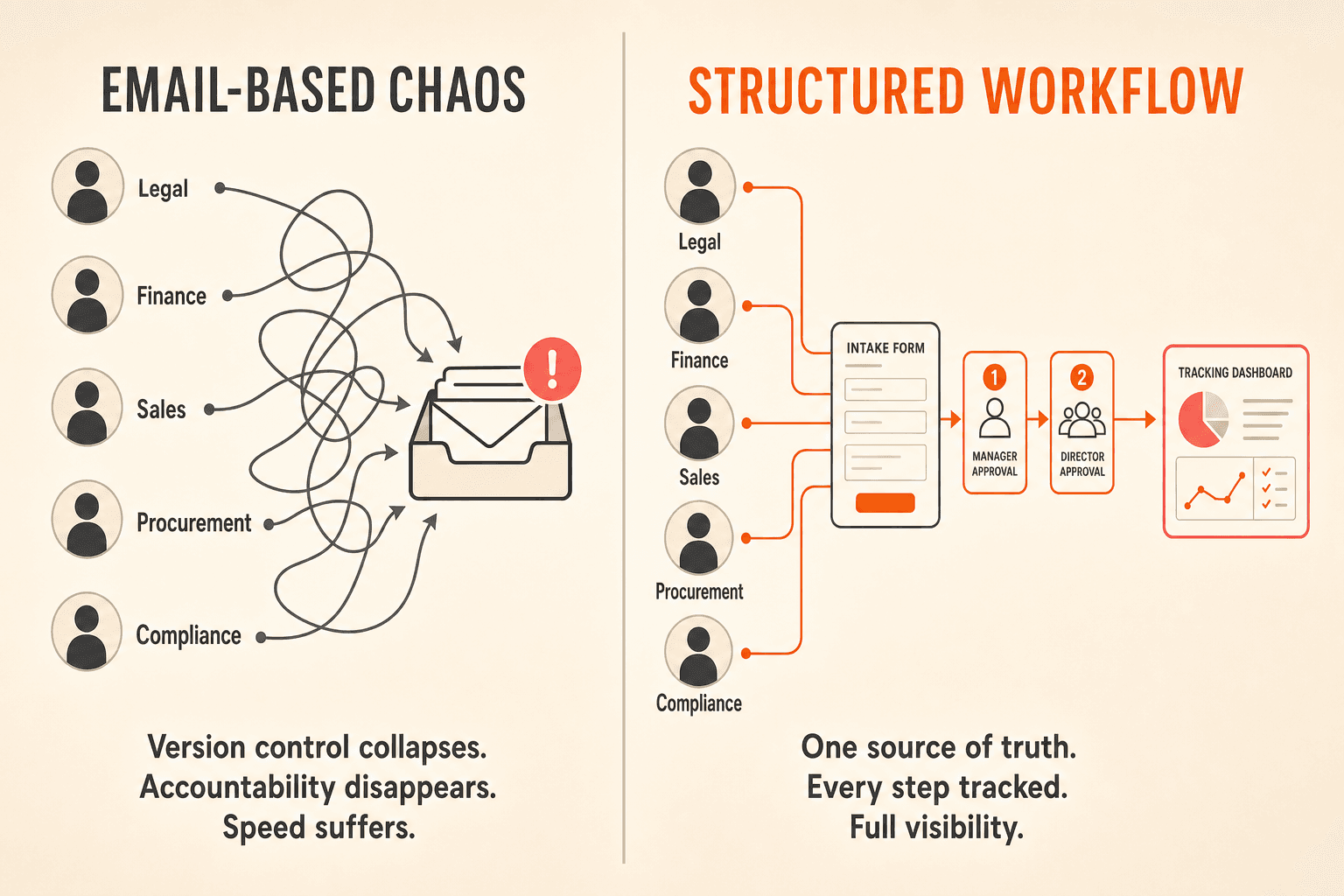
Across industries, the most common pain point operations teams describe is managing the entire contract lifecycle through Outlook or Gmail. When contracts move between departments via email, three things break at the same time.
Version control collapses. Which version is current? Is it the one legal marked up yesterday, or the one finance commented on this morning? No one is sure, and no one wants to be the person who signs off on the wrong draft.
Accountability disappears. Who has reviewed and who hasn't? When a contract has been "sitting for a long time," the operations leader has no way to determine whether it's stuck with legal, waiting on finance, or lost in someone's inbox. The manual work of chasing reviewers across departments is one of the most frustrating and time-consuming parts of the job.
Speed suffers. Without a system of record, there's no way to measure cycle time, identify patterns of delay, or set expectations with stakeholders. Email creates the illusion of a workflow, with messages moving back and forth, but it provides zero visibility into where things actually stand.
How configurable workflows solve cross-department coordination
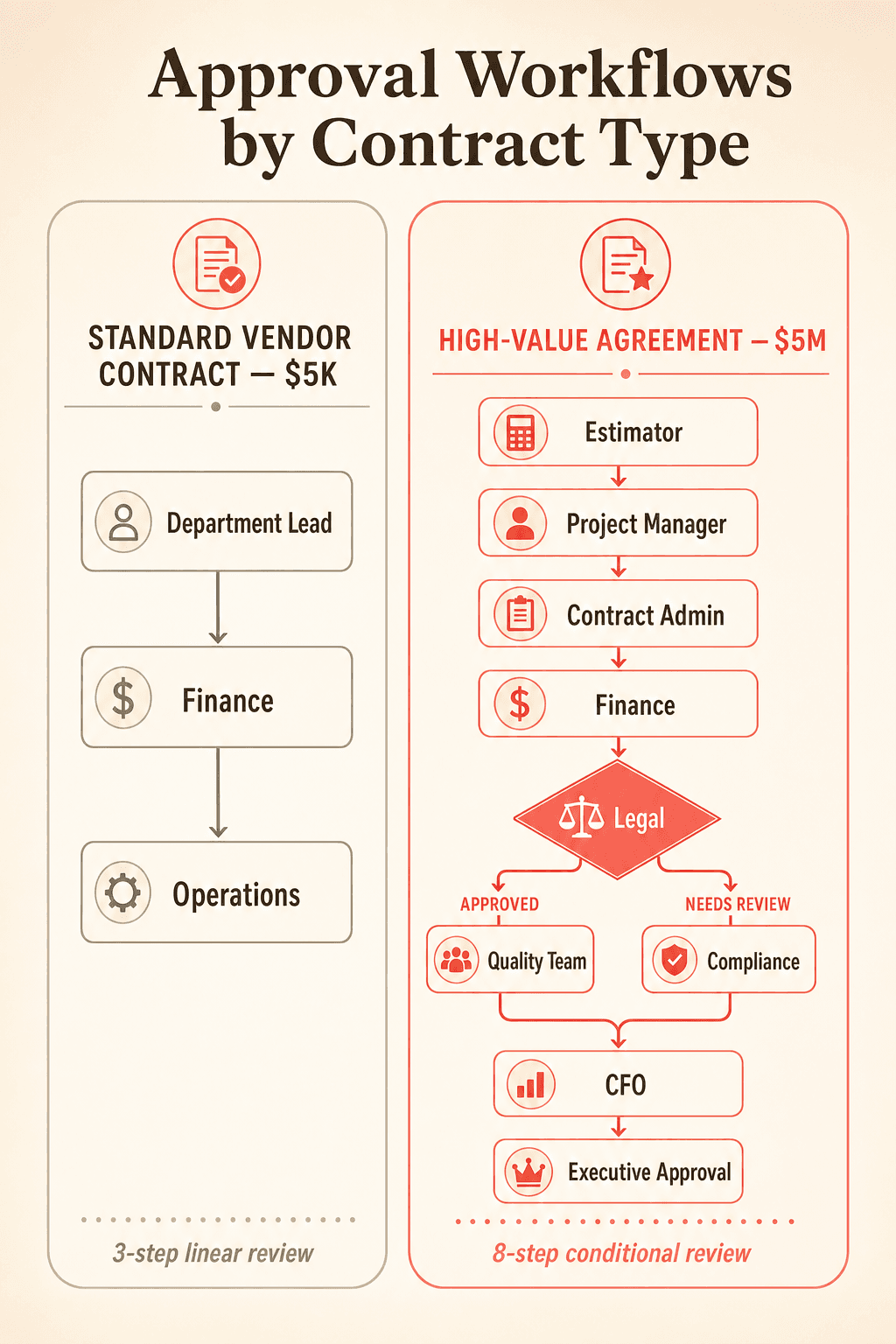
A $5,000 vendor contract might need three reviewers. A $5 million agreement might require eight, including conditional routing back to legal if certain clauses are flagged. A construction subcontract demands input from estimators, project managers, and contract administrators. A pharmaceutical contract requires quality team sign-off before legal can finalize.
No two departments approve contracts the same way, and your CLM needs to reflect that reality.
Concord's workflow automation engine supports both linear and conditional approval workflows. You can templatize workflows and attach them to specific contract types or intake forms so the right approval chain triggers automatically. System-wide workflow rules can even auto-assign workflows based on AI-detected contract type, which means third-party paper uploaded into the system gets routed correctly without manual intervention.
This flexibility matters because operations teams need to accommodate variation without rebuilding approval chains for every contract. Template the workflow once, and your team runs on it consistently going forward.
Structured intake replaces the "email me a contract" approach
Contract intake requests let business stakeholders across departments submit structured contract requests without sending emails to the ops team. Forms are customizable by contract type and can auto-route to the correct reviewer based on the information submitted.
This does two important things for operations teams. First, it standardizes how contracts enter your system, eliminating the inconsistency that comes from five different departments submitting requests five different ways. Second, it removes the operations leader as a manual routing bottleneck, freeing your time for higher-value coordination.
AI-powered extraction fixes the metadata problem
Operations teams need to report on contract data: total contract value across vendors, upcoming renewals, expiration dates by department, termination notice windows. But if that data depends on manual entry by sales reps, project managers, and department heads who each follow their own naming conventions, the data is unreliable.
Legal ops leaders frequently report exporting contract data and finding it essentially useless for analysis because of inconsistent entry. The underlying problem is straightforward: when data quality depends on every individual following a manual process, inconsistency is inevitable.
Concord automatically extracts agreement category, document type, parties, description, lifecycle dates (signature, effective, duration, renewal, early termination notice), and financial terms from every uploaded document. Custom properties and additional deadlines can be added manually. This extraction powers reporting, calendar views, and deadline alert features, giving you a trustworthy dataset without depending on perfect data entry from every stakeholder.
Folder-based permissions solve the access control tension
Cross-department contract management creates a constant tension. You need to see everything, but the sales team should only see sales contracts. IT should only access vendor agreements. HR contracts should be restricted to authorized personnel.
Without granular permissions, organizations either over-share (creating compliance risk) or under-share (forcing the ops leader to become a bottleneck for every information request).
Concord organizes contracts through a folder structure with folder-level permissions. Admins control who sees what. Deadline emails are automatically scoped to each user's access level, so a sales team member only receives renewal alerts for sales contracts, not the entire portfolio. You maintain a single source of truth while enforcing appropriate access boundaries.
Capturing institutional knowledge before it walks out the door
Many operations teams describe a familiar and uncomfortable scenario: one experienced contract administrator, often with decades of tenure, holds all the knowledge about how contracts should be reviewed and what clauses to flag. The fear of that person retiring or leaving without a system that captures their expertise is a recurring motivator for CLM adoption.
Concord's template library, AI copilot for contract review, and configurable intake forms allow you to embed institutional knowledge into repeatable processes. The AI copilot can assess risk, identify obligations, and answer questions about individual contracts, giving newer team members an on-demand resource. When expertise lives in the system rather than in a single person's memory, your organization is protected against key-person risk.
A CLM that non-legal users will actually adopt
Because operations teams need buy-in from sales reps, project managers, accountants, and executives, the tool has to feel intuitive from the first login. Teams consistently say their people "don't want another piece of software" and that any new tool must require minimal training.
Concord's interface is designed to feel comparable to familiar document collaboration tools. Each user gets a contract inbox showing what needs their attention. A centralized task management dashboard displays all action-required items across contracts: invitations, validations, and signatures. The operations leader can see what's pending across the entire portfolio without opening individual contracts one by one.
This matters more than any feature list. A CLM that your team refuses to use is worse than no CLM at all.
If you're a COO, controller, compliance manager, or IT director responsible for contracts, you already know the truth: contracts touch every department in your organization, and you're the one holding it all together. You didn't go to law school, but contract management operations teams rely on falls squarely on your shoulders.
The challenge is real. Legal drafts agreements. Sales initiates them. Finance tracks their value. Procurement manages vendor relationships. Compliance verifies that terms are met. And you, the operations leader, coordinate all of it, often through email chains, shared drives, and spreadsheets that no one updates consistently.
Most contract lifecycle management (CLM) platforms were built for legal departments. They assume the buyer thinks in legal terminology, needs clause libraries spanning dozens of jurisdictions, and has six months for implementation. That's not your reality. You need visibility, configurable workflows, and a tool your non-legal colleagues will actually use.
Why operations leaders are driving CLM decisions
The person evaluating and purchasing a CLM tool is increasingly someone without a legal background. Operations leaders, controllers, and compliance directors commonly describe themselves as the primary drivers behind CLM adoption. A recurring pattern stands out: an operations professional is brought in to improve the efficiency of contract processes, only to discover that contracts are the single biggest operational bottleneck across the organization.
This makes sense. Contracts are fundamentally cross-functional. A single agreement might require input from estimators, project managers, contract administrators, accountants, quality teams, sales reps, HR, and safety officers. The number of reviewers often varies based on contract value or type, which means rigid, fixed approval chains simply don't work.
Yet most CLM platforms still cater primarily to legal buyers. They're packed with features that legal power users love but that operations teams never touch. Organizations frequently pay for enterprise-grade CLM platforms and use roughly 10 percent of the functionality, mostly because the intake and workflow features are too complicated to configure and maintain.
The real cost of email-based contract coordination
Across industries, the most common pain point operations teams describe is managing the entire contract lifecycle through Outlook or Gmail. When contracts move between departments via email, three things break at the same time.
Version control collapses. Which version is current? Is it the one legal marked up yesterday, or the one finance commented on this morning? No one is sure, and no one wants to be the person who signs off on the wrong draft.
Accountability disappears. Who has reviewed and who hasn't? When a contract has been "sitting for a long time," the operations leader has no way to determine whether it's stuck with legal, waiting on finance, or lost in someone's inbox. The manual work of chasing reviewers across departments is one of the most frustrating and time-consuming parts of the job.
Speed suffers. Without a system of record, there's no way to measure cycle time, identify patterns of delay, or set expectations with stakeholders. Email creates the illusion of a workflow, with messages moving back and forth, but it provides zero visibility into where things actually stand.
How configurable workflows solve cross-department coordination
A $5,000 vendor contract might need three reviewers. A $5 million agreement might require eight, including conditional routing back to legal if certain clauses are flagged. A construction subcontract demands input from estimators, project managers, and contract administrators. A pharmaceutical contract requires quality team sign-off before legal can finalize.
No two departments approve contracts the same way, and your CLM needs to reflect that reality.
Concord's workflow automation engine supports both linear and conditional approval workflows. You can templatize workflows and attach them to specific contract types or intake forms so the right approval chain triggers automatically. System-wide workflow rules can even auto-assign workflows based on AI-detected contract type, which means third-party paper uploaded into the system gets routed correctly without manual intervention.
This flexibility matters because operations teams need to accommodate variation without rebuilding approval chains for every contract. Template the workflow once, and your team runs on it consistently going forward.
Structured intake replaces the "email me a contract" approach
Contract intake requests let business stakeholders across departments submit structured contract requests without sending emails to the ops team. Forms are customizable by contract type and can auto-route to the correct reviewer based on the information submitted.
This does two important things for operations teams. First, it standardizes how contracts enter your system, eliminating the inconsistency that comes from five different departments submitting requests five different ways. Second, it removes the operations leader as a manual routing bottleneck, freeing your time for higher-value coordination.
AI-powered extraction fixes the metadata problem
Operations teams need to report on contract data: total contract value across vendors, upcoming renewals, expiration dates by department, termination notice windows. But if that data depends on manual entry by sales reps, project managers, and department heads who each follow their own naming conventions, the data is unreliable.
Legal ops leaders frequently report exporting contract data and finding it essentially useless for analysis because of inconsistent entry. The underlying problem is straightforward: when data quality depends on every individual following a manual process, inconsistency is inevitable.
Concord automatically extracts agreement category, document type, parties, description, lifecycle dates (signature, effective, duration, renewal, early termination notice), and financial terms from every uploaded document. Custom properties and additional deadlines can be added manually. This extraction powers reporting, calendar views, and deadline alert features, giving you a trustworthy dataset without depending on perfect data entry from every stakeholder.
Folder-based permissions solve the access control tension
Cross-department contract management creates a constant tension. You need to see everything, but the sales team should only see sales contracts. IT should only access vendor agreements. HR contracts should be restricted to authorized personnel.
Without granular permissions, organizations either over-share (creating compliance risk) or under-share (forcing the ops leader to become a bottleneck for every information request).
Concord organizes contracts through a folder structure with folder-level permissions. Admins control who sees what. Deadline emails are automatically scoped to each user's access level, so a sales team member only receives renewal alerts for sales contracts, not the entire portfolio. You maintain a single source of truth while enforcing appropriate access boundaries.
Capturing institutional knowledge before it walks out the door
Many operations teams describe a familiar and uncomfortable scenario: one experienced contract administrator, often with decades of tenure, holds all the knowledge about how contracts should be reviewed and what clauses to flag. The fear of that person retiring or leaving without a system that captures their expertise is a recurring motivator for CLM adoption.
Concord's template library, AI copilot for contract review, and configurable intake forms allow you to embed institutional knowledge into repeatable processes. The AI copilot can assess risk, identify obligations, and answer questions about individual contracts, giving newer team members an on-demand resource. When expertise lives in the system rather than in a single person's memory, your organization is protected against key-person risk.
A CLM that non-legal users will actually adopt
Because operations teams need buy-in from sales reps, project managers, accountants, and executives, the tool has to feel intuitive from the first login. Teams consistently say their people "don't want another piece of software" and that any new tool must require minimal training.
Concord's interface is designed to feel comparable to familiar document collaboration tools. Each user gets a contract inbox showing what needs their attention. A centralized task management dashboard displays all action-required items across contracts: invitations, validations, and signatures. The operations leader can see what's pending across the entire portfolio without opening individual contracts one by one.
This matters more than any feature list. A CLM that your team refuses to use is worse than no CLM at all.

Need to know
Frequently Asked Questions

Take the "management" out
of contract management.
Customer Support
Legal
Compare
Resources
Customer Support
Company
Legal
Compare
Resources
Customer Support
Company
Legal
Compare
© 2025 Concord. All rights reserved.

