
Concord Unveils Custom Document Properties and a Party Library!
Concord Unveils Custom Document Properties and a Party Library!
Concord Unveils Custom Document Properties and a Party Library!
Concord Unveils Custom Document Properties and a Party Library!
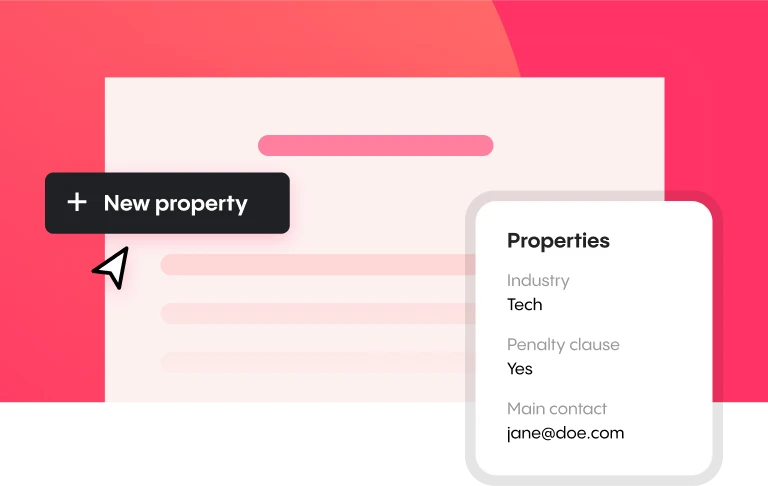
Starting today, you’ll be able to add custom properties to your Concord documents, and manage third parties in a personal Party Library! These new features will help streamline your workflow, improve document organization, and get to value faster. Let’s see how.
Third-party management
The new Party Library feature simplifies the process of creating and managing both internal and external parties you share documents with. Here’s how it works:

Add a new party
Select the Party library on the Automations tab of the left-hand panel.
Click the Add New Party button.
Enter the party name and select whether the party is internal or external.
Save the party.
Edit a party
Click the checkbox next to the party you want to edit.
Make the necessary changes.
Click Save.
Delete a party
Select the party you wish to delete.
Click the Delete button.
In short, the Party Library helps you keep track of all your document collaborators, so you always know who’s involved with an agreement and how to contact them.
Custom document properties
With Custom Document Properties, you have more control than ever over the metadata attached to your documents. Six different property types enable you to create custom metadata like project names, company names, or data ranges, and easily sort contracts by these properties.
How to set up custom document properties
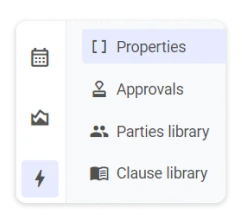
What will users be able to do with document properties?
The launch of this feature will be rolled out in three phases:
👀 Phase 1: Users can create custom document properties.
📊 Phase 2: Users will be able to display document properties in columns within the Inbox, Reports, Shared Folders, Personal Folders, and Starred Sections. Users will be able to export properties by contract directly into Excel and CSV formats.
🔍 Phase 3: Users will be able to leverage these properties in filters for both the Inbox and Reports sections.
These new features — Third-Party Management and Custom Document Properties — make it easier than ever to manage the data associated with your digital contracts.
If you're evaluating your options, check out our guide to the best contract management software to see how Concord compares.
Sign into Concord today and take these new features for a spin! They’re just two more ways we’re making your workflow more efficient and organized.
Add custom document properties and manage third parties, with Concord.
Starting today, you’ll be able to add custom properties to your Concord documents, and manage third parties in a personal Party Library! These new features will help streamline your workflow, improve document organization, and get to value faster. Let’s see how.
Third-party management
The new Party Library feature simplifies the process of creating and managing both internal and external parties you share documents with. Here’s how it works:
Add a new party
Select the Party library on the Automations tab of the left-hand panel.
Click the Add New Party button.
Enter the party name and select whether the party is internal or external.
Save the party.
Edit a party
Click the checkbox next to the party you want to edit.
Make the necessary changes.
Click Save.
Delete a party
Select the party you wish to delete.
Click the Delete button.
In short, the Party Library helps you keep track of all your document collaborators, so you always know who’s involved with an agreement and how to contact them.
Custom document properties
With Custom Document Properties, you have more control than ever over the metadata attached to your documents. Six different property types enable you to create custom metadata like project names, company names, or data ranges, and easily sort contracts by these properties.
How to set up custom document properties
What will users be able to do with document properties?
The launch of this feature will be rolled out in three phases:
👀 Phase 1: Users can create custom document properties.
📊 Phase 2: Users will be able to display document properties in columns within the Inbox, Reports, Shared Folders, Personal Folders, and Starred Sections. Users will be able to export properties by contract directly into Excel and CSV formats.
🔍 Phase 3: Users will be able to leverage these properties in filters for both the Inbox and Reports sections.
These new features — Third-Party Management and Custom Document Properties — make it easier than ever to manage the data associated with your digital contracts.
If you're evaluating your options, check out our guide to the best contract management software to see how Concord compares.
Sign into Concord today and take these new features for a spin! They’re just two more ways we’re making your workflow more efficient and organized.
Add custom document properties and manage third parties, with Concord.


Take the "management" out
of contract management.
Customer Support
Legal
Compare
Resources
Customer Support
Company
Legal
Compare
Resources
Customer Support
Company
Legal
Compare
© 2025 Concord. All rights reserved.

